Intel Core 2 Quad Q6600 (G0) + ASRock G31M-S R2.0
-
Well, folks, I'm reaching out to you to see if I can get the most out of my PC, I'll post some pics of the max OC I could get.
PC specs:
-Satellite Xblade 511k case
-2x1gb kingston 667 (2x1gb)
-CoolerMaster V8
-ASRock G31M-S R2.0 Mother
-ATI Radeon R7850 1GB
-Thermaltake TR2 TR-600Watts 2 channel +12v Power SupplyI hope you can help and what I could do to get it there…
BIOS:


-
Hello:
Having 667 memory limits you a bit. If it were 800 you could set the multiplier to 8, the FSB to 400 and with a little more voltage you could easily get 3200 unless it's a very lazy micro, but mine has the worst VID, 1.325 I think it is and I get 3200. People with a good VID get 3400 easily, some 3600 but with high voltages in general.
With your memory you can't play around as much with the multiplier, first try setting it to 333 and the multi to 9, give the micro a little more voltage gradually to see if it starts up. You can also lower the multi to 8, which may be more comfortable and raise the memory. Some 800 made the 1000 from Kingston, so I suppose your memory can go up a bit. Maybe they don't do 800 but they stay close and you can get around 3000 for the micro.
You have to push that micro as much as you can. Having a Q6600 at less than 3200 is a sin ¬¬
You'll keep us posted. It's important that if you're going to try many things, make an Excel table or write it down on a piece of paper. That way, every time the computer doesn't start or once it starts up and turns out to be unstable, you'll know what to touch to make it stable, but basically it's a matter of forcing the memory a bit, raising the voltage to the micro and monitoring temperatures. You may have to raise the voltage to the memory by 0.1.
Many motherboards have Vdrop. This is that in Bios you put a voltage to the micro but then that voltage doesn't give you in reality, it gives you something less. I won't tell you the voltage at which I have my micro :ugly: but I have it at more than 1.45 :troll: and in reality in Windows it hovers around 1.4 or less. So don't be scared if you have to approach figures of 1.35 or something more in Bios. As long as you control the temperatures everything is fine, and then when it starts up you'll put some stress program like OCCT http://www.ocbase.com/ to see if the micro is stable and what temperatures it reaches.
Long live the Q6600, even today a very worthy micro.
-
Hello:
Having memories of 667 limits you a bit. If they were 800 you could set the multiplier to 8, the FSB to 400 and with a little more voltage you would easily get 3200 unless it's a very lazy micro, but mine has the worst Vid, 1.325 I think it is and I do 3200. People with a good Vid easily do 3400, some 3600 but already with high voltages in general.
With your memories you can't play as much with the multiplier, first try to set them to 333 and the multi to 9, give the micro a little voltage little by little to see if it starts up. You can also lower the multi to 8, which may be more comfortable and raise the memories. Some 800 did the 1000 of Kingston, so I suppose that your memories can go up a little. Maybe they don't do 800 but they stay close and you can reach around 3000 for the micro.
That micro has to be raised as it is. Having a Q6600 at less than 3200 is a sin ¬¬
You will keep telling us. It is important that if you are going to try many things you make an excel table or write it down on a paper. So every time the computer does not start or once started it turns out to be unstable, you will know what to touch to make it stable, but basically it is a matter of forcing something with the memories, raising the voltage to the micro and watching temperatures. Maybe you have to raise 0.1 the voltage to the memories.
Many boards have Vdrop. This is that in Bios you put a voltage to the micro but then that voltage does not give you in reality, it gives you something less. I do not tell you the voltage at which I have my micro :ugly: but I have it at more than 1.45 :troll: and in reality in Windows it hovers around 1.4 or less. So do not be scared if you have to approach figures of 1.35 or something more in Bios. As long as you control the temperatures everything is fine, and then when it starts you will put some stress program like OCCT Home to see if the micro is stable and what temperatures it reaches.
Long live the Q6600 even today a very worthy micro.
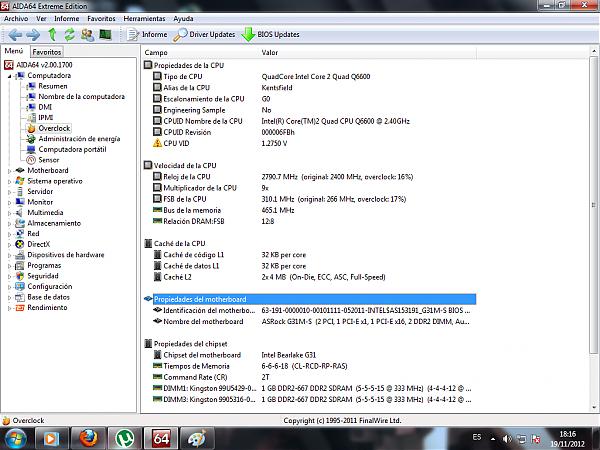
Thank you very much for your quick response... now I'm going to take pictures from my cell of the BIOS and I'll show you... My processor is Revision G0, they told me it's something good, no idea the truth... I'll show you my BIOS and the CPU-ID
-
Hello:
Check out the program: Core Temp
It will give you info about the micro. It tells you the micro revision and the VID. The G0 revision is the good one. The first batch of Q6600 were I think B3 so they were hotter and some didn't go over 3000.
The G0s, no matter how lazy they come out to be, do 3200 easy.
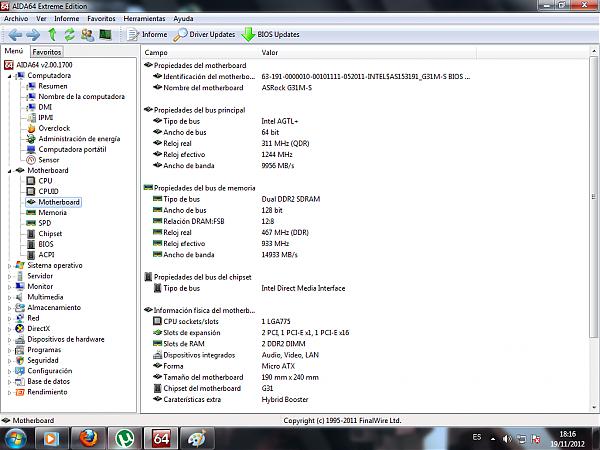
In your Bios which is a bit weird, I understand that the CPU Frequenzy is the FSB that you should increase a bit. In the same way the Ratio Cmos Setting is the multiplier. This is 310*9=2970 that the micro does. What I don't know is why the memory comes out to 932 when it should go to 620… well DDR2 is multiplied by two. For example my DDR 800 the FSB is 400 * 2 = 800.
Maybe someone can clarify this. But anyway, try to increase the FSB a bit and little by little you touch voltages. Also as I mentioned you can increase the FSB more and lower the multiplier to 8. I have my computer at FSB 8 multiplier 8 and it does 3200 without problems, completely stable.
-
Hello:
Check out the program: Core Temp
It will give you info about the micro. It tells you the micro revision and the VID. The G0 revision is the good one. The first batch of Q6600 were B3 I think, so they were hotter and some didn't go over 3000.
The G0s, no matter how lazy they come out to be, do 3200 easy.
In your Bios which is a bit weird, I understand that the CPU Frequenzy is the FSB that you should raise a bit. Similarly, the Ratio Cmos Setting is the multiplier. This is 310*9=2970 that the micro does. I don't know why the memory says it will go to 932 when it should go to 620… well, DDR2 is multiplied by two. For example, my DDR 800 the FSB is 400 * 2 = 800.
Maybe someone can clarify this. But anyway, try raising the FSB a bit and little by little you touch voltages. Also, as I mentioned, you can raise the FSB more and lower the multiplier to 8. I have my computer at FSB 8, multiplier 8 and it does 3200 without problems, completely stable.
Now I put the Jumper in OverClock position 2-3, 1-2 and 1-2 (but I don't see results)
here's a picture of how I have it now…

I don't go over 330. not with 8X or 9x… my screen doesn't turn on, I only get to 330...
-
You have to increase the Bus Speed from 330 to 350 and you would probably get 2800 without touching the voltage… Otherwise, keep increasing the voltage. I don't know if the memory will be able to do 400, maybe you have to increase the Voltage by 0.1. Then keep increasing from 330 to 340... to see if you can get to about 400.
You can also try leaving the memory at 330-333 and putting the multiplier to 9. Remember that the memory, being DDR2 667, works at 333 so it's not easy to stretch to 400 = DDR2 800
It probably won't boot, but keep increasing the voltage by 0.1 until it boots. Don't be afraid to go over 1.3. From 1.4-1.45 it's already high, but you don't have a VID as bad as mine so you shouldn't require much voltage.
Normally, if the memory doesn't go much higher than 333, you have to be satisfied with leaving it at 333, forget about getting to 400 and leave the multiplier at 9. Then keep giving the micro juice at 0.1 at a time. The idea is to get 333*9 and then fine-tune from there.
I'm going to sleep ;D we'll continue tomorrow
-
You should increase the Bus Speed from 330 to 350 and you would probably get 2800 without touching the voltage… Otherwise, keep increasing the voltage. I'm not sure if the memory can do 400, maybe you have to increase the Voltage by 0.1. Then keep increasing from 330 to 340... to see if you can get to about 400.
You can also try leaving the memory at 330-333 and set the multiplier to 9. Remember that since the memory is DDR2 667, it works at 333, so it's not easy to stretch to 400 = DDR2 800
It probably won't boot, but keep increasing the voltage by 0.1 until it does. Don't be afraid to go over 1.3. From 1.4-1.45 it's already high, but you don't have a VID as bad as mine, so you shouldn't need much voltage.
Normally, if the memory doesn't go much higher than 333, you have to be satisfied with leaving it at 333, forget about getting to 400 and leave the multiplier at 9. Then keep giving the micro 0.1 at a time. The idea is to get 333*9 and then fine-tune from there.
I'm going to sleep ;D we'll continue tomorrow
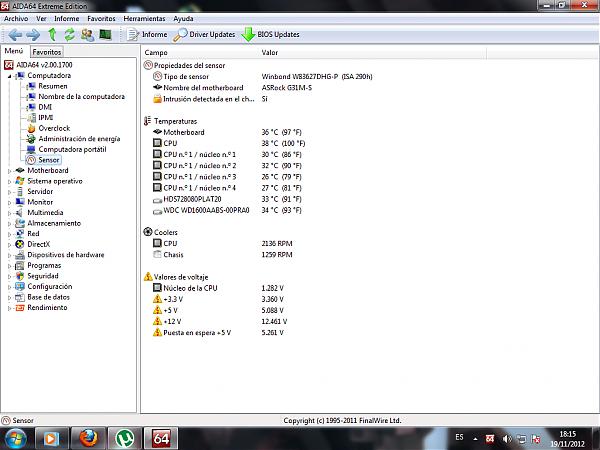
Of course my problem is that my BIOS doesn't have the option to increase Vcore, so I can't do anything… although now it's at 310x9 and the memory at 2.14V and I have no problems, the memory is at 462Mhz (or something like that) but it's causing a bottleneck, I would need more CPU frequency for the memory to work better.
-
If you can't touch the micro's Vcode, you're in trouble to go much higher than 2800, I'm sorry, there's little that can be done. For example, I have the OC without touching the memory voltage.
-
Most likely the problem is with the G31 chipset motherboard, and that's what's limiting it. At my house we have my ex-Q6600 G0 that on a GA-P35 I had it at 3-3.2Ghz, beyond that it was hard for me to push it (probably not messing around enough) and now it's on a GA-G31 and it's so limited that you wouldn't believe it goes over 2.8Ghz, it's more that lately it doesn't even... I don't know why and it's on default.
Anyway the Q6600/6700 will pass as some durable micros the truth

And another problem with the boards with the G31, is that they don't support more than 4GB of memory, so that's another thing that limits them to put more memory and be able to last longer, but well... in my case it's more than enough for what it does.
And, in the future, if I can use it again and put it in the pc2 of my company, on that board I can probably overclock it more.Greetings!!
-
Neptunno is right, I myself checked it recently with 3 motherboards and my E6600.
Asus P5KPL-CM (G31) = I managed to set the E6600 to 2.4@3.1Ghz but you had to increase many things and the voltage increases it makes are not reliable, so I ended up leaving it to standard.
Asus P5K-VM (G33) = Here I managed to have it at 3.4Ghz with the same micro, and on the P5Q at 3.5 but because it allows voltage increases.
I imagine that's what everyone tells you, an increase to 333 is perhaps the limit of that motherboard, but it's clear that it depends on the type of micro you use, it goes up more or less.
Regards!
-
and if the truth... well I'm satisfied with 2.8 and the memories in 800... for now it's going well... later I'll change the motherboard and micro... with the 7850 I have enough for games.
-
I think you are doing well. A well-overclocked Q6600 still performs decently in games, but you have a motherboard that limits you and only two Gigabytes of memory. Rather than changing the motherboard and expanding the memory, it would be cheaper to change platforms and sell your components, unless you find a bargain on the second-hand market, so stretch the platform as much as you can.
The micro at 2800 will cause some bottleneck to the graphics card, which would work better with a higher micro, but it would be worse if you had a Dual Core. The Q6600 still performs decently even at 2800.
-
Soon I will change… I had a Gigabyte GA990FX-UD3 something like 4gb DDR3 1600MHZ GSkill and a Phenom 2 x4 965BE Revision C3 and I was running at 10. But at that moment my 5870 burned out and I sold it because it was overheating… -
In an online store they sell P5Q's from outlet at 25€ elcamaleon, in case you are interested
they carry the P45, and up to 16GB DDR2, in addition to 8 SATA ports. -
In an online store they sell P5Q's from outlet at 25€ elcamaleon, in case you are interested
they carry the P45, and up to 16GB DDR2, in addition to 8 SATA ports.I appreciate it but I am from Argentina… if I lived in Europe I would pay for a PC of 2000€ right away. but here everything is expensive... -.-
-
¡Esta publicación está eliminada!



Hello! It looks like you're interested in this conversation, but you don't have an account yet.
Getting fed up of having to scroll through the same posts each visit? When you register for an account, you'll always come back to exactly where you were before, and choose to be notified of new replies (either via email, or push notification). You'll also be able to save bookmarks and upvote posts to show your appreciation to other community members.
With your input, this post could be even better 💗
Registrarse Conectarse