My 4850X2 gets stuck with one game, but I think it's only with 1
-
-
The graphics card is on fire!!! I just played Grid, 2 races in a row and watched the corresponding replays a couple of times each… and it didn't crash my graphics!!! It was activating Vsync and goodbye problems!!! All thanks to a guy from another forum, who told me the following about Grid: *"I'll tell you my experience with the game, which by the way, in my opinion, is one of the best on pc.. When I had the vsync option deactivated, the graphics at that time, the gtx 280 got over 100 degrees, and this caused me artifacts, as well as with the 480, try activating vertical synchronization and let me know.." Before I jump for joy tomorrow, if I can, I'll test it thoroughly until I almost break it, to see if it keeps going well Best regards!!! @Franziskaner:
Thanks for the links, I'll use them to stress the graphics (along with Furmark, which gives it a lot of strain), but tell me, do you recommend any? do you know which ones really take advantage of CFx/SLI? (to ensure that I'm stressing the CrossfireX system and not a single GPU, which I know that a single one didn't have problems).here you have a few HardLimit - Benchmarks variados
saludos -
pues nada me alegro ;D
saludos -
if you look at the 3Dmark 11 you'll see that for example Nemo puts data in single and in CrossfireX, there must be a reason for that, right?
regards -
Well, the thing is that I'm a bit slow, and I've been giving up all this time to use Windows 7 (I wouldn't have installed Vista, not even for a joke), I still use Windows XP and I have 4 GB of RAM that I'm wasting...
I guess it's time to install Windows 7, to take advantage of the 4 GB of RAM, and DirectX11 at least...
Regards.
-
Ya, lo que pasa es que yo soy un poco retard, y he renunciado todo este tiempo a usar Windows 7 (Vista ni de coña lo hubiera instalado), sigo con Windows XP y eso que tengo 4 GB de RAM que estoy desaprovechando…
Supongo que sera hora de ir instalado el Windows 7, para aprovechar los 4 GB de RAM, y las DirectX11 por lo menos...
Saludos.
pues creo que si ….. que toca instalar un W7 64B
saludos -
Just one question and I won't bother you anymore, I've been asking a lot lately:
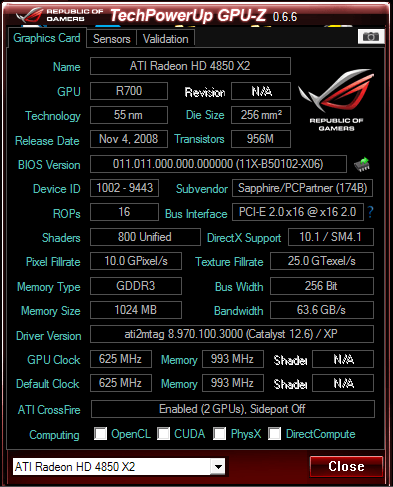
According to that image, CrossFireX is enabled, right? It says: "Ati Crossfire Enabled (2 GPUs)
The thing is that it also says "sideport off" at the same time, which makes me doubt, although it may make sense, since it's a 4850X2 with 2GB, and the sideport (where the cable to do crossfire is connected), has nothing connected (it would be to put another 4850X2 or a 4850 for tricrossfire).
So, is it enabled, right?
PD: In the tab below, where it says "ATi Radeon 4850X2", if I expand the tab, I see 2 ATi Radeon 4850X2 (I suppose one for each GPU).
Regards.
-
The best place to check if it's activated is in the Catalyst, under Performance->AMD CrossfireX, where the option to enable or disable CrossfireX is checked
Regards
-
That's exactly why I looked at the GPU-Z... because when I start WindowsXP, the Catalyst Control Center, pops up with an error telling me that Crossfire could not be enabled because a 3D application was running. However, when I enter the Catalyst Control Center, it marks CrossFire as activated (and won't let me disable it), so I doubted whether it was activated or not, but when it crashed on the Grid I assumed that if it was (without CrossFireX it wouldn't crash). The GPU-Z told me: "Enabled (2 GPU's), Sideport Off". Now I've just installed Windows7, but living with XP... since I had WindowsXP, Debian and Mint, I deleted Mint and used the partition for Windows 7. In Windows 7 it does let me enable and disable CrossFire (I don't know if my XP is too messed up, since it's been years since I reinstalled, or if it's the version of the XP Catalys 12.6 that's causing problems). When I enable it, the GPU-Z appears just like the image (as it appeared in XP), if I disable it says: "Disabled (Crossfire available)" So I've got it clear now, in XP, even though it won't let me enable and disable it, it is enabled and working
-
Another thing that has caught my attention, look at the GPU-Z screenshot on Windows XP (the one I already posted)… now I'll show you the one from GPU-Z on Windows 7.
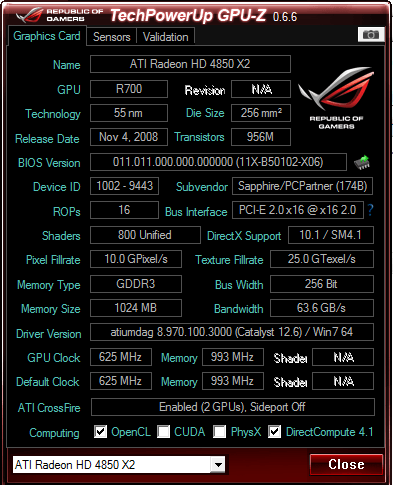
On WindowsXP it says that my graphics card is not compatible with OpenCL or DirectCompute… however on Windows 7 it is...
Is this normal? does this always happen? with Windows XP there is no support for OpenCL?


Hello! It looks like you're interested in this conversation, but you don't have an account yet.
Getting fed up of having to scroll through the same posts each visit? When you register for an account, you'll always come back to exactly where you were before, and choose to be notified of new replies (either via email, or push notification). You'll also be able to save bookmarks and upvote posts to show your appreciation to other community members.
With your input, this post could be even better 💗
Registrarse Conectarse