Kingston HyperX Blu 1333 2x4GB memory problem with Ga-P55-USB3 motherboard
-
Good afternoon to all. I start in the forum with a problem that is driving me crazy.
Two Kingston HyperX Blu memories of 4gb each at 1333mhz have just arrived.
Ref: KHX1333C9D3B1K2/8G.The configuration of my current equipment is as follows:
-Gigabyte P55-USB3 motherboard
-Intel Core i5 650 at 3.20GHz
-nVidia GeForce GTX 560 Ti OC
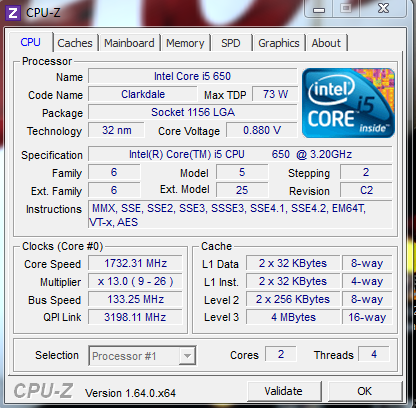
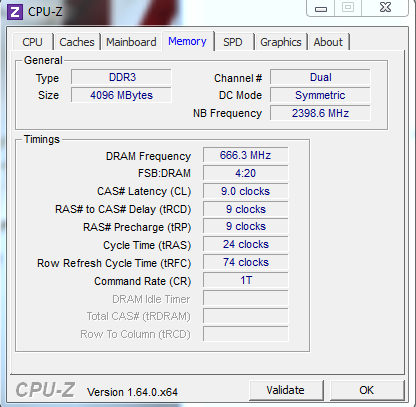
-Memories: 2x2GB Ref: Kingston KVR1333D3N9/2Gwhich works perfectly for me. I leave you a couple of images of the CPUZ so that you can see the frequencies of the current memories (the old ones) and bus speeds.
My equipment runs with Windows 7 Professional x64.
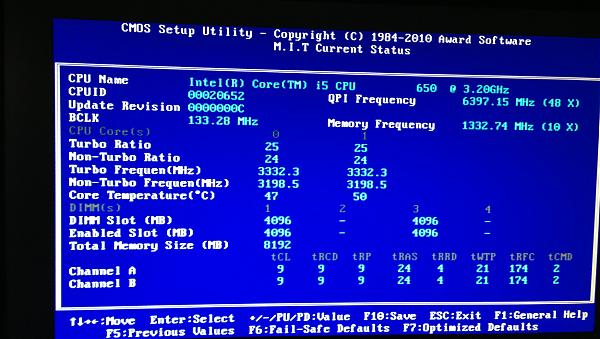
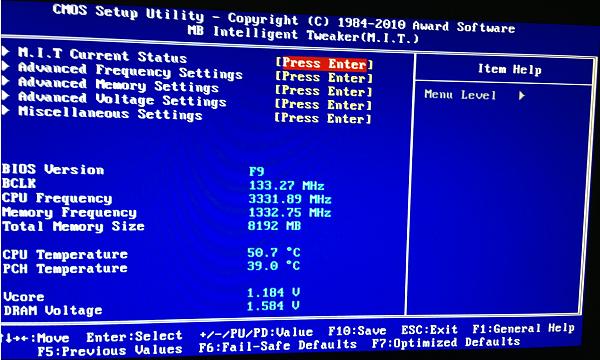
Well, I connect the new memories of 4GB each to the sockets 1 and 3, corresponding to the first channel so that it works with dual channel, and the equipment gets stuck on the "Starting Windows" screen just before the bubbles that would end up forming the Win7 logo appear. I have tried placing one first and then the other and it doesn't work either, it stays stuck in the same place. If I put the old memories back, everything works ok. I have tried using all of them at once with dual channel and it doesn't work either, nothing at all. I start Ubuntu x64 from a liveCD and just when the letters "UBUNTU" appear which is when the OS loads into RAM, the PC restarts again. In the BIOS, the new memories are recognized well, in fact I also leave you some images.
And here are the links to everything in case you want to take a look to help me.
New Kingston memories: http://www.kingston.com/es/memory/hyperx/blu
New Kingston memories where I bought them: Kingston HyperX 8GB DDR3 1333MHz Kit
My motherboard: GIGABYTE - Motherboards - Socket 1156 - Chipset P55 - GA-P55-USB3 (Rev. 1.0) - SpecificationsThe compatibility with my motherboard is totally correct, right? I say this because in the Kingston specifications sheet: http://media.kingston.com/pdfs/HyperX_Blu_ES.pdf it says…
Compatible with Intel chipsets P55, H67, P67,
Z68, Z77 and H61; also with AMD chipsets A75,
A87, A88, A89, A78 and E35If you can help me, I would greatly appreciate it. Regards.;D
-
Good afternoon. What version of bios do you have? There are 3 bios revisions on your motherboard that improve memory compatibility: f2, f3, and f8
Does that live cd you have not have the memory test? -
Good afternoon. What version of bios do you have? On your motherboard there are 3 bios revisions that improve memory compatibility: f2, f3 and f8
Does that live cd you have not have the memory test?F9. I don't want to touch the F10 because it says it's beta and those things are better... leave them alone. I booted with a memtest86+ and it stopped after a short time starting the test. It didn't throw any more forward.
Best regards.
-
return them and buy some Gskill that have the voltage at 1.5V
the kingston need more voltage and for your motherboard they are not goodregards
-
buy some Gskill that have the 1.5V voltage
the kingston need more voltage and for your board they are not goodregards
The kingston at 1333 go to 1.5V.
Taken from the spec sheet: DDR3: JEDEC standard 1.5V ± 0.075V -
The kingston at 1333 run at 1.5V.
Taken from the spec sheet: DDR3: JEDEC standard 1.5V ± 0.075Vthat's what they say but they don't run well
regards
-
it is normal for it to fail
slots 1 and 3 are from the same channel. 2 and 4 are the second channel.
you would have to put a 2gb module in slot 1 and the 4gb one in slot 3.
in slot 2 another 2gb and in slot 4 the remaining 4gb. in each channel there must be the same sum of memories. if not, it blows up. sometimes the manual messes up with that issue. i have found many computers working with only one channel and two 2gb modules in the same.


Hello! It looks like you're interested in this conversation, but you don't have an account yet.
Getting fed up of having to scroll through the same posts each visit? When you register for an account, you'll always come back to exactly where you were before, and choose to be notified of new replies (either via email, or push notification). You'll also be able to save bookmarks and upvote posts to show your appreciation to other community members.
With your input, this post could be even better 💗
Registrarse Conectarse