Overclocking amd fx quad core bios UEFI
-
in short, what I understand you want is for "someone" to tell you exactly which parameters you have to touch :fumeta:
unfortunately, the O.C. thing doesn't work that way, if you ask specific questions, people will surely answer you, but if you put it that way …. :mudo:
regards -
basically from the bios parameters more or less you can tell me the guidelines I'm not going to touch anything randomly that is, if I raise it to 4.00 ghz I'll have to touch something else or not? because in my bios you put increase 20 percent which would be 4.00 ghz but that's not enough right? I'll have to touch something else because I can't take a screenshot of the bios or if not more or less someone tells me this is for this and such and from there I'll keep doing, I don't think I said anything wrong, don't you think? for that I'm a newbie at this…
-
hello
have you ever done O.C?
have you read some O.C guides (to know what each thing is)
regards
P.D and no you have not said anything bad -
I have been reading lately but buff, honestly I don't get it. I've searched on YouTube for new BIOS like my UEFI from AMD and my motherboard and nothing. With my PC's data I could make an interesting overclock I think without sacrificing anything. The only thing I know is that when I go into my bios, increasing the mghz is more now I have it at 4 mhz, but the voltage of the memory etc etc I have no idea and ah, the turbo boost I think is called deactivated but the mhz thing is that I don't know what value is the right one I lose. -
if you have a decent heatsink, then you put something soft and without going too far, set the multi x23
and make sure the memory does not go up in frequency
and set the bus of the graphics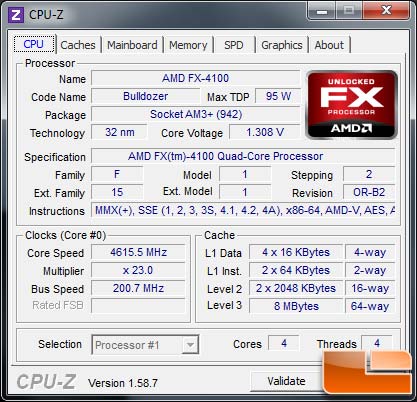
this O.C. is not very complicated
regards
-
I would recommend you start from the beginning: Basic overclock guide - HardLimit Because if you don't know what you're doing, it's easy to break something. The important thing, as Fran was trying to say, is that YOU learn how to do OC and not that someone does the OC for you; and that will serve you for future occasions

-
thanks guys but before using the program I have to make the relevant changes in the BIOS right? I say this because my bios is different you know…where can I download the program?
-
thanks guys but before using the program I have to make the relevant changes in the BIOS right? I say this because my bios is different you already know…where can I download the program?
What program?, the photo that ferelxyx put is not a program to do OC, the point is that all BIOS are different but the values that you have to change are the same.
-
the capture friend, I just downloaded this program, ok? the issue is setting up the configuration, I don't know, but you're talking to a NOVICE, I don't know if you've read ok? the CPUZ, now the issue is touching the BIOS, look what I put at the beginning, good, that is, I don't think that tone of the program, in the sense that you say it's useless, helps much, and I'm not saying this in a tone of arrogance, far from it, I'm the least informed of all and of all this, and that's why I'm here to learn.
-
do you know what the multiplier is?
do you know where it is in your bios?
that's it
greetings -
O.C through program for clumsy (I as I have an asus I use Turbo V);D
clarify that O.C by Bios is more stable and safe so you don't burn anything, clarify that with "programs" you can burn things (I burned a memory module due to overvoltage)
regards -
capture friend I just downloaded this program ok? the issue is setting it up, I don't know but you're talking to a NOVICE I don't know if you've read ok? CPUZ now the issue is touching the BIOS look what I put at the beginning of good, that is, I don't think that tone of the program in the way you say it's useless, helps much, and I'm not saying it in a way of arrogance or anything I'm the least informed of all and that's why I'm here to learn.
We're not going anywhere with those ways, that's clear, ok? If you ask something that you can find on Google (http://www.google.es/search?q=cpuz) it's logical that I ask what you mean to make sure, ok?
If you read part of the guide (Basic overclock guide - HardLimit) "How to overclock a processor?" you'll know it's the multiplier. And "How do I increase the values?" to know what to do. If you want to know where the multi option is in your BIOS, look at the manual (ftp://europe.asrock.com/manual/880GMHU3S3.pdf) and go to "3.3 OC Tweaker Screen" and read where it interests you "Overclock Mode" and "Multiplier/Voltage Change".
If you're bothered that we recommend you read a guide before starting since you're a NOVICE, it's because it's the best, I don't know why 1º you don't do it, 2º you get angry, 3º you ask things that you can find on google or in the motherboard guide. Once you start and ask specific things we can help you, if what you say is that you don't know where to start the answer is to look at an OC guide, don't be offended, it's what we've all done in our day; no one comes out learned
-
I'm not angry at all, but this is new to me and you understand, for those of us who are just starting out with overclocking, we're scared to death that they're going to tell us "oh my god that's super dangerous, that's very bad etc etc" and please excuse me or excuse someone if they misunderstood my words, but it's the fear of how do I start, what do I do? what does this mean? am I going to burn my pc? it's just that I'm a little scared that I'll mess it up, that's all and no, I'm not offended, and on top of that with the BIOS UEFI that will be the same but they change the look etc etc


