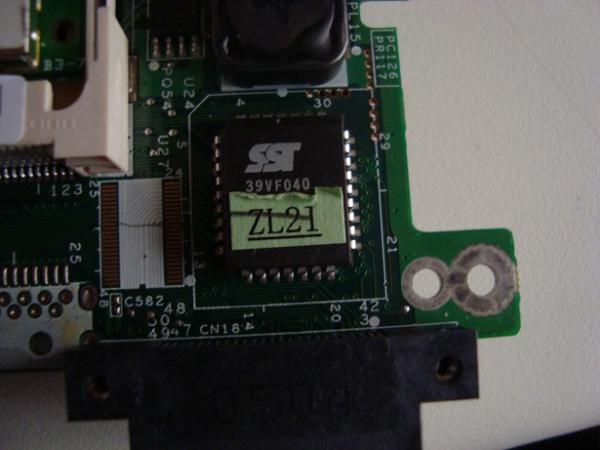
Chip Bios sst 39vf040 (-photos-)
-
Many thanks I will try it.
As for the floppy drive I have a Sata-usb converter, what I will do is connect the power of the floppy drive to another computer and the floppy disk with its adapter and through the usb to the laptop.
I hope these key combinations work or if someone tried it with my model then they posted here the combination, I would be very grateful.
If it works I will make a video tutorial. Regards.
But the floppy drive must be USB, because most desktops have their own connection, similar to an IDE cable, but narrower, the ones that are Sata are the DVD readers or rewriters. The floppy drive cable is usually a Floppy cable, it must be something like that, I mean if your computer is portable.
Portable external USB 1,44 Mb 3,5 "floppy disk floppy drive for laptop PC on eBay!
if it is a desktop maybe it does have a floppy connection.
regards
-
Correct, the USB-SATA adapter does not work with the floppy drive, it is only for hard drives and recorders, but the thing is that it fits well, but it has extra pins, to try that it does not fit:wall:. I have already bought a USB floppy drive for 8 euros waiting for it to arrive, to see how it goes and if I can solve my problem. For now I already have the data, I read the manual and everything is ready, I am going to try it with the laptop's CD to see if it can record both on the floppy drive and on the CD. I suppose that it will not work with the CD, I still do not know, it will have to be tested. Goodbye, and waiting, I will tell you if it worked with the CD. PD: I still do not know the type of BIOS I have because on the chip it does not say anything, it only says (( SST 39VF040 )), I have searched on the internet but it comes out a company called (( microchip )) http://ww1.microchip.com/downloads/en/DeviceDoc/20005023B.pdf I do not know if this would be equivalent to Intel or other companies that manufacture BIOS. -
Correct, the USB-SATA adapter does not work with the floppy drive; it is only for hard drives and burners, but the thing is that it fits well, but it has extra pins, to try that it does not fit:wall:
I have already bought a USB floppy drive for 8 euros, waiting for it to arrive, to see how it goes and if I can solve my problem.
For now I already have the data, I read the manual and everything is ready, I am going to try it with the laptop's CD to see if it picks up both the floppy drive and the CD.I suppose it won't work with the CD, I don't know yet, it will have to be tested.
Best regards, and waiting, I will tell you if it worked with the CD.
PD: I still don't know the type of BIOS I have because it doesn't say anything on the chip, it only says (( SST 39VF040 )), I have searched on the internet but it comes up with a company called (( microchip ))
http://ww1.microchip.com/downloads/en/DeviceDoc/20005023B.pdf
I don't know if this would be equivalent to Intel or other companies that manufacture BIOS.
The BIOS I think is Phoenix, you would have to download that program from the WEB that I gave you, here it says the brand of BIOS that this laptop uses, look if they are similar components to yours, each manufacturer usually uses a type of BIOS, although it could use a different one but in this thread they mention a model like yours and it says Phoenix.
AYUDA POR FAVOR CON PORTATIL ACER TRAVELMATE 4101 LMIhere I also found a report from Everest
Hello, I leave here some data of the laptop given by the everest program, let's see what you think.
Regards.
Mobile Intel Pentium M 730, 1600 MHz (12 x 133)
Motherboard name Acer TravelMate 4100
Motherboard chipset Mobile Intel Alviso-G i915GM
System Memory 502 MB (PC2700 DDR SDRAM)
BIOS type Phoenix (01/06/05)Monitor:
Graphics card Mobile Intel(R) 915GM/GMS,910GML Express Chipset Family (128 MB)
Graphics card Mobile Intel(R) 915GM/GMS,910GML Express Chipset Family (128 MB)
3D accelerator Intel GMA 900
Monitor Monitor Plug and Play [NoDB]
Monitor Monitor Plug and Play [NoDB]Multimedia:
Sound card Conexant Cx20468 @ Intel 82801FBM ICH6-M - AC'97 Audio Controller [B-2]Storage:
IDE controller Storage controllers Ultra ATA Intel(R) 82801FB/FBM - 266F
Hard drive IC25N060ATMR04-04 (60 GB, 4200 RPM, Ultra-ATA/100)
Optical drive MATSHITA UJ-840D (DVD+R9:2.4x, DVD+RW:8x/4x, DVD-RW:4x/2x, DVD-ROM:8x, CD:24x/10x/24x DVD+RW/DVD-RW)
Hard drive status SMART OKI also leave you the results that everest gave me from the speed test etc.es this:
Memory read:2357 MB/s
Memory write:2363 MB/s
Memory Copy:1980 MB/s
Memory latency:109.1 ns
CPU Queen:1246
CPU PhotoWorxx:6708
CPU ZLib:10081 KB/s
FPU Julia:889
FPU Mandel:1153
FPU SinJulia:875
The easiest thing is that it is Phoenix and if it is not, it will not flash it, it will give an error
This is the thread you should look at to try to recover it.
How to recover a BIOS after a failed update (Phoenix BIOS) | How-to do Stufflet's see if you are lucky, I have recovered boards like this with a floppy disk, another one I had to remove the chip and have them flashed in an electronics store but it was a removable chip, it didn't come soldered, it has a little box where it fits but not many boards use that system.
You must download the BIOS version from the ACER page for your model, that Crysis disk program should be enough and then put in the BIOS file and the program to flash it, that should come all together, it goes on the floppy disk.
regards
-
Okay, I almost have it.
1.- This is the bios, you'll tell me if it's removable or not, I think it's soldered to the board, which leads me to the next question, because I bought another identical bios in case everything failed, how to put it or solder all those pins or how to extract it, I sincerely hope I don't have to do it but I will if everything fails.
2.- I think it's logical to think it's phoenix, because the program to update it that I used is this one, the thing is that the program made a backup on the hard drive or so I think, to know where it is inside the disk, I will look for it by extracting the hard drive with a usb adapter from 2.5 to 3.5 and ready.
3.- And finally after reading the tutorial from crisDisk, I'm left with these 3 files, which I put in a A:\\ (( floppy disk)), previously formatted in FAT. And waiting for the usb-floppy adapter to arrive or praying, praying a lot.
By the way, within these files, the bios I chose was the oldest from the official Acer page replacing it with the bios from the CrisiDisk program.
PD: I copied the files to a CD, and it didn't work, I don't know if it was because I didn't press the correct key combination or not in time, since the screen is dead and nothing is visible (completely black), not even a little light.
If anyone has key combinations for this laptop or knows what the sequence is and the time I must hold those keys, I would appreciate it.
I just have to say THANK YOU VERY MUCH :love: for your help.
MORE DATA EDIT in case someone has the same problem.
MOTHERBOARD: acer travelmate 4101lmi (pentium m 730)
VIDEO: xga tft lcd
CHIPSET: Mobile intel 915 gm express
GRAPHICS: ati Mobility Radeon x600 (64 md ddr sdram)
SOUND: ac'97
BIOS: I suppose it's phoenix, looking for tutorials they say that the correct version to update is ((( L2243C29 ))) for this model, but I updated it and the laptop corrupted.
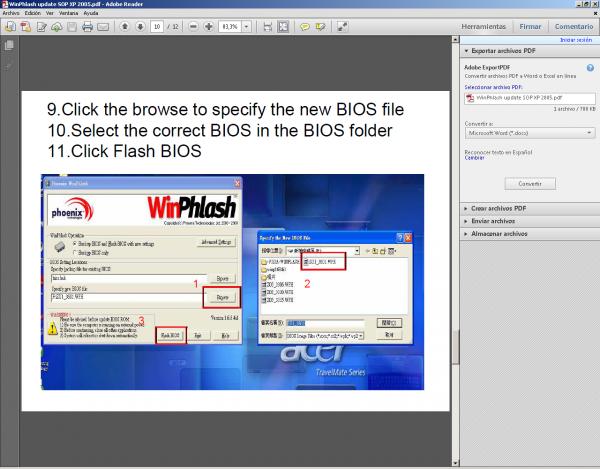
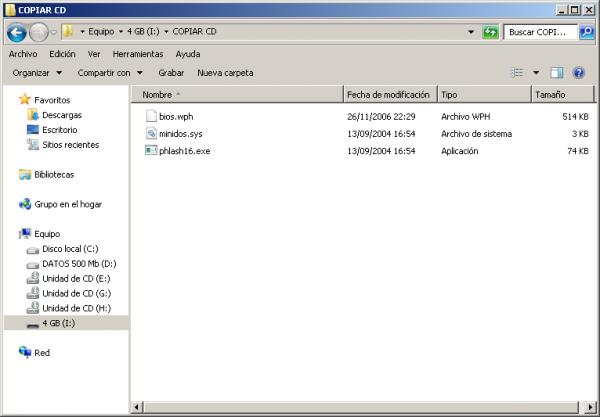
-
Have you followed this step? 6) Rename the BIOS file previously extracted from the compressed file (in my case, it is *.UMA) to BIOS.WPH (it must be renamed as shown). I would try with the newer bios or an older one but not the oldest one, but you must follow the steps that are given to you in that tutorial. It's that old motherboard may not use the CD, it must use the floppy disk drive. regards -
Hello:
Well, it's a laptop, and it doesn't have a A:\\ floppy disk drive, so I imagine that it should be possible to do these steps both from the CD or DVD and from USB.
My doubt is that if I have to use a floppy disk-USB, the BIOS will have to recognize the USB first, it's more logical, I think, to think that it will read the CD first at startup, I would have to try it.
I'm already sharpening the soldering iron :wall:.
p.d.1: Are there more key combinations??
p.d.2: How to know the BIOS brand? How easy it would be to put the logo embedded or a sticker. Personally, I suppose it's Phoenix because the update program picked up the new BIOS and updated it, but wrong, I suppose that if it had been another program it wouldn't have picked it up, I don't know.
p.d.3: Has anyone desoldered and soldered an embedded BIOS to the board and what is the procedure?And finally, I still don't understand how it's possible that leaving the laptop without the BIOS battery, even making a short circuit between + and - with a wire on the terminals of the battery socket and leaving it 2 days without battery, the factory settings don't return. Mystery to me.
Best regards and thanks.
-
BREAKING NEWS :wall::
I just removed the two memories that the laptop had and no beep sounded, is this normal? what could be happening to it?
The screen is still completely black. And the processor fan continues to work even after being turned off for at least 1 minute or so.
pd: I just bought flux and desoldering tape, I've watched about 30 videos on the net on how to use it, I hope that when they bring me the floppy-usb drive it will work.
Greetings to all and if anyone comes up with another idea, don't hesitate to post it, no matter how silly it may seem, sometimes those are good ideas.
the bios is almost 80% phoenix but I'm still not sure.
-
BREAKING NEWS :wall::
I just removed the two memories from the laptop and no beep sounded, is this normal? what's happening to it?
The screen is still completely black. And the processor fan continues to work even after being turned off for at least 1 minute or so.
pd: I just bought flux and desoldering tape, I've watched about 30 videos online on how to use it, I hope that when they bring me the floppy-usb drive it will work.
Greetings to everyone and if anyone comes up with another idea, don't hesitate to post it, no matter how silly it may seem, sometimes those are good ideas.
The bios is almost 80% phoenix but I'm still not sure.
With the corrupt bios it's normal that you don't get video, the memory thing maybe doesn't beep because with the bios corrupted it might not even do the component check, it should only flash the floppy or DVD light if it were looking for a bios file there.
The best thing will be to wait to have the floppy drive and then try, that motherboard I think is a 915 chipset, which is quite an old chipset, that's why it won't look on CD or DVD, it would do it with a floppy drive, sometimes with equipment that old it's better to buy a new and cheap laptop that will be much better, although personally I don't like laptops because they limit you a lot when fixing them and use bad components, excluding the CPU and things like that, the boards are bad. But now you have laptops at 300€ that are much better.
Even a desktop is better, any current CPU is much better, even the lower end ones.
regards
-
Thanks for the guidance.
The thing about repairing my computer is already out of pride, I have to survive it with your help, I have everything ready, waiting for the bios chip that I bought along with the flux and the desoldering tape, plus 30 videos of how to solder boards, chips and other things, and then there is the option, of course, of the usb-floppy disk.
The doubt is if, as you say, I won't read the cd because of the corrupt bios how is it going to read the usb-floppy disk??
It's strange but I will soon find out and I will share it here.Best regards.
-
VERY GOOD:
Well, they have already brought me the floppy-usb drive. Bad news, it doesn't work.
I have placed it just as the tutorial says, all the files on the floppy disk, I have pressed several combinations of letters
fn + b
windows + b
fn + f = floopy
esc + windows
windows + RAnd some more that I can't remember, and nothing, the screen remains black, and connecting another external monitor through the laptop's vga port also shows nothing.
I have been reading a lot, and I can't find a solution, and even the task becomes more difficult when you can't see the graphic.
As for the usb-floppy, it turns on, and makes the little noise to read, but turns off immediately.I have also formatted the floppy disk in ms-dos and copied the files but nothing.
I have even made an autorun.inf file, I don't know why to be honest.I think that some file is missing from the ms-dos disk, so that it picks it up directly or something, I don't know if the extension is *.bat or something like that, I think I read that it starts directly and doesn't go to the hard drive.
Do you know any other way through software to repair this phoenix bios??
Regards and thanks for your attention
-
Good afternoon:
Well, as I said, they brought me everything I needed to solder the electronic component (the bios)
I have purchased several products, such as:
flux, desoldering iron, new bios, desoldering mesh, etc.
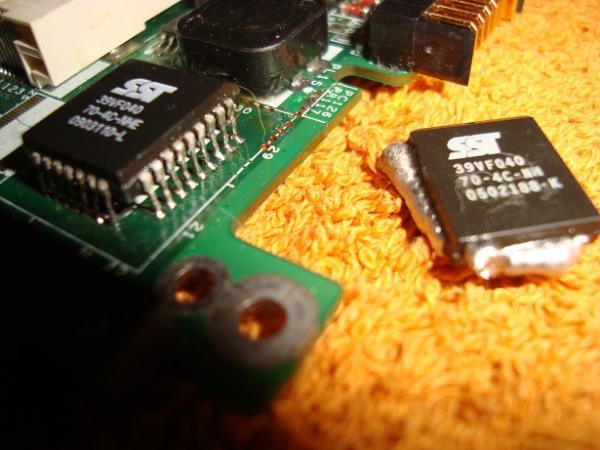
The issue was that the bios did not fit into a slot, that is, it was surface-mounted.
What I did was stretch the legs of the new bios and solder it. I must say that I am not one of the best solderers out there, but well, after checking with the multimeter in diode mode (sound), everything is fine.
Now I just have to put the pc together again and see if the new bios works.If you see anything strange in the photo or any advice before turning on the laptop, I'll be here, until tomorrow I won't put it together, I'll be checking the connections of the new bios and that, and of course, going out to party.
Goodbye, I'll let you know if I managed to recover the laptop.
foto1: here we can already see the new bios installed by me, and the other bios with the desoldering iron.
foto 2: A perspective of how it turned out, already tested, and ready to put the laptop together. All that's left is to pray.
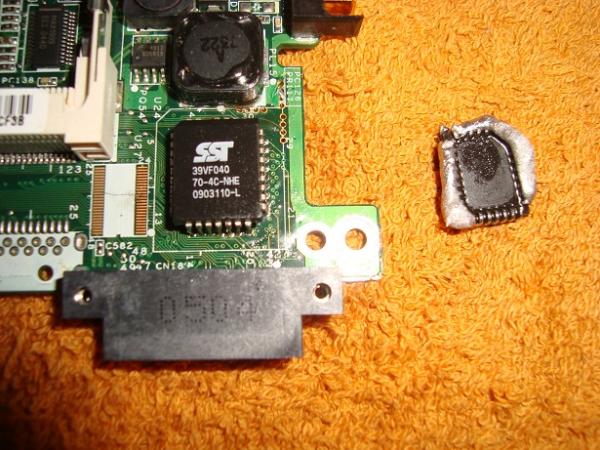
-
Soldering integrated directly onto the board without a socket is risky because the heat can damage it. Other than that, I don't see anything strange about that solder.
Sent from my EHT7DC using Tapatalk
Toda la actualidad en la portada de Hardlimit
Mis cacharros

Hello! It looks like you're interested in this conversation, but you don't have an account yet.
Getting fed up of having to scroll through the same posts each visit? When you register for an account, you'll always come back to exactly where you were before, and choose to be notified of new replies (either via email, or push notification). You'll also be able to save bookmarks and upvote posts to show your appreciation to other community members.
With your input, this post could be even better 💗
Registrarse Conectarse