The BIOS of the FOXCONN 945gz7mc remains checked
-
Hello, thank you very much for addressing my concern: I have already reset it several times, left it for a full day without battery, and when I tried it, I only connected the power supply, the processor, and a hard drive (I have already tried with 4 different hard drives, 2 SATA and 2 IDE), I also turned it on without any type of drive or device connected other than the power and the processor. It continues with the same problem :wall:
What I want to know is if it is possible to flash the BIOS with some method other than doing it with the Operating System, logically because it does not boot, it does not go beyond the message described in the question I asked.
Maybe some electronic bridge, I don't know... -
With the source, motherboard, processor, and memory, it should boot, and if you also have a PS/2 keyboard (USB ones can cause problems, although you can use an adapter) you should be able to enter the BIOS.
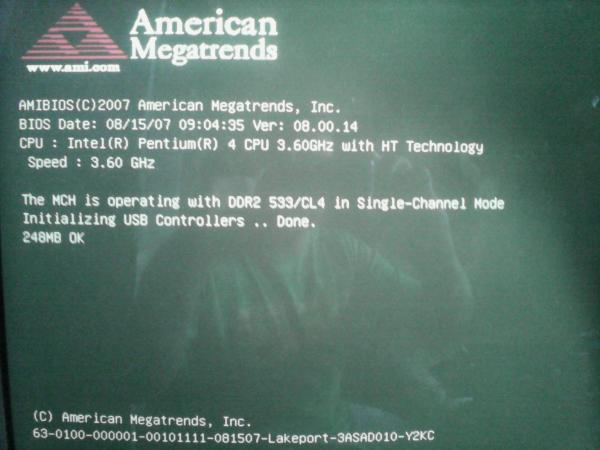
Anyway, if you can post a picture of the screen, we can help you better.
Regards!
P.D.: Yes, you can update a BIOS without using Windows.
Intel i5 3570k / ASRock Z77 Extreme 4 / G.Skill F3-12800CL9D-8GBRL / Sapphire HD5850 / Samsung HD103UJ / TR TrueSpirit / NZXT Source 210 / OCZ ZS550W
Intel i5 4570 / ASRock H87 Pro 4 / 2x G.Skill F3-14900CL8-4GBXM / Samsung 850 EVO 250Gb + ST1000DM003 + ST2000DM003 + HGST HDS723020BLA642 + Maxtor 6V250F0 / CM Seidon 240M / Zalman MS800 / CM MWE 550
AMD Ryzen 7 1800X / B350 / 2x8GB Samsung DDR4-2400 CL17 / NVIDIA GTX 1070 8GB / SSD 120GB + ST4000DM004 + ST6000DM003 / EVGA Supernova 650 G2 -
PD: Si, se puede actualizar una BIOS sin usar Windows.
+1
From a diskette you can do it without problems. You have to download the latest version of the BIOS for your motherboard and follow the instructions on the manufacturer's website.
Greetings
>> i7-2600K Sandy Bridge @4.4GHz || Noctua NH-D14 || ASRock Z77 Extreme4 || 4x8Gb G.Skill Ripjaws X DDR3 1600MHz || XFX RX 5700 XT 8Gb || SSD Samsung 850 PRO 256Gb & 850 EVO 500Gb || WD Caviar Green 1Tb || Barracuda 1Tb || Corsair TX650 V2 || M-Audio Fast Track Pro || KRK RP8 RoKit G3 || BenQ GW2750 27"
>> Athlon 64 X2 5600+ Brisbane @2.9GHz || Gigabyte GA-M61PME-S2 || 2x2Gb DDR2 Kingston 800MHz || Sapphire Radeon HD 5850 Xtreme 1Gb || Maxtor 320Gb SATA2 || OCZ ModXStream 500W Modular || TEAC PowerMax 120/2 || Acer X243w 24"
>> Intel Core2Duo E6600 Conroe @2.4GHz || Asus P5N32-SLI SE DELUXE || 2x1Gb DDR2 Kingston 800MHz || Asus nVidia GeForce 9800GT 1Gb GDDR3 || Seagate Barracuda IDE 80Gb 7200RPM || Linkworld LPK12-35 450W -
Hello fellow!
Well you know I was looking at the manual and it doesn't say anything about doing it on diskette… I'm going to go crazy with that crappy board. No it's not mine it's borrowed, I used the PC to do some simple letters in Word and pumm, the next day when I went to turn it on it was like this..
-
Hello fellow!
Well you know that I was looking at the manual and it doesn't say anything about doing it on a diskette… I'm going to go crazy with that dirty board. It's not my own, I borrowed the PC to make some simple letters in Word and pumm, the next day when I went to turn it on it was like this..
Do you have something connected via USB?
If it stops right where the USB is, try with a PS/2 keyboard and mouse, those boards have been around for a while but the BIOS shouldn't be corrupt if it shows you something from the BIOS post, something is wrong with the memory or some hardware that prevents it from loading, if it allows you to enter the BIOS, load a safe configuration, although if you removed the battery it would set the default configuration, but it seems that some hardware doesn't pass the BIOS post, it will be a matter of not connecting USB.
regards
-
Let's see if it's a ram module that's giving us bad contact, or something like that, it wouldn't be the first time.
MSI MAG271CQP 2K | Zalman Z9 Neo | CorsairTX850M | MSI MPG X570 Gaming Edge Wifi | AMD Ryzen 7 3700X | Cooler Master ML240L | 2x16GB Gskill TridentZ Neo 3600 CL16 | Gigabyte RTX2070 8GB | Samsung 970 EVO PLUS 500GB M.2 | Crucial 2TB | Crucial MX500 1TB SSD | 3x1TB HDD | Windows 11Pro
Asus P6X58D-E| Intel i7 950 | Noctua | 10GB DDR3 1333 | SSD256 | GTX560 TI 1TB - Windows 10 -
I haven't read if you can or cannot enter the bios. If you can, disable the usb. Just in case. Let's see if it starts up. Anyway, the ram modules. Sometimes they are a pain.
-
I have a strange case with a foxconn 945gz7mc board. It has an American Megatrends bios, when the pc starts up, the AM logo appears, and below it says loading USB controllers...
And there it stays, never to start up or respond again, either to commands with the keyboard or some event of the same system.
I have already tried changing the battery, moving the jumpers in all ways, disconnecting everything, and leaving it only with the hard drive and of course the power connection. And it remains the same.
I thought of flashing the bios, but, according to what I read on the foxconn page, you can only do it through a program that runs on the operating system (Windows), but how the hell do I do it if the bios doesn't even get to the boot stage??
Likewise, how do I do it via USB? Or diskette? Or some electronic method of making some kind of bridge or connection?
Thanks for the help you can provide.Hello. As far as I know these bios are only installed through an executable.exe file, not with flashing. In fact, to flash the bios you need to have the bios functioning.
I have the same motherboard. We are talking about an old pc, right? Well, mine is a compaq presario I bought around the year 2008.
Have you tried updating any bios and that's why the machine is like this? If so, you have probably corrupted the bios.
Another thing that comes to mind is that, if this is a pc with more than 5 years, and with a lot of use, the bios battery is directly depleted. You can confirm this if you have previously had problems with the time settings for example.Now, if the bios has been corrupted, either because you wanted to update it, or because of some very unusual virus, you have an option that is quite difficult. There are some technicians who dedicate themselves to recovering bios I think I saw a publication on Mercado Libre. It is done as follows, first you have to find someone who has the same model as your motherboard, and put the bios of this equipment in your motherboard. These bios will allow you to access your operating system, once there you have to make a backup of the bios through a program, I have seen in linux, maybe there is for windows (google bios backup). You can directly enter a live cd of linux or from a usb drive with linux. Once the backup of the bios is made (that is, you copy the software that comes with the healthy bios), restart the computer and enter the bios again with F10 (SETUP), and put your bios back into the motherboard, this is done with the pc turned on :ugly:, since the bios use volatile memory they are only useful when turning on the computer once entered into the bios, it doesn't matter if the bios is put or not, that's why you put your bios there, and you load the information of the new bios. It's tricky, but trickier is that someone has that motherboard and lends it to you for that :troll:
There is a video on youtube that shows how to do this last procedure.I have this motherboard I can give you a backup of my bios if you need it, but it will be of no use to you if you can't even enter the bios setup. If the bios stays frozen, the ONLY solution is to find someone who has a motherboard so you can use those Bios.
Regards I hope it helps you. :fuckyea: -
Hello. As far as I know, these bios are only installed through an executable.exe file, not through flashing. In fact, to flash the bios, you need to have the bios working.
I have the same motherboard. We're talking about an old PC, right? Well, mine is a compaq presario that I bought around 2008.
Have you tried updating the bios and that's why the machine is like this? If so, you probably corrupted the bios.
Another thing that comes to mind is that, if this is a PC over 5 years old and with a lot of use, the bios battery is directly depleted. You can confirm this if you've had problems with the time settings before, for example.Now, if the bios was corrupted, either because you wanted to update it or because of some very unusual virus, you have an option that is quite difficult. There are some technicians who specialize in recovering bios. I think I saw a post on Mercado Libre. It's done as follows: first, you have to find someone who has the same model as your motherboard, and put the bios of that computer into your motherboard. These bios will allow you to access your operating system. Once there, you have to make a backup of the bios through a program. I've seen one for Linux, maybe there's one for Windows (google bios backup). You can directly enter a Linux live cd or from a USB drive with Linux. Once you've made a copy of the bios (that is, you copy the software that comes with the healthy bios), restart the computer and enter the bios again with F10 (SETUP), and put your bios back into the motherboard, this is done with the PC turned on :ugly:, since the bios use volatile memory and are only useful when turning on the computer. Once in the bios, it doesn't matter if the bios is set or not, that's why you put your bios there, and load the information from the new bios. It's tricky, but even trickier is finding someone who has that motherboard and lends it to you for that :troll:
There's a video on YouTube that shows how to do this last procedure.I have this motherboard and I can give you a backup of my bios if you need it, but it won't be of any use if you can't even enter the bios setup. If the bios freezes, the ONLY solution is to find someone who has a motherboard so you can use those bios.
Regards, I hope it helps. :fuckyea:Also make sure it's not the Ram memory, even the power supply, especially if it's an old one or is a 220v one.
-
I also have a foxconn d945 and I have already changed the battery, ram, hard drive, processor, power supply, keyboard and jumpers and nothing happens, it doesn't go past the bios




Hello! It looks like you're interested in this conversation, but you don't have an account yet.
Getting fed up of having to scroll through the same posts each visit? When you register for an account, you'll always come back to exactly where you were before, and choose to be notified of new replies (either via email, or push notification). You'll also be able to save bookmarks and upvote posts to show your appreciation to other community members.
With your input, this post could be even better 💗
Registrarse Conectarse