RAM change
-
Good evening HARDLIMIT family,
As you can see in my signature I currently have 2x4 GB of G.Sikill Ripjaws DDR3 1600 CL9 and I would like to prepare for the RV of 2016.
I have doubts if it is preferable to sell the current memory and go to 2x8GB of the same brand and speed at CL10, and thus keep 2 slots for future expansion, or to buy another 2x4 GB of the same as I have of CL9 (I would have 16 GB but all slots full).
If I am lucky and sell the memories well I would not have to put much money into the change.
-Expansion of the current memories: 45,95 €
-Sale of the current ones and purchase of 2x8: 45 € (80-35) or the CL9 for 52 € (87-35).
Now that I see it the difference of the Skills Ripjaws of CL10 (red) to the CL9 (blue) is 7 €…
I appreciate your wise advice in advance. -
The difference between CL9 and CL10 is minimal, only some very specific programs notice appreciable improvements from a memory latency drop.
As for whether to use all 4 banks or leave 2 free, the latter is preferable, not only for future upgrades (although by the time you go to upgrade to 32GB I think it will already be on DDR4
 ) since 4 unbuffered modules put a high load on address and data buses compared to 2 and can significantly degrade the signaling of said buses.
For a more technical explanation, we can say that the memory subsystem "sees" an electrical load for each memory chip, so if we have double-sided modules we will have 32 loads for 2 memory sticks and 64 electrical loads for 4 memory sticks.
The subsystem automatically adjusts to support that higher load, slightly increasing the voltage on the memory or slightly reducing the clock frequency or adding cycles to the latency. These adjustments help keep the memory subsystem safer, but as you can imagine, having 4 modules installed will mean a slight loss of performance and in the worst case, the probability of failures in communication with the memory. -
More clear water, so nothing... said that... to define do you think the 7 € is profitable for the CL9...?
-
Profitable no, but for €7 I would buy them CL9
 CL10 for DDR3 1600 I think is very high (the Trident X are CL7 at that speed).
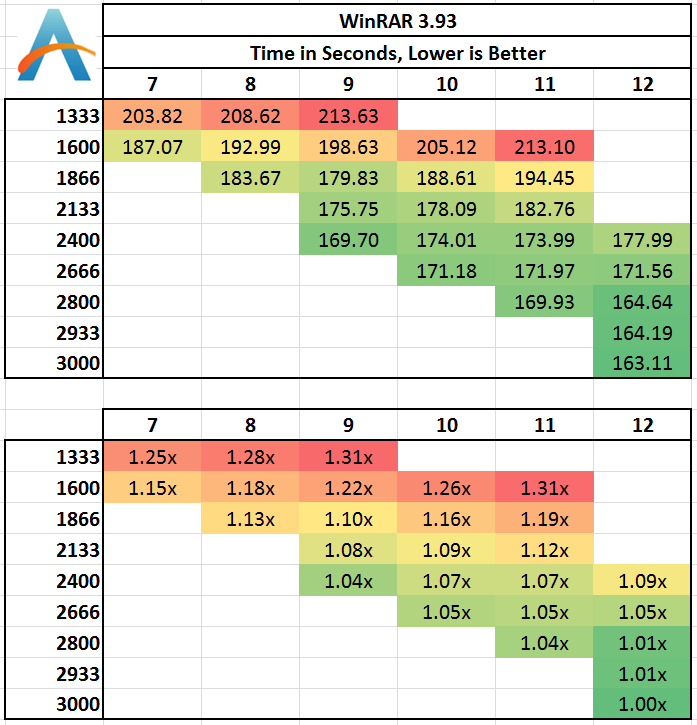
I'll put a table from WinRar, it's one of the programs where the difference is most noticeable:
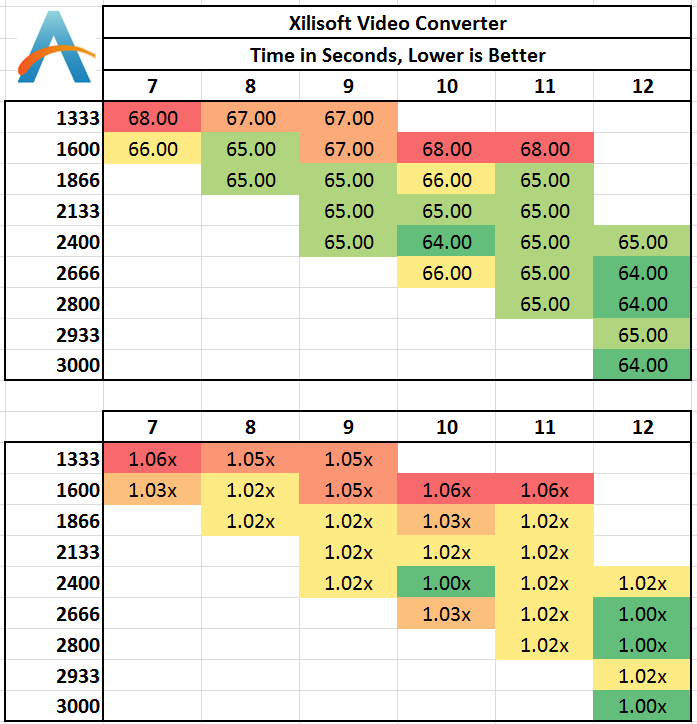
On the other hand, for ripping you'll see that the difference is almost nil:
-
Damn... great information, you're a genius
Finally, these would be if you see it ok:
G.Skill Ripjaws X - 16 GB RAM Kit (2 x 8 GB DDR3 SDRAM, PC3-12800, 1600 MHz, 1.5 V), blue: Amazon.es: Computers & ElectronicsAsrock Z77 Pro3 # i5-3570 3.4 Ghz # ZOTAC GTX 1060 - 6GB # G.Sikill Ripjaws X DDR3 1600 2x8 Gb # Corsair HX520W # Antec P182
-
Absolutely correct!
-
Hey krampak, taking advantage of the post and seeing that you have a 7950.. I might have the opportunity to get another 7870 for 70€… do you think the sli is worth it?
Asrock Z77 Pro3 # i5-3570 3.4 Ghz # ZOTAC GTX 1060 - 6GB # G.Sikill Ripjaws X DDR3 1600 2x8 Gb # Corsair HX520W # Antec P182
-
Personally I wouldn't set it up, I've had several CrossFires (including the 7950 from the firm) and I've always ended up going back to monoGPU. It generates a lot of heat, the electricity cost is considerable (seeing your firm's power supply you should also set up another one) and the improvement is only noticeable in some titles, in the ones I play it's not very noticeable. Now, if you tell me that you play Battlefield at 2560x1600 maybe it's worth it for you, but at 1080p it's not.
-
Bueno, RAM sold and new RAM ordered (I will receive it tomorrow), a thousand thanks krampak for your help.
-
Well no, for now nothing at 1080p, in fact I am trying to sell my current monitor and get a 24 with 144Hz... but the second-hand market is flooded... we continue with my humble card... thanks for the advice. -
Hello:
I agree with Krapak about the memory, for the price you pay the memory is very good.
Regarding mounting two graphics cards, I have always believed that it makes sense to mount two graphics cards if you have the money and a good power supply, and a good case to dissipate the heat. In addition, I only see it as a good idea if you mount it with high-end graphics cards, or mid-range high-end. For example, today mounting two 970 GTXs can make the team perform much better in games than with graphics cards that are worth more than double like the Titan. Many people who have two graphics cards have this model for what I comment. As in their day they had in AMD, the 7950 - 7970 for example. Because without having an excessive price in Dual they would sweep away much more expensive graphics cards.
That being said, your graphics card today would be considered mid-range low. But I believe that it should continue to defend itself very well in Full HD without filters with not very demanding games. If your monitor is not Full HD, you will not notice much improvement in changing graphics cards, so I would stay as you are. When you can, change the monitor, and depending on how the games go, then when you can change the graphics card; but not the other way around.
In addition, the 7870 has 2 Gigabytes of memory. At full HD with filters there are already games that ask for more memory; so even by mounting another graphics card, some game would give you frame drops, so it's better not to put another graphics card. To mount for 70€ another 7870 you sell yours for 70 and get some 7970 - 280X that hover around 130-140€ second-hand, the cost of the change would be similar, and even having slightly less power, you wouldn't notice it in all games and those 3 Gigabytes of memory from these two graphics cards would help in some games.
Best regards.
PD: To move the games on a 24 at 144Hz, prepare your wallet... or if not, think that you will be able to enjoy few games at the speed that the monitor allows you. The same thing happens to people who buy a 4K monitor to play... either you have a huge team or you have to start thinking about lowering the resolution.
-
What a long winded explanation, and thank you so much for the advice... wow... it's clear that I didn't have a clue. But I thought I could defend myself with the current games for a couple of years.
What really leaves me cold is the monitor thing... I thought it would be more sensible to invest in a 24-144 (250€) on average, than in a 24 full HD (150 €?)... besides, I would have to "undersell" my current one (LG 226WTQ)... how do you see it? -
Personally, I think it's fine to invest in a 24" Full HD that is 144Hz if you are a very big gamer; but you must be aware that you need to have a great graphics card to take advantage of the frames that this monitor is capable of. There will be games that require a good graphics card and your graphics card won't be able to give you more than 60 frames, so you won't notice a big change compared to a monitor with a lower frequency; and there will be games that do, and then you will notice the change. I know people who, after trying a 144Hz monitor, would never go back to a "normal" monitor no matter what, but these are very big gamers, and they value that feeling of speed and fluidity that these monitors give you if the hardware is up to it.
That being said, and without being a big monitor expert, you should buy a monitor according to your needs. If you are a very big gamer, then a 144Hz can be a very good option. I see it as better than 4K resolution because, as I mentioned, you really need to have a super computer to run a game at that resolution. On the other hand, if you use the monitor a little for everything, then you might prefer another technology.
For example, IPS panel technology is not the best for gaming only, but if you use the computer for photo editing, these monitors are highly recommended. So the first thing you need to do is weigh the percentage of use you give the monitor for gaming, for movies, etc. and based on that we can guide you.
I repeat that I am not a big monitor expert. In my case, I have a crappy 17" monitor that is at least from the brand EIZO :ugly: because my previous one broke; and I am waiting to get a monitor just like you, but in my case I value that I am 40 years old, that I don't have the same eyesight as a young guy, and that Full HD is enough for me, to which I add that I love photography and that I don't play much; so I will probably end up buying an IPS of 24" and if I can, a 27".
As a final tip, a good monitor is not a luxury, it's health for your eyes, so don't skimp on a computer component that will last you years and will affect your well-being. Skimp on the case if you want, on other computer components, but not on a monitor; so first think about what you are going to use it for and based on that we can try to help you.
If that's the case, it's almost better to open another thread, and then more people will enter and be able to help you. But do it at the time of buying the monitor. For now, with the change of the RAM and keeping the graphics card until you save for a new monitor and subsequently a new graphics card, you are served.
Best regards.
-
Once again I appreciate your comments, with popular wisdom being what I value... here another close to 40... has been using monitors since the 286, so my eyesight is suffering jejejejeje
On the other hand you are right, this topic has fulfilled its function, as soon as I get some money OS I will ask for advice on a monitor, which I use in a varied way, but a larger percentage for gaming, although not as much as I would like....
Once again a thousand thanks...


Hello! It looks like you're interested in this conversation, but you don't have an account yet.
Getting fed up of having to scroll through the same posts each visit? When you register for an account, you'll always come back to exactly where you were before, and choose to be notified of new replies (either via email, or push notification). You'll also be able to save bookmarks and upvote posts to show your appreciation to other community members.
With your input, this post could be even better 💗
Registrarse Conectarse