-
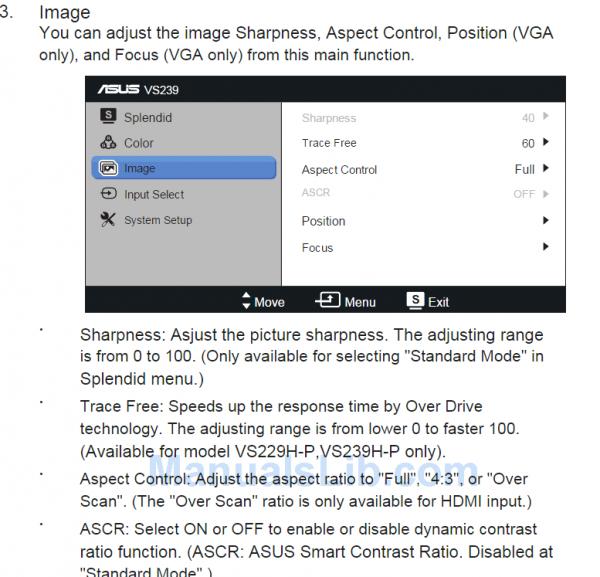
Hello, I have had a problem for some time with the AUS VS239HV monitor, because according to the characteristics of this model, the screen can be configured in 16:9 which would be the full screen, and in 4:3, but there is no way to leave the monitor in 4:3, the technical support is making me dizzy and does not give me any solution. In the last email they tell me that I have to buy a Box to be able to put it in 4:3, I do not know what this Box is, but I do not want to buy anything, since according to the manual it can be put in 4:3. Does anyone know what this Box is? The graphics card I have is a vidia GeForce GTX 560 Ti, and I have tried monitors of worse quality from another brand and I can put it in 4:3, so I do not think it is a problem of the graphics card. Bye. -
When you say there is no way, what do you mean? Doesn't it give you an option to do it or when you choose the 4:3 ratio it does nothing?
-
Hello, and sorry I didn't reply to you before, but I got the notification in the spam folder. Yes, it doesn't give the option to change to 4:3. If I put the monitor via DVI, the option turns gray, with no possibility of changing to 4:3 If I connect the monitor via HDMI, it doesn't show 4:3, it shows OverScan, which I don't know what it is, and even though I've asked the technical service about it, it seems they have no idea either, because they don't answer that question, the thing is that with OverScan it doesn't stay in 4:3
  Best regards.
-
According to what I read on the Asus ayoda forum, (a pretty old branch, by the way) it seems to be related to the video driver resolution settings (nVidia control center in this case).
Try selecting the maximum available resolution (1920*1080), without forcing the 4:3 aspect on the nVidia panel, and try the settings menu again. -
Hello whoololon.
I don't know what's going on but I'm not receiving notifications.
The settings you tell me to put, that's how I have them "I've also tried others", and the options in the monitor menu appear like the first image in the post above, in gray without being able to select anything.

Regards.
-
No, I mean in the nVidia control panel, in "Desktop size and position", "Scaling" tab.

-
This is how it is in the graphics card settings. Although I'm not sure if it has something to do with the monitor menu, with the menu or the graphics card settings, I think I've already tried everything and I can't activate the option of the aspect of the monitor menu to show 4:3, which according to the monitor manual can be set to 4:3 This is a screenshot from the manual
  **P.D. I still don't receive notifications of new replies, I don't know if it's just me. ** Salu2.

