Problem Gigabyte Ga-x48t-dq6 + q9550 when running with 8 gbs
-
Good afternoon, I start by listing the characteristics of my PC:
Processor: Intel Quad Core Q9550 2.83GHz
Motherboard: Gigabyte ga-x48t-dq6
Bios version: F6 (last stable version) with the optimal configuration loaded.
Installed memories: -KVR1333D3N9/4G 1,5V
-KVR1333D3N9/2G -SP 1,5V
-KVR1333D3N9/2G 1,5VOperating system: Windows 7 64 bits
Well, before posting I have checked that all the memory channels on the board work correctly (together and only with one different memory at a time) and that all the memories are in good condition.
I have been running this motherboard for quite some time with 4gbs (with the 4gb memory) and I have not had any problems, no BSOD or anything.
Recently I decided to increase the memory since some games took quite a while to load and gave a drop in frames, exactly with Fallout 4. Although when I played everything worked perfectly and there were no failures or exits from the desktop of any kind.
In the store where I usually buy the memories, they only had one 2gb left that supported my board, so I spent some time running the game with 6gbs and everything went perfectly.
A few days ago I ordered the other 2gb memory and that's when the failures started. Specifically when the 3 memories work together providing 8gbs.
It turns out that while I play, after a short while it goes back to the desktop (without screen shots or errors) and if I run the game again and continue playing the BSODs start. The BSODs only occur while I am playing and with 8gbs, not when I browse, watch videos or anything.If I remove one of the 2gb memories and run everything with 6gbs again it works perfectly.
What could be the problem? Should I download a beta version of the bios that is more recent although it is not official? Should I change the configuration?
I appreciate all advice, thank you for your time.
-
Well, all of a sudden, I would say it's a matter of the memory module.
Try running memtest and check the BIOS.
Ah, and welcome to the forum.

-
Thanks for the welcome and for the response.
Actually, a while ago I removed one of the 2gbs of memory and had the 4gb one placed and the 2gb one in different colored channels and I got a BSOD (dxgmms1.sys). Now I have put them in the same dual channel (both the same color) and it seems to be going well.
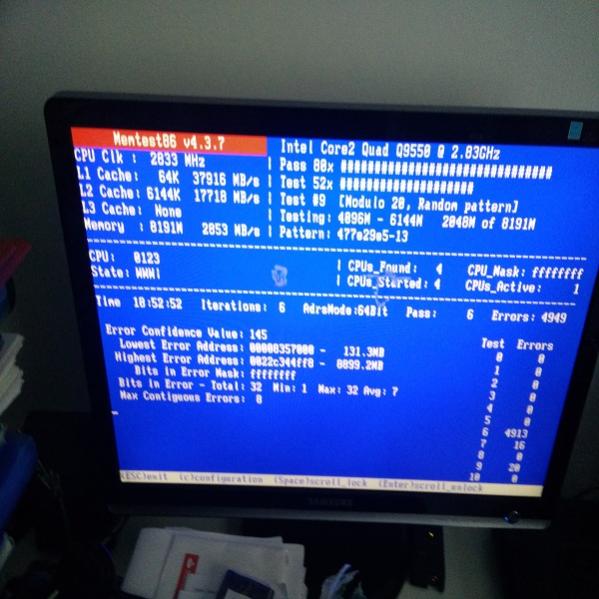
Right now I am proceeding to run a memtest86+: the correct way to do it is by using one of the memories in each memory channel of the board and then running the test once with the other memories in any channel, right?
Best regards.
-
It will sound strange to you :facepalm:, but if you look in the motherboard manual, you will find a section that tells you the correct way to place the memory, with examples of mixing modules of different sizes.Another issue is that the "Optimal Settings" option in the BIOS is usually a source of problems when you mix different memories, so check the SPD info with a program like CPU-Z for example, to make sure.
Regards!
Intel i5 3570k / ASRock Z77 Extreme 4 / G.Skill F3-12800CL9D-8GBRL / Sapphire HD5850 / Samsung HD103UJ / TR TrueSpirit / NZXT Source 210 / OCZ ZS550W
Intel i5 4570 / ASRock H87 Pro 4 / 2x G.Skill F3-14900CL8-4GBXM / Samsung 850 EVO 250Gb + ST1000DM003 + ST2000DM003 + HGST HDS723020BLA642 + Maxtor 6V250F0 / CM Seidon 240M / Zalman MS800 / CM MWE 550
AMD Ryzen 7 1800X / B350 / 2x8GB Samsung DDR4-2400 CL17 / NVIDIA GTX 1070 8GB / SSD 120GB + ST4000DM004 + ST6000DM003 / EVGA Supernova 650 G2 -
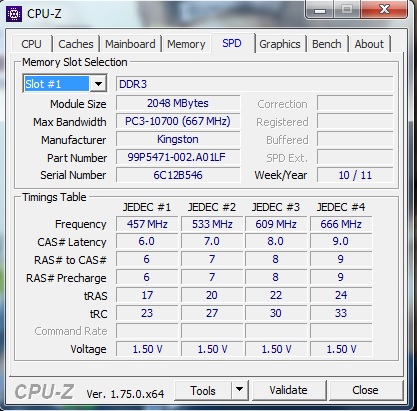
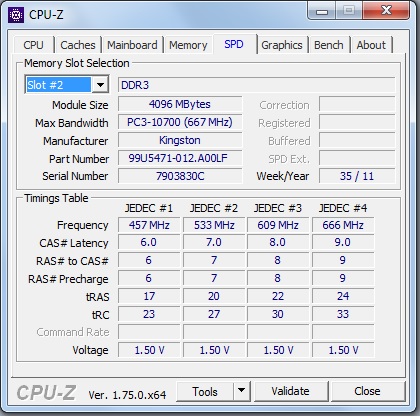
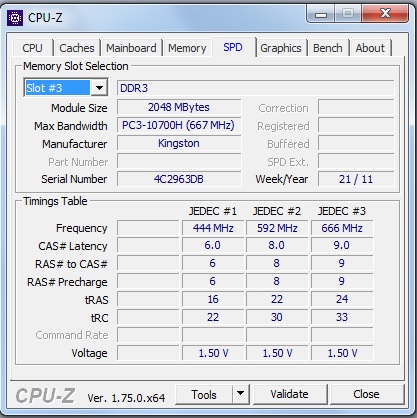
Well, after passing the memtest I installed the cpu-z, I leave here the information of the SPD to see what you advise me to do.
Best regards, thanks.
-
The Memtest is throwing errors According to the manufacturer's info, the board supports up to 8GB in total, and the manual does not consider the mixing of memories, so you are in uncharted territory.
 According to the SPD, the three modules can work without problems at 667@9-9-9-24-33, so even if you leave it in auto, you shouldn't have problems, although I would put at least 1.55v. Try the Dual Channel combinations, in case it changes depending on whether you avoid having the two 2GB modules in the same channel. So you already know, trial and error. Salu2!
Intel i5 3570k / ASRock Z77 Extreme 4 / G.Skill F3-12800CL9D-8GBRL / Sapphire HD5850 / Samsung HD103UJ / TR TrueSpirit / NZXT Source 210 / OCZ ZS550W
Intel i5 4570 / ASRock H87 Pro 4 / 2x G.Skill F3-14900CL8-4GBXM / Samsung 850 EVO 250Gb + ST1000DM003 + ST2000DM003 + HGST HDS723020BLA642 + Maxtor 6V250F0 / CM Seidon 240M / Zalman MS800 / CM MWE 550
AMD Ryzen 7 1800X / B350 / 2x8GB Samsung DDR4-2400 CL17 / NVIDIA GTX 1070 8GB / SSD 120GB + ST4000DM004 + ST6000DM003 / EVGA Supernova 650 G2 -
Hello Fassou,
yesterday I read the motherboard as you told me and as you said, I found no reference to different memory sizes, except for Flex Mode, which is automatically activated when the motherboard detects the modules.
I will increase the voltage a bit in DDR3 OverVoltage Control and (G)MCH OverVoltage Control, to see how it goes, but I know almost nothing about overclocking, what is the maximum voltage I can add without damaging anything?
When testing the different memory channels, I imagine that they should always be the same size in the same color, right?
Another thing that has happened to me is that if I leave the first channel free and use the last three, respecting the same color for the same size, the PC does not enter Windows. I do not know if this is a protection of the motherboard when the modules are placed incorrectly or if there is an error there.
Regarding the errors that Memtest86 has given me, I have read that if the ranges are very far apart (I do not know if mine are far apart or close) it is usually a problem with drivers and other things, nothing to do with the memory, right?
Best regards and have a good afternoon.
-
The errors are very far apart, so it seems more like instability than a specific module, but I would try to have the two 2GB ones alone in Dual Channel, to see if it throws errors. If it goes well, you add the big one without moving the others, and when you start up, look at the message it shows you about whether they are in Dual Channel or not.
As for voltage, you can reach 1.60v without danger.
Salu2!
Intel i5 3570k / ASRock Z77 Extreme 4 / G.Skill F3-12800CL9D-8GBRL / Sapphire HD5850 / Samsung HD103UJ / TR TrueSpirit / NZXT Source 210 / OCZ ZS550W
Intel i5 4570 / ASRock H87 Pro 4 / 2x G.Skill F3-14900CL8-4GBXM / Samsung 850 EVO 250Gb + ST1000DM003 + ST2000DM003 + HGST HDS723020BLA642 + Maxtor 6V250F0 / CM Seidon 240M / Zalman MS800 / CM MWE 550
AMD Ryzen 7 1800X / B350 / 2x8GB Samsung DDR4-2400 CL17 / NVIDIA GTX 1070 8GB / SSD 120GB + ST4000DM004 + ST6000DM003 / EVGA Supernova 650 G2 -
Regarding the errors that Memtest86 has given me, I have read that if the ranges are very far apart (I don't know if mine are far or close) it is usually a problem with drivers and other things, nothing to do with memory. Is that right?
Not quite… in memtest no "driver" is used... the program tests the RAM. If there are failures, there can be many causes but never due to drivers.
It is not advisable to use memories of different densities, even if they can work with the same primary latencies.... the secondary ones are to blame for this since they are different at different densities.
With 6Gb you had no problems (as far as you know) because the board worked in single channel with each module, but now you are putting together a mishmash that the board is not prepared for.
Increasing the voltage will not solve anything, the only sensible thing is to exchange the two 2Gb modules and put another 4Gb module... if they can be exchanged and you can find a 4Gb module that is the same to have 8Gb in dual channel (2X4Gb)... I don't even know how what you have installed starts Windows :facepalm:.
-
Well, first of all I'm going to run memtest on them one by one to rule out any errors at all, and see if there's any corrupt channel or module, I'll post the results. Secondly, as you say Espinetenebolas, that may be the cause, in any case I'm going to look first if there are errors in modules, then I'll try the voltage thing and finally I'll give up and try to change the two 2gbs modules and get myself a 4gbs one. Regards. -
Well, I have run a memtest for each module and in each channel of the motherboard and none have failed, although I only left them for about 20 minutes to do a full pass of 10 tests. Can I then rule out errors in the module and motherboard?
By the way Espinetenbolas, the motherboard manual says that if I use memories of different density, it uses the FLEX technology, so it is supposed to be prepared, right? I am using 2x2gbs in dual channel and another of 4gbs in single channel.
I am going to test with different voltages to see.
-
There is a fact that I am not sure if it is more important, but whenever I make a change, I open Fallout 4 and leave it on for a while to see what happens, the curious thing is that it does not give me a BSOD, at least the first few times. It only takes me to the desktop, which does not happen to me when I use 6gbs.
-
6Gb should not cause problems if the modules are in different channels... that does not mean it will work 100% stable since the operating system's error correction system can mask such instability if it exists.
In any case, I wouldn't waste time testing anything else... the problem is only solved by changing the modules and putting a 2x4Gb configuration.
Add that if you really want to test the instability of the memory, run Test 5 of the memtest for one or two hours on the configuration you want to test (5 or 6 passes of said test are also valid), as it is the most demanding and always fails if there is instability that is difficult to detect for whatever reason.
If the module(s) have something wrong and irreparable, all the tests will fail, but only the 5 forces it enough so that failures of the memory controller or of some very tight or poorly done timing configuration can be detected.
-
I see two options:
The cheap one. Try the memtest without haste, module by module, in case the whole failure is caused by a faulty module (or several). :ugly:
The expensive one. Buy all 4 modules from the same brand and with the same characteristics. This way, you can rule out the possibility that the failure is caused by a mix that the motherboard cannot handle.
Personally, I prefer the second one and have the security of a stable system. If it is not possible due to lack of budget, keep removing RAM until you find the most stable configuration.
I leave it in your hands. ;D -
Hello again,
I have tested test 5 for a couple of hours with each of the following cpu options: Parallel, round robin and sequential. Only the parallel test has failed (56) in test 5, the others have not.
Anyway, it seems that I have no choice but to resign myself, thank you for your answers.
-
Hello again,
I have discovered the specific cause of the error, but I am not sure how to interpret it.
It turns out that if I leave two different memories in different slots (one of 4gbs in a slot of one color and another of 2gbs in another of another color) the memories run in single channel and I get an error when I am playing. Before I said that it exits to the desktop, but this time I have located that it says "the AMD display driver has stopped working". This happens shortly after starting the application.
On the other hand, if I place the two memories as if they were in Dual channel, the PC runs in Flex Memory Mode and everything works perfectly (with 6gbs), it doesn't exit to the desktop, no screen crashes or anything.
In that case, why doesn't it accept one more module of 2gbs? and How does this affect the display driver? -
In that case, why don't you accept a module larger than 2gbs? and How does this affect the screen controller?
First, it's not that it doesn't accept another memory module, it's that it can't run that configuration... I've already given you the solution before and believe me it's the only one.
As for the controller... the controller loads into RAM... if it fails when the graphics access them to see how the controller has to work, it detects that the instructions given to the graphics are corrupt, it tells the operating system and it disables it for safety... that is, unless it crashes the screen or the OS restarts.
RAM failures are like that... they cause all kinds of instabilities.
-
Alright, understood then.
Thanks to everyone for your help and advice. We can consider the matter closed
-
Good morning,
I am here to comment that I have already found the cause of the problem and the solution.

It turns out that I was placing the 4gbs memory in the first slot, the 2gbs in the second slot and the other 2gbs in the third slot. Therefore, channel 0 had 6gbs and the motherboard supports 4gbs in channel 0 + 4gbs in channel 1.
I have removed the modules and placed the 2gbs in the first two slots and the 4gbs in the third.This has solved the problem, I have entered Fallout and tested the conflicting areas where it took me to the desktop and I have been playing for half an hour without problems, so it seems that the solution was that (it was not specified in the manual and my knowledge of hardware is minimal).
Thank you for your time.
-
The errors are very far apart, so it seems more like instability than a specific module, but I would try to have the two 2GB ones alone in Dual Channel, to see if it throws errors. If it goes well, you add the big one without moving the others, and when you start up, look at the message it shows you about whether they are in Dual Channel or not.
A shame that no one suggested you do that before

Congratulations on solving the problem, and you will tell us if now the Memtest runs without errors.
Salu2!
Intel i5 3570k / ASRock Z77 Extreme 4 / G.Skill F3-12800CL9D-8GBRL / Sapphire HD5850 / Samsung HD103UJ / TR TrueSpirit / NZXT Source 210 / OCZ ZS550W
Intel i5 4570 / ASRock H87 Pro 4 / 2x G.Skill F3-14900CL8-4GBXM / Samsung 850 EVO 250Gb + ST1000DM003 + ST2000DM003 + HGST HDS723020BLA642 + Maxtor 6V250F0 / CM Seidon 240M / Zalman MS800 / CM MWE 550
AMD Ryzen 7 1800X / B350 / 2x8GB Samsung DDR4-2400 CL17 / NVIDIA GTX 1070 8GB / SSD 120GB + ST4000DM004 + ST6000DM003 / EVGA Supernova 650 G2


