Help if possible OC AMD Athlon 64 X2 5000+
-
Hola amigos, acabo de registrarme en el foro, mi nombre es Iván y soy de Tenerife (Islas Canarias).
Mi pregunta es la siguiente:1º. Me gustaría realizar un OC a mi viejo equipo, lo tengo desde el año 2007 y quisiera saber si puede realizar con este hardware y si vale la pena hacerlo, me gustaría sacarle un poco más de rendimiento(si se puede) para programas de música y algún que otro juego.
He leído algo por encima en los foros referente al tema, pero nunca me he atrevido hacerlo.2º. Una curiosidad que tengo, cuando pongo algún programa para ver la especificaciones del procesador, tal como CPU-Z, Everest.
¿Es normal que el multiplicador de la CPU cuando está el programa en funcionamiento, oscile, o sea va cambiando 5x, 9x, 10x, 11x, 13x.
¿No tiene que quedar fijo, supuestamente en 13x?Adjunto un reporte del Everest referente al hardware, haber si recibo alguna opinión al respecto.
Tengo el cooler que viene de fábrica y la Bios la actualizé hoy con la úlima versión que había disponible, por si acaso haya méjoras en cuanto a los settings para realizar el OC.Agradeciendo sus respuestas, les envío un cordial saludo a todos.
Grácias,
Generador PC
Sistema operativo Windows 10 Pro Professional 6.2.9200
Fecha 2016-05-20
Hora 09:52–------[ Resumen ]–---------------------------------------------------------------------------------------------------
Computadora:
Tipo de computadora Equipo basado en x64 ACPI
Sistema operativo Windows 10 Pro ProfessionalMotherboard:
Tipo de CPU DualCore AMD Athlon 64 X2, 2600 MHz (13 x 200)
Nombre del motherboard Gigabyte GA-M55plus-S3G v1 (4 PCI, 2 PCI-E x1, 1 PCI-E x16, 4 DDR2 DIMM, Audio, Video, Gigabit LAN, IEEE-1394)
Chipset del motherboard nVIDIA GeForce 6100, AMD Hammer
Memoria del sistema 4096 MB (DDR2-533 DDR2 SDRAM)
DIMM1: Kingston 1 GB DDR2-533 DDR2 SDRAM (5-4-4-12 @ 266 MHz)
DIMM2: Kingston 1 GB DDR2-533 DDR2 SDRAM (5-4-4-12 @ 266 MHz)
DIMM3: Kingston 1 GB DDR2-533 DDR2 SDRAM (5-4-4-12 @ 266 MHz)
DIMM4: Kingston 1 GB DDR2-533 DDR2 SDRAM (5-4-4-11 @ 266 MHz)
Tipo de BIOS Award Modular (07/17/06)
Puerto de comunicación Puerto de comunicaciones (COM1)
Puerto de comunicación Puerto de impresora (LPT1)Monitor:
Placa de video NVIDIA GeForce GT 730 (2048 MB)
Monitor Monitor PnP genérico [NoDB] (190216843009)Multimedia:
Placa de sonido nVIDIA nForce 430 (MCP51) - High Definition Audio Controller
Placa de sonido nVIDIA Unknown @ Controladora de High Definition Audio [10DE-0BEA] [NoDB]Almacenamiento:
Controlador IDE Controladora estándar PCI IDE de doble canal
Controlador de almacenamiento Controladora de espacios de almacenamiento de Microsoft
Controlador de almacenamiento Controladora RAID NVIDIA nForce
Controlador de almacenamiento Controladora serie ATA NVIDIA nForce
Controlador de almacenamiento Dispositivo RAID NVIDIA nForce
Disquetera Unidad de disquete
Disco rígido Maxtor OneTouch USB Device (465 GB, USB)
Disco óptico HL-DT-ST DVDRAM GSA-H42N ATA Device (DVD+R9:10x, DVD-R9:10x, DVD+RW:18x/8x, DVD-RW:18x/6x, DVD-RAM:12x, DVD-ROM:16x, CD:48x/32x/48x DVD+RW/DVD-RW/DVD-RAM)
Estado SMART de los discos rígidos OKParticiones:
C: (NTFS) 372.1 GB (338.1 GB libre)
D: (NTFS) 465.8 GB (259.7 GB libre)
Tamaño total 837.9 GB (597.8 GB libre)–-----[ Overclock ]–-------------------------------------------------------------------------------------------------
Propiedades de la CPU:
Tipo de CPU DualCore AMD Athlon 64 X2 5000+
Alias de la CPU Windsor-512
Escalonamiento de la CPU JH-F2
Engineering Sample No
CPUID Nombre de la CPU AMD Athlon(tm) 64 X2 Dual Core Processor 5000+
CPUID Revisión 00040F32hVelocidad de la CPU:
Reloj de la CPU 2611.9 MHz (original: 2600 MHz)
Multiplicador de la CPU 13x
FSB de la CPU 200.9 MHz (original: 200 MHz)
Reloj de HyperTransport 1004.6 MHz
Bus de la memoria 261.2 MHz
Relación DRAM:FSB CPU/10Caché de la CPU:
Caché de código L1 64 KB per core (Parity)
Caché de datos L1 64 KB per core (ECC)
Caché L2 512 KB per core (On-Die, ECC, Full-Speed)Propiedades del motherboard:
Identificación del motherboard 07/17/2006-C51-MCP51-6A61HG0HC-00
Nombre del motherboard Gigabyte GA-M55plus-S3G v1 (4 PCI, 2 PCI-E x1, 1 PCI-E x16, 4 DDR2 DIMM, Audio, Video, Gigabit LAN, IEEE-1394)Propiedades del chipset:
Chipset del motherboard nVIDIA GeForce 6100, AMD Hammer
Tiempos de Memoria 4-4-4-12 (CL-RCD-RP-RAS)
Command Rate (CR) 2T
DIMM1: Kingston 1 GB DDR2-533 DDR2 SDRAM (5-4-4-12 @ 266 MHz)
DIMM2: Kingston 1 GB DDR2-533 DDR2 SDRAM (5-4-4-12 @ 266 MHz)
DIMM3: Kingston 1 GB DDR2-533 DDR2 SDRAM (5-4-4-12 @ 266 MHz)
DIMM4: Kingston 1 GB DDR2-533 DDR2 SDRAM (5-4-4-11 @ 266 MHz)Propiedades del BIOS:
Fecha del BIOS del sistema 07/17/06
Fecha del BIOS de video 05/27/14
Tipo de BIOS Award Award Modular BIOS v6.00PG
Mensaje del BIOS Award GA-M55PLUS-S3G F4
DMI Versión del BIOS F4 -
Well no, besides the fact that it's not easy because it's not an FX, it's not worth it since it's almost 10 years old... if you go right, it's best that you buy something new.
The little that you can earn doesn't compensate... or at least that's my opinion... another thing is that you want to tinker.
-
Check if the motherboard in the Bios allows you to adjust the FSB, to increase it a little and with it you would increase the speed of the micro. I used to do that with an AMD 3800x2 from a long time ago... although it was from the 939 socket not AM2 like yours.
Anyway, and without wanting to discourage you. That micro today is good for office work and little more. Internet, MKV movies, Office, light programs... but it's very old. The graphics card is also old, so you won't be able to play much with that computer. Also, we would have to know what kind of heatsink the micro has. If you're from Tenerife, with good weather most of the year, with the stock heatsink it's almost better not to do much overclocking on the micro.
In summary, I wouldn't spend even 1€ on that equipment. Look at the Bios options, see if you can squeeze the micro a little, but you won't notice much improvement, and if you don't have computer knowledge, it's better not to touch the equipment.
Regarding the micro's multiplier and speed varying. Yes, it's normal if you have those options enabled in the Bios. Which, by the way, is usually the best. You can rest assured that if the micro needs power, it will go to its maximum speed, and if for example you're browsing the Internet, listening to music, the micro will be more relaxed and will consume less.
Here are the CPUs that your motherboard supports: http://www.gigabyte.com/support-downloads/cpu-support-popup.aspx?pid=2283
If the computer, for the use you give it, still works reasonably well, you might be able to look for a more powerful micro second-hand. You should find them at a good price and if for example you put a 4-core one, for very little money, it might be a good idea, but that depends on you.
Best regards.
-
+1
I don't think the desire to overclock is the case since you're talking about getting more out of it, but the fact is that overclocking it won't solve much for you, it would only boost it between 400 and 600 mhz at most since it's not one of the most overclockable CPUs, besides it's one of those that comes with the chip soldered on the board with paste instead of soldered and you would need a good heatsink just to barely contain the temperatures. You could also unsolder the micro, but I definitely don't recommend you embark on that and besides it would improve it little to nothing.As you can see, even if you buy a good heatsink you wouldn't get much since a 20% on a micro that already has low performance means very little more performance.
For that, it's better to take the money that a decent heatsink costs and buy a second-hand Phenom II micro (watch out! Don't even think about it being a Phenom II if you just say Phenom), which is much superior to the one you have and on top of that it is a good overclocker, and by the way if you want to overclock it "easily" without having to become an expert, you choose one that is "black edition".
Or if not, save that money and keep saving to change the equipment to something current.
In summary: overclocking your current equipment won't solve anything in games and you will only notice it a little in other programs.
If you install a Phenom II the pc would be "useful" again, but for games you will have to look for a decent graphics card that you would get the most out of with that micro, but with integrated graphics upgrading the processor won't improve anything in games.
If the main problem is money and you won't be able to get a new pc for a long time, the option of upgrading the micro, or the micro and second-hand graphics card gets you out of the jam for a season more.
If on the other hand you could save for a few months for a new computer with a decent graphics card then don't spend a dime on the current equipment.If it helps you, I used to have an A64 x2 5000+ (brisbane), a few years ago I bought a refurbished HD5850 for 100€, this one didn't go beyond approx 80% usage with the A64x2, and recently I got a Phenom II x3 for 25€ and besides getting the most out of the graphics and playing decently for the rest of the uses, it suits me perfectly at 3.2ghz, and it easily reaches 3.8 and more (well cooled).
can you upload a screenshot of cpuz in the "Memory" and "SPD" tabs? it seems like you have ram at 533 but it's not sure.
Regards and welcome.
-
Hello, good afternoon to all.
Thanks for responding.Espinetenbolas
You are right, I think it's time to upgrade a bit.
amd125
Yes, I think I saw the option in the bios to change the FSB, I think it's set to Auto by default, but I haven't tried changing the values yet, I'll check it later.
The cooler is the Stcok one, the one that came from the factory.
I have already replaced the 4 capacitors on the board with 6.3 V, 3300 uF. It wouldn't start and I could see that they were swollen, I changed two yesterday.
Thanks for the link, I have already seen the processors that the board can support.defaultuser
I think I will consider the option of changing the micro, to see if I find something worth it, since my current economic situation is not good.
As for the graphics, I am not using the integrated one on the board, I was given a Gigabyte Nvida GForce GT 730 2 Gb. DDR3. 128 Bit. I know it's not like a GTX, but I can get by with it.
What do you think?Yes, the Ram memory is at 533.
I attach screenshots of CPU-Z, the SPD tab shows me without values, I don't know why it could be the reason.Grateful for your responses,
Thank you all very much.
ivan_r2d2
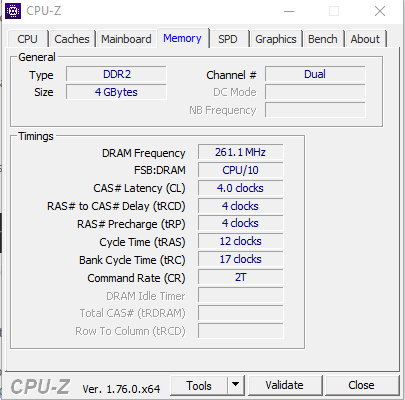
-
:facepalm: I hope I was not painting it too beautifully for you, I'm sorry to disappoint you but upon closer inspection your motherboard does not support any PII, that means you'll have to upgrade the whole thing :sisi:
-
defaultuser
Yes. It seems that for Phenom II, I need a motherboard with Socket AM2+ or AM3.
Although on the Gigabyte page there is a note at the end that says:
If you install an AMD AM3 / AM2 + processor on an AM2 motherboard, the system bus will be reduced from HT3.0 (5200 MT / s) to HT1.0 (2000 MT / s); however, the frequency of the AM2 + CPU will not be affected.
Therefore, I think it will not be worth it.
Nevertheless, thank you for your help.
Greetings to all…
ivan_r2d2 -
defaultuser
Yes. It seems that for Phenom II, I need a motherboard with Socket AM2+ or AM3.
…
Negative, there are AM2 motherboards without the + that do support some of the Phenom II.
My own for example is just AM2 and supports up to the PII of 95Vatios, but I've looked a bit and from gigabyte they are the nf570 and the ones with amd chipset nothing more, not even the ga m59 support them, bad luck."…M3.
Although on the Gigabyte page there is a note at the end that says:
If you install an AMD AM3 / AM2 + processor on an AM2 motherboard, the system bus will be reduced from HT3.0 (5200 MT / s) to HT1.0 (2000 MT / s); However, the frequency of the AM2 + CPU will not be affected.
Therefore, I think it won't be worth it.
Nevertheless, thanks for your help.
Greetings to all...
ivan_r2d2That is the system bus that is still sufficient, but it doesn't matter in your case that it doesn't support them.
Maybe it's worth starting to save and look around for cheap motherboard+cpu+ram combos that might interest you, don't spend a dime on the current one that will compensate you very little, better to save it.
See you later.
-
¡Esta publicación está eliminada!


