Sometimes it doesn't recognize my Samsung SSD 860 EVO
-
Good morning, I hope you are well. Since I bought my new computer, I transferred the main disk from the old tower to a Samsung SSD 860 EVO 500GB. I cloned this disk to my current WD Black SN850 1TB SSD NVMe so that it is the main one and I formatted the Samsung and left it as storage. The problem is that sometimes it "disappears" from the configuration, I don't know why. I have put a new SATA cable, I have tried with the cables of my other HDD and it doesn't work. When it feels like it appears and disappears. Is it a problem with the disk, it's already 3 years old. Thank you very much.
-
The disk could be faulty, but I would start by going into BIOS and turning off power saving for that disk, just in case it's doing it too aggressively (in many BIOS they warn that with some disks it can cause problems). You will usually find it next to the option to enable or disable SMART.Another option, if you have a molex to sata power adapter, is to power it with one.
Salu2!
Intel i5 3570k / ASRock Z77 Extreme 4 / G.Skill F3-12800CL9D-8GBRL / Sapphire HD5850 / Samsung HD103UJ / TR TrueSpirit / NZXT Source 210 / OCZ ZS550W
Intel i5 4570 / ASRock H87 Pro 4 / 2x G.Skill F3-14900CL8-4GBXM / Samsung 850 EVO 250Gb + ST1000DM003 + ST2000DM003 + HGST HDS723020BLA642 + Maxtor 6V250F0 / CM Seidon 240M / Zalman MS800 / CM MWE 550
AMD Ryzen 7 1800X / B350 / 2x8GB Samsung DDR4-2400 CL17 / NVIDIA GTX 1070 8GB / SSD 120GB + ST4000DM004 + ST6000DM003 / EVGA Supernova 650 G2 -
@Fassou said in Sometimes it doesn't recognize my Samsung SSD 860 EVO:
The disk could be bad, but I would start by going into BIOS and turning off power saving for that disk, in case it's doing it too aggressively (in many BIOS they warn that with some disks it can cause problems). You usually find it next to the option to enable or disable SMART.
Another option, if you have a molex to sata power adapter, is to power it with one.
Salu2!
Sorry Fassou I didn't make it clear, but the disk also appears and disappears from BIOS, although it's more times that it doesn't appear. The disk is connected on a single SATA line from the power supply... so if there are no other explanations, it's fried, right?
| AMD Ryzen 5 5600X | Gigabyte Aorus Elite V2 | 2x16GB Corsair Vengeance LPX DDR4 3200MHz PC4-25600 | XFX Speedster MERC 319 AMD Radeon RX 6950 XT Black Gaming 16GB GDDR6 | WD Black SN850 1TB SSD NVMe M.2 PCIe 4.0 | Samsung SSD 860 EVO 500GB | 2x1TB Seagate Barracuda 7.200RPM | Cooler Master V750 V2 750W | Phanteks Enthoo Evolv X USB 3.1 Cristal Templado RGB Negro
| Intel Core 2 Quad Q9550 @ 2.83GHz | Tacens Mars Gaming MCPU1V2 | Asus P5K-VM (LGA775) | 2x2GB OCZ Titanium DDR2 PC-6400 (800Mhz) CL4 | ASUS GeForce GTX 750 Ti OC | Samsung SSD 860 EVO 500GB | 2x1TB Seagate Barracuda 7.200RPM | Power & Cooling Silencer 650W | Windows 10 64 bits |
-
@desvest I have the feeling that you have not stopped to read my response.
On the one hand, there are diagnostic applications to know the health status of any disk.
On the other hand, there can always be a cable that makes poor contact.But what I wanted to alert you about is the possibility of having interruptions, related to energy saving, both those that are configured from the BIOS and those related to the power supply to the device.
I give you as an example the detail of a SATA connector of a brand equipment, in which you can see that they have placed a resistor in the lines that feed the HDD to ensure a minimum consumption.
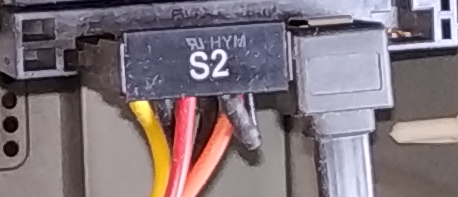
With the adapter that I mentioned to you, the conditions would not be given for it to enter "ECO" mode, to call it somehow, only the issue of configuration of the SATA controller that I mentioned above would affect it.
Salu2!
Intel i5 3570k / ASRock Z77 Extreme 4 / G.Skill F3-12800CL9D-8GBRL / Sapphire HD5850 / Samsung HD103UJ / TR TrueSpirit / NZXT Source 210 / OCZ ZS550W
Intel i5 4570 / ASRock H87 Pro 4 / 2x G.Skill F3-14900CL8-4GBXM / Samsung 850 EVO 250Gb + ST1000DM003 + ST2000DM003 + HGST HDS723020BLA642 + Maxtor 6V250F0 / CM Seidon 240M / Zalman MS800 / CM MWE 550
AMD Ryzen 7 1800X / B350 / 2x8GB Samsung DDR4-2400 CL17 / NVIDIA GTX 1070 8GB / SSD 120GB + ST4000DM004 + ST6000DM003 / EVGA Supernova 650 G2 -
@Fassou said in Sometimes it doesn't recognize my Samsung SSD 860 EVO:
plo the detail of a SATA connector from a brand's equipment
Sorry if it seemed like I didn't pay attention to you, but I did. The problem is that when I enter my MB's BIOS, that disk isn't even listed, but the rest is. I tried turning off the power saving on the SATA port where I know that disk is, but it still doesn't appear. I'll try to reconnect it to the computer where it was and see what happens. But I'm very surprised by this.
-
If you do not detect it anywhere (another computer, an external dock, etc...) and the contact pins look good, then there is nothing to do, but if it only fails on a specific computer, it is likely that the problem is with the computer.
Salu2!
Intel i5 3570k / ASRock Z77 Extreme 4 / G.Skill F3-12800CL9D-8GBRL / Sapphire HD5850 / Samsung HD103UJ / TR TrueSpirit / NZXT Source 210 / OCZ ZS550W
Intel i5 4570 / ASRock H87 Pro 4 / 2x G.Skill F3-14900CL8-4GBXM / Samsung 850 EVO 250Gb + ST1000DM003 + ST2000DM003 + HGST HDS723020BLA642 + Maxtor 6V250F0 / CM Seidon 240M / Zalman MS800 / CM MWE 550
AMD Ryzen 7 1800X / B350 / 2x8GB Samsung DDR4-2400 CL17 / NVIDIA GTX 1070 8GB / SSD 120GB + ST4000DM004 + ST6000DM003 / EVGA Supernova 650 G2 -
Finally they lent me a SATA/USB adapter, I plugged it in and it works great. I started looking for the Gigabyte page and I see that my SSD is not listed. I have left a query with Gigabyte's technical support to see what can be done. Thanks for your time Fassou.

Hello! It looks like you're interested in this conversation, but you don't have an account yet.
Getting fed up of having to scroll through the same posts each visit? When you register for an account, you'll always come back to exactly where you were before, and choose to be notified of new replies (either via email, or push notification). You'll also be able to save bookmarks and upvote posts to show your appreciation to other community members.
With your input, this post could be even better 💗
Registrarse Conectarse