Limited DDR5 frequency
-
Good evening, first of all, excuse me if I infringe any rules, it's my first day.
I'll tell you:
About a year ago I bought a PC by parts, I assembled it and everything was fine.
It wasn't until now that I realized that my RAM (Corsair Vengeance 32GB (2x16GB) DDR5 5200MHz), was "only" working at 4000mhz.
I saw that in the Bios, the frequency was on Auto and I started to tinker trying values to raise it at least to 4800mhz, all my attempts and there have been many have been in vain.
Can someone tell me what I might be doing wrong please?
My Motherboard is an Asus TUF Gaming Z690-PLUS and my CPU an Intel Core i7-12700KThank you very much!
Regards. -
Hello @Carallot How have you tried to upload it? Manually? I think what you should do is look at what XMP profiles are available in the AI Overclocker Tuner (in the Extreme Tweaker tab) of your Asus motherboard and use them.
The processor has a theoretical memory speed of 4800Mhz but the board via OC profile supports up to 5333Mhz. As you rightly say, at least up to 4800Mhz it should not pose any problem.PD: First of all, if you haven't already, update the BIOS to the latest version.
-
@carallot I suppose the first thing you looked at is that those memories are compatible with that M.B, right?
I think I read something about DDR5 only working at 100% if you install a single module, if you install two "layers" the speed.
Regards -
You can check what @clipper says here: https://www.asus.com/motherboards-components/motherboards/tuf-gaming/tuf-gaming-z690-plus/helpdesk_qvl_memory/?model2Name=TUF-GAMING-Z690-PLUS
You will need the part number because there are many Corsair models at 5200Mhz, it is most likely to be compatible given the number of models that come out, but it is better to check it.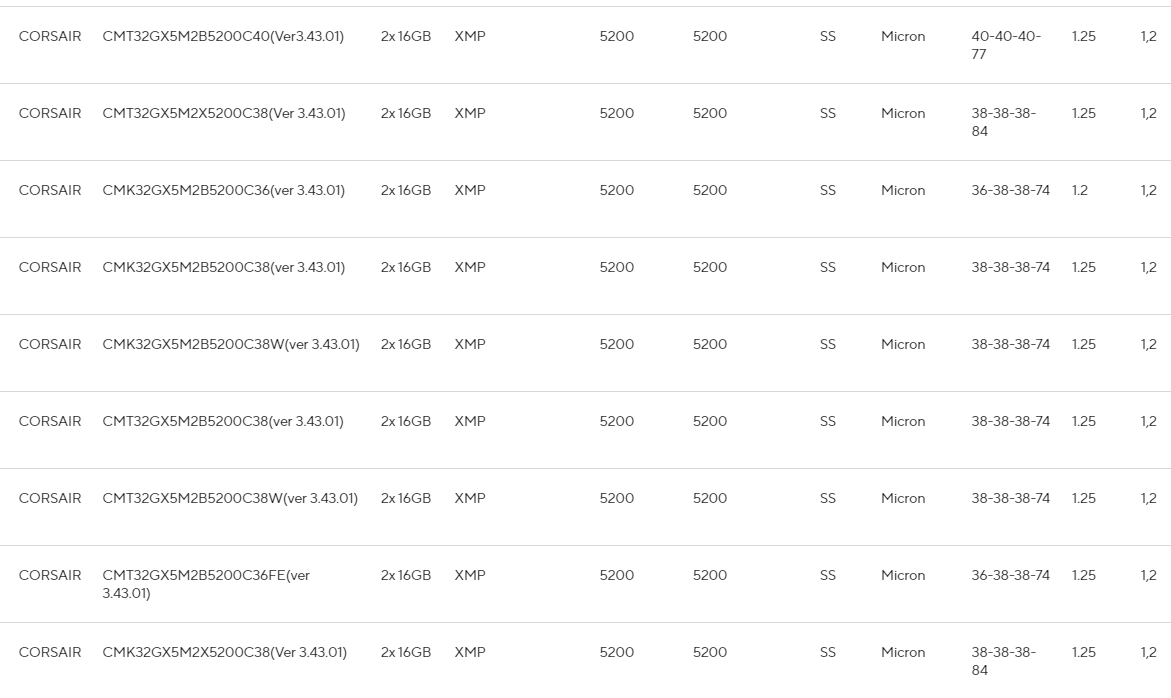
-
@krampak good help that buddy, it makes it enjoyable indeed, many things that others do not know.



Hello! It looks like you're interested in this conversation, but you don't have an account yet.
Getting fed up of having to scroll through the same posts each visit? When you register for an account, you'll always come back to exactly where you were before, and choose to be notified of new replies (either via email, or push notification). You'll also be able to save bookmarks and upvote posts to show your appreciation to other community members.
With your input, this post could be even better 💗
Registrarse Conectarse