dvi-d to vga gives me no image
-
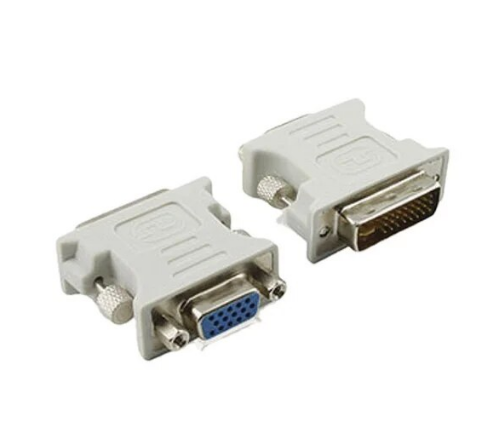
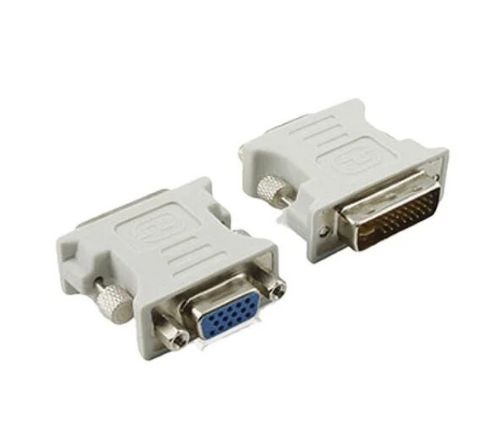
hello I have 1 monitor (that I use with the hdmi port) and another that I want to use but it has vga and the graphics (I have a 1050 ti 4g that has a dvi-d port) does not have vga (only dvi-d, hdmi and displayport) so I bought a dvi-d to vga adapter and when I connect it I don't get an image on the monitor, only the hdmi works, the adapter is the same as the image if anyone could help me solve it :c
-
Hello @Tilinsito421
Probably the adapter you bought is DVI-I to VGA (passive), and as you have mentioned, the 1050 Ti has a DVI-D port, so you will need a DVI-D to VGA adapter which are usually active and a bit bulkier than the one in the picture.
Best regards
-
@Tilinsito421 When the output is DVI, when transforming it to VGA, it should work correctly. What cable do you connect it with? Do you use a VGA cable and transform the signal directly from the card or do you connect it via DVI and transform the signal directly on the monitor? It seems silly but the number of times a slightly dodgy cable gives signal errors. Another option is to try it with the other outputs although you would need other signal adapters...
- I assume you have already checked the card's control panel and no other screen appears connected because it would not be the first time that a resolution error or sampling frequency error gives a signal error on a VGA screen...



Hello! It looks like you're interested in this conversation, but you don't have an account yet.
Getting fed up of having to scroll through the same posts each visit? When you register for an account, you'll always come back to exactly where you were before, and choose to be notified of new replies (either via email, or push notification). You'll also be able to save bookmarks and upvote posts to show your appreciation to other community members.
With your input, this post could be even better 💗
Registrarse Conectarse