Installation problems
-
Hello, I have this problem with my Photoshop, I have Windows 7-32 bits.
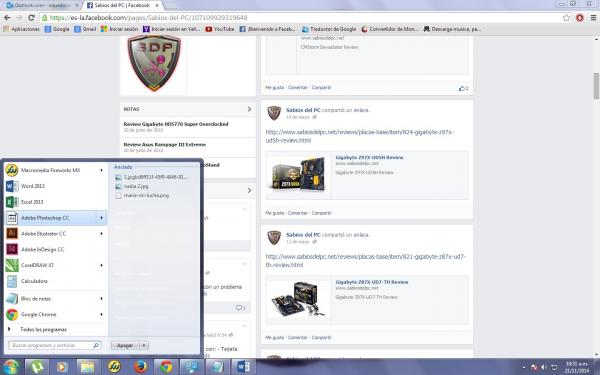
When I turn on the PC and select Photoshop, this message appears:
C:\\Program Files\\Adobe\\Adobe Photoshop CC 2014 (32 Bit)\\Photoshop.exe
"Windows does not have access to the specified device path or file. You may not have the appropriate permissions to access the item."
When I click ACCEPT, this appears:
"The item you have selected is not available. It may have been renamed, moved, or deleted. Do you want to remove it from the list?" YES/NO
The Photoshop icon appears blank as if the program did not exist.
I uninstalled it and when I click the installer now this appears:
Adobe Installer
"The installer could not be initialized. Download Adobe Support Advisor to detect the problem".
(This program appears on the Adobe page as discontinued)I give it as: Run as Administrator, it installs but the program icon appears with the Administrator symbol and when I restart the PC, the same story, the program disappears.
I have attached an image.
Thank you for any help you can provide.
-
Did the program work for you before or did you just install it and does it have that problem?
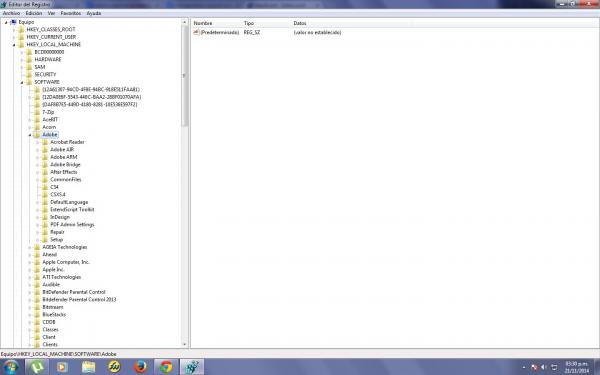
The program did not install correctly, make sure to delete its folder and before reinstalling it, delete any trace of the program from the registry using regedit.
Press the windows key and "R" at the same time, and type regedit. -
Hmm yes, it worked, I had Photoshop CC from 2013 and the bug got into it when I wanted to update it with the new 2014 update, and from there everything got complicated. I even installed my old version and it took away the 3D option. I even ran CC Cleaner Pro, I installed, restarted and it was the same, I thought it was the CC Cleaner and I uninstalled it, I deleted folders, reinstalled things..nothing, when I restarted, Photoshop disappeared.
I fixed the issue with Run as Admin..but when I restart..again.
I have come to the conclusion that it is a supermegatrojan that hates Photoshop. I will try your solution again.
I think that at some point I deleted things with Regedit and who knows if I deleted something I shouldn't, I deleted the Photoshop folder and now it only shows the Adobe one, but I have more Adobe applications and I don't want to be left without more besides Photoshop. (I leave image)
Even illustrator when I open it launches:
"adobe application manager required to verify your license is missing or damaged"
And after many restarts now it says: "the operation cannot complete because of an unknown error" CAN'T.
I fix it by opening it running as Administrator..but it is very annoying.
-
Do not post links where they talk about solutions for warez versions of programs, even if they may work for the original ones.
This time I have deleted it, but next time you will receive negative points for it.
Regards! and please fix it.
Intel i5 3570k / ASRock Z77 Extreme 4 / G.Skill F3-12800CL9D-8GBRL / Sapphire HD5850 / Samsung HD103UJ / TR TrueSpirit / NZXT Source 210 / OCZ ZS550W
Intel i5 4570 / ASRock H87 Pro 4 / 2x G.Skill F3-14900CL8-4GBXM / Samsung 850 EVO 250Gb + ST1000DM003 + ST2000DM003 + HGST HDS723020BLA642 + Maxtor 6V250F0 / CM Seidon 240M / Zalman MS800 / CM MWE 550
AMD Ryzen 7 1800X / B350 / 2x8GB Samsung DDR4-2400 CL17 / NVIDIA GTX 1070 8GB / SSD 120GB + ST4000DM004 + ST6000DM003 / EVGA Supernova 650 G2



Hello! It looks like you're interested in this conversation, but you don't have an account yet.
Getting fed up of having to scroll through the same posts each visit? When you register for an account, you'll always come back to exactly where you were before, and choose to be notified of new replies (either via email, or push notification). You'll also be able to save bookmarks and upvote posts to show your appreciation to other community members.
With your input, this post could be even better 💗
Registrarse Conectarse