Network connection with W10 … help
-
Good afternoon …
I've been fighting with my PC with W10 for 4 hours...
The story. My son keeps nagging me to make him a Minecrafter server :wall: but now that I've had some time I run into the following...From his laptop, he can't see my computer. The ping can't find it
I disable my Firewall and it's the same
I disable his Firewall and it's the sameI'm starting to get pissed off... but since my kid is always with his crap, I grab my wife's laptop, which is much more secure.... And he can't see my PC in the ping :llorar:
I've disabled all firewalls and it's still the same...
So I start pinging the laptops and it does respond... so I'm at a loss and don't understand much
The laptops are on wifi... and I'm on cable. I say :"tate... we're already with the nonsense"... so I put the laptops on cable to the router.... And they don't ping either...
And I'm about to do PANG to them... but it's not a good idea ;D
Does anyone have any idea I can try??
Thanks in advanceSiempre Aprendiendo
www.namiga.es
-
Starting with the basics, check that all computers can ping the gateway.
Goodbye!
P.D.: I have no n.p.i on the subject of Minecraft :facepalm:
Intel i5 3570k / ASRock Z77 Extreme 4 / G.Skill F3-12800CL9D-8GBRL / Sapphire HD5850 / Samsung HD103UJ / TR TrueSpirit / NZXT Source 210 / OCZ ZS550W
Intel i5 4570 / ASRock H87 Pro 4 / 2x G.Skill F3-14900CL8-4GBXM / Samsung 850 EVO 250Gb + ST1000DM003 + ST2000DM003 + HGST HDS723020BLA642 + Maxtor 6V250F0 / CM Seidon 240M / Zalman MS800 / CM MWE 550
AMD Ryzen 7 1800X / B350 / 2x8GB Samsung DDR4-2400 CL17 / NVIDIA GTX 1070 8GB / SSD 120GB + ST4000DM004 + ST6000DM003 / EVGA Supernova 650 G2 -
Check the network discovery and file sharing settings from the Network and Sharing Center.
Turning on visibility of computers and files between computers connected to your local network makes it easier for them to connect automatically. -
Starting with the basics, check that all the computers can ping the gateway.
Best regards!
P.D.: I have no n.p.i about the Minecraft issue :facepalm:
What bugs me is not seeing them on the ping … the Minecraft thing will be a matter of doing homework

Thanks
Siempre Aprendiendo
www.namiga.es
-
Check the network discovery and file sharing settings in the Network and Sharing Center.
Turning on the visibility of computers and files between computers on your local network makes it easier for them to connect automatically.Well, here's a prize for you
That's it …Here's a picture
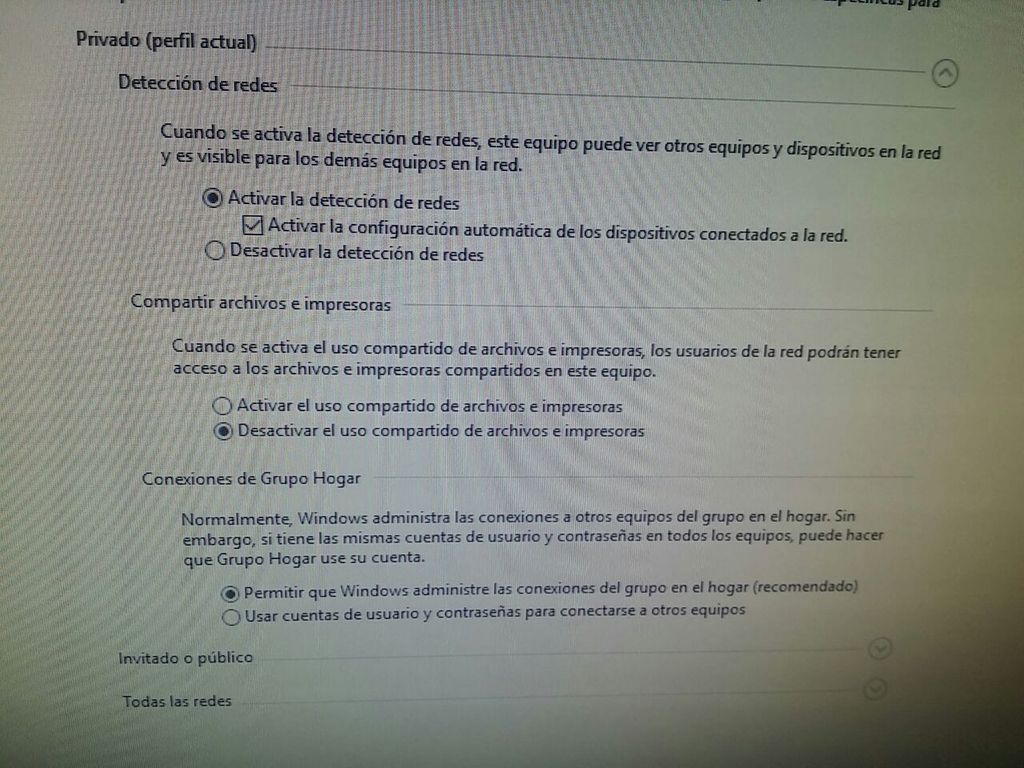
It was about activating the file sharing theme and that's it …
Siempre Aprendiendo
www.namiga.es


Hello! It looks like you're interested in this conversation, but you don't have an account yet.
Getting fed up of having to scroll through the same posts each visit? When you register for an account, you'll always come back to exactly where you were before, and choose to be notified of new replies (either via email, or push notification). You'll also be able to save bookmarks and upvote posts to show your appreciation to other community members.
With your input, this post could be even better 💗
Registrarse Conectarse