Presentation and doubt about ventilation in desktop mod
-
Hello,
I want to change my computer and create a mod on the desktop, I am new to the world of overclocking and of course, although I have read a lot of things, I still have many doubts and that is why I wanted to raise them in a forum like this to count on your experience and knowledge.The mod is not a church arch, it is about integrating the PC into my desk resting on a drawer with a glass on top of the table top and I am not very clear about the ventilation issue.
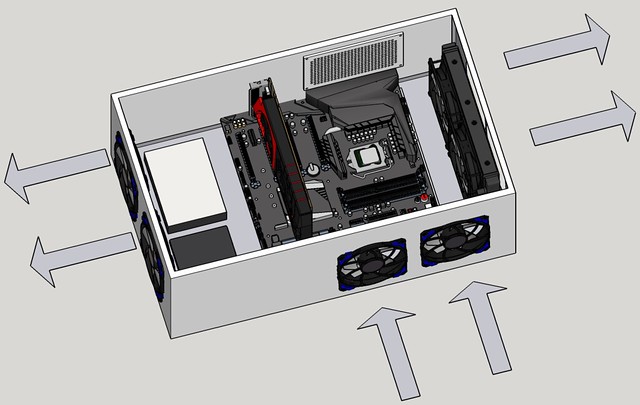
In the image I put there are the airflows that I have thought of and I wanted to have your opinion.The dimensions of the drawer are 60x37x20
The characteristics of the components are these:
Asus Maximus VIII Hero
The processor will be a 6700K
32 Gb Ram at 3200 (in 4 modules)
RL H100i v2
MSI GeForce GTX 1060 OC 6GB GDDR5 or Gigabyte GeForce GTx 970
HDD 3Tb of 7200 rpm
SSD 750 Gb
An M2 disk of 128 Gb for RamCache that supports the boardIf you see something that does not fit so much in the components as in the ventilation system, please comment.
Best regards and thank you very much

-
Hello and welcome to the forum.

Looking at your layout, I would personally lower the ones you have placed on the front (bottom of the image) by 10 cm each, and put all the fans in except for the ones on the radiator. The graphics will thank you for it.
By the way, if I'm not mistaken, you haven't taken the power supply into account. :ugly:
-
Hello whoololon,
Thanks for the welcome
I take note of the height of the fans, I suppose so that the air reaches more clearly to the components of the board including the processor.Regarding the two fans that are left on the left of the image, which blow out instead of suck in, I had thought of it that way because the fans on the graphics card push the air in the same direction as these fans so that the heat generated by the graphics card evacuates quickly (I also take note). I don't know if an acceptable variant would be to keep the fans on the left blowing out air and put another fan further back on the left that blows air in.
The power supply is going to be outside and I had thought of the "EVGA SuperNOVA 750 G2 750W"
By the way, do you think the components "go well together"?
Best regards.
-
The components are suitable, however, I believe that an Asrock Z170 Pro4 will give good results and costs almost half, and regarding an M.2 as RAMcache, let's see which one you plan to put, because there are some that perform the same as a SATA SSD, and for that we save the expense.
No, the fans are only for the chipset and the graphics.
The processor already has its own cooling system, but the graphics in particular are isolated from any other intake of fresh air.
In addition, I assume that the power supply will be in the area where the HDD is represented, so you are going to lose one of the fans on that side; I still think that all the fans except those on the radiator should bring in air. -
I'll take a look at the Asrock.
I had thought of this drive: Kingston SM2280S3G2 120 Gb.
The power supply, I had actually thought of it but on the HDD side
Best regards -
And in parallel, the scheme with fans at the bottom bringing in air and at the top expelling it is always based on the temperature of the air:
The air that enters is theoretically colder, and therefore "weighs more", so the gravity acting on it causes it to descend, displacing the hot air upwards.
In the case of a scheme like yours, where the case is mostly horizontal, the difference is very small when placing the fans higher up or lower down, but note that when the "cold" air enters, it will heat up as it passes through the components and rise towards the ceiling of the case, so you should place a fan in the top/rear part of the case.
In summary, I would try to put a couple of fans at the top and bottom of the case, always trying to follow a linear scheme of air intake and exhaust, since the straighter the direction of circulation, the less it will accumulate inside the case and the better temperatures you will achieve in all the components.
Best regards!
-
The most optimal thing is to have the same amount of fans blowing air in as out... otherwise the flow won't be optimal in terms of volume.
And that's only if the restriction is more or less the same at the intake as at the outlet... but in this case it's not.
To improve you have to put two more fans on the radiator (PUSH/PULL configuration)
I understand that you reasoned that by putting two fans blowing air out through the AIO and another two "below" you'll have the CPU and the graphics card cooled separately... it's not like that unless you physically separate both zones.
The air flows wherever it wants unless you channel it so if you want to have two zones with different temperatures you'll have to put something that physically separates them... that or take the AIO out of the case and cool it with the outside air otherwise when gaming the heat from the GPU will always affect the CPU.
It's also recommended that for the entire area of the VRM of the motherboard you put a fan creating turbulence since it's the weak point of AIOs and RL systems in general.
For the rest put some good filters that are easy to remove, put on and clean because otherwise it's a hassle to remove the dirt... both to remove it from the components if there are no filters and to clean the filters every few weeks if these are fixed or go with screws.
-
Digiriendo vuestras indicaciones….. :wall:
Do you know any system to install those dust filters with the fans?
Thanks for the help, comrades
-
Commercial or homemade filters?
Commercial ones are usually dense plastic or metal meshes (more expensive), with or without a frame, depending on the fan dimensions, namely 80 mm, 120 mm, etc., to be placed between the fan and the grille. They are sold with and without holes for screwsHomemade ones… a cardboard frame to which we attach a piece of pantyhose with staples.
Regarding flows and turbulence, listen to espinete, he is the Viktor Schauberger of Hardlimit. ;D
-
Jeje
:sisi:
I will take note again.
-
Well, there are commercial filters... remember that the filter goes before the fan.
http://www.aquatuning.es/refrigeracion-por-aire/filtros-de-ventiladores/
It's just an example and you can look at your usual store since the minimum order at aquatuning is 50€, although it has cool things like grilles and special screws that can be very useful for your mod to turn out well.
It all depends on the fixing system since I'm not entirely clear from the drawing how you're going to assemble the fans.
In any case, I would reconsider adding a plate in the front because I don't see how to fix the bare fans as you've put them and add a filter without making the mod look terrible.
It would also help to place switches, USB ports and something like a normal case.
That is, they can keep the wooden structure but you can attach a panel of between 1 and 2mm thickness to the front that is fixed to the frame and then the fans, connectors, switches.. etc are fixed to the panel.
-
I haven't included how to assemble the fans in the diagram (made with sketchup) because I don't control it well and it's really hard for me...
I thought about the grille that there was some model with a mechanism that would allow you to remove them without having to unscrew them.
I'll put the computer switch, USB ports, temperature monitor and those things on top of the desk, but I haven't painted this yet but I have an idea of how to do it.
Regards
-
The buttons are not complicated, just look for the best position so they are accessible without getting in the way or being accidentally activated.
As for the buttons themselves, you have them recessed or auxiliary; and within the latter, there are those with a built-in USB port, headphone output, and microphone input.As for the grilles, considering that maintenance is usually performed 3 times a year, it doesn't really matter if you have to unscrew.
The bad thing about these projects, where everyone stumbles, is in the anchoring of the components in their design. Something that seems simple in a prefabricated chassis, is a nightmare in a wooden frame... and this is where most people who start these projects end up abandoning them. :crying:
If this really becomes a problem, I would recommend an ATX chassis from a junkyard (it doesn't matter if the fan is on top, you can mount the radiator next), remove plastics and covers, mount the equipment there and then adapt that box.
By the way, maybe this would be better suited for modding.
-
Ok,
I have seen people use the metal base of a chassis where the motherboard and the back with the slots for expansion cards and the output of the various PC connectors are anchored. I have one that I am going to use. For the rest of the components I will invent something
Anyway, I hope I don't get a flat tire ;DYou are absolutely right about the off topic, I have been to other forums with section names like "Overclocking and Mod" and I got a little confused. Sorry for the faux pas.
If you think it's appropriate, you could include it in the "Modding" sectionThanks again!



Hello! It looks like you're interested in this conversation, but you don't have an account yet.
Getting fed up of having to scroll through the same posts each visit? When you register for an account, you'll always come back to exactly where you were before, and choose to be notified of new replies (either via email, or push notification). You'll also be able to save bookmarks and upvote posts to show your appreciation to other community members.
With your input, this post could be even better 💗
Registrarse Conectarse