i5, i7 which model?
-
Hello fellow users,
I am thinking about changing my processor, motherboard, graphics card, and RAM (I will reuse the rest)
I am between the i5 2550k since I was able to test it and it is incredible, with scary speeds, without hardly any effort and with a normal noctua and OC up to 4Ghz it doesn't reach 45°.The problem is that it is somewhat "old" and I don't know… do you know any i7 model that is similar to the 2550k?
In principle, it would be for rendering, 3D design, graphic design, and post-production (I study design and development) and I need something powerful as you can see, it is also true that I am fond of video games, currently playing the light League of Legends and the aggressive BT3.
In case there are no i7 that surpass the 2550k around the price of the 2550k, what motherboard do you recommend for this great i5?
Best regards!
-
The 2600K has gone down, the 2500K hasn't, in fact it has been cheaper. If you can stretch to 255€ (pccomponentes reference price) better the i7. To take advantage of QuickSync with compatible programs buy a board with Z77 chipset, it makes a big difference with encoding. I would recommend the ASRock Z77 Extreme4, don't skimp too much as OC depends more on the micro you get. The speed of the RAM is not important but as you're going to get into tasks that can take advantage of the amount you could stretch to get some G.Skill Ares of 1333MHz that are low profile and won't give you space problems with CPU cooler and you have 2x8GB at 90€. What cooler do you have? -
The 2600K has gone down, the 2500K hasn't, in fact it has been cheaper. If you can stretch to 255€ (reference price pccomponentes) better the i7. To take advantage of QuickSync with compatible programs buy a card with Z77 chipset, it makes a big difference with encoding. I would recommend the ASRock Z77 Extreme4, don't pay too much because OC depends more on the micro you get. The speed of the RAM is not important but as you're going to do tasks that can take advantage of the amount you could stretch for some G.Skill Ares of 1333MHz which are low profile and won't give you space problems with CPU cooler and you have 2x8GB at 90€.
What cooler do you have?
So you advise the i7 2600K better than the i5 2500k /2550k? why? that is… what does this i7 have better?
Right now I use the Noctua NH-U9B SE2 I don't know exactly what range it falls into... but it gives me DPM xD
Thanks for answering so quickly!

EDIT:
OK, I'm looking at it a bit and I see that the 2600k has much more cache memory, 4 cores and 8 virtual (or that's what I call them XD) compared to the 4/4 of the 2500k, it has much more L2 - 2 MB, L3 8MB compared to the Level 1 cache size
4 x 32 KB instruction caches
2 x 32 KB data cachesLevel 2 cache size 4 x 256 KB
Level 3 cache size 6 MB shared cacheof the 2500...
I just have a couple of doubts, what do those 4 types of cache mean? (beginner's doubt, I know! jejeje)
BEST REGARDS! ;D
-
Forget about the cache, just remember that the virtual ones are really just one more core and that's what you care about for editing.
The 2500K is at launch prices and the 2600K will cost about €35 less. It's a good time to get an i7.
If you get a power user you'll be missing a cooler but that's okay, you have 4GHz guaranteed and if you're lucky in winter you won't exceed 60° with a decent OC (4 with a little more). Try to keep it under 65° in summer at full load and test with Prime 26.6 Custom mode (Min./max. FFT 1792, 1 pass/min. and all the RAM in MB's for 2h.). If you start OCing with dynamic voltage try to keep the peaks under 1.3 of vcore if you want to be conservative, if you get a lazy one and you want to give it some juice you can squeeze up to 1.35v.
Stability under load is easy to test with the stress test but the minimum voltage is a matter of trying it out and seeing if you get any blue screens. If it fails at idle you can try playing with C-States (C3 and C6 can be tricky) or you can raise the offset a bit (dynamic voltage adjustment).
Editing: You can monitor voltage and temperatures with OCCT.
To increase the voltage under load and control the peak of 1.3-1.35 in vcore you have to play with LLC.
Alright, there you have the OC instructions and the recommended equipment. You could look up some OC guide for Sandy Bridge online, having a 2X00K with the stock frequencies is a sin xD
-
Many thanks for the info, the motherboard you recommend with the 2600k is the ASRock Z77 Extreme?
Can I push it to the limit with that motherboard? I just read that even though it heats up little, it has very little temperature margin, and I don't like that at all, I live in a small apartment in Madrid, where it's either very cold or very hot XD (in summer we reach 40 without problems, if we don't put air conditioning)I don't understand anything about motherboards, can you explain a little bit why you would pick the ASRock you mentioned?;D
Regards!
P.D.: Which air and liquid cooler would you recommend?
-
If you don't understand about motherboards, how do you want me to argue that option? ASRock is making good motherboards and this one is good value for money.
For now, use the cooler you have, it's fine not to push it to the limit. The problem is that you didn't make a good purchase because a decent cooler of 9 is equivalent to a cheap one of 12 and you have more noise but if this aspect doesn't bother you, it's fine.
You pulled the temperatures out of thin air. It's the performance micro with the best temps.
-
Nose, there are many motherboards that hover around many prices… you can say something I guess XD
Another thing, I'm not very knowledgeable but, this motherboard allows CrossFire and SLI if I read it correctly.
I was thinking of getting a graphics card, something with which to run BT3, COD, dota2 and Diablo3 I don't need any nonsense that puts you in 1902x1080 at 78756fps with everything on high...
But how is dualGPU technology advancing? I've seen some comparison of 2 mid-range Nvidia graphics cards connected and being worse than 1 of a slightly higher range when in theory they should be much better.I insisted on the heatsink, I gave this to my sister as she is almost with the factory one XDD
Regards and thanks for the help!
-
Hello
I just got the ASRock Z77 Extreme4 and I can tell you that it works great with a 2500K. It has native USB 3.0, support for SLI or Crossfire and good integrated graphics (although you won't need it) as well as a considerable overclocking margin. It comes absolutely ready for overclocking, (the BIOS is a marvel in my opinion xD) although right now I am one of those who commit sin for having a 2500K at stock frequency, but it's because I didn't have the budget for a cooler and I have the stock one, everything will work out xD
The latest chipsets from ASRock are quite tough and get along great with the Sandy Bridge, since they are made for them, which by the way, are much cooler than the Ivy. Really, the Ivy are not having much success for this among other things.
That's why I support Obione's proposal, right now the best option is an i7 2600K or an i5 2500K, since you can get very high performance at a better price and better temperature than any other processor from the new platforms, besides that in the case of the i7 as you mentioned, it is the one indicated for rendering video and for working with image, sound and so on, the virtual cores will give you an extra boost of performance for that.Not much more to add, get a good cooler and tighten the screws on the micro you choose, that's where the real difference lies xD
Best regards!
-
Hey Sylver! do you have this motherboard?
Could you show photos or video with the different BIOS options (just out of curiosity)?
What graphics do you have? Is the crossfire or SLI really as good as it was initially intended to be?If it's that good, it's possible to get 2 mid-range graphics to work perfectly, but if I'm not sure about good performance, I'd rather get a high-end one.
What do you recommend? Since the gtx550 I lost track (I had an accident and was disconnected from this world for a while)
-
Sylver does not have native USB 3 without an Ivy.
Xtreme if you want to buy a cooler for light OC a Hyper 212 EVO or for 10 euros more the Scythe Mugen 3.
As for graphics I would get a 7850 Sapphire for just over 200€. The graphics market is even worse than it was a year ago.
-
between the 255 of the proc, the 140 of the plate, the 90 of the ram and the 200 of the graphics, the price of the pc goes up XD
Another question, what is the difference between the 2600k and the 2700k? because the latter is 15€ more expensive when looking in other shopping areas.
-
They come to be the same thing.
If you go over budget you can go down to a Z77 Pro3 and a Sapphire 7770. I would stretch with the graphics card, if the 7850 hasn't improved the performance/price that was there more than a year ago, the 7770 has gotten worse. Suffice it to say that a 5850 performing the same thing you could get on sale for 100€ more than a year ago, costing 130€ the 7770...
You can always buy 2x4 and the Pro3 or the Pro4, you will add 8 or 16GB more.
Editing: Don't buy a cooler, save that money to spend on the rest of the components.
If you want to save money on a graphics card on Amazon.es they have the 6870 for 137€ and you can get it without shipping by activating the trial premium. You could look at prices for the rest of the components there, you might save some money.
-
hello,
thanks for the help
One question, wouldn't it be better to get something from Nvidia? according to what I've been able to test, they give better results... currently.
I'll look into the graphics card thing... but I don't think I'll get it, I really liked that one XD
Best regards! and thanks again
-
Indeed, without an Ivy processor there is no native USB 3.0 on the Z77, which I did not mention.
Regarding graphics, I have always been pro-nVidia, but certainly ATI are very strong these days, quite economical and fresh, depending on the model. I would go for a 6870 or similar, I have the 5850 Xtreme and it is a delight.
Regarding the ASRock BIOS, there are already some captures of the UEFI BIOS out there:!

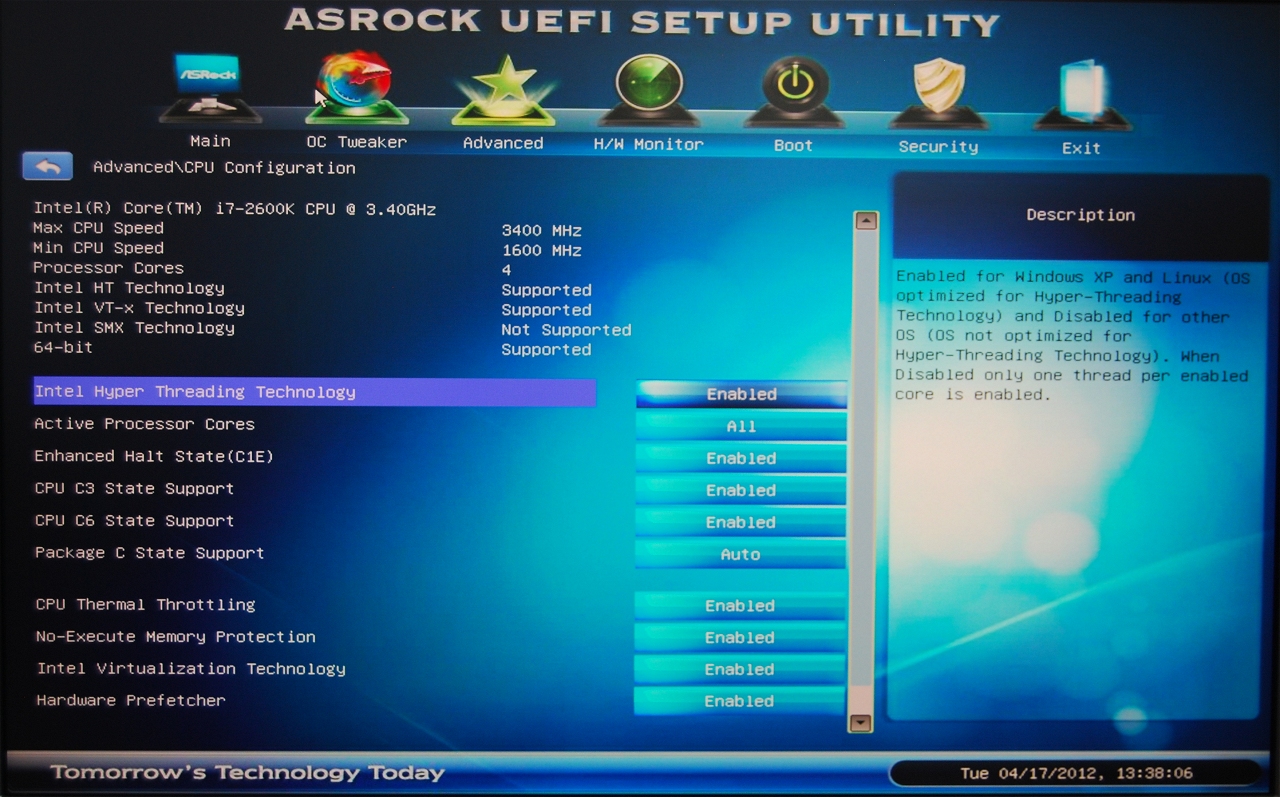
!Saving on the cooler is what I did, it is a good idea to be able to pull through until you save money.
Ah, the best way to save is to get everything on Amazon, I took advantage of the free premium and the truth is that everything arrived in 24 hours for €2.99 shipping and I saved a lot on all the components.Regards
-
Indeed, without an Ivy processor there is no native USB 3.0 on the Z77, which I did not mention.
Regarding the graphics, I have always been pro-nVidia, but certainly the ATI are very strong these days, quite economical and fresh, depending on the model. I would go for a 6870 or similar, I have the 5850 Xtreme and it is a delight.
Regarding the ASRock BIOS, there are already some captures of the UEFI BIOS out there:!
!Saving on the cooler is what I did, it is a good idea to be able to hold out until you save up.
Oh, the best way to save is to get everything on Amazon, I took advantage of the free premium and the truth is that everything arrived in 24 hours for €2.99 shipping and I saved a lot on all the components.Regards
Wait tell me if I don't put an Ivy, will the usb 3.0 stay as 2.0?
The 2600k is Sandy, so that would happen in this case, I think it wouldn't be worth getting this motherboard then no? what do you think? if one of its strong points is 3.0 and it doesn't have to not allow it the proce… you'll tell me XD hahahaRegards!
-
Native means that the Z77 chipset has them integrated, just like the USB 2 ports are integrated. With Sandy, you will have 2 USB 3 ports with an integrated controller on the motherboard, but as an extra addition to the chipset. With an Ivy, you would have 2 native ones from the Z77 chipset and 2 others from the NEC controller (or whichever manufacturer it is) added.
-
No, no, that's not it, if it wasn't a scam it would be xDD
Native USB 3.0 means the absence of additional drivers, that is, once the board is assembled for the first time and the OS is installed, USB 3.0 works at speed 3.0 with any device prepared for USB 3.0 just by connecting it, without needing to install anything else. I don't have native 3.0 because of my processor, nor PCI-Express 3.0 (same thing, I need an Ivy) but with the drivers USB 3.0 works perfectly for me with an external Samsung Story hard drive, and the speed is really noticeable to be honest
The versatility of the board model lies above all in its expansion possibilities. If any of the latest Ivy (or a future batch) significantly improves the temperature issue and start to succeed, you can always make the jump without changing the board, with the added advantage of everything you gain (USB 3.0, PCI-E 3.0...) apart from continuing to have a very wide capacity for overclocking, as I have mentioned a couple of times.
By the way, the integrated audio on this board is also no joke, eh? It's not the same as a good external sound card, but it gives a good fight :sisi:Regards
PD: I just reiterated what Obione said, but I couldn't see his post, I don't know why. Well, it's backed up anyway xD
-
Ok, perfect, so then if my family doesn't prevent me, I'll proceed to buy it XD
One more question, is there much difference between the 2600k and the 2700k?
Greetings!
-
As Obione told you, they are pretty much the same, it just depends on the micro you get and the performance you can get out of it by overclocking it.
Regards
-
like it depends on the micro that I get? I don't understand that :S not all 2700k are the same?


Hello! It looks like you're interested in this conversation, but you don't have an account yet.
Getting fed up of having to scroll through the same posts each visit? When you register for an account, you'll always come back to exactly where you were before, and choose to be notified of new replies (either via email, or push notification). You'll also be able to save bookmarks and upvote posts to show your appreciation to other community members.
With your input, this post could be even better 💗
Registrarse Conectarse