ASUS Rampage IV Extreme
-
Hello friends, I'm back here, I've already changed my motherboard for this beauty of a board hehe, now I want to ask you a question, I have 2 DDR3 RAM memories, one of 4GB of 1600 MHz Corsair and another of 2GB of 1600 also Corsair, and I don't know if it will have problems with this motherboard that really demands a lot in terms of requirements and I don't want to try it just for the sake of trying, I read the manual on the official page of the supported memories but I don't understand it well.
For example, it says for 6GB use 3 of 2GB of 1600.
And I don't know if I will have problems and I don't want to burn anything before everything starts (ASSEMBLY) in a few days I will buy the i7 LGA 2011 processor but I don't want to do something that damages the motherboard or memory.. I want some advice. Regards
-
As I assume you have already ordered the Quad-Channel kit of 4 identical memories (I assume 4x4GB), until they arrive, just plug in your 4GB memory, and this will avoid problems configuring the timmings in BIOS manually.
Salu2!
PD: don't worry, you won't burn anything
Intel i5 3570k / ASRock Z77 Extreme 4 / G.Skill F3-12800CL9D-8GBRL / Sapphire HD5850 / Samsung HD103UJ / TR TrueSpirit / NZXT Source 210 / OCZ ZS550W
Intel i5 4570 / ASRock H87 Pro 4 / 2x G.Skill F3-14900CL8-4GBXM / Samsung 850 EVO 250Gb + ST1000DM003 + ST2000DM003 + HGST HDS723020BLA642 + Maxtor 6V250F0 / CM Seidon 240M / Zalman MS800 / CM MWE 550
AMD Ryzen 7 1800X / B350 / 2x8GB Samsung DDR4-2400 CL17 / NVIDIA GTX 1070 8GB / SSD 120GB + ST4000DM004 + ST6000DM003 / EVGA Supernova 650 G2 -
The memories I have are:4 GB CMX8GX3M2A1600C9 model

2 GB TR3G6G1600C9 model
I am thinking of adding 1 more memory to the 4 GB one, what I still don't understand is why it says for example
(2x4GB) 9-9-9-24 1.65V, is this some kind of configuration in the setup to modify it in case of having the same model with that amount of GB to configure it?
For the moment I am not getting the memories in Quad-Channel because there are none here in my country or I haven't looked well yet :facepalm: well I have only seen that they sell them separately. -
This is the list of memories available in the store where I bought the board.
|90283|MEM DDR3 2GB 1600MHZ CORSAIR DOMINATOR
|106985|MEM DDR3 2GB 1600MHZ CORSAIR VENGEANCE
|98262|MEM DDR3 2GB 1600MHZ CORSAIR XMS3
|104486|MEM DDR3 2GB 2000MHZ CORSAIR VENGEANCE
|92043|MEM DDR3 4GB 1333MHZ CORSAIR - CMX8GX3M2A1333C9
|94074|MEM DDR3 4GB 1333MHZ CORSAIR DOMINATOR
|83372|MEM DDR3 4GB 1333MHZ KINGSTON (PC3 10600)
|130025|MEM DDR3 4GB 1333MHZ KIT AMD PATRIOT GAMER
|93901|MEM DDR3 4GB 1333MHZ MARKVISION
|130023|MEM DDR3 4GB 1600MHZ AMD PATRIOT GAMER
|93668|MEM DDR3 4GB 1600MHZ CORSAIR
|130026|MEM DDR3 4GB 1600MHZ KIT AMD PATRIOT GAMER
|68146|MEM DDR3 4GB 1600MHZ OCZ GOLD SERIES DUAL KIT
|93669|MEM DDR3 4GB 2000MHZ CORSAIR
|136378|MEM DDR3 4GB 2133MHZ CORSAIR PLATINUM DOMINATOR
| 83037|MEM DDR3 6GB 1866MHZ CORSAIR DOMINATORGT KIT C/ 3
|122000|MEM DDR3 8GB 1600MHZ CORSAIR VENGEANCEWhat do you advise me to do..
-
If you can't find any Quad-Channel kits, you can buy two exactly the same Dual-Channel kits.
Salu2!
PD: Corsair is a great brand, but buy the 1.5V models
Intel i5 3570k / ASRock Z77 Extreme 4 / G.Skill F3-12800CL9D-8GBRL / Sapphire HD5850 / Samsung HD103UJ / TR TrueSpirit / NZXT Source 210 / OCZ ZS550W
Intel i5 4570 / ASRock H87 Pro 4 / 2x G.Skill F3-14900CL8-4GBXM / Samsung 850 EVO 250Gb + ST1000DM003 + ST2000DM003 + HGST HDS723020BLA642 + Maxtor 6V250F0 / CM Seidon 240M / Zalman MS800 / CM MWE 550
AMD Ryzen 7 1800X / B350 / 2x8GB Samsung DDR4-2400 CL17 / NVIDIA GTX 1070 8GB / SSD 120GB + ST4000DM004 + ST6000DM003 / EVGA Supernova 650 G2 -
If you can't find any Quad-Channel kits, you can buy two Dual-Channel kits that are exactly the same.
Salu2!
PD: Corsair is a great brand, but buy the 1.5V models
Many thanks I will take it into account and I think that for now it is the solution until those memories are on sale here. Regards
-
Or buy me 2x4GB of 2133MHZ that could come out super well.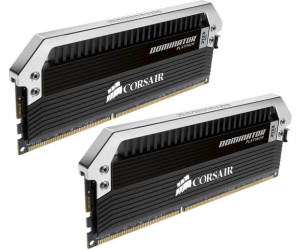
-
Apart from the memories I recommend that the ones you buy are of the lowest profile possible, as Corsair tells you it is one of the best brands, if you buy also gskill they are very good and they are usually low, the quad kits are the ripjaws-z. -
On the official Asus page there is a list of supported memories, is it mandatory to meet these memory requirements or can you deviate a little from this configuration.
I have seen the prices of G.SKILL ram and I think they seem more accessible, one of 8GB of 2133 MHZ costs $78 according to the manual I downloaded from the official site, this is the recommendation.
DDR3 2133 Qualified Vendors List (QVL)
G.SKILL F3-17000CL9Q-16GBXLD(XMP) 16GB (4x 4GB)
G.SKILL F3-17066CL9Q-16GBTDD(XMP) 16GB (4x 4GB)
G.SKILL F3-17066CL9D-8GBPID(XMP) 8GB (2x 4GB)Here is the detail that I do not understand if it is necessary to comply with these rules that come out there or if they are just recommendations for good functioning
-
A picture is worth a thousand words ;D
-
¡Esta publicación está eliminada!


Hello! It looks like you're interested in this conversation, but you don't have an account yet.
Getting fed up of having to scroll through the same posts each visit? When you register for an account, you'll always come back to exactly where you were before, and choose to be notified of new replies (either via email, or push notification). You'll also be able to save bookmarks and upvote posts to show your appreciation to other community members.
With your input, this post could be even better 💗
Registrarse Conectarse