-
If it is a proprietary format from Microsoft, and clicking on it in a Windows 7 / 8 does not modify it, the best option is to look for a tool from a Microsoft Partner (such as Paragon), but if it exists it will be paid.
I think you will have to extract the content and repartition <:(
Salu2!
Intel i5 3570k / ASRock Z77 Extreme 4 / G.Skill F3-12800CL9D-8GBRL / Sapphire HD5850 / Samsung HD103UJ / TR TrueSpirit / NZXT Source 210 / OCZ ZS550W
Intel i5 4570 / ASRock H87 Pro 4 / 2x G.Skill F3-14900CL8-4GBXM / Samsung 850 EVO 250Gb + ST1000DM003 + ST2000DM003 + HGST HDS723020BLA642 + Maxtor 6V250F0 / CM Seidon 240M / Zalman MS800 / CM MWE 550
AMD Ryzen 7 1800X / B350 / 2x8GB Samsung DDR4-2400 CL17 / NVIDIA GTX 1070 8GB / SSD 120GB + ST4000DM004 + ST6000DM003 / EVGA Supernova 650 G2 -
Well I don't know, yes Gparted and the disk managers of Linux and Windows detect it well… in the end I'll have to do a transfer and then look into how to format a partition in XFS. Thanks for everything Cobito! If Fasou I have no idea how Windows doesn't support resizing being a system from Microsoft but I tell you that even though exfat is not new it almost seems like it because until 2 days ago when SDHC appeared this system was completely unused.
-
if you have windows 7 or similar, it should work
possibly the problem is with the USB, remove the disk from the case and put it directly on the motherboard
windows should recognize it by nowHere are the Microsoft support and updates: exfat - Search Results - Microsoft Support
EXFAT is compatible with the following operating systems:
Windows XP sp2 after installing the Microsoft update here.
Windows Vista with Service Pack 1
Windows 7
Windows 8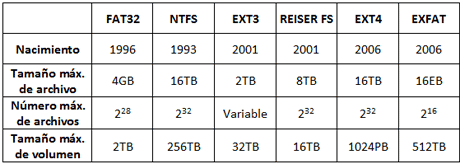
regards
-
¡Esta publicación está eliminada! -
Well, we're not talking about recognizing the disk, I already said in the first post that I have it in exfat because it's recognized in all the OSs, what I want is to resize it.
-
Well I took the disk out of the box and after plugging it into the PC and reading it I put it back in the box and it crashed… damn samsung hard drives... anyway I'm now with another toshiba disk with less capacity formatting in XFS and looking to see how to make it work on OSX.
:ffu:
-
The software that came inside the Samsung must have been corrupted… Don't scare me, I have the Story right here next to me and it's brand new :cry:>> i7-2600K Sandy Bridge @4.4GHz || Noctua NH-D14 || ASRock Z77 Extreme4 || 4x8Gb G.Skill Ripjaws X DDR3 1600MHz || XFX RX 5700 XT 8Gb || SSD Samsung 850 PRO 256Gb & 850 EVO 500Gb || WD Caviar Green 1Tb || Barracuda 1Tb || Corsair TX650 V2 || M-Audio Fast Track Pro || KRK RP8 RoKit G3 || BenQ GW2750 27"
>> Athlon 64 X2 5600+ Brisbane @2.9GHz || Gigabyte GA-M61PME-S2 || 2x2Gb DDR2 Kingston 800MHz || Sapphire Radeon HD 5850 Xtreme 1Gb || Maxtor 320Gb SATA2 || OCZ ModXStream 500W Modular || TEAC PowerMax 120/2 || Acer X243w 24"
>> Intel Core2Duo E6600 Conroe @2.4GHz || Asus P5N32-SLI SE DELUXE || 2x1Gb DDR2 Kingston 800MHz || Asus nVidia GeForce 9800GT 1Gb GDDR3 || Seagate Barracuda IDE 80Gb 7200RPM || Linkworld LPK12-35 450W -
No, when you turn it on it makes a clack clack clack sound and doesn't stop… I don't think it can be fixed. I've never had Samsung hard drives, I've never swallowed them, it's had some good models especially 3.5" ones but in 2.5" like Toshiba it's nothing like Samsung.
-
I feel very sorry for the loss, but Samsung has always given me problems and they never lasted more than 2 years
Best regards
-
Come on, but it's a 2.5"… mine is a 3.5" and so far the only one of that size that has failed me has been the LaCie F.A. Porsche 500Gb, the controller broke down 6 years after I bought it and because I gave it more trips than a taxi in London... it was also left on for thousands of hours, I had the mule installed on it downloading 24/7... :ugly:
To be honest, I don't trust 2.5" ones much, I think they're not much, and besides, they've brought me many damaged ones after 2 or 3 years and even by putting some SATA ones directly into the motherboard to try to rescue data they've ended up messing up the main disk :ffu:
>> i7-2600K Sandy Bridge @4.4GHz || Noctua NH-D14 || ASRock Z77 Extreme4 || 4x8Gb G.Skill Ripjaws X DDR3 1600MHz || XFX RX 5700 XT 8Gb || SSD Samsung 850 PRO 256Gb & 850 EVO 500Gb || WD Caviar Green 1Tb || Barracuda 1Tb || Corsair TX650 V2 || M-Audio Fast Track Pro || KRK RP8 RoKit G3 || BenQ GW2750 27"
>> Athlon 64 X2 5600+ Brisbane @2.9GHz || Gigabyte GA-M61PME-S2 || 2x2Gb DDR2 Kingston 800MHz || Sapphire Radeon HD 5850 Xtreme 1Gb || Maxtor 320Gb SATA2 || OCZ ModXStream 500W Modular || TEAC PowerMax 120/2 || Acer X243w 24"
>> Intel Core2Duo E6600 Conroe @2.4GHz || Asus P5N32-SLI SE DELUXE || 2x1Gb DDR2 Kingston 800MHz || Asus nVidia GeForce 9800GT 1Gb GDDR3 || Seagate Barracuda IDE 80Gb 7200RPM || Linkworld LPK12-35 450W -
The thing is that I have lost files, give them the disk even though it was quite new but I bought it mainly because of the box... Anyway it hasn't been a good day. The 2.5 ones are exactly the same, the difference is that you move them a lot more than a big one and in a box you often can't dismantle it before unplugging at the end so they break, so either it's a good disk or it doesn't last... -
Yes, basically that's how it is, and when you give more trips to a 2.5" it ends up taking more hits…
Haven't you been able to try taking it out of the box again and running an Easy Recovery?>> i7-2600K Sandy Bridge @4.4GHz || Noctua NH-D14 || ASRock Z77 Extreme4 || 4x8Gb G.Skill Ripjaws X DDR3 1600MHz || XFX RX 5700 XT 8Gb || SSD Samsung 850 PRO 256Gb & 850 EVO 500Gb || WD Caviar Green 1Tb || Barracuda 1Tb || Corsair TX650 V2 || M-Audio Fast Track Pro || KRK RP8 RoKit G3 || BenQ GW2750 27"
>> Athlon 64 X2 5600+ Brisbane @2.9GHz || Gigabyte GA-M61PME-S2 || 2x2Gb DDR2 Kingston 800MHz || Sapphire Radeon HD 5850 Xtreme 1Gb || Maxtor 320Gb SATA2 || OCZ ModXStream 500W Modular || TEAC PowerMax 120/2 || Acer X243w 24"
>> Intel Core2Duo E6600 Conroe @2.4GHz || Asus P5N32-SLI SE DELUXE || 2x1Gb DDR2 Kingston 800MHz || Asus nVidia GeForce 9800GT 1Gb GDDR3 || Seagate Barracuda IDE 80Gb 7200RPM || Linkworld LPK12-35 450W -
It doesn't even show up on the device list, it just moves the head from side to side. -
Ugh... Bad thing then :cry:
Already to finish testing something, put it back internally but try to boot with Hirens Boot and see if it detects it with any of the hard drive programs (Partition Magic, Paragon, Fdisk...)
If any of them detects it, try to put a quick format in a common format like NTFS or FAT32 and see if it detects it later in the system's disk manager (preferably Windows) and thus be able to pass an Easy Recovery.If nothing works, I would still try the Active Kill Disk, to put a low-level format and try to, at least, reuse the disk and not have to throw it away.
Regards
>> i7-2600K Sandy Bridge @4.4GHz || Noctua NH-D14 || ASRock Z77 Extreme4 || 4x8Gb G.Skill Ripjaws X DDR3 1600MHz || XFX RX 5700 XT 8Gb || SSD Samsung 850 PRO 256Gb & 850 EVO 500Gb || WD Caviar Green 1Tb || Barracuda 1Tb || Corsair TX650 V2 || M-Audio Fast Track Pro || KRK RP8 RoKit G3 || BenQ GW2750 27"
>> Athlon 64 X2 5600+ Brisbane @2.9GHz || Gigabyte GA-M61PME-S2 || 2x2Gb DDR2 Kingston 800MHz || Sapphire Radeon HD 5850 Xtreme 1Gb || Maxtor 320Gb SATA2 || OCZ ModXStream 500W Modular || TEAC PowerMax 120/2 || Acer X243w 24"
>> Intel Core2Duo E6600 Conroe @2.4GHz || Asus P5N32-SLI SE DELUXE || 2x1Gb DDR2 Kingston 800MHz || Asus nVidia GeForce 9800GT 1Gb GDDR3 || Seagate Barracuda IDE 80Gb 7200RPM || Linkworld LPK12-35 450W -
You have probably already solved the problem but in case you left it parked, after an "accident" Samsung has released the exFat source code which means that soon there will be support for partitioning tools.
More info: [Phoronix] Samsung Properly Open-Sources exFAT File-System
Toda la actualidad en la portada de Hardlimit
Mis cacharros




