Doubt about pcie 3.0 in 2 different boards
-
Hello. I am looking at the features of 2 different cards and on the pcie 3.0 it says this:
- Placa1: PCIe 3.0/2.0 x16 (x16 or dual x8 or x8/x4/x4)
-Placa 2: PCI Express 3.0 x16 (PCIE2/PCIE4: single mode at x16 (PCIE2) / x8 (PCIE4) or dual mode at x8/x8)
In the first one, it is supposed that individually both work at x16 but if you do sli they will both work at x8. And in the second one, it is supposed that individually only the PCIE2 goes to x16 and in dual mode like the first one, x8.
So it wouldn't be worth paying more for the second one in case of doing SLI, right? After all, in both if you do sli they will work in x8 mode.
Regards.
-
What kind of cards are these? Normally, all those from the same chipset work the same way by controlling the PCIE and what it does is divide that 16x bandwidth into 8-8 or 8-4-4. Then there are some that have an added controller to increase the number of PCIE to 16x, and logically they are more expensive.
PD. For example, in a Z77:
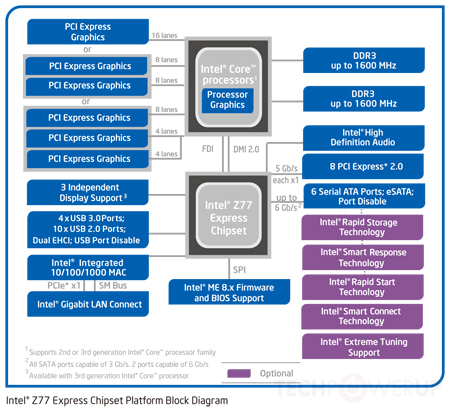
-
Motherboard 1:Asus Maximus V Formula
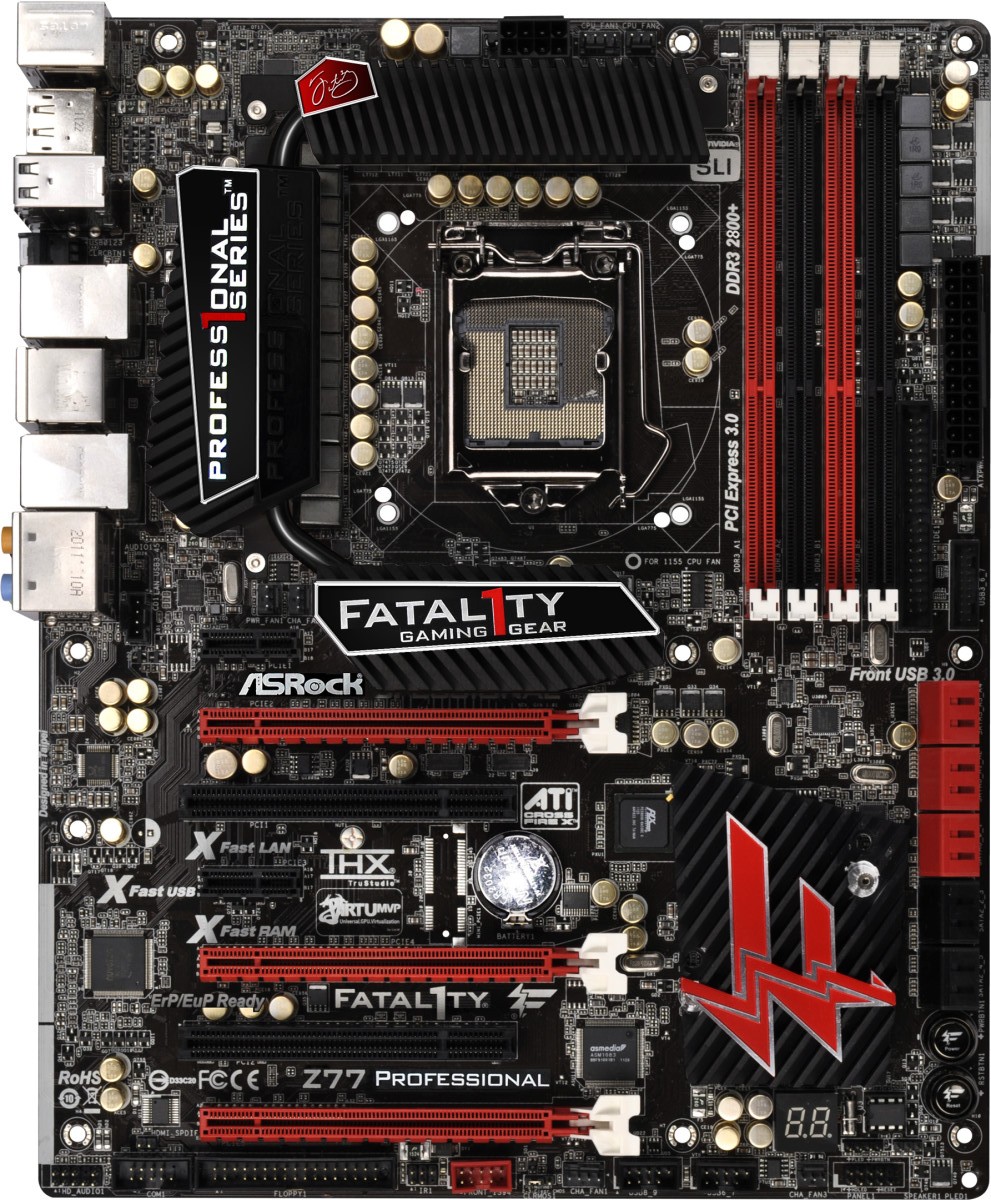
Motherboard 2: Asrock Fatal1ty Z77 Professional
Those are the 2 motherboards. At first I would choose the Asrock because it fits better with my budget, so the most significant difference I had seen was the pci3.0. But I think it's not worth paying more just for that, since if I put a graphics card it will be x16, and if I put 2 in SLI in both it is divided to x8.
Regards.
-
and if I put 2 in SLI on both it divides to x8.
That's right, so for those who want to set up 2 graphics cards at 16x (for example, to put two with dual GPU) or 3-4 graphics cards at 8x you have boards like the AsRock WS that allow it, it's around 250€. Since it's not your case I don't think it would interest you, and the Formula V I would only see it as interesting if you used the system for the RL it carries.
-
No, it's not my case. My intention is to get the GTX 670 or the GTX 770 from gigabyte. But even if I do SLI these are not dual core.Another thing. On the asrock it says: Supports Intel
 Extreme Memory Profile (XMP) 1.3 / 1.2 and on the asus: Compatible with Intel Extreme Memory Profile (XMP).
I know what XMP is but I didn't know that there were already distinctions between versions x.x. In this case, do the 2 boards support the same thing or in that sense does one admit more variety of RAM than the other?
-
No clue, I suppose they will be the same since they are from the same generation, of all things that are supposed to be updatable by BIOS. -
Thanks, I'll let you know which team I end up with. For now, I'm sticking with the Asrock motherboard for its value for money, unless I decide to put the RL in the motherboard as well.
One last question. I'd like to add a TV tuner/recorder. Example: http://www.pccomponentes.com/avermedia_avertv_h727_capture_hd_pci_e.html
These usually go in a PCIe x1 slot.Photos of the motherboard:
http://images.anandtech.com/doci/5842/Fatal1ty%20Z77%20Professional%20Top.jpg
http://assets.vr-zone.net/15384/nEO_IMG_z77_fatal1ty_6.jpgBut I can't put it in the first PCIe x1 slot because it hits the motherboard's heatsink, and if I put it in the second PCIe x1 slot with 2 graphics in SLI, it will be between the two and that doesn't convince me (it will block the airflow from the cooler of the graphics card that would be on top). So my question is whether it would be possible to put the tuner/recorder in the PCIe x16 slot. Physically it can fit, but it might fry the motherboard, the tuner, or both; or it might not work at all. Have you tried doing this before or do you know if it's possible?
-
Yes, of course you can.
-
Hola. Estoy mirando las caracteristicas de 2 placas diferentes y en el pcie 3.0 pone esto:
- Placa1: PCIe 3.0/2.0 x16 (x16 or dual x8 or x8/x4/x4)
-Placa 2: PCI Express 3.0 x16 (PCIE2/PCIE4: modo single a x16 (PCIE2) / x8 (PCIE4) o modo dual a x8/x8)
En la primera se supone que individualmente ambos trabajan a x16 pero si haces un sli trabajaran ambos a x8. Y en la segunda se supone que individualmente solo el PCIE2 va a x16 y en modo dual como la primera, x8.
Entonces no rentaria pagar mas por la segunda en caso de hacer SLI, ¿no? Total al fin y al cabo en ambas si haces sli trabajaran en modo x8.
Saludos.
Las dos son 8x8 osea si metes dos graficas van a 8x8 ya sea PCIE3 o PCIE2, en la segunda parece que el Pcie3 funciona al pinchar las graficas en el slot 2 y 4, con una funcionaran en PCIE3 a 16x, pero luego el controlador lo suele tener el CPU, si pinchas un 2600K no va a funcionar PCIE3, también tiene que ser la grafica PCIE3, aunque es retrocompatible, vamos que podrias meter por ejemplo una 780 que es PCIE3 con un 2600K que es PCIE2.
Pero eso que en Intel ya las placas no suelen tener el PCIE3 lo tiene el procesador, aunque hay placas con PLX para aumentar lanes PCIE3 por ejemplo para que puedan ir 4 graficas a 8x o dos a 16x16, aunque de momento el 8x8 ya sea mas que suficiente para dos tarjetas.
No, no es mi caso. Mi intencion es pillar la GTX 670 o la GTX 770 de gigabyte. Pero aunque haga SLI estas no son de doble nucleo.
Otra cosa. En la asrock pone: Soporta Intel
Extreme Memory Profile (XMP) 1.3 / 1.2 y en la asus: Compatible con Intel Extreme Memory Profile (XMP).Se lo que es el XMP pero no sabia que habia ya distinciones entre vesiones x.x. En este caso, ¿soportan lo mismo las 2 placas o en ese sentido admite mas variedad de RAM una que la otra?
Yo creo que esas versiones XMP se adaptan a los nuevos modulos que traen mas frecuencia, por ejemplo los primeros perfiles XMP creo que eran máximo de 2000 MHz y quizá ahora ya sean hasta 2400, aunque lo recomendable suele ser ajustar las memorias a mano, siempre podras ahorrar algo de voltaje y ajustar un poco mejor según lo buenas que te salgan.
saludos
-
Thanks for the information.
The processor I want to put in is an i7-3770k so as it is third generation it does have pcie3.
Regards.
-
What is XMP 1.3?
Intel Extreme Memory Profile (XMP) is a profile that will allow users to configure their speeds
Without the need to capture each value within the BIOS manually.
The XMP 1.3 standard offers a the ability to explore and modify DRAM timings more precisely and accuratelyregards




Hello! It looks like you're interested in this conversation, but you don't have an account yet.
Getting fed up of having to scroll through the same posts each visit? When you register for an account, you'll always come back to exactly where you were before, and choose to be notified of new replies (either via email, or push notification). You'll also be able to save bookmarks and upvote posts to show your appreciation to other community members.
With your input, this post could be even better 💗
Registrarse Conectarse