Switching from Win 7 to Win vista
-
Hello:
I have a laptop that has Windows 7 installed, it's an HP Pavilion dv9738es. I checked the specifications on the official HP website and it says that the drivers are only for Windows Vista.
The graphics are kind of broken, maybe it's a problem with the graphics drivers, the black color looks reddish to me, so the problem is with Windows 7 since this computer does not support said system and is prepared for Windows Vista.
Does anyone know how to switch from Windows 7 to Vista without having to format the PC and without losing the programs already installed??
I would need a tutorial. Thanks.
-
Buenas:
Tengo un portatil el cual tiene instalado windows 7 es un hp pavilion dv9738es, mire en las especificaciones de la web oficial de hp y dice que los controladores solo son para windows vista.
La Grafica esta como rota, sera cosa de los controladores graficos, el color negro se me ve como rojizo, osea que el problema esta en windows 7 ya que este equipo no soporta dicho sistema y esta preparado para windows vista.
Alguien sabe como pasar de windows 7 a vista sin tener que formatear el pc y sin perder los programas ya instalados??
necesitaria un tutorial. Gracias.
Eso que dices no tiene ni pies ni cabeza.
Según veo en las especificaciones, tiene una gráfica nVidia. Vete al sitio de nVidia y bájate de ahí los controladores para Windows 7. Y haz lo mismo con los controladores de todos los dispositivos: vete a su sitio oficial y te bajas de ahí los controladores.
De todas formas si es un portátil de la era Windows Vista, dudo mucho que tengas que instalar controladores con Windows 7: la mayoría de los dispositivos estarán incluidos en la base de datos de controladores de Windows.
Si la pantalla muestra cosas raras no es por Windows 7 sino por un fallo en el hardware, algún malware o una configuración errónea.
Toda la actualidad en la portada de Hardlimit
Mis cacharros -
The nvidia driver is from the official page and for windows 7.
But the rest of the drivers, whether they are chipset, bios, or others, are from windows vista.
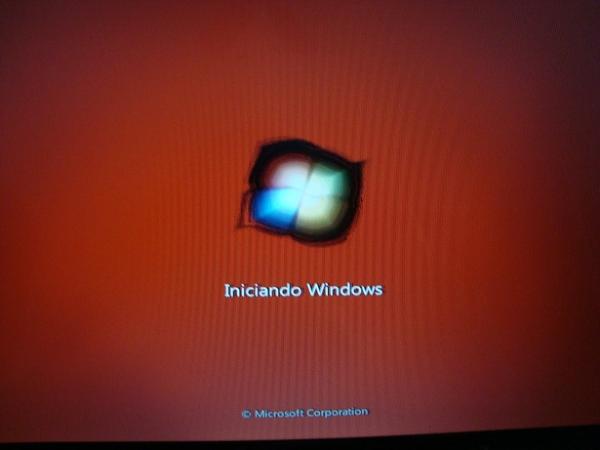
This laptop had the windows vista operating system and when I changed to windows 7, the graphics started to fail.
Hp says that this can happen when updating to a higher or lower operating system.And besides, I can't see the laptop's dvd drive, or when I see it, it disappears.
I suppose I will have to make a bootable usb of windows vista and install
or reinstall windows 7 just in case.Right now I am installing from a usb-dvd a windows 7 to see if it was the windows 7 that was corrupt. I will comment on it.
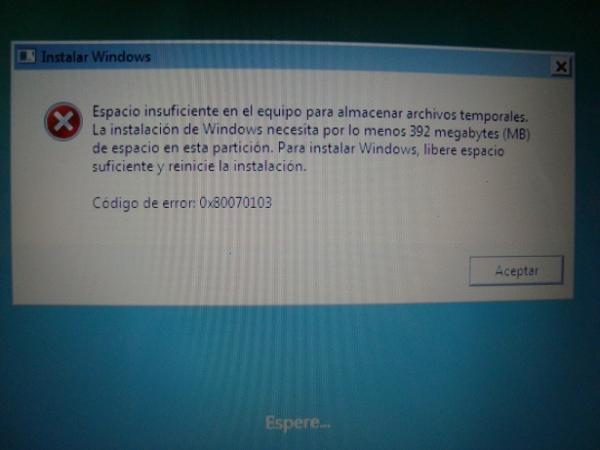
Even so it is strange because it does not let me install from the usb-dvd adapter the windows vista system
The question is that I have about 100 gb free on the hard drive, I don't see the dvd drive, and the screen is bad.
This is very strange, that's why I am seeing if I can switch from windows 7 to windows vista in an effective or good way.
-
Run a memtest.
Also try a clean install: format before installing.
Toda la actualidad en la portada de Hardlimit
Mis cacharros -
The problem is that I put a Windows Vista disc in the USB-DVD adapter and it doesn't pick it up when I restart, nor does it pick up the option (f11) which is to restore the system to factory settings and I only have the last option left which is what I'm trying to do.
download a Windows Vista ISO and use wintoflash to make a bootable USB. But sometimes I get desperate because I don't understand why the USB isn't working.
Anyway, now that I've figured it out, I'm going to try a CD that I have for booting through a menu between DVD, USB and disc, this installs the drivers to see if it picks up the adapter and I can finally install Windows Vista once and for all :wall:
edit: if the laptop's DVD doesn't work what a joke. The CD won't work.
Best regards and thanks for your patience.
-
Solved:
I updated Windows 7, it took the drive and from the bios with the cd boot I installed Vista.
To be honest I don't know why this happened, it's curious, the laptop's dvd drive should appear if or so with the generic drivers, I think.As for the graphics, well it was obvious, now that I think about it, if from the moment Windows starts up the screen turns red, that is from the beginning of the bios, then it's the graphics.
I'm going to try to open the laptop to take a look inside, according to what I've read in videos of replacing the graphics in laptops the graphics usually fail due to poor soldering due to the heating of the components and the pins of the chip are unsoldered
-
I've seen that bug where red is displayed instead of black countless times on Toshiba laptops, although I imagine it happens on others as well. In the cases I'm mentioning, I tried connecting the laptop to an external monitor and it looked fine, which made me suspect the screen, but no, most of the time it was the motherboard (integrated graphics, of course).
-
Hello, the issue is resolved but I still have problems as you mentioned regarding the graphics drivers or the screen or the GPU card itself
My doubt is whether I can use the VGA port to see the operating system, because the screen looks red to me, is it the cable's fault?? or the motherboard's? I have already ruled out the drivers, so there must be some problem with the image processing.
This would be solved if I had at least another screen and could definitively rule out the screen.
But I don't understand why it's seen through the VGA and not through the original laptop's screen.As soon as I plug in the computer, a white screen appears and gradually blurs to black, the screen has not been damaged, so I think it's the motherboard.
If anyone has had a similar experience or solved this conflict, I would appreciate it.
edit: from the VGA port to an external screen everything looks perfect to me, but from the laptop's screen it's not visible.
-
As I told you in the other thread, the screen issue looks like it could be a loose contact or a damaged cable. You'll need to open the laptop and check that the buses connecting the motherboard to the screen are properly connected and that the cables are not damaged.
It could also be a problem with the motherboard or the screen, but that's harder to diagnose without the PC in front of you. The graphics card looks like it's working fine.
It's a physical problem with the computer and can't be fixed with software.
Toda la actualidad en la portada de Hardlimit
Mis cacharros -
I DON'T HAVE WORDS, I don't know what happened, but after removing and replacing the cable from the screen to the board about 20 times, everything has returned to looking good.
I have disassembled the entire laptop, changed the bios battery, as it was at 2.95 volts, and I have closed it again, at first everything went wrong, just like before, but after several attempts I restarted the computer and everything went well.
LITTLE BY LITTLE YOU ARE RESOLVING MY DIAGNOSTIC PROBLEMS AND GIVING ME IDEAS, thank you very much to all of you.
the only thing left for me to do is to put the sound and I don't know if I should open another specific topic for this, as it seems more serious than it is. What do I do?
As I said this computer is for windows vista, and now I have windows 7, I have tried downloading the sound drivers from the official realtek page, but it doesn't work, not even the video multimedia devices, games etc.. appear in the device list.
Anyway, summary:
DVD.. solved (reinstallation of the operating system)
Graphics.. solved (cable placed incorrectly, or bad contact with the pins + change of bios battery)
sound … (error 10), still in diagnosis, but with help everything will surely go well.Greetings and thanks to all of you for your comments.
-
Did you try the Linux live-cd for the sound issue?
Toda la actualidad en la portada de Hardlimit
Mis cacharros


Hello! It looks like you're interested in this conversation, but you don't have an account yet.
Getting fed up of having to scroll through the same posts each visit? When you register for an account, you'll always come back to exactly where you were before, and choose to be notified of new replies (either via email, or push notification). You'll also be able to save bookmarks and upvote posts to show your appreciation to other community members.
With your input, this post could be even better 💗
Registrarse Conectarse