-
Hello, I'm thinking about buying an SSD and giving my PC a little boost. I've been dealing with poor performance for a while now. And after looking around... I started with disk tests like CrystalMark.
I have 3 partitions C:\\80GB (83%) D:\\146GB( 71%) F:\\ 146GB (66%)
Passing the tests.... my surprise is that the last partition almost doubles the speed of the first one.
In it stays at 45mb/s reading and writing and in F:\\ 72mb/s both. Is this because of the free space??? Or maybe C:\\ has more wear and that's why it works at a lower speed?
Any ideas??
Thanks
-
Fragmentation level and file size for the test.
-
When you test HDD with CrystalDiskMark, select the 1000MB or higher test, because small tests can give very unrealistic results.
Regarding the worst result on the C: drive, keep in mind that if you have virtual memory set to dynamic, it may be paging at the time of the test.
Salu2!
Intel i5 3570k / ASRock Z77 Extreme 4 / G.Skill F3-12800CL9D-8GBRL / Sapphire HD5850 / Samsung HD103UJ / TR TrueSpirit / NZXT Source 210 / OCZ ZS550W
Intel i5 4570 / ASRock H87 Pro 4 / 2x G.Skill F3-14900CL8-4GBXM / Samsung 850 EVO 250Gb + ST1000DM003 + ST2000DM003 + HGST HDS723020BLA642 + Maxtor 6V250F0 / CM Seidon 240M / Zalman MS800 / CM MWE 550
AMD Ryzen 7 1800X / B350 / 2x8GB Samsung DDR4-2400 CL17 / NVIDIA GTX 1070 8GB / SSD 120GB + ST4000DM004 + ST6000DM003 / EVGA Supernova 650 G2 -
I try to remove pagination completely and pass the test again???
I tried it with 100mb but everyone is the same, so my doubt is with such disparate results with the same test -
Pass the test when you know the team is not under load, or put the virtual memory on manual, indicating the same size for maximum and minimum. Salu2!Intel i5 3570k / ASRock Z77 Extreme 4 / G.Skill F3-12800CL9D-8GBRL / Sapphire HD5850 / Samsung HD103UJ / TR TrueSpirit / NZXT Source 210 / OCZ ZS550W
Intel i5 4570 / ASRock H87 Pro 4 / 2x G.Skill F3-14900CL8-4GBXM / Samsung 850 EVO 250Gb + ST1000DM003 + ST2000DM003 + HGST HDS723020BLA642 + Maxtor 6V250F0 / CM Seidon 240M / Zalman MS800 / CM MWE 550
AMD Ryzen 7 1800X / B350 / 2x8GB Samsung DDR4-2400 CL17 / NVIDIA GTX 1070 8GB / SSD 120GB + ST4000DM004 + ST6000DM003 / EVGA Supernova 650 G2 -
Good here we have the results disk by disk without touching anything. I'm going to try to remove the pagination to see if it increases. If not…. what idea do you give me? formatting?
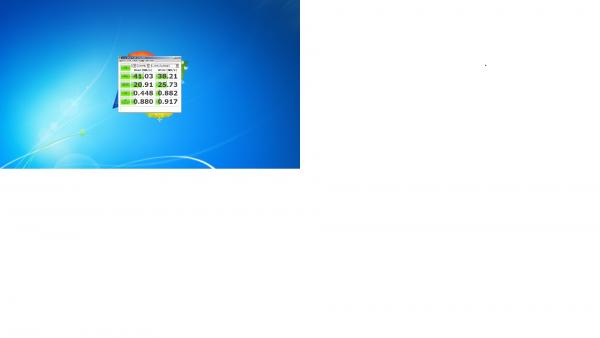
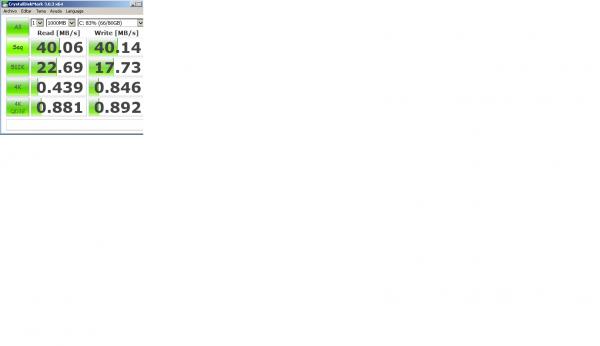
It looks a bit bad, but from less to more, C:\\ D:\\ F:\\Edit: Tested without pagination, no improvement.
Could that part of the disk be more worn out? or have damaged elements?


-
From a veteran SATA HDD, you can expect values of 60-70MB/s as you have in the two largest partitions, so unless you have a bad sector, you will have to check that you are not "braking" the performance on drive C:, for being very defragmented, having compressed directories, etc …
Anyway, it doesn't hurt to change to something from this century, and have double the speed with a current HDD, or seven times more if you opt for an SSD.
Salu2!
Intel i5 3570k / ASRock Z77 Extreme 4 / G.Skill F3-12800CL9D-8GBRL / Sapphire HD5850 / Samsung HD103UJ / TR TrueSpirit / NZXT Source 210 / OCZ ZS550W
Intel i5 4570 / ASRock H87 Pro 4 / 2x G.Skill F3-14900CL8-4GBXM / Samsung 850 EVO 250Gb + ST1000DM003 + ST2000DM003 + HGST HDS723020BLA642 + Maxtor 6V250F0 / CM Seidon 240M / Zalman MS800 / CM MWE 550
AMD Ryzen 7 1800X / B350 / 2x8GB Samsung DDR4-2400 CL17 / NVIDIA GTX 1070 8GB / SSD 120GB + ST4000DM004 + ST6000DM003 / EVGA Supernova 650 G2 -
Well in the end I messed it up, it's clear that to free up C space, I installed programs and drivers related to the graphics card and other things on another drive, so... when I formatted, I got the message operating system missed. And I had to reinstall everything.
After all, every cloud has a silver lining.
Let's see if hacienda espabila and I can buy the ssd.
Thanks again -
I take this opportunity to refresh, in a very generic way, the topic of configuring the swap file, alias virtual memory, in Windows.
It will always be better to have two "physical" hard drives than just one. Regardless of where we install the operating system, its partition should be exclusively dedicated to elements of its environment, that is, the OS itself, driver files, and the most essential applications.
To establish virtual memory, if we don't want to complicate things too much, we will set the same minimum and maximum size, and said size will be the one recommended by the OS. The trick is to host it in a partition (only one, not distributing it in several) of a different drive from the one that carries more workload, avoiding that it has to be reading and writing at the same time.
This was quite important in mechanical drives, today, the transfer rate of SSD drives allows the OS and the swap file to be on the same hard drive.
Beware, it's better to have games on a separate drive.


Hello! It looks like you're interested in this conversation, but you don't have an account yet.
Getting fed up of having to scroll through the same posts each visit? When you register for an account, you'll always come back to exactly where you were before, and choose to be notified of new replies (either via email, or push notification). You'll also be able to save bookmarks and upvote posts to show your appreciation to other community members.
With your input, this post could be even better 💗
Registrarse Conectarse