GTX 750Ti
-
Hello good night
For weeks I have had this graphic, but today I bought a 24" monitor for the HDMI, LG 24M37H.
My problem is that every so often the monitor gives me an error, saying that it has no signal from the HDMI. When I get that message I have to press the INPUT/EXIT button on the monitor for it to react again. But this is VERY uncomfortable. Do you know what is happening to me?
Thank you for the trouble.
Good night -
Have you tried changing the cable?
-
The thing is that, previously, I had an HDMI to VGA adapter and this problem already happened to me. So can you not give me any solution to why this happens? Do I have to configure the graphics in any special way? I hope for a response
-
You don't say the model of the graphics card, or the monitor you had before, etc...
So I'm going to assume that you're always using the same HDMI output of the graphics card (try another one), and the same HDMI cable (try another one).
If you already had the problem with another monitor ¿VGA?, then the new monitor is not the problem.
If the graphics card has several HDMI outputs, use another one, and see if the manual indicates anything about the order of priority between them.
Check that the HDMI cable doesn't have any slack in the connection.
Bye!
Intel i5 3570k / ASRock Z77 Extreme 4 / G.Skill F3-12800CL9D-8GBRL / Sapphire HD5850 / Samsung HD103UJ / TR TrueSpirit / NZXT Source 210 / OCZ ZS550W
Intel i5 4570 / ASRock H87 Pro 4 / 2x G.Skill F3-14900CL8-4GBXM / Samsung 850 EVO 250Gb + ST1000DM003 + ST2000DM003 + HGST HDS723020BLA642 + Maxtor 6V250F0 / CM Seidon 240M / Zalman MS800 / CM MWE 550
AMD Ryzen 7 1800X / B350 / 2x8GB Samsung DDR4-2400 CL17 / NVIDIA GTX 1070 8GB / SSD 120GB + ST4000DM004 + ST6000DM003 / EVGA Supernova 650 G2 -
Hello
I used to use my 20" monitor with the same graphics card via VGA.
The cable is not the problem because I'm testing the same cable with the tablet and it's not happening.
What should I do? -
At this point, I am surprised that you have not sent us a photo of the graphics connections, or at least the link to the manufacturer's website, to see the model and be able to help you better, but well... it must be that it is a secret :facepalm:
On the other hand, the test with the tablet only rules out that the HDMI cable is very damaged, something we assumed because it usually works well most of the time. Think that the demand, in terms of changing refreshments and resolutions that a PC generates compared to connecting it to a tablet, is very different, but assuming that the cable was fine, you are left with the graphics card as the possible culprit.
Try to do more tests with it, before taking it to the service center, unless it is a physical store where you have a lot of trust, and you know that they will first try to help you, before getting rid of the problem and charging you for the labor.
Salu2!
Intel i5 3570k / ASRock Z77 Extreme 4 / G.Skill F3-12800CL9D-8GBRL / Sapphire HD5850 / Samsung HD103UJ / TR TrueSpirit / NZXT Source 210 / OCZ ZS550W
Intel i5 4570 / ASRock H87 Pro 4 / 2x G.Skill F3-14900CL8-4GBXM / Samsung 850 EVO 250Gb + ST1000DM003 + ST2000DM003 + HGST HDS723020BLA642 + Maxtor 6V250F0 / CM Seidon 240M / Zalman MS800 / CM MWE 550
AMD Ryzen 7 1800X / B350 / 2x8GB Samsung DDR4-2400 CL17 / NVIDIA GTX 1070 8GB / SSD 120GB + ST4000DM004 + ST6000DM003 / EVGA Supernova 650 G2 -
is the graphic a secret? have you seen what this theme is called?
if you haven't read the title it would be appropriate.
thanks -
At this point, I am surprised that you have not sent us a photo of the graphics connections, or at least the link to the manufacturer's website, to see the model and be able to help you better, but well... it must be that it is a secret :facepalm:
I think it is quite clear, that I am referring to the exact model, to be able to see the connections it has.
Salu2!
Intel i5 3570k / ASRock Z77 Extreme 4 / G.Skill F3-12800CL9D-8GBRL / Sapphire HD5850 / Samsung HD103UJ / TR TrueSpirit / NZXT Source 210 / OCZ ZS550W
Intel i5 4570 / ASRock H87 Pro 4 / 2x G.Skill F3-14900CL8-4GBXM / Samsung 850 EVO 250Gb + ST1000DM003 + ST2000DM003 + HGST HDS723020BLA642 + Maxtor 6V250F0 / CM Seidon 240M / Zalman MS800 / CM MWE 550
AMD Ryzen 7 1800X / B350 / 2x8GB Samsung DDR4-2400 CL17 / NVIDIA GTX 1070 8GB / SSD 120GB + ST4000DM004 + ST6000DM003 / EVGA Supernova 650 G2 -
Fassou refers to the manufacturer: Asus, Zotac, Gigabyte, MSI…
-
Sorry for being rude.
It's an ASUS.
Right now the monitor has been running for 5 uninterrupted hours via VGA and it's working perfectly. -
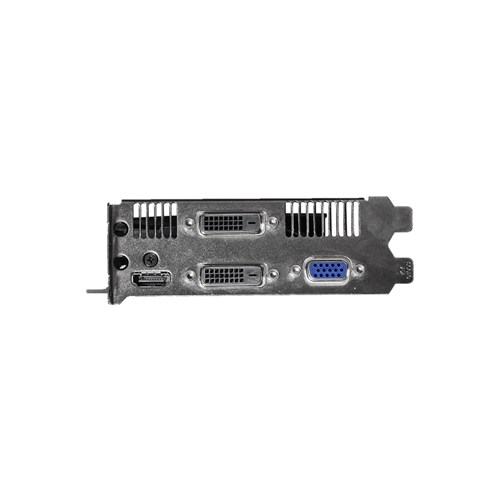
The fact that you can connect the monitor to the tablet and it works makes me think that it's not the monitor's fault, but it doesn't rule out the possibility that the connector doesn't have enough slack, because I suspect you might have had to pull the adapter to connect it.
One good thing about older connections (VGA or DVI) is that they allow you to fix the connector.
!
!
We can try playing around with the refresh rate, check and clean the graphics connections and/or try another cable. The most expensive of the three options doesn't cost 4 €.
-
hello. As I told you, I'm using the VGA right now and it's working fine, but it seems like it's an internal problem with the HDMI


Hello! It looks like you're interested in this conversation, but you don't have an account yet.
Getting fed up of having to scroll through the same posts each visit? When you register for an account, you'll always come back to exactly where you were before, and choose to be notified of new replies (either via email, or push notification). You'll also be able to save bookmarks and upvote posts to show your appreciation to other community members.
With your input, this post could be even better 💗
Registrarse Conectarse