Mozilla Thunderbird does not compress/delete the deleted emails correctly
-
Since there are many Veterans around here, I'm sure some of you are still using "old-fashioned" email clients with POP, and when you perform the typical cleaning of old emails with gigantic attachments, you might have been concerned to see that the files were not being reduced proportionally to what you were deleting, or even that they were growing.
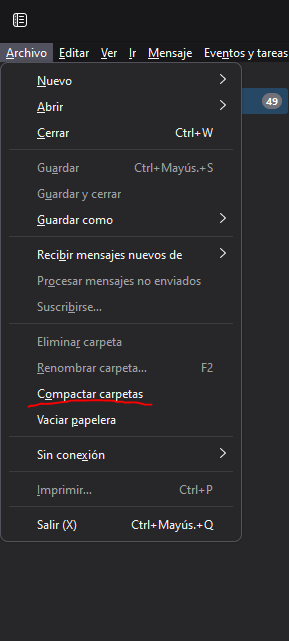
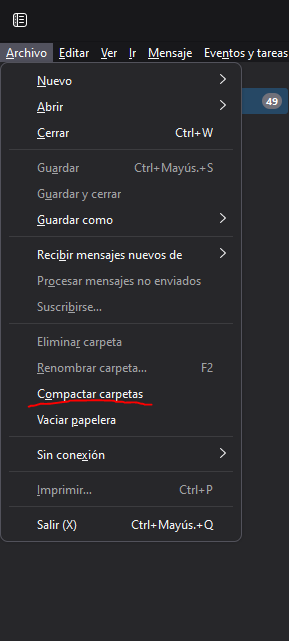
In the good of the Thunderbird, this should be as simple as Empty Trash and then click on Compact Folders
But if you have thousands and thousands of emails, and many folders, it's possible that it's not being processed correctly.
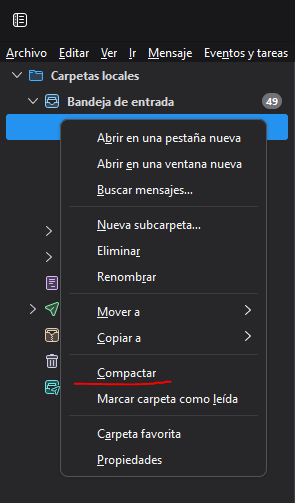
Solution. By clicking on Compact, folder by folder.
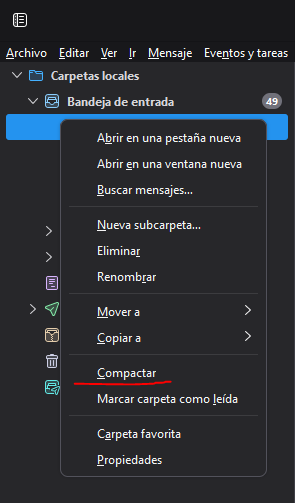
Laborious but simple
Best regards!
Intel i5 3570k / ASRock Z77 Extreme 4 / G.Skill F3-12800CL9D-8GBRL / Sapphire HD5850 / Samsung HD103UJ / TR TrueSpirit / NZXT Source 210 / OCZ ZS550W
Intel i5 4570 / ASRock H87 Pro 4 / 2x G.Skill F3-14900CL8-4GBXM / Samsung 850 EVO 250Gb + ST1000DM003 + ST2000DM003 + HGST HDS723020BLA642 + Maxtor 6V250F0 / CM Seidon 240M / Zalman MS800 / CM MWE 550
AMD Ryzen 7 1800X / B350 / 2x8GB Samsung DDR4-2400 CL17 / NVIDIA GTX 1070 8GB / SSD 120GB + ST4000DM004 + ST6000DM003 / EVGA Supernova 650 G2 -
I've been a Thunderbird user for a long time, though more for IMAP than POP, so I can have multiple devices.
Thanks for the advice, it will come in handy for the next cleanup since I tend to copy the databases instead of resyncing accounts on new devices and those extra GBs add up.
Toda la actualidad en la portada de Hardlimit
Mis cacharros -
@Fassou I'll be a bit slow, but I always thought that you had to go folder by folder, I didn't know the option to do it for all folders.
I'm one of those who use thunderbird with dozens of email filters and many subfolders, with imap, and it's true that it's a pain to have to go folder by folder.
-
@kynes The wise man ? is the one who uses the foolproof procedure
Intel i5 3570k / ASRock Z77 Extreme 4 / G.Skill F3-12800CL9D-8GBRL / Sapphire HD5850 / Samsung HD103UJ / TR TrueSpirit / NZXT Source 210 / OCZ ZS550W
Intel i5 4570 / ASRock H87 Pro 4 / 2x G.Skill F3-14900CL8-4GBXM / Samsung 850 EVO 250Gb + ST1000DM003 + ST2000DM003 + HGST HDS723020BLA642 + Maxtor 6V250F0 / CM Seidon 240M / Zalman MS800 / CM MWE 550
AMD Ryzen 7 1800X / B350 / 2x8GB Samsung DDR4-2400 CL17 / NVIDIA GTX 1070 8GB / SSD 120GB + ST4000DM004 + ST6000DM003 / EVGA Supernova 650 G2



Hello! It looks like you're interested in this conversation, but you don't have an account yet.
Getting fed up of having to scroll through the same posts each visit? When you register for an account, you'll always come back to exactly where you were before, and choose to be notified of new replies (either via email, or push notification). You'll also be able to save bookmarks and upvote posts to show your appreciation to other community members.
With your input, this post could be even better 💗
Registrarse Conectarse