-
You are referring to a KVM or dataswitch, depending on the manufacturer. In theory, you can have two sets of keyboard/mouse connected, so you could have the KVM connected, with which you would control both computers from it, and another set of keyboard and mouse, connected via USB. You can connect as many devices as you have USB ports.
-
Thanks for the reply. I mean I have two independent computers, and with the dataswitch I can control both and at the same time they have their respective keyboards etc, so I asked at pcbox if there was something like this and they said they had never heard of it, could you tell me where it could be bought
thanks. -
Thanks for the reply. I mean I have two independent computers, and with the dataswitch I can control both and at the same time they have their respective keyboards etc, so I asked them at pcbox if there was something like this and they said they had never heard of it, could you tell me where it could be bought
thanks.I'm not quite clear about your question. If what you want is to be able to control both PCs with a single keyboard, a single mouse (and a single screen), what you're looking for is what kynes has told you. It's a gadget where you connect both PCs and from the gadget you connect the keyboard and the mouse. If it's a simple one, with a key combination, you switch from one PC to another.
Toda la actualidad en la portada de Hardlimit
Mis cacharros -
Well I already have that, but the problem is if another person wants to use the other computer I have to go around pulling the cables to connect the keyboard and mouse, what I'm asking is, that both PCs are operational for two people, an example, I'm on my PC, and next to me is my brother using his,
Well my brother leaves, and I now want to use both PCs from my keyboard, but without disconnecting any cable from the PC, I hope you understood, Thanks. -
Well I already have that, but the problem is if another person wants to use the other computer I have to go around pulling the cables to connect the keyboard and mouse, what I'm asking is that both PCs are operational for two people, an example, I'm on my PC, and next to me is my brother using his,
Well my brother leaves, and I now want to use both PCs from my keyboard, but without disconnecting any cable from the PC, I hope you understood, Thanks.I think the easiest way is using Windows remote desktop or VNC.
Toda la actualidad en la portada de Hardlimit
Mis cacharros -
Well, from what I understand, the KVM switch wouldn't be 100% useful for you. If both of you use each computer independently and then you can control both directly from yours, then you would need at least two monitors so that both of you could use yours independently. In that case, the KVM switch wouldn't help you because it's designed for a single monitor.
I have one for two computers right here, and each computer has its own keyboard and mouse, one for PS2 and another for USB, although I could connect only the USBs to the switch and forget about it, but I happen to have them separately as you suggest. Now the problem comes for your case, I only have one monitor and I switch between computers alternately with it, so I think that in your case you could add a VGA port duplicator to your brother's computer in order to connect the switch end to one output and his monitor to the other. This way when he leaves he can turn off his monitor and you from your position activate the switch button (this is how I do it, since I don't have a common keyboard the key combination rarely works) and access his computer from your monitor, although you need to grab his keyboard and mouse.
Another alternative that comes to mind is that he has his keyboard and mouse for PS2 and you connect yours by USB to the switch, so when you activate it directly you will control his computer from your keyboard, mouse and monitor without having to disconnect his keyboard and mouse (I don't know if the latter will cause a conflict, but it sounds like it's possible)
I hope I've given you ideas, and sorry for the length.Regards
-
What type of monitors do you have? If you have at least one TFT with dual input, e.g., DVI HDMI or similar, you must have a key to select the input you want, and there is your solution;)
-
Let's see, has anyone tried what happens if you connect two keyboards or two mice via USB to the same computer? Well, you can have the KVM connected, and also have another keyboard and mouse connected to a single computer. If necessary, even a video cloner, to have the same screen on two computers, or two monitors with cloned output by the graphics. It's not that complicated...
P.ej:
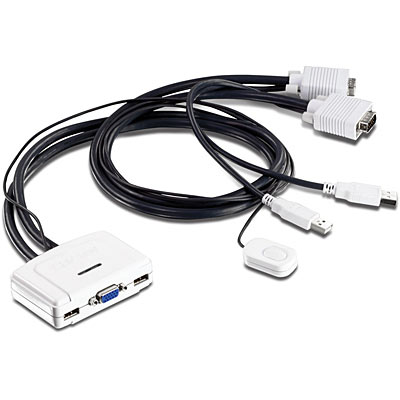
This little gadget connected to a set of keyboard/mouse/monitor, with the button or a combination of keys you choose which of the two computers, yours or your brother's, to control. So that your brother has his own set of keyboard/mouse/monitor, you can connect directly to the computer his keyboard, his mouse and his corresponding monitor.
-
Indeed, that's what kynes explains, that's the idea. I've explained the same thing, although a bit less clearly.
What I was talking about is putting a VGA duplicator on your brother's computer so that it gives an independent signal to his own monitor and on the other hand to the KVM switch, so that when he accesses it via the KVM key he can see his brother's computer on his monitor, without conflicts over the connection of his own monitor or keyboard or mouse. It's simple, yes.Regards
-
So that your brother has his own keyboard/mouse/monitor set, you can connect directly to the computer his keyboard, his mouse and his corresponding monitor.
With a VGA duplicator or directly having the monitor connected to the graphics by an alternative output (HDMI, DVI…) so that it gives signal to both the monitor and the switch.
Regards
-
Thank you for your answers, but they generate more doubts for me than before. The problem with the VGA duplicator is that if I can see the monitor of the other computer, but could I control the computer from my own keyboard?? without using the keyboard of the other computer?
What I wanted is a switch for two equipped PCs and when I want to control both from my keyboard and screen without using the keyboard of the other computer, it would be like saying, I press the button on the switch and the keyboard and mouse of my brother's computer stop working because I control the computer with my keyboard and when I want to, I return it to its state and he regains control. With the switch you showed me, if I connect it to my brother's PC where do I put his keyboard and mouse?? What a mess, I hope I have expressed myself well. Thank you very much. -
Let me try to explain it with another diagram:
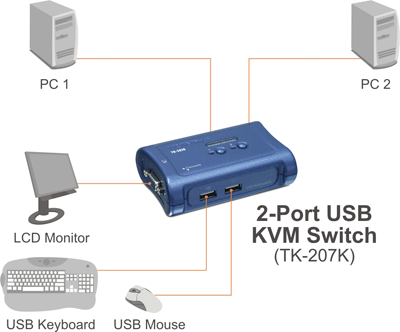
This is the normal wiring diagram for a KVM. In this case, with the keyboard, mouse, and monitor shown, which would be the ones you use, you control computer 1 or 2 depending on the button you press on the KVM. The KVM connects to each of the two PCs, in this specific case, with a cable that includes VGA connection to the graphics card, and a USB port that carries the keyboard and mouse signal.
You could have an extra monitor, keyboard, and mouse connected to computer 2, which would be your brother's. You would have to configure the two video outputs in cloning mode on the graphics card, to display the same thing through both monitors when you select your brother's computer on the KVM. There would be no problem having both keyboards and both mice connected at the same time, the only thing you couldn't do is block the one connected directly to computer 2, but it wouldn't cause any problem if your brother wasn't pressing keys, or moving the mouse.
I really don't know how to explain it better.
-
It is exactly what kynes says, there is also no way to express it more clearly.
You connect the switch to both computers, but on your brother's graphics card you must connect the switch's VGA and another video output for your brother's monitor (whichever one, just make sure to set it to clone mode as kynes says) and that same computer of your brother should have connected its own keyboard and mouse, either via USB or PS2, which as kynes explains to you, will not interfere at any time with yours USB connected to the switch, at least as long as they are not used by anyone at the same time. In this way, you have your keyboard and mouse both USB connected to the switch, and they control your computer when you have it selected, and your brother's when you select it, without needing to touch his keyboard and mouse, or the monitor, none of which three will need to be disconnected from his computer, and you will control it entirely from your keyboard, your mouse and your monitor, exactly what you wanted.
It is simply that, it does not have much science. Maybe a very detailed drawing would make you see it all at once, but I do not feel skilled to elaborate it, sorry xD
I trust that between kynes and I we have clarified a little more with these last explanations.Greetings
-
Let me try to explain it with another diagram:
This is the normal wiring diagram of a KVM. In this case, with the keyboard, mouse and monitor shown, which would be the ones you use, you control computer 1 or 2 depending on the button you press on the KVM. The KVM connects to each of the two PCs, in this specific case, with a cable that includes VGA connection to the graphics card, and a USB port that carries the keyboard and mouse signal.
You could have an extra monitor, keyboard and mouse connected to computer 2, which would be your brother's. You would have to configure the two video outputs in cloning mode on the graphics card, to show the same thing through both monitors when you select your brother's computer on the KVM. There would be no problem in having both keyboards and both mice connected at the same time, the only thing you couldn't do is block the one connected directly to computer 2, but it wouldn't cause any problem if your brother wasn't pressing keys, or moving the mouse.
Honestly, I don't know how to explain it better.
in short, does it need a monitor with dual input yes or not?

-
-
No
I think I didn't explain myself. We have computer A, which is yours, and computer B, which is your brother's. And monitor A1, which we connect to the switch. We also have keyboard and mouse A1, which we connect to the switch as well. With this, we can control both computers, but always with the same keyboard and mouse, and from the same monitor (this is where I realize I messed up :mudo:, but I'll continue in case I clarify something
. Apart from that, we'll need a keyboard and mouse B2 for when your brother wants to use his PC B. These will be connected directly to his PC via USB, and a monitor that will also be connected to his computer (which would have to have a graphics card with dual output or an output duplicator (one of the outputs is connected to the switch, and the other has to be connected to his monitor)). Obviously, it can also be done with a monitor with dual output, but... -
As you rightly say, you could do it with a monitor with dual output, but why? That's what a KVM is for. KVM stands for Keyboard Video Mouse, Keyboard Video Mouse.
-
in short you need a monitor with dual input yes or yes?
No dual input monitor at all… You need two VGA outputs from the graphics (duplicator) or one VGA and another one (DVI, HDMI...) for your brother's monitor, you have to have at least one VGA for the KVM switch.
If you mean with your comment that a single monitor can receive the two alternative signals from one or the other computer, that is exactly what the KVM switch is for, it is more than clear.
Regards
>> i7-2600K Sandy Bridge @4.4GHz || Noctua NH-D14 || ASRock Z77 Extreme4 || 4x8Gb G.Skill Ripjaws X DDR3 1600MHz || XFX RX 5700 XT 8Gb || SSD Samsung 850 PRO 256Gb & 850 EVO 500Gb || WD Caviar Green 1Tb || Barracuda 1Tb || Corsair TX650 V2 || M-Audio Fast Track Pro || KRK RP8 RoKit G3 || BenQ GW2750 27"
>> Athlon 64 X2 5600+ Brisbane @2.9GHz || Gigabyte GA-M61PME-S2 || 2x2Gb DDR2 Kingston 800MHz || Sapphire Radeon HD 5850 Xtreme 1Gb || Maxtor 320Gb SATA2 || OCZ ModXStream 500W Modular || TEAC PowerMax 120/2 || Acer X243w 24"
>> Intel Core2Duo E6600 Conroe @2.4GHz || Asus P5N32-SLI SE DELUXE || 2x1Gb DDR2 Kingston 800MHz || Asus nVidia GeForce 9800GT 1Gb GDDR3 || Seagate Barracuda IDE 80Gb 7200RPM || Linkworld LPK12-35 450W -
Nothing with dual input monitor… It needs two graphics VGA outputs (duplicator) or one VGA and another one (DVI, HDMI...) for your brother's monitor, a VGA at least has to have it anyway for the KVM switch.
If you mean with your comment that a single monitor can receive the two alternative signals from one or the other computer, that is exactly what the KVM switch is responsible for, it is already more than clear.
Regards
It doesn't have to, there are DVI KVMs. They are more expensive, but they do exist.
-
This post is being processed/translated. The original version will be shown:
No tiene por qué, hay KVM DVI. Son más caros, pero haberlos, haylos.
Sabía que me estaba precipitando, y es verdad, los vi hace unos meses cuando estuve buscando el mío leñe…
Culpa mía kynes.
Rectifico: NECESITA UN PAR DE ENTRADAS CUALESQUIERA QUE SEAN EN LA GRÁFICA DE SU HERMANO PARA CONECTAR POR UN LADO EL MONITOR CORRESPONDIENTE A ESE EQUIPO Y POR OTRO EL SWITCH KVM. (Normalmente traerá un par de ellas de cualquier tipo, con lo que no será problema a priori)
Solo tiene que conectar SU TECLADO Y RATÓN USB AL SWITCH, y en el equipo de su hermano puede tener conectados su teclado y ratón independientes del switch KVM ya sea por USB o PS2, que mientras no se toquen no interferirán en el uso que él le de desde el switch KVM.Estareis hartos de oir lo mismo, vamos a quemar este tema una barbaridad, pero esto lo pongo a modo de resumen para que nos aclaremos del todo caray
 )
)
Lamento las mayúsculas.Saludos



Hello! It looks like you're interested in this conversation, but you don't have an account yet.
Getting fed up of having to scroll through the same posts each visit? When you register for an account, you'll always come back to exactly where you were before, and choose to be notified of new replies (either via email, or push notification). You'll also be able to save bookmarks and upvote posts to show your appreciation to other community members.
With your input, this post could be even better 💗
Registrarse Conectarse