Transparent and ventilated side cover
-
I am going there to study and learn.
And I will comment on anything in any case.Thank you
-
The idea is basically the one that Franciskaner told you.
Either you cut a piece of sheet metal and screw the methacrylate or you cover the side with methacrylate directly.
The second option is very simple, but personally, I like the one of cutting the sheet better, it looks much more elegant.
Then the best finishing touch is to include inside some fan with LED or some cold cathode to light up the insides a bit, because without light everything looks a bit bland.Greetings
-
And the operations to make the circle in the methacrylate?
the first link is complicated to take the photos because they don't appear directly apparently.Thanks
-
I was thinking about the possibility of using screws from the back, on one side, and on the other a tab that holds the case. This way, the acrylic would be seen on the side without any fastening.
One of the photos I saw had a very ingenious fastening for the sata cables so that they go up in order.
You can see the mess of cables. I have four hard drives in this pc (in another I have 7 sata hard drives... inside a thermaltake mozart TX.
Is there anything to group them? Maybe a mesh or something?
The solution you provide for hard drives leaves a considerable space between them. I had thought of the option where you can fit three sata in the equivalent of two 5 and 1/4 inch bays.
-
so far i have not done how to remove the cover with fans installed.
What type of connections are usually used?
Thanks
-
I think I would be better off with two 120 mm fans, one at the bottom in the center to bring in air
and another at the top, but below the power supply, to blow air out.In the current state it wouldn't be necessary, but with the change of motherboard, CPU and disks I think I will put quick-release disks at the bottom, which eliminates one of the front fans, and the removable ones are closer together.
As it is, it's a cool computer. It has a powerful power supply. I usually don't turn it off.
Right now I've gotten used to having it without the cover on, which makes it cooler…..
-
To make the circle in the methacrylate you can use crown drills, of this type:
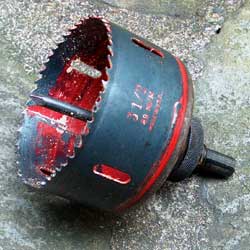
For the fans, cable connection to the board or to mólex generally, quite long if possible to be able to maneuver when removing them.
The idea of the methacrylate without apparent fastening is not bad, but the methacrylate screwed by the edges will tend to open.
Greetings
>> i7-2600K Sandy Bridge @4.4GHz || Noctua NH-D14 || ASRock Z77 Extreme4 || 4x8Gb G.Skill Ripjaws X DDR3 1600MHz || XFX RX 5700 XT 8Gb || SSD Samsung 850 PRO 256Gb & 850 EVO 500Gb || WD Caviar Green 1Tb || Barracuda 1Tb || Corsair TX650 V2 || M-Audio Fast Track Pro || KRK RP8 RoKit G3 || BenQ GW2750 27"
>> Athlon 64 X2 5600+ Brisbane @2.9GHz || Gigabyte GA-M61PME-S2 || 2x2Gb DDR2 Kingston 800MHz || Sapphire Radeon HD 5850 Xtreme 1Gb || Maxtor 320Gb SATA2 || OCZ ModXStream 500W Modular || TEAC PowerMax 120/2 || Acer X243w 24"
>> Intel Core2Duo E6600 Conroe @2.4GHz || Asus P5N32-SLI SE DELUXE || 2x1Gb DDR2 Kingston 800MHz || Asus nVidia GeForce 9800GT 1Gb GDDR3 || Seagate Barracuda IDE 80Gb 7200RPM || Linkworld LPK12-35 450W -
I think 120 mm ones are not that big.
But anyway, making a circle and then holes.
I must have the minibosch somewhere. And with patience, it will surely come out. The thing is that it looks decent when seen from outside the box.I mentioned the cables because I have been noticed for the crucifix of cables I have.
How do they clean the heatsink of the micro of the cpu?
-
"The idea of methacrylate without apparent fastening is not bad, but the methacrylate screwed by the edges will tend to open."
Great observation. It is convenient that the tab is wide to avoid that bending.
Or several tabs distributed. I think the best would be glued with crystal glue. Maybe it can be done with small pieces of the same methacrylate. As it has a certain thickness, add something that makes it fit with the box.
-
I was thinking about the possibility of using screws from the back, on one side, and on the other a tab that holds the case. This way, the acrylic would be seen on the side without any fastening.
In one of the photos I saw, the fastening of the sata cables to go up in order is very ingenious.
You can see the mess of cables. I have four hard drives in this pc (in another I have 7 sata hard drives... inside a thermaltake mozart TX.
Is there something to group them? Maybe a mesh or something?
The solution you provide for hard drives leaves a considerable space between them. I had thought of the option where you can fit three sata in the equivalent of two 5 and 1/4 inch bays
this is usually done if you mount a fan to cool the hard drives (if they are "stuck" you cool what I know)
-
of 120 mm I think they do not come that big.
But anyway, making a circle and then little holes.
Somewhere I must have the minibosch. And with patience it will surely come out. The thing is that it ends up being something decent seen from outside the box.The thing about the cables I was saying because they have drawn my attention because of the crucifix of cables I have.
How do they clean the heatsink of the micro of the cpu?
you dismantle it and put it under the tap, nail brush and that's it. The other option is to use a compressed air compressor (pressurized air) they also sell some compressed air sprays (but it is more expensive) obviously if you give it a shower you have to dismantle the fan and let the heatsink dry well before mounting it.
regards -
Without wanting to offend, I would and do the same with my windowless tower xD, so as to see what's inside it's better not to put a window :ugly:
The modding I would do to that case is an adaptation of the hole for the power supply, preparing it so that it can be turned over. You would need a dremelada at the top and a homemade or prepared filter, if it's 14 it's better. This way you will get something useful, you will gain a lot in power supply temperature by bringing in fresh external air and not the reheated air from the inside. Although it will need fewer RPM to cool, I suppose you will hear it more for giving to the outside but well, you can't have everything xD
Editing: If you want to complicate things more you can repeat the trick at the back by perforating to put a 12 or 14 fan. You would be amazed by the performance/noise ratio of a SilentWings 2 14cms. compared to those 2 of 8.
Editing 2: I got a bit excited, I doubt that a 14 would fit there jejeje, if anything a 12. It's all about measuring or doing it on the ceiling and even putting a bottom one at the base of the tower with a filter.
-
Obione will be attempted. Thank you very much.
-
in the Obione line ….
is that tower one of the tall ones, right? look if you have space to put the F.A on the "floor" but with the ventilation down. drill or stick a series (generous) of holes where the fan goes in front of the power supply, mount a 140 fan blowing air in (if 2 or two 120 fit) and on the top of the tower put either two 140 or two 120 blowing air out.
make the holes for the fans with a jigsaw jigsaw and if they don't fit well then this for the cables I've always used the plastic coated wires that come to collect the cables from any component but if you want something more fancy although I'm a fan of duct tape :ugly: on the meshes meshes avoid the packs (they're expensive and a pain, then they come with covers you don't want for anything and they're useless. I buy them separately) to close them either pull duct tape or [="http://www.tienda-traxtore.com/tienda/index.php?page=pp_productos.php&tbusq=1&ref=ref-506&md=1"]this shrinks with heat (logical, right?) from a hair dryer for example.
anyway I left that tower "clean" without buying any of the above, it's just a matter of a little ingenuity and materials around the house.
regards -
the last one is missing
if any moderator gets involved and wants to edit it, thanks. otherwise, to see it, you know: :troll:
greetings -
Before you cut a side panel, you should consider a couple of things.
The fact of making a side window is purely aesthetic, if it were about improving temperatures, the thing would be to make a couple of holes and put in fans and that's it.
Being aesthetic, the interior has to be very well organized and clean, keep in mind that the more fans you put in, the more dust will enter and you will have to clean more often, here it helps that the work environment is as clean as possible.To help you hide elements that you don't want to be visible I would opt for cutting the side, making a drawing, there's no need to make an artwork of course.
For example, the area of the bays I would leave "behind the sheet" and thus I would take advantage to pass the cables there so that they are not seen or are seen as little as possible.
If you make the entire side in methacrylate you will have the pc in "balls" and for a pc like this to look good aesthetically... there you have to be an artist hiding cables.If you decide to cut the side and screw in the methacrylate, keep in mind:
-The edges of the cut sheet must be perfectly polished, if not it will look "ugly".
-It would be convenient to paint the side, when cutting you will see the "live" metal, so a little paint on the edge.
-Use "allen" type screws or at least not the typical ones of all time, it seems like an unimportant detail but it will give it a touch of distinction.As for ventilation, I never liked side fans, they cover too much side in my opinion.
I currently have a box from the pile, with 2x120 bringing in air and 1x120 taking out (plus the 140 from the power supply"), although I once had a box with 11 fans at low rpm ;DAnd that's it, I think it had been years since I wrote so much in this section, in the end the itch is biting me and all...
Regards. -
hello everyone.
in case anyone didn't notice, I can't edit.
the reason I think is clear, right?
With 2 balls, edit it you lazy one xD
P.D it seems we are still the same or worse
regards
about what Gaitero says... almost everything is fine, but the cables are better if you pass them on the right side of the tower (behind the bays) so you will surely not see any
regards -
This morning I ran into a neighbor of mine who told me where to get the acrylic sheet cut cheaper.
And that for the holes he uses a drill and a jigsaw. He's into acrylic.My computer is currently cool because no matter how much we mess with it, it has fans bringing in air at the front and the two rear ones plus the FA blowing out….
There's no more carbon no matter how many hard drives you put in.
I think a couple of 5 1/4 to 3 1/2 bay adapters would be worth it for me. The ones that convert two into three bays.
And I say this thinking about the future new motherboard.
And I've also seen adapters to transform a 3 1/2 space into six 2 1/2 spaces I think for the SSD series.
The acrylic side panel would be for show.
Right now the computer is on the floor. Always on and cool.
What has never failed me so far is a good FA. Always oversized.
And over the years I do notice it gets a little hotter, but a good FA saves me the three hundred hard drives I usually put in.One question.
I've seen that in terms of motherboards things are still the same.
It's hard to find boards with more than 6 sata drives or connectors.Don't they make motherboards for fifteen hard drives or what?
Thanks
-
This post is being processed/translated. The original version will be shown:
…Mi ordenador actualmente es fresco porque por mucho que nos líemos tiene ventiladores entrando aire en el frontal y los dos traseros más la FA sacando...
¿Es que no hacen placas madre para quince discos duros o qué ?
Ahí está el problema, que en la parte superior tienes el punto más caliente y las fuentes no son ventiladores xD
Para 15 discos pilla placa decente con 8 SATA y varios PCIe para añadir controladoras, cambia la caja por una de servidor, o mejor compra discos de 3TB y funciona con 7 discos + SSD sin controladoras dedicadas.
-
This post is being processed/translated. The original version will be shown:
Gracias Obione.
me acabas de confirmar.
la placa que tengo en el ordenador más reciente tiene 8 SATA y le puse una tarjeta de esas con salidas para discos duros adicionales.
Asus P7P55D EVOOye qué opinas del precio de los discos duros ?
Dicen por las inundaciones, pero yo creo que es el monopolio que se tienen montado Seagate y Western Digital que no los deja bajar…..Discos de 3 TB (ya he visto de 4 TB) no me los admite windows xp pro fácilmente.
Aunque el ordenador nuevo estaría montado sobre windows 8 de futuro.


Hello! It looks like you're interested in this conversation, but you don't have an account yet.
Getting fed up of having to scroll through the same posts each visit? When you register for an account, you'll always come back to exactly where you were before, and choose to be notified of new replies (either via email, or push notification). You'll also be able to save bookmarks and upvote posts to show your appreciation to other community members.
With your input, this post could be even better 💗
Registrarse Conectarse