Test of the Real Nvidia Gtx Titan, single-sli-tri Sli, 4 WAY SLI
-
Without knowing which bios you have installed, it is difficult to help you. The ones that disable Throtling are those of Naemonn and its derivatives. There are many modifications, in general they raise the Boost to 1.202 Mhz, the voltage to 1.21, and allow a Power between 115% and 150%. I used the first one from here:
http://www.evga.com/forums/tm.aspx?m=1891166
which is where I found everything better explained. Look at what majo says, restart the computer and then play with the Precission or the Afterburner, whichever you prefer.
Regards
-
Thank you for your help.
I'll tell you. I did the guide thing. I modified the bios myself. I only changed the power target. It's a value that needs to be modified, following the screens that Naemonn posted.
Alright. After I did this, I flashed and rebooted. Everything OK (let's say they put a tie on me), and I already had a power target modification of 115%. I hadn't touched anything else, because I also didn't want to leave it with overvoltage, because, after tests I've done, the unigine holds it at 1150 and 1.20, with throttling.
I thought that, by raising the TDP limit, I could keep the graphics with values above or equal to 1.15 volts.
But, what I see is that I have throttling even when setting the power limit to 115 and, HERE comes the PROBLEM, I don't see the power going above 95-98%, even when I'm giving it 115%. Moreover, when it reaches that limit, it goes into throttling.
I've been looking at the thread from overclok.net and there are some with the same problem.
I imagine that if I modify the voltage to be fixed in 3D, it will stay standard all the time, which is what I think Naemonn has done. But I don't understand how Pepillo, for example, has in his captures power peaks of 114%, and I don't see it going above 100%.
The power supply I have is a Thermaltake of 1000, I've tried both rails to see if it changed, but it didn't.
Any ideas of what might be happening to me?
I add that, even after the flash, I reinstalled the drivers.
-
I have no idea what might be happening to you. I can only think of trying a Naennon bios, I'm not sure if it doesn't touch something else that we don't know and you don't do with the bios modified by you.
Good luck
-
Teeth the explanation is simple, the powertarget is an option that adapts the Vcore to the load that is to say to the speed which is really the total TDP of the card, that is to say you modify the total max consumption of the card as a function of the voltage and velocidad.Si you only touch the powertaget and do not raise the Vcore you do nothing. On the one hand you give permission to the card to eat more food but on the other hand you are giving it the semi-empty plate, conclusion there is not enough food for such a big stomach, I think you have understood me. With the evga precision you raise the voltage, that is to say you fill the plate with food and you will see how the TDP rises up to the limit imposed by the BIOS as a function of the order that the eVGA Precision gives it. Why have you put on a tie?
Teeth, I would not play around with changing the BIOS and less so touching only one part since if you unbalance them you can block them, especially at startup and that the system does not recognize it, be careful.
There is a program that lets you modify it, they say it is compatible with titan, but there are things that I think it does not interpret well, for the moment, but it is my personal opinion:
http://www.hardwareluxx.de/community/f14/nvidia-geforce-gtx-600-serie-bios-files-932143.html#
http://www.file-upload.net/download-7309019/KeplerBiosTweaker.exe.html -
I agree with majo, one thing is to flash a bios that is already tested, very simple, and another thing is to modify it yourself, I wouldn't dare. The rest, I don't agree, Throttling appears when the power or temperature limit is reached. If you set 115% and Throttling appears with less than 100%, either you exceed the temperature, or something doesn't work as it should.
Greetings
-
Teeth the explanation is simple, the powertarget is an option that adapts the Vcore to the load, that is, to the speed which is actually the total TDP of the card, that is, you modify the total max consumption of the card based on the voltage and velocidad.Si you only touch the powertaget and do not raise Vcore you do nothing. On the one hand, you give permission to the card to eat more food but on the other hand you are giving it the semi-empty plate, conclusion there is not enough food for such a big stomach, I think you have understood me. With the evga precision you raise the voltage, that is, fill the plate with food and you will see how the TDP rises to the limit imposed by the BIOS depending on the order given by the eVGA Precision. Why have you put on a tie?
Teeth, I would not play with changing the BIOS and less touching only one part since if you unbalance them you can block them, especially at startup and the system does not recognize it, be careful.
There is a program that lets you modify it, they say it is compatible with titan, but there are things that I think it does not interpret well, for now, but it is my personal opinion:
[Sammelthread] NVIDIA GeForce GTX 600 Serie - BIOS-Files
File-Upload.net - KeplerBiosTweaker.exeMajo, they have put on a tie for me in case the lights go out... in those precise moments.
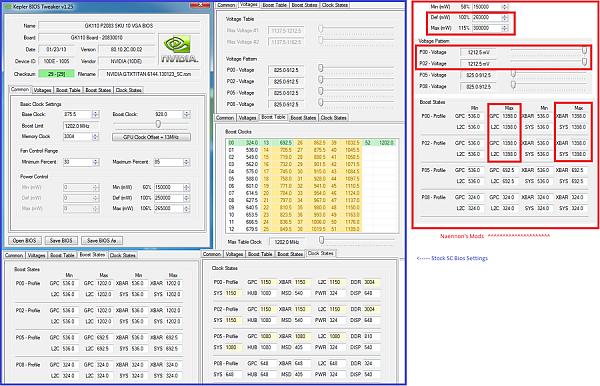
Look, I am going to show you an image of the bios, they are not mine, one is from an SC, as you can see in the clocks.
As you can see, the modifications are limited to the TDP and the 3D voltage. The P0 state. ELP3 this is useful for you, if you want to ignore the Precision X or the MSI Afterburner, you can create not the nvidia inspector an overclock that starts when you start, without having to have any of these programs running in the background.
Majo, I understand what you mean on the one hand, that is, I say, take consume more, but even so I still can't see the fact that by giving it more food it enters throotling and lowers the vcore to 1.37 or it is at 1.50 and it goes down to 1.25... when it would no longer be limited by consumption, and I am not talking about overclocking at the level that you do, which I can't reach... That is, the conclusion I come to is that the bios you use do not let them go below the voltage we put in the P0, that is why throttling disappears.
-
I agree with majo, one thing is to flash a bios that is already tested, very simple, and another thing is to modify it yourself, I wouldn't dare. I don't agree with the rest, throttling appears when the power or temperature limit is reached. If you set 115% and throttling appears with less than 100%, either you exceed the temperature, or something is not working as it should.
Regards
Pepillo, maybe I expressed myself wrong or you didn't understand me. I agree 100% with what you say because that's how it is. Let's see, I can't see Teeh's images clearly, or rather, I can't see the values. What I wanted to say is that Teeh has modified the bios in such a way that he left it half-done. He increased the maximum power consumption (TDP) but doesn't allow using more voltage than the one that comes by default, that is, the bios is half-finished. The card, as you rightly say, is limited by temperature or power consumption.
From what I've seen in the 4 I've tested (in the end I stayed with 2 because I couldn't get another 2 good ones), if the cooling is air, the maximum Vcore is not what the gpu can accept but what it can spend is 1.13V. You have to add to this what the fan and its control circuit consume, etc. to reach the maximum TDP of 250W, which Nvidia.Si allows. If you remove the fan, you're allowing the Vcore to go up to 1.16V more or less and with that voltage you also reach the 250W TDP. Teeh hasn't changed the voltage curve in the bios, that is, it still has that limit. Believe me, the energy management is like that. Of course, there are gpus that with 1.13 do 875mhz and others that do 1050Mhz, etc. depending on the quality of doping the cores have. Teeh, put larger images, I can't see them -

Perdón, vuelvo a subir la imagen.
Entiendo lo que quieres decir majo. Ahora lo entiendo. Por ello la tarjeta arranca a 1.16. Donde a mí me hace 980. Después baja y oscila entre 1.13 y 1.15. Yo creía que solamente cambiando el TDP el voltaje subiría automáticamente, pero, lo que veo es que también están limitadas por la temperatura. Es más, les da igual que tu subas de los 80 grados. A partir de ahí empieza el throttling. Luego ahí está la cuestión. El boost pasa por no dejarle bajar de un voltaje. Subir, subirá (el máximo no se puede modificar), pero el mínimo voltaje sí.
Sé que la tengo a medio cocer. Me falta limitar el voltaje mínimo.
-
Indeed Teeth. I hate to put this but beware you know there is a lot of risk, if the flashing fails. goodbye card. If I were to put any I would put this:
The BIOS is well modified, that is to say it is tested and it is much less aggressive than those of Naenon and company, but then you have to play a little with the evga precision if you want to gain something more.Si you test it is at your own risk and if you have the slightest doubt do not do it, but I already told you that it has no flaws, I mean that it is half done or that it will not start or anything like that. Remember before anything to leave the evga precision closed or in default to start from scratch.
I edit that now if I see it well, what I was telling you and I supposed from the beginning, on the screen of voltages you limit to the serial voltage P00 and P02.
I edit more, on the common screen you continue to limit to 250w 100% target and 265W with 106% power target, do not increase voltage do not do anything -
The screenshot I posted is from overclock.net. Mine is a stock one. This image belongs to an SC, like the ones you have.What I was telling you in red are the bios modifications that are circulating, which are the boost to 1400 (which would actually let the card start from 1200, the voltage modification (which leaves it at 1.21 fixed) and the TDP (which leaves it at 150%). The rest of the values are untouched.
I, ignorant of me, copied my bios with GPUz and then, with bios tweak, I only modified the TDP.
Thanks for the bios. It's from an SC, right? From what I see the TDP at 100% is equivalent to 107% of the original, and, the next one to 15% of the original.
I also see a modification between the state P00 and P02 of between 1.17 and 1.18. I imagine that these will be the values in which the vcore will fluctuate, right? I would like to leave it at 1.16, I wouldn't like to put more voltage into it.
This is what I was telling you that I had missed changing.
-
Teeth, what I have sent you is not from an SC, if you want I can send you one from an SC, (from mine) but they do not perform as you want by air. It is modified calculating the V drop that the fan produces, that is, in theory, it should work for you like mine, now that they do not have a fan, that is why I recommend it to you since it is for you, so that you can test it on your cards according to try to solve the problems that you specifically have, you see that the voltage is very, very little raised, that is, like mine without a fan, so I know that nothing will happen to you. I do not want to flash mine as I said before because for me, I have enough and when I finish assembling the 4, what more do I need.
There are CPUs that suck more voltage and cause more drops, from what you comment I think that yours is one of those, that is why it is raised a little more. At your own risk if you want to test it and if you want we can lower it a little, but be careful, I am not responsible for anything, you know.
Edit, that 1.18 is when this bottleneck but it should drop to point or point and a half, more or less to 1.16V. like mine -
Teeth what I have sent you is not from a SC, if you want I can send you one from a SC, (one of mine) but they do not perform as you want for air. It is modified calculating the V drop that the fan produces, that is, in theory it should work like mine, now that they do not have a fan, that is why I recommend it to you since it is for you, so that you can test it on your cards according to try to solve the problems that you specifically have, you see that the voltage is very, very little raised, that is, like mine without a fan, so I know that nothing will happen to you. I do not want to flash mine as I said before because for me, I have enough and when I finish assembling the 4, what more do I need.
There are CPUs that suck more voltage and cause more drop, from what you comment I think yours is one of those, that is why it is raised a little more. At your own risk if you want to test it and if you want we can lower it a little, but watch out, I am not responsible for anything, you know
Edit, that 1.18 is when this bottleneck but it should drop to point or point and a half, more or less to 1.16V. like mineThanks for your help.
I thought they were SC because of the base and boost values, which are 875.5 and 928. I imagine it will be to compensate for the fact that they will rise up to 1019 at input plus the boost that adds the extra voltage between 1.16 and 1.18, the latter voltage being temporary.
Did you modify it yourself?
I would not hold you responsible for anything, in fact, I appreciate your help. If you tell me that this voltage is safe I will be more at ease. I intended to keep them above those 1084 without fluctuating.
-
Teeth, in my opinion, I don't think your GPU can reach those values with the stock Vcore or an already modified one, since the SCs have the same voltage as the others, or at least that's what I think since all the ones I've touched were SCs. That's why it's a bit higher, but if you test it and want to lower it a bit, you know there's no problem, I lower it and that's it, you'll say. Of course, don't feel committed or forced to test it or anything like that. I forgot to tell you that the voltage curve has also been modified, that is, instead of rising so suddenly when you put a very large load on it, it does it more progressively to avoid the voltage spike that could damage the CPU and thus perform better control of the power supply, that is, even more security.
-
Tomorrow I will try it (today I am traveling, as usual),
so, forgive my ignorance, but I want you to tell me if I have understood it correctly:
My GPU doesn't think it can reach 1084 with stock voltage. However, I have run Unigine up to 1110 without crashes. But, according to what you say, it has nothing to do with it. That is, probably, for my GPUs to be able to go up to 1084-1097 or 1110 I will have to put more vcore (logical because they also start at lower frequencies).
So, the modification you left of the values from 876-928 in the biios (which as I mentioned to you, are the values of an SC, that's why I had asked you, since mine are 837-876), are to go up to 1032 from the start (since it stays at 980, as I mentioned to you). That is 980-876 = 104. Now 928+104 that go up automatically would be the 1032?, or does this not work that way?
So, you have modified the minimum core that the card will work at, which becomes 1.175 (mine starts at 1.16, then goes down to 1.15 and 967 in Crysis, for example). This way it would always stay at a minimum of 1.16 (which is what I am looking for), and, you raise the vcore by one point to 1.187 to avoid crashes due to a momentary peak of maximum consumption at around 1084 frequency.
Forgive the long text. I am a bit slow to understand these things.
-
Perfect, nothing more to add. I leave tomorrow afternoon to go to work and I will try to read here when I can to see how you are doing.
-
Thanks. I'll keep you posted.
I'm sorry that it came out so lazy.
Don't you think I can reach 1084 with 1.16 if I've been playing crysis 3 and unigine and passed the OCCT with a +104 offset and serial voltage?
If I see that it's going well at 1.175 would we go down to 1.16-1.175?
And, what do you mean by it will be more protected, by not going up all of a sudden from, for example, 1.16 to 1.20? (which is what the EVGA Precision does by raising the voltage, right?), since we limit it to a maximum of 1.18?
It seems like I already understand what it's about.
Thanks really. Tomorrow I'll flash, test and let you know.
-
Teeth try this one first, it is even less aggressive than the previous one to see how it goes, if it doesn't convince you try the previous one. This one is from an SC just like the original (from one of mine) I have just removed the name of evga, so that it only says Nvidia, if you want it to say gigabyte or the one you have, send me yours and I will read how gigabyte or asus or the one you have encodes it:
GK110SC_Teeth.rom | PutLocker -
Well, I've pulled myself together and flashed it.
No, in the end, everyone who goes through the thread with a Titan flashes it…......;)
There's a lot of potential to be gained just by maintaining voltages and TDP.
Well, I already have the operational equipment, so I've gone through a series of rounds with the resolution you're using, which, by the way, what's up with that strange resolution?
First with the 3930 stock, and the memory at 2100 CL9. The graphics, the SC at 1019 and the Gigabyte at 993 without touching anything, completely in default, bios modified.

Second with the 3930 at 4.9 and the memory at 2400 CL9, the graphics still stock.

I think it's pretty clear that these beasts need a processor that moves them well….... :ugly:
And finally with the processor at the previous OC and the graphics, the SC at 1215 and the Gigabyte at 1189.

The graphics by water change like night and day, temperatures in idle, 20-21º, and under load, the maximum they've gone up with the OC has been 37º.
For today, that's enough PC day, tomorrow I'll update the mod thread with the finished equipment, but I'll give you a sneak peek…........;).

By the way majo, since we were talking about power supplies earlier, could it be that with the new power supply, the equipment consumes up to 100W less?, with more load?. I have a power meter connected to the wall, with the complete equipment before changing the power supply with the graphics with OC, it gave me peaks of 1100W. Now I've been monitoring the consumption with the equipment with OC processor and graphics, and it's around 1000W, with the new power supply.
I haven't downloaded the power supply software yet, I went to register it, but the EVGA registration page wouldn't load. I'll try again tomorrow.
Best regards..
-
Jotole, do you have two gigabytes and an SC? You say that you flash and stock give you 993 and 1019 the SC? But that with the voltage increase already in?
Yes, I was scared to flash it. As Majo and I discussed, I put it in half-baked. I expect more testing when I get home. I intend to leave the 1.16 fixed, and avoid throttling up my nose.
Majo, thanks for your help.
-
Jotole, of course you can have that difference, even more. Keep in mind that from the start of platinum or gold quality to silver or bronze we can have differences in real effectiveness between 10 and 20%, if we talk about 1000W, which in this case is more, do the math (between 100 and 200W of loss). It is also true that all PSUs lose effectiveness little by little until they stabilize and yours will also suffer from it, of course depending on the quality and design of the circuit, this loss is greater or lesser, logically and it will happen in a few or many hours of use.
I would also say that you throw that wattmeter ;D;D;D;D;D ;:
3 Impressive Beasts = 900W or something more depending on the OC.
CPU Overclocked = 175W, this is very variable, from stock maximum 130W and you know that depending on the load it is extremely variable.
Motherboard = 65 W, also variable depending on the OC, memory, etc.
RL pumps, if they are D5, depending on whether they are adjustable or not and if you have them at full capacity 37W x2= 74W
Fans, you have a good number of them, I put 20 fans = 30 W
Rest of equipment = 30W.
PSU waste a minimum of 10% depending on the workload, it can reach to waste between 100W and 150W that are simply transformed into heat, good for winter :osvaisacagar:Let's say that you can have peaks of 1300 to 1400W real so you will have the opportunity to test the PSU to the max.
And also we must take into account the harmonics that it produces that can even make the differential of the house jump for overload in a line, in this case it would be necessary to put an immunized differential to avoid this problem. The one I checked did not have many harmonics, in this aspect I liked it a lot.I just found this link that comes in quite handy:
eXtreme Outer Vision - eXtreme tools for computer enthusiasts click on psu calculator

Hello! It looks like you're interested in this conversation, but you don't have an account yet.
Getting fed up of having to scroll through the same posts each visit? When you register for an account, you'll always come back to exactly where you were before, and choose to be notified of new replies (either via email, or push notification). You'll also be able to save bookmarks and upvote posts to show your appreciation to other community members.
With your input, this post could be even better 💗
Registrarse Conectarse