Test of the Real Nvidia Gtx Titan, single-sli-tri Sli, 4 WAY SLI
-
Jotele, the bios I put in was taken from here:
http://www.evga.com/forums/tm.aspx?m=1891166
it's the BIOS1, from "Naemon", which unlocks the power limit up to 150%, the fan up to 100%, and sets the Boost to 1.202 Mhz, and yes, at rest or low load, it lowers the voltages without problems. I love it, I've had several sessions of Crysis 3 and the core doesn't move from 1.202 Mhz with the memos at 6.302 Mhz, stable and without problems. I've passed the whole battery of tests, Unigine, 3dMark, 2011, Vantage, etc. pulverizing all my previous records, and with the right fan profile, at lower temperatures. It's an amazing card, I overdid the bios. And with RL, it must be for launching rockets, who knows where you can get to, look at what the ones from Majo do without touching anything.
Majo, impressive temperatures. Ta lowers the consumption a lot and you can raise them a lot without touching anything else, congratulations. Very interesting about the power supplies, I've been using a Corsair HX1000 for a few years now, which are actually two power supplies in one box, and I'm very happy with it (of course the maximum has been an SLI of GTX580, for tris or those things, I wouldn't reach it anymore).
Regards
-
The cooler that comes standard is very nice and whatever you want but not very effective, as soon as you lower the temperatures it's amazing how much they perform. Today I am seeing and looking for many results, which I had never done with my other graphics, in fact it's the first time I've touched graphics, that is only to test, that they are already standard again and I am realizing that mine really work well. When the different brands release these graphics with custom coolers people are going to be amazed. I am the least qualified to talk about price but in my opinion if they cost what they cost it's because they are worth it and the moment they improve via drivers what can I say. There are many comments that if they are based on the gtx680 and these already have mature drivers, but they really look little like them, especially in power management and there is a lot to be done there. That said I am afraid of electromigration in these gpus if people go too far with the voltage. As eVGA selected some of the gpus for their hydrocooler they are going to be great, that is if they are also priced well.
In the end you come to the conclusion that almost without doing Mod-BIOS simply by improving cooling, the performance improves a lot.
From what I have commented with a coworker teeth has not had much luck with his, although they should have been worse, but if I could cool them more I think they would perform a lot more seeing what happens with mine.
Pepillo the ones I posted here today are different from the one I posted the first day, these according to my partner and what I saw yesterday, are better, things as they are -
I don't have RL, nor an i7 3960X, nor SLI, nor any of that, but I still "wax it" when I'm bored, and I've tried to keep pushing it a bit:

1.228 Mhz, it still doesn't protest and is scaling results. Majo, you're right, the Titan is a great card, what does it matter to me to "soak it"? But I'm not going to do it, this is just to bench a little, as it is I think it's a beast for playing anything.
Regards
-
Hello again everyone.
As you know, I have personal issues that, for the moment, make it impossible for me to have time for anything else. But since I try to read you daily, I got bitten by the mod bios bug, and I wanted to know how right I was when I thought that Nvidia capped TITAN with certain intentions and from what I see, I wasn't far off.
I always thought that with a proper OC, these TITANs would easily reach the level of a stock GTX 690, and from what I see, I wasn't too far off...
With just 1.21V fixed, that's for sure, this card is an endless BEAST... without RLs, without stories, with its maravislloso heatsink and only with the bios that keeps the clocks fixed, and especially that 1.21V... you see, just 1.21V that lets it feed those theoretical 300W that the power target can give without restrictions with those 8+6PIN, it's capable of benching at almost 1270MHZ and getting some numbers that a stock GTX 690 would want if it could.

If it does this with just 1.21V maintained... imagine what could be done with the craziness that AMD allows, or rather, allowed, of more than 1.35V... although it's clear that each brand works differently. But anyway, I'm sure that with just 1.25V, the good units would stand at 1300MHZ with stock cooling.
This card is undoubtedly a world apart from everything else, light years ahead of the ones that exist in monogpu, and with the performance of a dual but without its problems.. as I say, impressive. Almost 6000 GPU score points in Xtreme... 65-70% more than a 680 or 7970 oced at the same frequency... almost nothing...
Greetings to all...
-
Hello again. Thanks Majo for looking at this for me. I'm still in doubt about what to do and, with the luck I have, I might get another one that's even worse... Yesterday I did various tests. As I have a nagging doubt about how this card works, I ran OCCT in version 3.1, the best tool I've had for testing graphics overclocks. It's curious that, at shader complexity 0, the card runs at 837 mhz. The minimum of how Nvidia marks it. I can raise it to 920 without artifacts appearing. This translates to about 1045-1058 stable. Not to mention the throttling that appears as soon as it exceeds the limit. I would like, if any of you are kind enough, especially to you Majo, since you have the SCs, to see if, by passing the stock OCCT the card (not SLI) goes down to 876 and to what voltage (since the SCs have their minimum at 876). I get 1150, or so I think, with throttling, of course, by raising the voltage to the max. Of course it oscillates between 1150 and 1163, but, as soon as the consumption goes up, it goes down to 1150 and 1.18 or 1137-1110.. ELP3, on which card did you test the bios change?, of the four you have, and, the laziest one to what do you have it working?. I'm sorry you have family problems. I hope they get resolved. Greetings to all. -
Hello again everyone.
As you know, I have personal problems that, for the moment, make it impossible for me to have time for anything else. But since I try to read your posts daily, I got bitten by the mod bios bug, and I wanted to know how right I was when I thought that Nvidia capped the TITAN with certain intentions, and from what I see, I wasn't far off.
I always thought that, with a proper OC, these TITANs would easily reach the level of a stock GTX 690, and from what I see, I wasn't too far off...
With just 1.21V fixed, that's for sure, this card is an endless BEAST... without RLs, without stories, with its maravilloso cooler and only with the bios that keeps the clocks fixed, and especially that 1.21V... you see, just 1.21V that lets it feed those theoretical 300W without restrictions with those 8+6PINs, it's capable of benching at almost 1270MHZ and getting some numbers that, if it wanted, a stock GTX 690 would.
If it does this with just 1.21V maintained... imagine what could be done with the craziness that AMD allows, more than 1.35V... although it's clear that each brand works differently. But anyway, I'm sure that with just 1.25V, the good units would stand at 1300MHZ with stock cooling.
This card is undoubtedly a world apart from everything else, light years ahead of the ones that exist in monogpu, and with the performance of a dual but without its problems.. as I say, impressive. Almost 6000 GPU score points in Xtreme... 65-70% more than a 680 or 7970 overclocked at the same frequency... not bad...
Greetings to all...
You've already been tempted by the Titan, it was clear that they were intentionally capped, besides that they didn't allow custom models, but those frequencies in such a large chip with so many transistors prove that the node is capable of high frequencies, when they said they would come to 875mhz I already imagined that they could easily bench at more than 1200mhz.
A GK104 could perhaps stretch a bit more in frequency as it's a much smaller chip, but the 28nm seems to allow 1200 MHz, then it will depend on the voltage and power supply of the card, the cooling or how good it comes out, but I believed a while ago that 1200 wouldn't be difficult in those Titans.
Even that they would gain more since they have better performance per clock, they are more powerful cards and every MHz should be noticed more than in a 680.
regards
-
Hello again everyone.
As you well know, I have personal problems that, for the moment, make it impossible for me to have time for anything else. But since I try to read you daily, I got bitten by the mod bios bug, and I wanted to know how right I was when I thought that Nvidia capped TITAN with certain intentions and from what I see, I wasn't far off.
I always thought that, with a proper OC, these TITANs would easily reach the level of a stock GTX 690, and from what I see, I wasn't too far off...
With just 1.21V fixed, that is, this card is an endless BEAST... without RLs, without stories, with its maravilloso cooler and only with the bios that keeps the clocks fixed, and especially that 1.21V... you see, just 1.21V that lets it feed those theoretical 300W without restrictions with those 8+6PINs, it's capable of benching at almost 1270MHZ and getting some numbers that if a stock GTX 690 wanted.
If it does this with just 1.21V maintained... imagine what could be done with the craziness that AMD allows, more than 1.35V... although it's clear that each brand works differently. But anyway, I'm sure that with just 1.25V, the good units would stand at 1300MHZ with stock cooling.
This card is undoubtedly a world apart from everything else, light years ahead of the ones that exist in monogpu, and with the performance of a dual but without its problems.. as I say, impressive. Almost 6000 GPU score points in Xtreme... 65-70% more than a 680 or 7970 overclocked at the same frequency... not bad...
Sorry to read about the problems. Whatever it is, I wish you luck and that they get resolved.
What do you mean by 1.21 maintained? To me, at least in idle, if it goes down the voltage.
Another question that comes up when I see your screenshots. When I flashed the bios, the core went to 1.202 Mhz without raising the offset at all. But if I put the precision to boot with the system, when I restart I have the 1.006 Mhz again, I had to create a profile with 200 offset. It's not really a problem, in fact, I prefer it this way, the only thing is that you have to be careful because as soon as you get distracted you put the +200 over the 1.202, and at 1.400 peta, of course.
With the modified bios, the potential of the card is unleashed, all of us who have tested it agree. It's the first time I see with a new card, that so many people modify the bios, and it's that what you gain, is a lot.
Regards
-
This post is being processed/translated. The original version will be shown:
Jotole también es cierto que después de mandarlas a testear y pasar controles de calidad EU,eVGA debió hacer alguna corrección para solucionar el tema , pero de esas revisadas ni sé si realmente existen o no, no te puedo decir más.De todas maneras si tienes un voltímetro mide lo que realmente dá y lo que marca el software a diferentes cargas y verás la desviación si existe como tal.
El mayor problema de usar 2 fuentes es interconectar la alimentación entre ambas.En caso de ser las 2 idénticas no debe haber problema ya que el sistema tira de la fuente que menos caída de tensión tiene para nivelar ambas, pero no siempre es así.Es mejor independizar las alimentaciones, cada una que alimente una parte de componentes y la otra otra parte, pero OJO que no esten intercomunicados lo componentes.Por ejemplo, una PSU para alimentar los conectores de las gráficas ( circuito de potencia 8+6, 6+6, etc.) y otra para alimentar el circuito de control ( socket pci de la placa), ya que en Nvidia , por lo menos, ambas alimentaciones son independientes.La placa si que recibe una señal del circuito de potencia pero simplemente es para que la placa sepa si la grafica esta alimentada o no, es de control no de utilización esa señal.
El tema está que hay placas que llevan un conector molex de 4 vias para reforzar la alimentación 12V. de las gráficas ( en teoría el socket) pero que sin embargo pueden llegar a estar puenteados con los circuitos de alimentación de los conectores y esto puede ocasionar problemas.En la rampage IV que lleva este conector, por ejemplo, yo pregunté a Asus si estaba interconectado con la circuitería de fuerza a través de la motherboard, pero no recibí respuesta.Luego pregunté en el foro ROG y tampoco, nadie lo sabe. Mi idea era poner 3 PSU. Una para alimentar los conectores de las 4 gráficas, cuando tenga todas.Otra para placa y CPU y otra para resto de componentes del equipo.
Es muy peligroso usar 2 psu y que cada una alimente una parte de hardware y que éste este intercomunicado a traves de la placa.Si una PSU no funciona por lo que sea, toda la corriente de aliemntación de esa parte del hardware pasará a traves de la circuitería de la placa y ya sabes que pasaria, no? Asado de electrónica y extintor a mano.Y eso por muy buen diseño que tenga la placa no se puede evitar.Para que esto no ocurra, 2 soluciones:
1º.Alimentaciones independientes de circuitos independientes totalmente ( nunca ningún problema)
2º Interconectar todas las alimentaciones de las 2 fuentes ( circuito en paralelo total) pudieras llegar a tener algún problema si una fuente es diferente a la otra, no me refiero en watage sino en tiempo de respuesta diferencial entre una y otra.
En alimentaciones y por lógica y sentido común hay una regla y es que es mejor que trabajen 2 fuentes al 75% que no una al 100%, no solamente por riesgo de rotura sino por calidad de aliementaciónMe interesa bastante ese tema, y teniendo ya 3 fuentes de calidad como tengo, en cuanto tenga el equipo ok, puedo mirar eso de la alimentación. A ver como conectarlas. Yo utilicé un cable de esos de 2 hembras para unirlas las 2, no sé si será adecuado, o te refieres a que encienda por separado.
Un Saludo..
Jotele, la bios que puse la saqué de aquí:
http://www.evga.com/forums/tm.aspx?m=1891166
es la BIOS1, de "Naemon", que desbloquea el límite del power hasta 150%, el ventilador hasta el 100%, y pone el Boost en 1.202 Mhz, y sí, en reposo o poca carga, baja los voltajes sin problemas. Me encanta, llevo varias sesiones de Crysis 3 y el core no se mueve de los 1.202 Mhz con las memos a 6.302 Mhz, estable y sin problemas. He pasado toda la batería de tests, Unigine, 3dMark, 2011, Vantage, etc. pulverizando todos mis anteriores registros, y con el perfil del ventilador adecuado, a menos temperaturas. Es una pasada de tarjeta, la bios la capaba demasiado. Y con RL, ya tiene que ser para echar cohetes, a saber donde llegas, mira lo que hacen las de Majo sin tocar nada.
Majo, impresionantes temperaturas. Ta baja mucho el consumo y puedes subirlas un montón sin tocar nada más, enhorabuena. Muy interesante lo de las fuentes, yo hace ya unos años que uso una Corsair HX1000, que en realidad son dos fuentes en una sola caja, y muy contento con ella (claro que lo máximo ha sido un SLI de GTX580, para tris o esas cosas, ya no llegaría).
Saludos
La mia es parecida, son todas mas o menos iguales, aumentando un voco el limite de poder.
Anoche al final hubo problemas tecnicos, un par de fugas….........xD. Así que no me dio tiempo a terminar el equipo. Ahora mismo lo tengo montado con el circuito de gpu´s lleno. Madre mia como mueven liquido 2 bombas, creo que nunca he tenido tanas ganas de terminar un equipo....
A ver si esta tarde cuando llegue a casa puedo escaparme un par de horas que es lo que me falta para terminarlo.....
Un Saludo..
Hola de nuevo a todos.
Como bien sabeis,tengo problemas personales que de momento,me hacen imposible tener tiempo para otra cosa.Pero como os intento leer a diario,me picó el gusanillo de las bios mod,y quería saber hasta que punto estaba en lo cierto cuando pensaba que Nvidia capó a TITAN con ciertas intenciones y por lo que veo,no andaba mal encaminado.
Siempre pensé,que con un OC en condiciones,estas TITAN se pondrían sin problemas a la altura de una GTX 690 de stock,y por lo veo,no me equivoqué mucho…
Con tan solo 1,21V fijos,eso si,esta gráfica es una BESTIA infinita...sin RLs,sin historias,con su disipador maravislloso y solo con la bios que mantiene fija los cloks,y sobre todo ese 1,21V...ya veis,tan solo 1,21V que le dejen alimentar a esos 300W teóricos que puede dar el power target sin restricciones con esos 8+6PIN,me es capaz de benchear casi a 1270MHZ y obtener unas cifras que para si quisiera una GTX 690 de stock.
Si esto lo hace con tan solo 1,21V mantenidos…imiginaos lo que se podría hacer con las burradas que permite,o mejor dicho,permitía AMD de mas de 1,35V...aunque esta claro que cada marca trabaja de manera diferente.Pero vamos,que estoy seguro que con tan solo 1,25V,las buenas unidades se plantarian en 1300MHZ con disipación de stock.
Esta gráfica indudablemente es un mundo y aparte con todo lo demás,a años luz de las existentes en monogpu,y con el rendimiento de un dual pero sin los problemas de ella..como digo,impresionante.Casi 6000 puntos de GPU score en Xtreme...un 65- 70% mas que que un 680 o 7970 oceadas a misma frecuencia...casi nada..
Un saludo a todos..
Jejejeee, otro que no ha resistido la tentación eh. ;). La verdad es que es una gozada ver las tarjetas trabajar así. En OCN, hay algún animalito que ha editado sus propias bios y les ha metido 1,35 y las pone a 1400. A ver quien es el primero de aqui que las prueba…............ xD. Y de paso se queda con un pisapapeles monisimo de aluminio...............xD.
Me alegro mucho de leerte, aunque sea fugazmente.
Un Abrazo y mucho animo ELP3….
-
Well, I've pulled myself together and flashed it.
I've put 115% of the TDP into it, but
I NEED HELP
I see that in your usage graphs there is up to 114% of TDP, but mine doesn't go above 95. Moreover, when I put the 115 TDP and 105 offset, it goes to 1084 at 1.16, but, when playing Crysis, as soon as the TDP load goes over 95, throttling comes back...
I don't know what it could be...
Let's see if you can give me a hand, please
-
teeth after flashing have you restarted your PC? if so open the evga precision and see if you can set the power target above 106% which is how it comes from the factory, if you can't see that option in the evga then you didn't flash it properly or the bios you put in is the same as the one that came with it. Also the vcore should be set to 1.21 and if you only have 1.16 then you didn't put in the same bios as pepillo and company. I just got in and I was going to do the test for you, but I see I'm late, still if you want tell me
-
Without knowing which bios you have installed, it is difficult to help you. The ones that disable Throtling are those of Naemonn and its derivatives. There are many modifications, in general they raise the Boost to 1.202 Mhz, the voltage to 1.21, and allow a Power between 115% and 150%. I used the first one from here:
http://www.evga.com/forums/tm.aspx?m=1891166
which is where I found everything better explained. Look at what majo says, restart the computer and then play with the Precission or the Afterburner, whichever you prefer.
Regards
-
Thank you for your help.
I'll tell you. I did the guide thing. I modified the bios myself. I only changed the power target. It's a value that needs to be modified, following the screens that Naemonn posted.
Alright. After I did this, I flashed and rebooted. Everything OK (let's say they put a tie on me), and I already had a power target modification of 115%. I hadn't touched anything else, because I also didn't want to leave it with overvoltage, because, after tests I've done, the unigine holds it at 1150 and 1.20, with throttling.
I thought that, by raising the TDP limit, I could keep the graphics with values above or equal to 1.15 volts.
But, what I see is that I have throttling even when setting the power limit to 115 and, HERE comes the PROBLEM, I don't see the power going above 95-98%, even when I'm giving it 115%. Moreover, when it reaches that limit, it goes into throttling.
I've been looking at the thread from overclok.net and there are some with the same problem.
I imagine that if I modify the voltage to be fixed in 3D, it will stay standard all the time, which is what I think Naemonn has done. But I don't understand how Pepillo, for example, has in his captures power peaks of 114%, and I don't see it going above 100%.
The power supply I have is a Thermaltake of 1000, I've tried both rails to see if it changed, but it didn't.
Any ideas of what might be happening to me?
I add that, even after the flash, I reinstalled the drivers.
-
I have no idea what might be happening to you. I can only think of trying a Naennon bios, I'm not sure if it doesn't touch something else that we don't know and you don't do with the bios modified by you.
Good luck
-
Teeth the explanation is simple, the powertarget is an option that adapts the Vcore to the load that is to say to the speed which is really the total TDP of the card, that is to say you modify the total max consumption of the card as a function of the voltage and velocidad.Si you only touch the powertaget and do not raise the Vcore you do nothing. On the one hand you give permission to the card to eat more food but on the other hand you are giving it the semi-empty plate, conclusion there is not enough food for such a big stomach, I think you have understood me. With the evga precision you raise the voltage, that is to say you fill the plate with food and you will see how the TDP rises up to the limit imposed by the BIOS as a function of the order that the eVGA Precision gives it. Why have you put on a tie?
Teeth, I would not play around with changing the BIOS and less so touching only one part since if you unbalance them you can block them, especially at startup and that the system does not recognize it, be careful.
There is a program that lets you modify it, they say it is compatible with titan, but there are things that I think it does not interpret well, for the moment, but it is my personal opinion:
http://www.hardwareluxx.de/community/f14/nvidia-geforce-gtx-600-serie-bios-files-932143.html#
http://www.file-upload.net/download-7309019/KeplerBiosTweaker.exe.html -
I agree with majo, one thing is to flash a bios that is already tested, very simple, and another thing is to modify it yourself, I wouldn't dare. The rest, I don't agree, Throttling appears when the power or temperature limit is reached. If you set 115% and Throttling appears with less than 100%, either you exceed the temperature, or something doesn't work as it should.
Greetings
-
Teeth the explanation is simple, the powertarget is an option that adapts the Vcore to the load, that is, to the speed which is actually the total TDP of the card, that is, you modify the total max consumption of the card based on the voltage and velocidad.Si you only touch the powertaget and do not raise Vcore you do nothing. On the one hand, you give permission to the card to eat more food but on the other hand you are giving it the semi-empty plate, conclusion there is not enough food for such a big stomach, I think you have understood me. With the evga precision you raise the voltage, that is, fill the plate with food and you will see how the TDP rises to the limit imposed by the BIOS depending on the order given by the eVGA Precision. Why have you put on a tie?
Teeth, I would not play with changing the BIOS and less touching only one part since if you unbalance them you can block them, especially at startup and the system does not recognize it, be careful.
There is a program that lets you modify it, they say it is compatible with titan, but there are things that I think it does not interpret well, for now, but it is my personal opinion:
[Sammelthread] NVIDIA GeForce GTX 600 Serie - BIOS-Files
File-Upload.net - KeplerBiosTweaker.exeMajo, they have put on a tie for me in case the lights go out... in those precise moments.
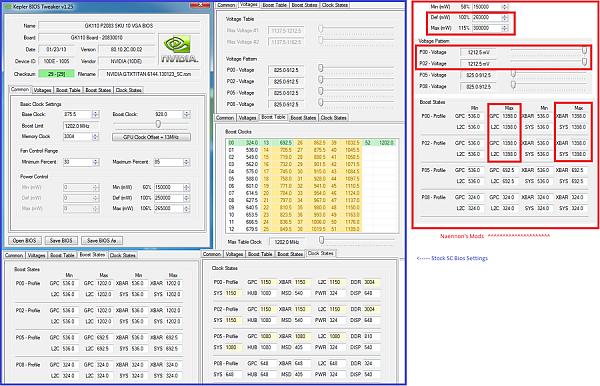
Look, I am going to show you an image of the bios, they are not mine, one is from an SC, as you can see in the clocks.
As you can see, the modifications are limited to the TDP and the 3D voltage. The P0 state. ELP3 this is useful for you, if you want to ignore the Precision X or the MSI Afterburner, you can create not the nvidia inspector an overclock that starts when you start, without having to have any of these programs running in the background.
Majo, I understand what you mean on the one hand, that is, I say, take consume more, but even so I still can't see the fact that by giving it more food it enters throotling and lowers the vcore to 1.37 or it is at 1.50 and it goes down to 1.25... when it would no longer be limited by consumption, and I am not talking about overclocking at the level that you do, which I can't reach... That is, the conclusion I come to is that the bios you use do not let them go below the voltage we put in the P0, that is why throttling disappears.
-
I agree with majo, one thing is to flash a bios that is already tested, very simple, and another thing is to modify it yourself, I wouldn't dare. I don't agree with the rest, throttling appears when the power or temperature limit is reached. If you set 115% and throttling appears with less than 100%, either you exceed the temperature, or something is not working as it should.
Regards
Pepillo, maybe I expressed myself wrong or you didn't understand me. I agree 100% with what you say because that's how it is. Let's see, I can't see Teeh's images clearly, or rather, I can't see the values. What I wanted to say is that Teeh has modified the bios in such a way that he left it half-done. He increased the maximum power consumption (TDP) but doesn't allow using more voltage than the one that comes by default, that is, the bios is half-finished. The card, as you rightly say, is limited by temperature or power consumption.
From what I've seen in the 4 I've tested (in the end I stayed with 2 because I couldn't get another 2 good ones), if the cooling is air, the maximum Vcore is not what the gpu can accept but what it can spend is 1.13V. You have to add to this what the fan and its control circuit consume, etc. to reach the maximum TDP of 250W, which Nvidia.Si allows. If you remove the fan, you're allowing the Vcore to go up to 1.16V more or less and with that voltage you also reach the 250W TDP. Teeh hasn't changed the voltage curve in the bios, that is, it still has that limit. Believe me, the energy management is like that. Of course, there are gpus that with 1.13 do 875mhz and others that do 1050Mhz, etc. depending on the quality of doping the cores have. Teeh, put larger images, I can't see them -

Perdón, vuelvo a subir la imagen.
Entiendo lo que quieres decir majo. Ahora lo entiendo. Por ello la tarjeta arranca a 1.16. Donde a mí me hace 980. Después baja y oscila entre 1.13 y 1.15. Yo creía que solamente cambiando el TDP el voltaje subiría automáticamente, pero, lo que veo es que también están limitadas por la temperatura. Es más, les da igual que tu subas de los 80 grados. A partir de ahí empieza el throttling. Luego ahí está la cuestión. El boost pasa por no dejarle bajar de un voltaje. Subir, subirá (el máximo no se puede modificar), pero el mínimo voltaje sí.
Sé que la tengo a medio cocer. Me falta limitar el voltaje mínimo.
-
Indeed Teeth. I hate to put this but beware you know there is a lot of risk, if the flashing fails. goodbye card. If I were to put any I would put this:
The BIOS is well modified, that is to say it is tested and it is much less aggressive than those of Naenon and company, but then you have to play a little with the evga precision if you want to gain something more.Si you test it is at your own risk and if you have the slightest doubt do not do it, but I already told you that it has no flaws, I mean that it is half done or that it will not start or anything like that. Remember before anything to leave the evga precision closed or in default to start from scratch.
I edit that now if I see it well, what I was telling you and I supposed from the beginning, on the screen of voltages you limit to the serial voltage P00 and P02.
I edit more, on the common screen you continue to limit to 250w 100% target and 265W with 106% power target, do not increase voltage do not do anything -
The screenshot I posted is from overclock.net. Mine is a stock one. This image belongs to an SC, like the ones you have.What I was telling you in red are the bios modifications that are circulating, which are the boost to 1400 (which would actually let the card start from 1200, the voltage modification (which leaves it at 1.21 fixed) and the TDP (which leaves it at 150%). The rest of the values are untouched.
I, ignorant of me, copied my bios with GPUz and then, with bios tweak, I only modified the TDP.
Thanks for the bios. It's from an SC, right? From what I see the TDP at 100% is equivalent to 107% of the original, and, the next one to 15% of the original.
I also see a modification between the state P00 and P02 of between 1.17 and 1.18. I imagine that these will be the values in which the vcore will fluctuate, right? I would like to leave it at 1.16, I wouldn't like to put more voltage into it.
This is what I was telling you that I had missed changing.


Hello! It looks like you're interested in this conversation, but you don't have an account yet.
Getting fed up of having to scroll through the same posts each visit? When you register for an account, you'll always come back to exactly where you were before, and choose to be notified of new replies (either via email, or push notification). You'll also be able to save bookmarks and upvote posts to show your appreciation to other community members.
With your input, this post could be even better 💗
Registrarse Conectarse