MB Asus p8b75 MLX-PLUS, it came out on the MB TEMp -63 degrees and then …
-
I have an Asus P8b75 MLX-PLUs MB: micro Dual Core G2020 vel 2.9 and GSkill 1866 ram, note that it only takes 1333. and an nvidia 9500 GT video card..now…
A week ago it showed me the Aus Suite Tool from asus to monitor the pc...
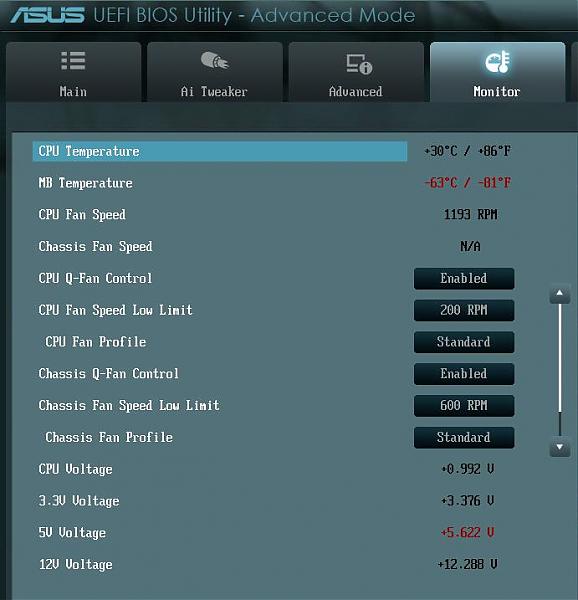
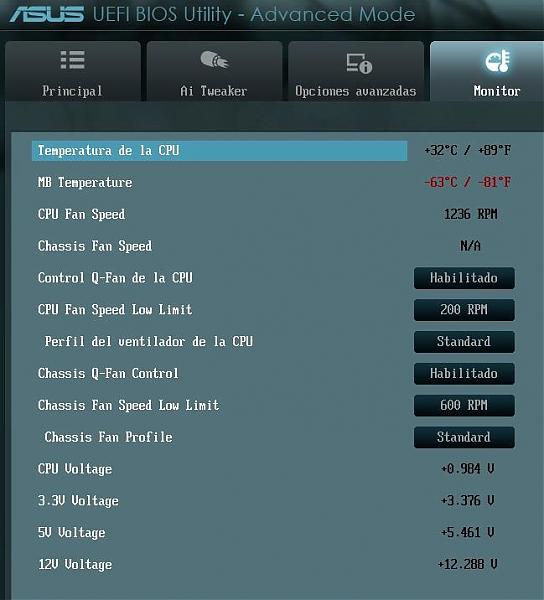
that the MB temperature was -63 degrees C and -81 degrees F...I kept working and yesterday...working in After Effect, I felt it was slow..and I turned it off for a while...when I turned it on again, it had a sign that the Asus Surge from the board went up...because of the voltage and it shows me this image...IMAGE 1...I disconnected it and changed the power supply that mine is not very good...for another and it was still the same....I removed all devices, left it only with the keyboard and monitor......and it gave me this...
IMAGE 2...
WHAT COULD HAVE HAPPENED?.....GREETINGS TO ALL!!!...AND HELP ME PLEASE...
-
A negative temperature is usually a symptom that the probe is damaged, but as you explain it like a closed book, it is difficult to tell.
Salu2!
Intel i5 3570k / ASRock Z77 Extreme 4 / G.Skill F3-12800CL9D-8GBRL / Sapphire HD5850 / Samsung HD103UJ / TR TrueSpirit / NZXT Source 210 / OCZ ZS550W
Intel i5 4570 / ASRock H87 Pro 4 / 2x G.Skill F3-14900CL8-4GBXM / Samsung 850 EVO 250Gb + ST1000DM003 + ST2000DM003 + HGST HDS723020BLA642 + Maxtor 6V250F0 / CM Seidon 240M / Zalman MS800 / CM MWE 550
AMD Ryzen 7 1800X / B350 / 2x8GB Samsung DDR4-2400 CL17 / NVIDIA GTX 1070 8GB / SSD 120GB + ST4000DM004 + ST6000DM003 / EVGA Supernova 650 G2 -
And that is solvable… what else can it be.... another question could be a high or low voltage of the current..... or humidity?
-
1.-Damaged probe.
2.-Bad explanation.
3.-Write with a capital letter in the first letter of all words
Check that, let's see if we can help you more later :sisi:
Regards
>> i7-2600K Sandy Bridge @4.4GHz || Noctua NH-D14 || ASRock Z77 Extreme4 || 4x8Gb G.Skill Ripjaws X DDR3 1600MHz || XFX RX 5700 XT 8Gb || SSD Samsung 850 PRO 256Gb & 850 EVO 500Gb || WD Caviar Green 1Tb || Barracuda 1Tb || Corsair TX650 V2 || M-Audio Fast Track Pro || KRK RP8 RoKit G3 || BenQ GW2750 27"
>> Athlon 64 X2 5600+ Brisbane @2.9GHz || Gigabyte GA-M61PME-S2 || 2x2Gb DDR2 Kingston 800MHz || Sapphire Radeon HD 5850 Xtreme 1Gb || Maxtor 320Gb SATA2 || OCZ ModXStream 500W Modular || TEAC PowerMax 120/2 || Acer X243w 24"
>> Intel Core2Duo E6600 Conroe @2.4GHz || Asus P5N32-SLI SE DELUXE || 2x1Gb DDR2 Kingston 800MHz || Asus nVidia GeForce 9800GT 1Gb GDDR3 || Seagate Barracuda IDE 80Gb 7200RPM || Linkworld LPK12-35 450W -
I have an Asus P8b75 MLX-PLUs motherboard: dual core G2020 micro vel 2.9 and GSkill 1866 ram, note that it only takes 1333. and an nvidia 9500 GT video card..now…THE POWER SUPPLY IS BAD..I THINK THE BRAND IS EUROPE ELECTRI SOMETHING LIKE THAT...WELL THE CASE IS THAT...
A week ago it showed me the Aus Suite Tool from asus to monitor the pc...
that the temperature of the MB was -63 degrees C and -81 degrees F..NOTE...-63 NOT +63.....AND IT SHOWED IT TO ME IN THE SETUP.....I kept working and yesterday...working in After Effect, I felt it slow..and I turned it off for a while...when I turned it on again,, IT REbooted AND had a sign (Power supply surges detected during the previous power on. Asus Anti-Surge was triggered to protect system from unstable power supply unit!)..
and
the voltage values were like this!!..
Cpu Voltage +0.992 v
3.3v Voltage +3.376 v
5v Voltage +5.763 v ** IN RED**
12v Voltage +12.288and above in the temperature it stayed fixed:
MB Temperature -63degrees C / -81Grados FI turned it off, disconnected the video card and everything...I only connected the keyboard(PC2) and the monitor..removed HDD and everything.....and reset the bios, removing the battery....and I changed the power supply to another one that is not very good either, it is 550w 2A...and the values became like this...
Cpu Voltage +0.984 v
3.3v Voltage +3.376 v
5v Voltage +5.461 v without being in red
12v Voltage +12.288.....
and I no longer get the Anti Surge sign...but I do not want to use it because I do not know if I damaged it or not...what do you suggest I do.......GREETINGS AND PLEASE HELP ME!!!..THANK YOU!! -
3.-Escribir con mayúscula en la primera letra de todas las palabras
That's what VBulletin does, when you write everything in uppercase ¬¬
In summary, you had a very bad font, as expected it ended up messing you up, and you ruined the sensor of the board.
If you have learned the lesson, you will put a reliable and decent font and evaluate possible damage to the rest of the components, or you will put another one that is just as bad, and let the party continue.
Salu2!
Intel i5 3570k / ASRock Z77 Extreme 4 / G.Skill F3-12800CL9D-8GBRL / Sapphire HD5850 / Samsung HD103UJ / TR TrueSpirit / NZXT Source 210 / OCZ ZS550W
Intel i5 4570 / ASRock H87 Pro 4 / 2x G.Skill F3-14900CL8-4GBXM / Samsung 850 EVO 250Gb + ST1000DM003 + ST2000DM003 + HGST HDS723020BLA642 + Maxtor 6V250F0 / CM Seidon 240M / Zalman MS800 / CM MWE 550
AMD Ryzen 7 1800X / B350 / 2x8GB Samsung DDR4-2400 CL17 / NVIDIA GTX 1070 8GB / SSD 120GB + ST4000DM004 + ST6000DM003 / EVGA Supernova 650 G2 -
as you have been told, little more than changing the font for a decent one and praying that the broken part is just the temperature probe
-
Today I measured the voltage that the power supply is giving and it is correct…5.130 to 5.200 and the usb of the board...and also...it seems that the temperature sensors are broken...because the current that the power supply gives is correct and the one that is on the board is also correct....what do you think...regards!!!


Hello! It looks like you're interested in this conversation, but you don't have an account yet.
Getting fed up of having to scroll through the same posts each visit? When you register for an account, you'll always come back to exactly where you were before, and choose to be notified of new replies (either via email, or push notification). You'll also be able to save bookmarks and upvote posts to show your appreciation to other community members.
With your input, this post could be even better 💗
Registrarse Conectarse