Help my PC keeps restarting after performing OC
-
Hello, I just want to tell you that I only tried to increase the "CPU FSB" to 400mhz as a forum member recommended me:


(I must say that I previously tried to increase only 10 mhz to 343 and the OS would not start anymore) without touching anything else, leaving the rest on automatic, and it no longer works! I tried removing the battery, which I had done before with 10 seconds being enough, and I put it back in this time and nothing, I tried leaving it out for up to 10 minutes but nothing, and about the CMOS Clear, on my motherboard I don't have the jumpers and I lost it (I don't know if this could be the reason why the bios doesn't reset!!?):

I tried pressing the CMOS button for 10 seconds that my motherboard has integrated and nothing, I tried pressing it for longer and nothing at all, so I took my PC to a technician and they said it's the motherboard that's not working (but I don't trust them because they want to charge me money for another one, when it's possible to fix the PC)!!!
What bothers me about this is that I haven't even touched the voltage and the PC didn't start up for it to get damaged :wall:
I hope you can clarify the issue, if it's possible to revive my motherboard, since it still turns on, the problem is that the computer keeps restarting!!!
-
A forum member from which forum?
Booting without the CLEAR_CMOS bridge?
-
After a CMOS is removed the jumper is put back as it was. If it doesn't work remove the battery for a few minutes. If it still doesn't work the board is probably dead.
Make sure you have done the CMOS correctly, with 3 pins there is no doubt, with 4 you may not have jumpered the correct pins.
-
No importa que forero es, de todas formas no es su culpa…¬¬
Acá esta una foto del modelo de mi placa base y solo tiene 2 jumpers, en una parte y no sé si seran tambien para el Clear CMOS:

Ya que estas placas llevan integrado el boton para el Clear CMOS:

Espero que me puedan ayudar, ya que no creo que el pc no encienda si se le quitan los jumpers del Clear CMOS (y hace mucho tiempo que la quite y iniciaba el pc), que para eso esta la pila de la bios no!!?
O sin los jumpers no puedo formatear la bios aunque cambie de pila y por eso no funciona mi placa?? -
[…]and about the CMOS Clear on my motherboard I don't have the jumpers and I lost it (I don't know if it could be because of this that the bios doesn't reset!!?)[…]
[…]I took it to a technician[…](but I don't trust them because they want to charge me money to pay for another one, when it's possible to fix the pc)!!!
/evilmode_on
This (the OC) is done, at least, after having read several guides and after asking a lot, and having very clear the consequences.
As far as I know, and correct me if I'm wrong, a motherboard won't boot without the battery or without the CLEAR_CMOS bridge in the working configuration.
Not trusting an expert, whom at least you have in front of you and if he does a bad job you can complain, and trusting someone you don't even know or have in front of you is, at the very least, intriguing.Get the manual for your motherboard, buy the jumpers you need and install them correctly.
Your luck, in the worst case, is that you will only have fried the motherboard, because if you touched the voltages, you might even have to change memory and micro.For next time, listen to the old lady above.
/evilmode_off
-
/evilmode_on
This (the OC) is done, at least, after having read several guides and after asking a lot, and having very clear the consequences.
As far as I know, and correct me if I'm wrong, a board will not boot without the battery or without the CLEAR_CMOS bridge in the working configuration.
Not trusting an expert, whom you at least have in front of you and if he does a bad job you can complain, and trusting someone you don't know or have in front of you is, at the very least, intriguing.Get the manual for your motherboard, buy the jumpers that are missing and install them correctly.
Your luck, in the worst case, is that you will only have fried the motherboard, because if you touched the voltages, you might even have to change the memory and the micro.For next time, listen to the old lady above.
/evilmode_off
Let me clarify, I did read guides, not all of them but some yes, and I asked and all that, but as all or some companies have to make money…about trusting I say this from personal experience, with those people I had the same thing with the graphics card, they said it was impossible to fix, but I investigated on my own and I could make it functional at least temporarily, following some methods...And also when I did the internship at the company, they didn't always tell the truth...oh and also when I asked if the microprocessor worked, they said it wasn't necessary since if the board doesn't work what good is it, but I thought, if the micro doesn't work even if the board does the system won't boot!!!
And about whether the PC boots or not with or without the CLEAR_CMO bridge, I answer that it does boot, as I said I've gone months without it, another thing is if without the CLEAR_CMO bridge the BIOS is restored, but as I said if you change the battery you wouldn't need the CLEAR_CMO bridge, wouldn't you think so!!
-
It doesn't matter that the PC has been working for months without a clear CMOS bridge. It is evident that there has been some change in your motherboard and that may have caused it not to start up without the bridge now. My experience tells me that a motherboard without a bridge does not start up.
Put a bridge on it and comment on the results.
You can get a bridge from any IDE device (hard drive or CD/DVD reader) or from any motherboard or card you have lying around.
Toda la actualidad en la portada de Hardlimit
Mis cacharros -
I already put a jumper on it and there were no results… so I won't try to do an OC in my life...:wall:
I don't understand why they don't disable that option if it ends up breaking the PC, it seems like they do it on purpose...
Also, I don't understand why in the current motherboards Intel Socket 2011 it says:"Supports DDR3 2400+(OC)/2133(OC)/1866(OC)/1600/1333/1066 non-ECC, un-buffered"
So in order for it to recognize the 2400 RAM I would have to do an OC!!!! And why doesn't it recognize them without doing the OC, or do they want me to buy a 2x1!!!
I imagine that at least these motherboards will have some kind of software to help you or it's done the same way from the BIOS, with the same risks as the old motherboards, (like mine that breaks without even touching the voltage!!!) :ffu:
-
Come on, they don't break... They break if you do it wrong, but everything is designed to do it, even with pleasure, without having to strain your brain too much... In the old days, you really had to break a sweat to do Overclock, and the manufacturers didn't give the slightest possible margin of action, in fact, they warned that if you did overclock, you would lose the warranty of the components.
Flash your BIOS and start over, see if that way you can get it to work, but I think you have something plugged in wrong for it not to start up, the new platforms are almost impossible to burn out with OC...
Regards
>> i7-2600K Sandy Bridge @4.4GHz || Noctua NH-D14 || ASRock Z77 Extreme4 || 4x8Gb G.Skill Ripjaws X DDR3 1600MHz || XFX RX 5700 XT 8Gb || SSD Samsung 850 PRO 256Gb & 850 EVO 500Gb || WD Caviar Green 1Tb || Barracuda 1Tb || Corsair TX650 V2 || M-Audio Fast Track Pro || KRK RP8 RoKit G3 || BenQ GW2750 27"
>> Athlon 64 X2 5600+ Brisbane @2.9GHz || Gigabyte GA-M61PME-S2 || 2x2Gb DDR2 Kingston 800MHz || Sapphire Radeon HD 5850 Xtreme 1Gb || Maxtor 320Gb SATA2 || OCZ ModXStream 500W Modular || TEAC PowerMax 120/2 || Acer X243w 24"
>> Intel Core2Duo E6600 Conroe @2.4GHz || Asus P5N32-SLI SE DELUXE || 2x1Gb DDR2 Kingston 800MHz || Asus nVidia GeForce 9800GT 1Gb GDDR3 || Seagate Barracuda IDE 80Gb 7200RPM || Linkworld LPK12-35 450W -
I think the problem is that it doesn't pass the POST, so it's not possible to access the BIOS, much less flash it.
Assuming it's a dual BIOS motherboard, the secondary one may still have an incorrect configuration that prevents booting, as long as the jumpers are in the correct positions. Check the manual and double-check them.
Removing the battery is not recommended. That's what the CLEAR_CMOS bridge is for. With respect to said bridge, it usually has three terminals: with the central one as common, it opens or closes the circuit that powers the BIOS, depending on whether it is placed in one position or another.
I still think it's a matter of the bridge, or perhaps the battery or its socket have some problem. -
But can you tell me how I'm going to flash the bios if the computer turns on and restarts indefinitely!!!
-
Thanks anyway, it's not an easy topic to deal with, it may already be broken, or a jumper problem that doesn't allow the computer to start. Anyway, I'll try to take it to a trusted technician these days and see if he can fix it for me!!!
-
Well, you can't flash the bios if it doesn't even boot, of course, don't worry, people try to help even if it's sometimes a bit of a guess.
For us, the main problem is that we don't have even a hint of the necessary information to follow a checklist, and we wouldn't have it even if you wrote it a thousand times. When someone who knows very, very well what they're doing has an unexpected problem, they can usually rule out many things directly and create feasible suspicions, because they know exactly everything they've done and how.
As they tell you, it's very difficult to ruin a modern motherboard doing OC, even doing the beast with voltages, it would have to be that you did something out of the ordinary or that the motherboard really has a problem. If it were the micro or the ram, the bios would beep at startup (you haven't removed the beeper/microphone, right?).
On the other hand, I'll tell you that even the most experts don't touch things they're not sure about, because they clearly understand the difference between knowing for sure what you're doing and not knowing, and as your manual says that the bridge must be in a certain way to work, I don't understand how you got involved in experiments and now you're speculating that the manufacturer set you up by inviting you to overclock.Before taking it to a specialist, calm down, arm yourself with patience and mentally review everything you did, EVERYTHING. Helping you from here is difficult because your case is a mystery, and we can't review everything you did (you can, though).
And next time you do OC, don't be adventurous, learn all the procedures in depth and follow them to the letter, those of us who do OC with ease aren't inventing anything or taking risks, we just make sure to know well what we're going to do before anything.Oh, and don't get hooked on OC, get hooked on doing things adventurously.
I can't give you the solution for this case, but for your next OC: Don't make assumptions
Good luck and keep commenting what's needed.
Regards.
-
If you have the jumpers in the original position, leave the board without memory and turn off the computer completely, until you remove the plug from the wall.
Then, remove the battery, press the start button, and leave it alone for several hours.
If your board does not have a speaker, it is time to put one on.
When you return, put the battery, plug it in, and after not less than thirty seconds to confirm that it does not try to start on its own, press the power button.
If the board does not beep due to lack of memory, or the micro or the board is dead, and it will be necessary to remove the processor to confirm that it is a problem with the micro, and by the way, observe the contacts of the socket, in case any are bent.
Salu2!
Intel i5 3570k / ASRock Z77 Extreme 4 / G.Skill F3-12800CL9D-8GBRL / Sapphire HD5850 / Samsung HD103UJ / TR TrueSpirit / NZXT Source 210 / OCZ ZS550W
Intel i5 4570 / ASRock H87 Pro 4 / 2x G.Skill F3-14900CL8-4GBXM / Samsung 850 EVO 250Gb + ST1000DM003 + ST2000DM003 + HGST HDS723020BLA642 + Maxtor 6V250F0 / CM Seidon 240M / Zalman MS800 / CM MWE 550
AMD Ryzen 7 1800X / B350 / 2x8GB Samsung DDR4-2400 CL17 / NVIDIA GTX 1070 8GB / SSD 120GB + ST4000DM004 + ST6000DM003 / EVGA Supernova 650 G2 -
Thanks for the advice, but the truth is that I have already abandoned the motherboard and the reason is that I took it to a friend's house to test if the micro is still working, but when I removed its heatsink with plastic pins, and tried to put it back in it broke (just like mine):facepalm:
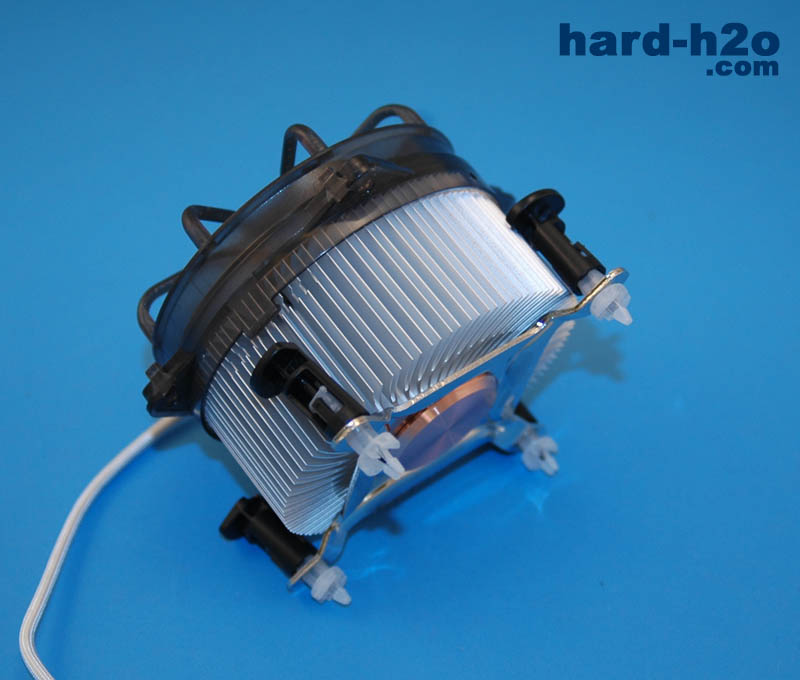
So I had to put mine on it and the joke is that I had to disassemble my motherboard and his because this heatsink has an iron bracket that goes under the motherboard:
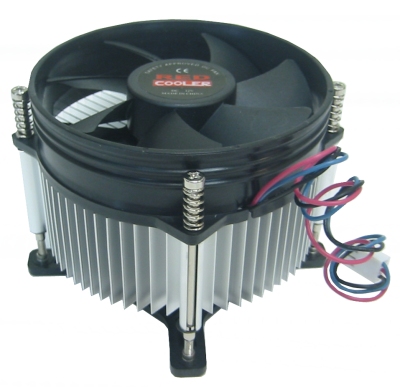
And it took us several hours to find a manual from a mobile phone to connect the front panel cables and get the PC to start...:wall:And as I know it will be almost impossible to recover my motherboard, apart from having to pay again to a technician for the review and a heatsink, I have already proposed in the meantime to buy a fan to hold out with the laptop, and save money to buy the motherboard:
Asrock X79 Extreme6

Asrock X79 Extreme6 90-MXGL80-A0UAYZ Placa BaseAnd the CPU:
Intel Core i7-4820K 3.7Ghz Box
Intel Core i7-4820K 3.7Ghz Box BX80633I74820K Procesador
What do you think of the idea? Any suggestion would be welcome_!!!_ :vayatela:
-
With that motherboard and that micro you want to buy, you will surely also buy a decent heatsink, because once you have started saving, save first and foremost for a decent heatsink that is compatible with both sockets, and so while you are using the laptop, you can get your motherboard and do what Fassou says before taking it to a technician or buying something else.
Regards.





