I need help, I don't know what can happen anymore.
-
Hello, I've been around the forum for a while, and I've never dared to enter and introduce myself, but today I feel forced to, since I can't find an answer anywhere.
Yesterday I bought a shappire r9 290x with the code for battlefield4, and very excited, after installing it, I started playing online with everything on ultra, the game was perfect, everything looked great, but I had fps drops every 2 or 3 minutes.
The game works perfectly for me, fluid, 80fps, but it has drops to 20fps, and then it's fluid again, and like this it becomes impossible to play, it also happens with other games.This is the error that my old asus gtx 560ti gave me, which I thought wasn't working well because it wasn't all amd, before I played battlefield 3 with everything on ultra, and the same thing happened to me, fps at 60, and drops that stuck at 10 fps and then went up again.
I don't know what to do anymore, I've spent 350€ and I still have the same error, I don't know if it's a bottleneck, the motherboard, I don't know.
I ask for help in general, to see if someone understands and can lend a hand.
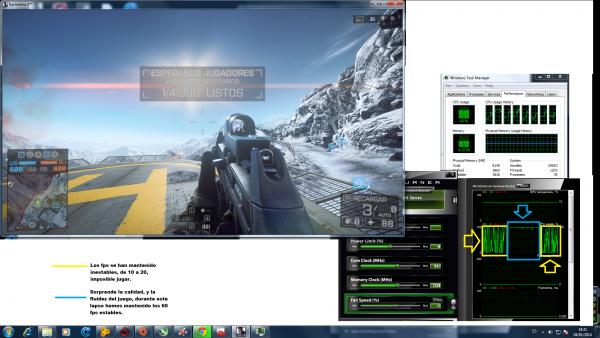
I attach an image of the msi afterburner, which shows the load drops on the gpu, which surprisingly coincide with the frame drops.

Windows 7 Complete Edition \u200e(X64)\u200e
-Windows installation date: 11/10/2013
Processor
-AMD FX-8150 at 3.60 GHz
Number of processors: 8 f(s), 8 Logical(s)
Processor socket: Socket AM3+ (942)
Motherboard
-ASRock 970 Extreme4
#SKU: To Be Filled By O.E.M.
BIOS Version: P2.30
Date: 01/17/2013
Chipset
North Bridge : AMD RD9x0
Revision ID: 02
South Bridge : AMD SB910/950
Revision ID: 40
Memory
Total Memory 8 GB DDR3
G.Skill Memory Chip 8 GB
Maximum frequency: 667 MHz
Maximum Bandwidth: PC3-10700
Graphics Card
-AMD Radeon R9 200 Series
DirectX Version: 11.0
Power Supply- Aerocool Strike-X 600W Modular
Hard Drive ST1000DM003-1CH162 931.51 GB SATA III
Firmware: CC47
SATA Version: SATA Rev 2.6
Serial Number: Z1D4QGLH
HDD Temperature: 35 °C
Power-On Time: 2550 Hours
Thank you very much to everyone, and a pleasure to be part of the forum;D
- Aerocool Strike-X 600W Modular
-
A first impression is that with that micro, you will have to have the temperatures it reaches well controlled. Put some screenshot of the memory configuration (Memory and SPD tabs of CPU-Z), and the images better in some external service, to be able to see it larger (Eg: tinypic.com). Salu2! and Welcome to the forumIntel i5 3570k / ASRock Z77 Extreme 4 / G.Skill F3-12800CL9D-8GBRL / Sapphire HD5850 / Samsung HD103UJ / TR TrueSpirit / NZXT Source 210 / OCZ ZS550W
Intel i5 4570 / ASRock H87 Pro 4 / 2x G.Skill F3-14900CL8-4GBXM / Samsung 850 EVO 250Gb + ST1000DM003 + ST2000DM003 + HGST HDS723020BLA642 + Maxtor 6V250F0 / CM Seidon 240M / Zalman MS800 / CM MWE 550
AMD Ryzen 7 1800X / B350 / 2x8GB Samsung DDR4-2400 CL17 / NVIDIA GTX 1070 8GB / SSD 120GB + ST4000DM004 + ST6000DM003 / EVGA Supernova 650 G2 -
A first impression is that with that micro, you'll have to keep the temperatures it reaches well controlled.
Put some screenshot of the memory settings (Memory and SPD tabs of CPU-Z), and the images better on some external service, to be able to see it larger (Eg: tinypic.com).
Salu2! and Welcome to the forum
Thanks,
here I leave you what was requested:

I have liquid cooling, for this heat.I add the photo from before, well uploaded

-
Since BF4 has things to polish, and you say it happens to you in other games, I will recommend some things you can check to improve overall performance.
I see that you only have one memory, so unless you have the option to buy another one to take advantage of Dual Channel, you can try activating the XMP-1600 profile in BIOS, to improve its bandwidth.
Set up the Virtual Memory manually by setting the recommended amount as maximum and minimum, which reduces access to HDD for paging. Or put an SSD and forget about bottlenecks related to the hard drive, and having to defragment, for a good season ;D
If the failure happens to you only with BF4, use the post dedicated to the game.
Salu2!
Intel i5 3570k / ASRock Z77 Extreme 4 / G.Skill F3-12800CL9D-8GBRL / Sapphire HD5850 / Samsung HD103UJ / TR TrueSpirit / NZXT Source 210 / OCZ ZS550W
Intel i5 4570 / ASRock H87 Pro 4 / 2x G.Skill F3-14900CL8-4GBXM / Samsung 850 EVO 250Gb + ST1000DM003 + ST2000DM003 + HGST HDS723020BLA642 + Maxtor 6V250F0 / CM Seidon 240M / Zalman MS800 / CM MWE 550
AMD Ryzen 7 1800X / B350 / 2x8GB Samsung DDR4-2400 CL17 / NVIDIA GTX 1070 8GB / SSD 120GB + ST4000DM004 + ST6000DM003 / EVGA Supernova 650 G2 -
Monitor the GPU load, if the dips occur while the GPU load also drops a lot, you can start to think that your system is bottlenecking that card.
BF4 seems to have a lot of bugs, but if you say it does it with more games, it's possible that your system isn't letting that card work properly, it's easy to see as I tell you if you see that the card's load goes up and down a lot and when it goes down it's the fps drops, it will most likely be a problem with the system.The 560Ti is not a problem to run on AMD platforms, the thing is that it doesn't have the power or vram for certain games, it's normal that if it reaches almost the limit of the stutter memory and even would stay like a slideshow if it exceeds all the vram, the 290 is different it's a very powerful graphics card and requires better equipment, but that of the 560Ti and the instability could also be a problem with the CPU OC if it wasn't set right, it can cause stutters and dips.
regards
-
When you change graphics cards, the drivers of the previous one can usually cause problems, so this program is used to remove the drivers and proceed to reinstall the new ones
I usually format and start from there
Regards.
-
Monitor the GPU load, if the drops occur while the GPU load also drops a lot, you can already think that your equipment is bottlenecking that card.
BF4 seems to have a lot of errors, but if you say it does it with more games, it's possible that your equipment isn't letting that card work well, it's easy to see as I tell you if you see that the card's load goes up and down a lot and when it goes down it's the fps drops, it will most likely be the equipment's fault.The 560Ti is not a problem to run on AMD platforms, what happens is that it doesn't have the power or vram for certain games, it's normal that if it reaches almost the limit of the slivers memory and even it would stay like a slideshow if it exceeds all the vram, the 290 is different it's a very powerful graphics card and requires better equipment, but that of the 560Ti and instability could also be a matter of OC to the CPU if it wasn't well, it can give jerks and drops.
greetings
as you said, the drops correspond with the gpu load, let's say that then the graphics card is bottlenecking with the equipment, what is the solution?
Above I have the characteristics, you can draw conclusions from there.
The cpu is newly bought, I haven't done any kind of oc to any component.
Do you think this graphics card is not compatible with the fx, and the motherboard?
Then what do I do, buy the Republic of Gamers card, and the latest from Intel?:wall:
(All the equipment is new, newly bought)When you change graphics cards, usually the drivers of the previous one can generate problems, this program is used to remove the drivers and proceed to reinstall the new ones
I usually format and start from there
Greetings.-
Just as soon as the graphics card arrived home, the first thing I did was to clean everything I saw from Nvidia, but still..
The last step is already known, format and see what happens, but of course, this I want to be the last option, ruling out possible problems with the hardware.thank you very much to everyone, I continue in your hands and looking for solutions
-
as you said, the dips correspond with the gpu load, so the graphics card is a bottleneck with the system, what is the solution?
I have the specs above, you can draw conclusions from there.
The cpu is new, I haven't done any overclocking on any component.
do you think this graphics card is not compatible with the fx, and the motherboard?
so what do I do, buy the Republic of Gamers motherboard, and the latest from Intel?:wall:
(all the equipment is new, just bought)as soon as the graphics card arrived home, the first thing I did was clean everything I saw from nvidia, but still..
the last step is known, format and see what happens, but of course, I want this to be the last option, ruling out possible hardware problems.thank you all very much, I am still in your hands and looking for solutions
Compatible it is, but the AM3+ architecture is a bit outdated for very powerful graphics cards, even more so when you add SLI and CF, it's not a matter of the CPU, it's more that it gets bogged down when the front bus isn't renewed, it also still has the Pcie controllers in the Chipset, it doesn't have native Pcie3.
For example, Intel when giving support to SLI did was redesign the bus, moving from FSB to QPI, and although it still had the controller in the Chipset, this made it better use the cards, then it moved to DMI which already has the controller inside the CPU and is faster, also it has already released two native Pcie3 platforms.
In any case, it is said that with Mantle the CPU will have less influence, it could improve the use of the graphics cards, another option will be to overclock the CPU and you will surely thank the graphics card, you can try to increase the CPU and memory and it should improve, if they release the Mantle patch for BF4 soon, it is possible that this game will improve quite a bit.The problem that AMD has in CPUs compared to Intel is the manufacturing process, if it could manufacture like Intel at 22nm it would almost be ready for 16nm, it could make a good architecture, it wouldn't need to release such large processors, it could integrate everything into the CPU, but I think it still manufactures at 32nm or 28nm and this way you can't compete with Intel that is already almost ready to release 16nm, it has been manufacturing at 22nm for a long time, that's why it must make larger CPUs and can't integrate so many things into the CPU, also a larger CPU is expensive.
regards
-
Thanks for the advice, buddy javi, everything is very well explained, but I'm not very knowledgeable about the subject, even so I've been able to draw my own conclusions:ugly: Many thanks

What I understand is that the processor falls short in front of the graphics, so I have to practice oc.
Come on, those from intel, with the money they make extra compared to amd with their products, please us with higher quality hardware, like you explained, a manufacturing at less nm would give room for a more complex architecture within the processor itself, right?
regarding doing the oc… I don't have much idea of how to do this.. an explanation would be appreciated

I leave you an image of a benchmark of the metro, everything at max, you can see that those drops in fps, just like in the btf, are very similar to the load drops of the gpu.

What could this drop in load be due to? The power supply? And most importantly, is there a solution that doesn't involve new hardware?
(The pc is newly formatted, clean installation of drivers):wall:
I've also run all the tune up modules, optimized and all that, you know.thanks for everything to everyone, let's see if we can get to the bottom of this:osvaisacagar:
Best regards
-
Well, for me it's a buffer problem, that the machine processes more data than the hard drive supplies.
To corroborate this, try to contrast those crashes (whose interval seems regular to me) with the hard drive activity.
I agree with Fassou about the virtual memory configuration and the acquisition of an SSD (one of 60 GB would be enough) or at least another hard drive to house the swap file there. It's something that greatly increases performance for the expense it entails, but it seems that the "single disk" fashion is still in vogue. :ugly:
Regards. ; ) -
Thanks for the advice, buddy javi, everything is very well explained, but I'm not very knowledgeable about the subject, even so I have been able to draw my own conclusions:ugly: Many thanks
What I understand is that the processor falls short compared to the graphics, so I have to practice overclocking.
Come on, Intel, with the extra money they make compared to AMD with their products, they please us with higher quality hardware, like you explained, manufacturing at a lower nm would allow for a more complex architecture within the processor itself, right?
regarding overclocking… I don't have much idea of how to do this.. an explanation would be appreciated
I leave you an image of a benchmark of Metro, everything at maximum, you can see that those drops in fps, like in BTF, are very similar to the GPU load drops.
What could this load drop be due to? The power supply? And most importantly, is there a solution that doesn't involve new hardware?
(The PC is newly formatted, clean driver installation):wall:
I've also run all the tune up modules, optimized and all that.Thanks to everyone, let's see if we can get to the bottom of this:osvaisacagar:
Best regards
It's easy to see if it's the hardware or the CPU that limits you, if you increase the frequency, increase memory and it runs more stable, it's asking for a CPU, Metro 2033 is a game that's not very CPU demanding and very demanding of graphics, in that game it should run better than for example BF4 or Crysis 3, many things influence like resolution or the game engine.
Also, before that, monitor the frequency to see if it stays stable, I mean the graphics frequency, you could do this with MSI afterburner while playing, if it goes up and down constantly, maybe it's a lack of voltage and that's why it lowers frequencies, if the load is constant but varying in moments of high load and moments of significant drops in load, it may be the hardware, then by increasing the CPU you could see if things improve, but Metro2033 should be a game where the load would remain high on the card.But there could be several things, for example at a low resolution the CPU limits earlier and those cards should already run better with higher resolution.
Then in Metro LL don't put supersampling, it has a flaw, at least with Nvidia, if you put SS it greatly lowers the card's load, I don't know if they've fixed it with a patch, I don't think so, it could be because of that, if you run it without SS and it improves stability a lot, it's the fault of that filter.
regards
-
It's easy to see if it's the hardware or the CPU that's limiting you, if you increase the frequency, increase the memory and it runs more stable, it's asking for a CPU. Metro 2033 is a game that's not very CPU demanding and very demanding of graphics, in that game it should run better than for example BF4 or Crysis 3, many things influence like resolution or the game engine.
Also, before, monitor the frequency to see if it remains stable, I mean the frequency of the graphics, you could do this with MSI afterburner while playing, if it goes up and down constantly maybe it's a lack of voltage and that's why it lowers frequencies, if the load is constant but varying at times of high load and times of significant drops in load, it may be the hardware, then by increasing the CPU you could see if things improve, but Metro2033 should be a game where the load would remain high on the card.But there may be several things, for example at a low resolution the CPU limits earlier and those cards should already run better with higher resolution.
Then, don't put supersampling in Metro LL, it has a flaw, at least with Nvidia, if you put SS it greatly lowers the load of the card, I don't know if they have fixed it with a patch, I think not, it could be because of that, if you run it without SS and it greatly improves stability, it's the fault of that filter.
regards
Hi javi! reading your post I noticed the core clock, it also drops in performance, according to these drops that we have been commenting on.
Coincidentally, Metro is the one that works the worst for me, without filters and without anything, it goes badly, on the other hand, the battlefield becomes more "playable".
So, if I increase the voltage on the graphics, will it improve things?
(I have an R9, and according to what they say it usually reaches up to 95ºC at maximum performance) I haven't reached that temperature with the MSI open, nor have I obtained the performance that is talked about for this card.
maybe the voltage is low, and that's why it doesn't end up working stable, and it doesn't reach the "optimal" temperature?thanks
-
Hi javi! while reading your post, I noticed the core clock, it also decreases in performance, in line with these drops we have been discussing.
Coincidentally, the metro is the one that works the worst for me, without filters and without anything, it's terrible, on the other hand, the battefield becomes more "playable".
So, if I increase the voltage on the graphics card, will it improve things?
(I have an r9, and according to what they say, it usually reaches up to 95ºC at maximum performance) I have not reached that temperature with the MSI open, nor have I obtained the performance that is talked about for this card.
maybe the voltage is low, and that's why it doesn't work stably, and it doesn't reach the "optimal" temperature?thanks
You need to make a fan profile, because if it reaches 95º it's normal that it lowers frequencies, the first thing is to make a fan profile so that it doesn't reach such high temperatures and with that it's possible that it will keep your frequency well, without the need for voltage.
The thing with Metro is perhaps because when the graphics card's temperature rises, the frequency drops and that's why it goes worse, but before doing anything else, what you should do is put MSI afterburner and monitor temperature, frequency and put a better fan profile, it's going to be noisier but if not, it won't perform well.
regards
-
You have to make a fan profile, it's that if it reaches 95º it's normal that it lowers frequencies, the first thing is to make a fan profile so that it doesn't reach such high temperatures and with that it's possible that it keeps your frequency well, without the need for voltage.
The thing with Metro maybe is because when the temperature rises on the graphics it lowers frequencies and that's why it goes worse, but before doing anything else what you should do is put MSI afterburner and monitor temperature, frequency and put a better fan profile, it's going to be more noisy but if not it's not going to perform well.
saludos
yes of course, but I have never reached 95ºC nor have I reached to perform with the graphics at the maximum of what is specified:ffu:, so, people talk wonders of this graphics at ultra with the btf 4, or other games, and I have these drops?xD
how do I raise the voltage and in what safe values?
(Why all this fuss, when all the parts I have are new?) I suppose it shouldn't go so bad
Thanks
-
yes of course, but I have never reached 95ºC nor have I reached to render with the graphics at the maximum of what is specified:ffu:, so, people talk wonders of this graphics at ultra with the btf 4, or other games, and I have these crashes?xD
how do I increase the voltage and in what safe values?
(Why all this fuss, when all the parts I have are new?) I suppose it shouldn't be going so wrong
Thanks
Well the graphics should perform what maybe something is not right, it could be several things it could be a bottleneck or the one they tell you about the buffer, even it could be power supply or faulty graphics.
It is very strange those ups and downs of BF4 and the fps of Metro LL, it is not normal that of so little, that graphics is Saphire? I ask because some came out that need a new vbios, it is also very strange that with the 560 you already had the problem of stuttering, because that card will not be a bottleneck, check if you have put the Windows updates because with AMD it gives you an update that improves the performance of those CPUs. I think what happens to you is strange, for a bottleneck it would be less stable and would perform less but it shouldn't have those ups and downs of BF4, so often it's as if something did not allow the graphics to work well and is cutting the frequency, I think the power supply if it has only one rail it should not be a problem.
Before anything did you update the bios of the motherboard?
that is the first thing you should always look at when something fails.regards
-
Well, the graphics card may be the issue, which could be due to several things, it could be a bottleneck or the buffer issue you mentioned, even the power supply or a faulty graphics card.
It's very strange that BF4 and Metro LL fps have those ups and downs, it's not normal to have such low fps, is that graphics card a Sapphire? I ask because some of them needed a new vbios, it's also very strange that you already had that tearing issue with the 560, because that card won't bottleneck, check if you've installed Windows updates, because with AMD they give you an update that improves the performance of those CPUs. I think what's happening to you is strange, because with a bottleneck it would be less stable and perform less but it shouldn't have those ups and downs in BF4, so often it's as if something isn't allowing the graphics card to work properly and is cutting the frequency, I think the power supply shouldn't be a problem if it only has one rail.
First of all, did you update the motherboard's bios?
that's the first thing to check whenever something goes wrong.regards
If it's a Sapphire, don't tell me it came faulty:wall: I also think about the power supply, it makes sense that it would drop 500mhz under load at "full performance" if the power supply is insufficient.
I refer to full performance because I play BF4 with everything on ultra, 1920 resolution and resolution scaling at 200%, and it runs at 40-50 fps with stuttering that drops to 5-10 fps.Anyway about updating the bios.. as well as the OC.. I don't dare and would appreciate help, I have the motherboard's specs above, etc.
Thanks
-
If it's shappire, don't tell me it came defective:wall: I also think about the power supply, it's logical that it would drop 500mhz of load to "full performance" if the power supply is insufficient.
I refer to full performance because I play btf 4 with everything on ultra, resolution 1920 and resolution scaling at 200%, and it runs at 40-50 fps with stutters that drop to 5-10 fps.bff that about updating the bios.. like the oc.. I don't dare and would appreciate help, I have the specs of the board above, etc.
Thanks
Look I found an OC guide but they also talk about throttle and maybe your problem if it also happened with the 560 is that, the VRM gets hot and the CPU lowers the load, you should enter a custom configuration, because if you have it on auto the board by default puts more voltage than would be needed to be stable, put for example 4200 MHz directly and remove boost options and things like that, so that it doesn't lower frequency, it's very possible that you need less voltage than the board puts on auto and look if the VRM heatsink on the board is hot, it should be somewhat hot but if it's already pretty hot it may be that the VRM is getting hot and is cutting off voltage, I think this guide can be useful for you to configure that equipment and gain some performance.
regards
-
Look, I found a guide on OC but they also talk about throttle and maybe your problem, if it also happened with the 560, could be that, the VRM gets hot and the CPU lowers the load, you should put a custom configuration, because if you have it on auto, the board by default puts more voltage than what would be needed to be stable, put for example 4200 MHz directly and remove boost options and things like that, so that it doesn't lower frequency, it's very possible that you need less voltage than the board puts on auto and look if the VRM heatsink on the board is hot, it should be somewhat hot but if it's already pretty hot, it may be that the VRM heats up and keeps cutting voltage, I think this guide can be useful for you to configure that equipment and gain some performance.
regards
Just what I needed, now let's see if I can figure it out and hopefully we can solve this, thank you very much javi!
I'm going to open the tower and look at everything, now I'll leave you some photos of the inside.hmmm… that's another thing! you already had me worried about the shapire issue... it's not the first time I hear something bad about this assembler, although I've always liked ATIs in general.
First of all, I'm thinking of getting another motherboard and an SSD, I'd like you to advise me a little on that, to be honest, I'd like everything to work well, without "touching anything", I'm the typical one who leaves things as they are... but it seems that with computers this is impossible.
I've only recently got into the "world" and let's say I'm still a bit green, for me this whole thing of updating the BIOS is a big deal, as is losing the warranty with OCI'll leave you the motherboard I'd like to get
Asus Crosshair V Formula-Z 90-MIBJ70-G0EAY0VZ Motherboard
With this, we would still have problems or maybe as you said it's a power supply failure, I'm going to try to rule out the power supply issue, looking for an 800w power supply and testing the performance, as I'm more convinced by the issue you mentioned about the Vs and the act.In the future, I plan to expand to crossfire with the same card, and expand to 16gb of RAM, keeping the 8150, or maybe upgrade to the 8350.
I don't really understand the differences between these processors, I suppose it's something about the generationsIn short, a thousand thanks for committing to me javi, you can imagine that feeling of having spent a lot of money on something, and not getting what you expected.
Now I'll get on with what you've told meP.D. (I hope that commercial-type links are not prohibited, if so, my sincerest apologies, without any problem the comment will be edited removing the url in question.)
-
Justo lo que necesitaba, now to see if I can figure it out and hopefully we can resolve this, thank you very much javi!
I'm going to open the tower and look at everything, now I'll leave you some photos of the inside.hmmm… that's something else! you already had me worried about the shapire issue... it's not the first time I've heard something bad about this motherboard, although I've always liked ATIs in general.
First of all, I'm thinking of getting another motherboard and an SSD, I'd like you to give me some advice on that, to be honest I'd like everything to work well, without "touching anything", I'm the typical person who leaves things as they are... but it seems that with computers this is impossible.
I've only just got into the "world" and let's say I'm still a bit green, for me updating the BIOS is a big deal, just like losing the warranty with OCI'll leave you the motherboard I'd like to get
Asus Crosshair V Formula-Z 90-MIBJ70-G0EAY0VZ Motherboard
With this, we would still have problems or maybe as you said it's a power supply issue, I'm going to try to rule out the power supply issue, looking for an 800w power supply and testing the performance, since I'm more convinced by the issue you mentioned about the Vs and the act.In the future, I plan to expand to crossfire with the same card, and expand to 16gb ram, keeping the 8150, or maybe upgrade to the 8350.
I don't really understand the differences between these processors, I suppose it's something about the generationsIn short, thank you very much for helping me javi, maybe you can imagine that feeling of having spent a lot of money on something, and not getting what you expected.
Now I'll get on with what you've told mePD{I hope that links like this commercial one are not forbidden, if so my sincerest apologies, without any problem the comment will be edited removing the url in question.}
I wouldn't spend anything, I also don't recommend CF because you won't take advantage of it, even less so going from an 8150 to an 8350 if with OC your CPU is going to be like the other or very close.
Your motherboard shouldn't be bad to be able to overclock the CPU and I don't think the one you put will work miracles, maybe it will overclock a little more, but it's not worth it, it matters more that the CPU comes out good, with a good CPU you can overclock on many good motherboards and in the end the performance is quite similar to more expensive components.But that Asrock in the end performs almost like the other Asus, the differences will be so small that it's not worth spending anything, especially if it's not for extreme OC, for a daily use OC they will give you quite similar results, it matters more the quality or VID of the CPU, a good CPU can be overclocked well with several motherboards, if the CPU is bad even the best motherboard won't work miracles.
regards
-
It makes sense to apply the least risky solutions first. Starting to tackle a problem with OC, especially when it hasn't been done before, I consider it a folly; even more so when it's not certain that it will solve the problem.
A possible buffer problem is solved by adding another hard drive and configuring virtual memory correctly.
A possible power supply problem is solved by avoiding sharing branches that go to the GPU and hard drives, or ultimately changing the power supply.
A possible GPU overheating problem (which can cause load drops and therefore, performance) is solved by improving the case ventilation, either by adding fans, or by opening the sides and placing a desktop fan blowing towards the interior (considered an unacceptable sacrilege by some users of "top-fashion" cases), and as a last resort, a new GPU cooler block, either air or liquid.
In summary, it's better to exhaust all avenues before touching voltages. That's my opinion.



Hello! It looks like you're interested in this conversation, but you don't have an account yet.
Getting fed up of having to scroll through the same posts each visit? When you register for an account, you'll always come back to exactly where you were before, and choose to be notified of new replies (either via email, or push notification). You'll also be able to save bookmarks and upvote posts to show your appreciation to other community members.
With your input, this post could be even better 💗
Registrarse Conectarse