-
I'm a docking fan, I discovered it and it changed my life :ugly:
If you're not going to move the disks, you have your storage base with USB 3.0 connection, and you can connect all the SATA disks of 2.5" or 3.5" you want, that's how I work and I'm very happy: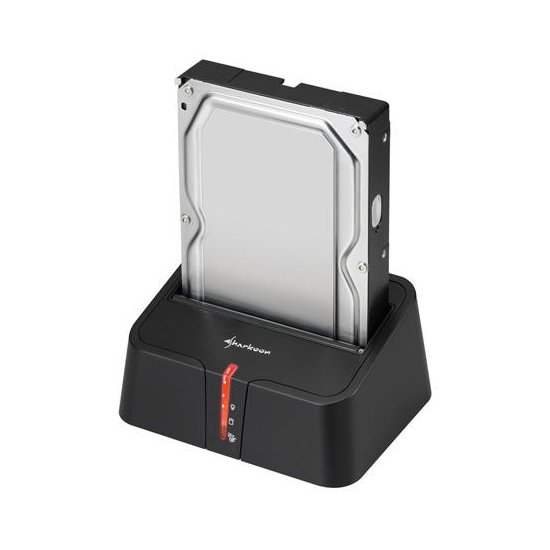
It cost me about 14€ :sisi:
Best regards!
well it doesn't look bad. it would save me some money on enclosures. I have about 4 external ones and I want to make two more, and the new one..
the only thing is that while the disks are not in the holder they are left very unprotected, right?
The last one I bought was a 3TB WD red and I was almost going to get a 4TB one but they were still a bit expensive, it already has more than 2000 hours, very happy with it. You know better how much you store, but I wouldn't buy a small one of 1TB, with what the contents take up now it fills up quickly.
true, I just need one that big because the rest don't reach 1Tb and are almost full. which makes it impossible for me to have order.
it's also true that with a 4Tb one if it breaks you lose everything. and a huge amount of data. not to mention the price they must reach. even so I'll take it into account
-
While the disks are not in the docking, it is good to store them in a padded box, with a little foam rubber and glue and you have it

The idea is to be able to put them in and take them out only when necessary, so you save hours of life on each disk.About the drives, for example, I find it more profitable to have many disks between 500Gb and 1Tb, because the percentage of gigas missing on each disk is smaller (it is not the same to have a 500Gb disk with 465Gb real than to have a 2Tb disk where there are only 1'79Tb, the pinch is noticed more, from missing 35gb to missing more than 200…)
This is why I dedicate myself to buying them second-hand without much use and I am filling them progressively :sisi:¡Saludos!
>> i7-2600K Sandy Bridge @4.4GHz || Noctua NH-D14 || ASRock Z77 Extreme4 || 4x8Gb G.Skill Ripjaws X DDR3 1600MHz || XFX RX 5700 XT 8Gb || SSD Samsung 850 PRO 256Gb & 850 EVO 500Gb || WD Caviar Green 1Tb || Barracuda 1Tb || Corsair TX650 V2 || M-Audio Fast Track Pro || KRK RP8 RoKit G3 || BenQ GW2750 27"
>> Athlon 64 X2 5600+ Brisbane @2.9GHz || Gigabyte GA-M61PME-S2 || 2x2Gb DDR2 Kingston 800MHz || Sapphire Radeon HD 5850 Xtreme 1Gb || Maxtor 320Gb SATA2 || OCZ ModXStream 500W Modular || TEAC PowerMax 120/2 || Acer X243w 24"
>> Intel Core2Duo E6600 Conroe @2.4GHz || Asus P5N32-SLI SE DELUXE || 2x1Gb DDR2 Kingston 800MHz || Asus nVidia GeForce 9800GT 1Gb GDDR3 || Seagate Barracuda IDE 80Gb 7200RPM || Linkworld LPK12-35 450W -
If you are going to eat the 2TB, it would not be a bad idea to get the Green 3 terabyte. It is not as big a price/mega jump as from 1 to 2TB but it comes out better. The 4TB are expensive, if you have several disks you can get a 2-slot docking like this:
http://xtremmedia.com/BASE_HD_TACENS_DOCKING_PORTUM_DUO2.html
Specify a maximum size of 2TB, you have for 50 and a bit an Akasa that does not specify such a limitation, I suppose it will hold 3TB.
The difference in capacity due to commercial nomenclature is the same.
-
About the drives, for me for example it's more profitable to have many disks between 500Gb and 1Tb, because the percentage of gigas missing in each disk is smaller (it's not the same to have a 500Gb disk with 465Gb real than to have a 2Tb disk where there are only 1.79Tb, the pinch is felt more, from missing 35gb to missing more than 200…)
Are we still with those superstitions?

Urgent help installing SSD Sandisk Ultra Plus - HardLimitSent from my Nexus 5 using Tapatalk
-
Are we still following those superstitions?
Urgent help installing SSD Sandisk Ultra Plus - HardLimitSent from my Nexus 5 using Tapatalk
Yes, I know it's because of the drives, the manufacturer uses Gib and we use Gb :lol:
But the margin (for whatever it is) is still lower on several disks spread out...
If I have 4x500Gb (~465Gb each) = 1860Gb
and on the other hand, on my 2TB external drive I have 1.76Tb = 1802GbThey are all in FAT32, they should have the same usable space in total, the four 500Gb as the 2Tb, but in practice there is a difference of 60Gb, where I can fit a few more movies, call me crazy...

>> i7-2600K Sandy Bridge @4.4GHz || Noctua NH-D14 || ASRock Z77 Extreme4 || 4x8Gb G.Skill Ripjaws X DDR3 1600MHz || XFX RX 5700 XT 8Gb || SSD Samsung 850 PRO 256Gb & 850 EVO 500Gb || WD Caviar Green 1Tb || Barracuda 1Tb || Corsair TX650 V2 || M-Audio Fast Track Pro || KRK RP8 RoKit G3 || BenQ GW2750 27"
>> Athlon 64 X2 5600+ Brisbane @2.9GHz || Gigabyte GA-M61PME-S2 || 2x2Gb DDR2 Kingston 800MHz || Sapphire Radeon HD 5850 Xtreme 1Gb || Maxtor 320Gb SATA2 || OCZ ModXStream 500W Modular || TEAC PowerMax 120/2 || Acer X243w 24"
>> Intel Core2Duo E6600 Conroe @2.4GHz || Asus P5N32-SLI SE DELUXE || 2x1Gb DDR2 Kingston 800MHz || Asus nVidia GeForce 9800GT 1Gb GDDR3 || Seagate Barracuda IDE 80Gb 7200RPM || Linkworld LPK12-35 450W -
My 500 disk is "missing" 35 and the external tera one is missing 69, I gained a gig by buying it bigger :ugly -
My 500 "lack" 35 and the external tera one lacks 69, I gained a gig by buying it bigger :ugly:
What a joke :ugly::ugly:
With the 1Tb ones it can happen, that's why I use 500Gb and 1Tb mainly, but it's obvious that with the 2Tb one you take a risk and it's noticeable that I'm disappointed with it :troll:
-
Here's a converter, I think you'll need it, lol. Gigabyte (GB) to Gibibyte (GiB) and Megabyte (MB) to Mibibyte (MiB) Converter
A drive like the one I have of 3TB has exactly 3000GB or 2794,5GiB which is EXACTLY the same, you don't lose or gain ANYTHING! And if the drive doesn't have the size it marks is that you've been ripped off, stop buying the drives at the Chinese
Sent from my iPad with Tapatalk
-
But isn't it supposed to be that in Windows 7, in Computer, when you look at the disk properties, the size appears in GB and not in GiB?
My internal terabyte also has 931GB like Obione's now that I think about it :ugly:
>> i7-2600K Sandy Bridge @4.4GHz || Noctua NH-D14 || ASRock Z77 Extreme4 || 4x8Gb G.Skill Ripjaws X DDR3 1600MHz || XFX RX 5700 XT 8Gb || SSD Samsung 850 PRO 256Gb & 850 EVO 500Gb || WD Caviar Green 1Tb || Barracuda 1Tb || Corsair TX650 V2 || M-Audio Fast Track Pro || KRK RP8 RoKit G3 || BenQ GW2750 27"
>> Athlon 64 X2 5600+ Brisbane @2.9GHz || Gigabyte GA-M61PME-S2 || 2x2Gb DDR2 Kingston 800MHz || Sapphire Radeon HD 5850 Xtreme 1Gb || Maxtor 320Gb SATA2 || OCZ ModXStream 500W Modular || TEAC PowerMax 120/2 || Acer X243w 24"
>> Intel Core2Duo E6600 Conroe @2.4GHz || Asus P5N32-SLI SE DELUXE || 2x1Gb DDR2 Kingston 800MHz || Asus nVidia GeForce 9800GT 1Gb GDDR3 || Seagate Barracuda IDE 80Gb 7200RPM || Linkworld LPK12-35 450W -
But isn't it supposed to be that in Windows 7, in Computer, when you look at the disk properties, the size appears in GB and not in GiB?
In the OSs it usually appears in gibibyte (GiB) almost everything, although abbreviated as if it were gigabyte (GB), of all some application can mark decimal gigabyte when giving the disk space (it would be strange). As the term gibibyte is somewhat recent to avoid confusion between decimal and binary base it is not used much
PD. And yes if you have noticed many manufacturers explain on the box that the disk capacity is based on decimal, to avoid those confusions.
I thought it had been made clear in that branch, that's why I was surprised, I thought it was a joke jajaja

Sent from my iPad with Tapatalk
-
In the OSes, almost everything usually appears in gibibyte (GiB), although abbreviated as if it were gigabyte (GB), but some application can mark gibibyte when giving the disk space (although it would be strange). As the term gibibyte is somewhat recent to avoid confusion between decimal and binary base, it is not used much

PD. And yes, many manufacturers explain on the box that the disk capacity is based on decimal, to avoid those confusions.
I thought it had been made clear in that branch, that's why I was surprised, I thought it was a joke jajaja

Sent from my iPad with Tapatalk
Okay, okay, it's me, I made up the belief at the time and was still convinced of the discrepancy between disks... And I do remember that branch, which by the way I have reread, but I thought that apart from the change of units there was also a small size discrepancy (minimum) due to the impossibility of making two disks absolutely identical and with the same exact size

In summary, that the disks do not lack a byte, and for the interested in this thread, that he buys the disk of the size that best suits him, that he will fit the same in one of 2Tb that in four of 500Gb :sisi:
Saludos!
-
Well that's also true, it doesn't have to be exact it could vary mb up mb down and I think they usually bring some mb extra normally; what will never happen is that a disk lacks several GB of space that would be a scam more than a mistake lol. So you can buy disks with peace of mind
Sent from my iPad with Tapatalk
-
thank you all so much for participating! and helping me make these decisions. for now it will take a few weeks to do it, but I will be back and comment; D
thank you.




Hello! It looks like you're interested in this conversation, but you don't have an account yet.
Getting fed up of having to scroll through the same posts each visit? When you register for an account, you'll always come back to exactly where you were before, and choose to be notified of new replies (either via email, or push notification). You'll also be able to save bookmarks and upvote posts to show your appreciation to other community members.
With your input, this post could be even better 💗
Registrarse Conectarse