Temperature problems i7 5930k
-
Hello to all the hardlimit forum members, I wanted to ask you a question or rather ask for your help. It's about the temperature of my processor, it reaches extreme degrees without even loading it to the top with a game or something that requires power. Yesterday I was using it without any problems until today when I turned it on I realized it wouldn't start and it gave me the famous CPU FAN ERROR F1 to configure, the thing is that when I turn it on it works normally at about 50 degrees to say and then it goes up without stopping at 70 degrees and more, and that's when I unplugged it and reassembled my watercooling (It's the one in my signature). I had to change thermal paste and reassemble it but it still doesn't work it seems like the watercooling doesn't work anymore and doesn't cool the processor or doesn't make the contact it should make, and the truth is that I don't know how to test these things, if they work or not, the only thing I can say is that the fans on the radiator spin naturally when I turn it on. Can someone advise me on how to test this pump, that is to see if it really works or not? The truth is that it's not even 1 year old that I bought it from amazon, and I can process a change since it could also be the case that the failure is in the pump but as I mentioned the truth is that I am totally ignorant about this issue. Just to finish I want to add a detail and that is that, when I was using it a normal day I remember hearing something in the pump as if the water was churning from here to there I don't know if that's where the whole dilemma started I didn't pay attention and I kept doing what I was doing at that time. -
I see that the signature is not updated the Watercooling is the Cooler Master Glacer 240L
-
it's when I unplug it and reassemble my watercooling (it's the one in my signature).
Let me see, I don't understand.
Do you have a cooler installed that's causing problems and when you install the RL it doesn't work either, or are we talking about the same component?In any case, based on the symptoms described, either it has run dry/air has entered (which is difficult without a detectable leak), or the pump has had enough... or one thing first and the other later.
Tests... I think the error it throws, the sound of intestines with diarrhea and finally, the temperatures are more than enough to advise you to make use of the warranty.
What I do not recommend in any case, is that you try to open the circuit to check if 1- it has enough liquid and 2- the pump is doing its job.
Although it is configured to be expanded, purging it and refilling it correctly is taking a risk when you have, as you have, a warranty to use. -
Let me see, I don't understand.
Do you have a cooler that's causing problems and when you install the RL it doesn't work either, or are we talking about the same component?In any case, based on the symptoms described, either it has dried up/air has entered (which is difficult without a detectable leak), or the pump has had enough... or one thing first and the other later.
Tests... I think the error it throws, the sound of intestines with diarrhea and finally, the temperatures are more than enough to advise you to use the warranty.
What I do not recommend in any case, is that you try to open the circuit to check if 1- it has enough liquid and 2- the pump does its job.
Although it is configured to be expanded, purging it and refilling it correctly is taking a risk when you have a warranty to use.First of all, thank you for responding whoololon, dedicating time to something always takes time and I appreciate it, in reality I decided to compare it directly with an H110 since I could process a change in the USA but since I am not from that country it would take much longer and since I already need it, I had to risk that.
If it has dried up, I don't think so because you can perfectly hear the liquid when you pour it, what seems strange to me is that the pump is like new, it has barely been used for 3 months, from my point of view it is a manufacturing defect although I don't understand how it could last this long.. I should also clarify that I don't know if it has anything to do with the fact that I connected the fan pins directly to the motherboard, that is, through the CHA_FAN input, although I don't think that's a problem since I imagine that's what they are for..
I wouldn't even think about opening the pump ;D as that would totally void the warranty, after receiving my h110 I'll see if I have time and see what the options are, that is, whether it's worth it or not to proceed to use the warranty while in a country different from the manufacturer.Anyway, thank you for your comment, I will update the post on how it went with the new H110 (New to call it that).
Regards
-
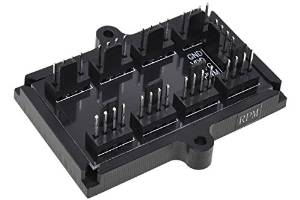
I love the H110 and I think it's even cooler than the one I had.. Now I'm thinking about putting it in push pull but I'm not sure if it's ideal to put or take out the air from the case.. What do you recommend?Another doubt I have is that I bought this for the fans.. (Image Attached)
But they don't work or I'm not sure if I'm connecting them wrong.. I connected the PWM input in CPU_FAN
-
The debate over whether it's better to blow in or blow out is always a contentious one.
My recommendation, as well as that of the manufacturers, is that it's better to blow air in.
The reason: the temperature outside will always be lower than inside, so you'll be passing cooler air over the radiator, increasing its cooling capacity.
The difference is usually around 4°C compared to blowing air out.
As for connections, if your motherboard has 3 CPU_FAN, one for the pump (some sites suggest it's better without temperature control, i.e., always at full speed) and the others for the fans. If not, I think it comes with MOLEX adapters to connect them to the FA.
There are many installation guides and videos for that product.
Edit: You won't be powering the splitter from the motherboard, but from a branch of the FA, right?
-
The debate about whether it's better to blow in or blow out is always controversial.
Edit: You won't be powering the splitter from the card, but from a branch of the FA, right?What do you mean by that whoololon when you say a branch of the FA? Sorry for my lack of understanding.. It only has one CPU_FAN input, the others are CHA_FAN, what I basically do is connect the molex and the PWM cable to the little board and the output of the cable to the motherboard CPU_FAN, I don't know if you understand? If not, I'll take a picture so you can understand better
Regarding the push-pull mode, it's true that the manufacturer says it's better to blow in air from the outside, I just had a doubt because, to tell the truth, in my country it's scorching hot only in the month of JUNE, between JULY it gets cold, that's why I had a doubt about which would be more efficient..
-
I add detail http://www.amazon.com/gp/product/B00OD7MO6E/ref=oh_aui_detailpage_o05_s00?ie=UTF8&psc=1 it is powered as you can see by a molex, I don't know if that's what you were referring to? -
If it's the one from Amazon, the image is quite descriptive.
Just plug the 3pin connector of the PWM signal into the motherboard at CPU_FAN1 and the other 3pin-MOLEX connector into the power supply and the splitter. The PWM signal cable only controls the revolutions of the connected device, while the other one is the one that will supply the energy.
Then simply connect the pump and the fans to the channels of the splitter that you find convenient.If that's how you have it, and the two auxiliary fans don't work, try disconnecting the PWM cable and having the whole set go to 100%, if they still don't work, try connecting them separately to check that they really work.
A branch is a set of cables that come out of the FA, in this case, one that has MOLEX.
The temperature thing, well, if it were 35º, to calculate the inside temperature, add the ambient temperature to the temperature of CPU+GPU+chipset+RAM+disk drives+FA. Without doing the math, I can already assure you that it will be much more, no matter how many fans you put on it.

Edit: If the FA branch to which you are going to connect the device has nothing else connected, better.
Edit: Pending to know what fans they are, I'll tell you that unless they work at the same level (no more, no less CFM) as the ones on the H110, it's not recommended to have them. For a push-pull or any other combination to be effective, all the fans must have the same performance. That they are the same, to put it simply. -
If it's the one from Amazon, the image is quite descriptive.
Just plug the 3pin PWM signal connector into the motherboard on CPU_FAN1 and the other 3pin-MOLEX connector into the power supply and the splitter. The PWM signal cable only controls the revolutions of the connected device, while the other one is the one that will supply the energy.
Then simply connect the pump and the fans to the channels of the splitter that you find convenient.If that's how you have it, and the two auxiliary fans don't work, try disconnecting the PWM cable and having the whole set go to 100%, if they still don't work, try connecting them separately to check that they really work.
A branch is a set of cables that come out of the power supply, in this case, one that has MOLEX.
The temperature thing, well, if it were 35º, to calculate the inside temperature, add the ambient temperature to the temperature of CPU+GPU+chipset+RAM+disk drives+power supply. Without doing the math, I can already assure you that it will be much more, no matter how many fans you put on it.
Edit: If the power supply branch to which you are going to connect the device has nothing else connected, better.
Edit: At the expense of knowing what fans they are, I'll tell you in advance that unless they work at the same level (no more, no less CFM) as the H110 ones, it's not recommended to have them. For a push-pull or any other combination to be effective, all the fans must have the same performance. That they are equal, to put it simply.Thanks for your answer whoololon, I'm going to wait for my 4 fans to be ordered to try it again.
I bought some Corsair Air Series SP 140 at the beginning, I ordered the AF version but I realized too late that these are not for radiators and that they don't have a static pressure like the SP version ones but well, I want to mount it in push/pull and I'll update the post, anyway thanks for the info and help you just gave me.
Best regards


Hello! It looks like you're interested in this conversation, but you don't have an account yet.
Getting fed up of having to scroll through the same posts each visit? When you register for an account, you'll always come back to exactly where you were before, and choose to be notified of new replies (either via email, or push notification). You'll also be able to save bookmarks and upvote posts to show your appreciation to other community members.
With your input, this post could be even better 💗
Registrarse Conectarse