• Portada
    • Recientes
    • Usuarios
    • Registrarse
    • Conectarse

    Laptop HP Pavilion dv7

    Programado Fijo Cerrado Movido Dispositivos móviles y portátiles
    15 Mensajes 5 Posters 4.3k Visitas 1 Watching
    Cargando más mensajes
    • Más antiguo a más nuevo
    • Más nuevo a más antiguo
    • Mayor número de Votos
    Responder
    • Responder como tema
    Accede para responder
    Este tema ha sido borrado. Solo los usuarios que tengan privilegios de administración de temas pueden verlo.
    • M Desconectado
      mitrasto
      Última edición por

      Hello good night
      A couple of days ago, an Hp Pavilion dv7 arrived in my hands. The laptop arrived without half of the parts, missing screws, completely disassembled. I am reassembling it but the problem came up when I had to connect the power supply to the screen.

      As you can see in this photo, the board that I am pointing to with my finger is the supposed transformer for the monitor and the two connectors, black and white, go to the monitor. My question is simple. Are these connectors properly plugged in or are they plugged in the wrong way?
      Thank you for your trouble.
      Good night

      1 Respuesta Última respuesta Responder Citar 0
      • Bm4nB Desconectado
        Bm4n
        Última edición por

        I say that the arrows (one white and one dark) indicate the color of the cable, at first glance I would say they are the wrong way round, but don't just take my word for it, get out the magnifying glass and see what inscriptions are on the plate.

        hlbm signature
        ↳ Mis componentes

        1 Respuesta Última respuesta Responder Citar 0
        • cobitoC Desconectado
          cobito Administrador
          Última edición por

          @mitrasto:

          Hello good night
          A couple of days ago, an Hp Pavilion dv7 arrived in my hands. The laptop arrived without half of the parts, missing screws, completely disassembled. I am reassembling it but the problem came up when I had to connect the power supply to the screen.

          As you can see in this photo, the board that I am pointing to with my finger is the supposed transformer for the monitor and the two connectors, black and white, go to the monitor. My question is simple. Are these connectors properly plugged in or are they plugged in the wrong way?
          Thank you for your trouble.
          Good night

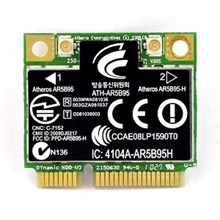
          The board you are showing is the wifi card and the cables that go to the screen are the ones that connect the card to the antenna (which is located in the screen). I do not know the effects of connecting them the wrong way, but I am almost certain that at most the wifi signal quality will be affected.

          Toda la actualidad en la portada de Hardlimit
          Mis cacharros

          hlbm signature

          M 1 Respuesta Última respuesta Responder Citar 0
          • M Desconectado
            mitrasto @cobito
            Última edición por

            Hello good
            Sorry but I don't think that's the part of the wifi, as I told you those two cables go directly to the monitor, and because of the connections it can only go there

            whoololonW 1 Respuesta Última respuesta Responder Citar 0
            • whoololonW Desconectado
              whoololon Veteranos HL @mitrasto
              Última edición por

              Hello good.
              Sorry but I am almost sure it is an Atheros ATH-AR5B95-H wifi card, as you were told those two cables go directly to the monitor because they connect to the antenna, and because of how the connections are, they can only go there.
              Nothing to do with the cell phone this.

              And I will put the brake here.

              ...me lo dicen las voces...

              hlbm signature

              M 1 Respuesta Última respuesta Responder Citar 0
              • M Desconectado
                mitrasto @whoololon
                Última edición por

                Damn man, if I saw you I would even give you two kisses.
                Many thanks.
                So if I connect them the other way around what would happen?
                A thousand thanks

                Lord AsmodaiL whoololonW 2 Respuestas Última respuesta Responder Citar 0
                • Lord AsmodaiL Desconectado
                  Lord Asmodai @mitrasto
                  Última edición por

                  I don't think anything happened, if I'm not mistaken they don't carry current. I even think it would work both ways, but with worse signal reception

                  1 Respuesta Última respuesta Responder Citar 0
                  • whoololonW Desconectado
                    whoololon Veteranos HL @mitrasto
                    Última edición por

                    But think about it, if Bm4n already told you that the black one goes to the black and the white one to the white… how can you possibly place them wrong?
                    Even if you do it on purpose, as cobito told you, at most you would have poor or no wifi connectivity.

                    ...me lo dicen las voces...

                    hlbm signature

                    1 Respuesta Última respuesta Responder Citar 0
                    • Bm4nB Desconectado
                      Bm4n
                      Última edición por

                      I already thought it was strange that it was that :risitas: the thing is that the wifi antenna goes behind the screen.

                      hlbm signature
                      ↳ Mis componentes

                      M 1 Respuesta Última respuesta Responder Citar 0
                      • M Desconectado
                        mitrasto @Bm4n
                        Última edición por

                        Good afternoon.
                        This afternoon I turned it on, without connecting the keyboard or the touch yet. It seems that everything turns on well, leeds, fan, hard drive, but the screen does not turn on.
                        Is there any way to know if the graphics card or the monitor is broken?
                        Thank you

                        cobitoC 1 Respuesta Última respuesta Responder Citar 0
                        • cobitoC Desconectado
                          cobito Administrador @mitrasto
                          Última edición por

                          @mitrasto:

                          Buenas tardes.
                          Esta tarde lo e encendido, sin conectar todavia el teclado ni el touh. Parece que todo se encienga bien, leeds, ventialdor, disco duro, pero la pantalla no se enciende.
                          Hay alguna forma de saber si se a cascado la targeta grafica o el monitor?
                          Gracias

                          Puedes probar conectando una pantalla externa.

                          Toda la actualidad en la portada de Hardlimit
                          Mis cacharros

                          hlbm signature

                          Lord AsmodaiL M 2 Respuestas Última respuesta Responder Citar 0
                          • Lord AsmodaiL Desconectado
                            Lord Asmodai @cobito
                            Última edición por

                            Try connecting a screen as cobito told you, and if it works, check that the flex has not been disconnected, it is like a thin sheet of rubber or plastic

                            1 Respuesta Última respuesta Responder Citar 0
                            • M Desconectado
                              mitrasto @cobito
                              Última edición por

                              Good.
                              I tried connecting an external screen and nothing.

                              Lord AsmodaiL 1 Respuesta Última respuesta Responder Citar 0
                              • Lord AsmodaiL Desconectado
                                Lord Asmodai @mitrasto
                                Última edición por

                                So it looks like it will be the graphics

                                whoololonW 1 Respuesta Última respuesta Responder Citar 0
                                • whoololonW Desconectado
                                  whoololon Veteranos HL @Lord Asmodai
                                  Última edición por

                                  Well, nothing, let's dismantle it again and sell it by parts.

                                  ...me lo dicen las voces...

                                  hlbm signature

                                  1 Respuesta Última respuesta Responder Citar 0
                                  • 1 / 1
                                  • First post
                                    Last post

                                  Foreros conectados [Conectados hoy]

                                  0 usuarios activos (0 miembros y 0 invitados).
                                  febesin, pAtO, HIAL-9000

                                  Estadísticas de Hardlimit

                                  Los hardlimitianos han creado un total de 543.5k posts en 62.9k hilos.
                                  Somos un total de 34.9k miembros registrados.
                                  roymendez ha sido nuestro último fichaje.
                                  El récord de usuarios en linea fue de 123 y se produjo el Thu Jan 15 2026.

