High temperatures in i7 4790K
-
Hello, companions!!
As some of you already know, I've had an i7 4790K for a few months now, but I've been so busy that I've barely messed with it.
Today I wanted to try doing a little OC but first I looked at the temperatures and got quite a fright, at stock it gets to 92 degrees in core2 after 15 minutes of prime95, image:

It's all stock, vcore is at 1.28 by default and the multiplier at 44, that is, 4.4GHz.
On the other hand, if I run a 3DMARK it gets to 82 degrees, it doesn't go any higher.Is this normal? I changed the thermal paste to try and it's still the same, bear in mind that I have an Antec Twelve Hundred case with 6 12cm fans and the cooler is a NOCTUA NHU12 that's about 7 years old now.
Could it be that the heatsink is no longer working properly? I wouldn't mind buying a new one, but with my previous 2500k I never noticed anything strange about the temperatures.
Or do these CPUs suffer a lot from temperature?
Greetings, companions!
SOLUTION:
Well, I'll update with the final results:
There are 3 reasons why these micros get so hot, it's not just my problem apparently, most people have the same issue:
-
They come with a VCORE that's too high for what they really need, to give you an idea, my motherboard was putting 1.28v to go to 4.0GHz (4.4 turbo 1 core) when with only 1.16v it does 4.4GHz x 4 cores without needing turbo, and with HT activated.
-
Prime95 is not a good program to measure either stability or temperatures on these CPUs, it creates a stress situation that will never happen in daily use. It's much better to do it with programs like RealBench or the Intel Xtreme Tunning Utility, overclocks that pass hours of prime95 usually fail when passing these benches.
-
There's a manufacturing "defect" due to which the glue they use to attach the IHS to the CPU causes it not to be in full contact with the core due to its thickness, if we add to this that now they don't solder the core to the IHS (as for example with the 1st and 2nd generation of i3,i5,i7 and the e8XXX, q8XXX) and that the thermal paste isn't very good, then the temperature dissipation isn't as good as it should be, which is why many people opt for a "delid", removing the IHS, removing the glue residues, changing the thermal paste for a better one, even for Coolaboratory Liquid Pro. With this you can gain between 15 and 20 degrees less in full.
So, for now, since I have the micro under warranty and I don't need more power, I've left it at 1.16v with the 4 cores at 4.4GHz, this gives me a maximum REAL temperature of 68º in these times, with prime it gets to 79º, but I don't take that into account since it's NOT REAL, when gaming and pushing it hard I don't go over 65 degrees, so I'm more than happy.
Later on, when it's no longer under warranty (or I need more power,:troll:) I'll remove the IHS and then I'll squeeze all its potential, for now, I don't need it.
I hope my experience is of some use to you, here are the links to said programs:
Greetings!
MAIN: Ryzen7 3800X + RTX2070Super + Asus x470 StrixF + KFA2 HOF 16GB DDR4 4000 + NVMe Samsung 970 EvoPlus 500GB + Samsung 850Pro 512GB + Samsung 860QVO 2TB + Asus Xonar STX + Phanteks Enthoo Pro M Se + Seasonic Focus+ 650W
LAPTOP: Asus Strix G531GT Intel i5 9300H + GTX1650 4GB + 16GB DDR4 2666 (8x2) + NVMe 256GB + 1TB HDD
-
-
As you rightly point out, I don't think I'll be able to dissipate the energy generated by that micro as efficiently as I should.
-
those processors are very hot, the only thing you can do is buy a much better heatsink
like the Cryorig R1 Ultimate 73 euros - or a liquid one Thermaltake Water 3.0 Ultimate 130 euros
regards
-
I will just say that:Stock: 1.28v / 4.4GHz / HT ON / 93º
Undervolt: 1.00v / 4.0GHz / HT Off / 55ºHow can this CPU come with this extremely high VCORE by default?
On the other hand, disabling Hyper threading has taken 15 degrees off it in one fell swoop when running prime95...When I have more elaborate results, I will post them, but for now I am flabbergasted by the extremely high vcore they come with by default and the temperature that this generates.
Regards
MAIN: Ryzen7 3800X + RTX2070Super + Asus x470 StrixF + KFA2 HOF 16GB DDR4 4000 + NVMe Samsung 970 EvoPlus 500GB + Samsung 850Pro 512GB + Samsung 860QVO 2TB + Asus Xonar STX + Phanteks Enthoo Pro M Se + Seasonic Focus+ 650W
LAPTOP: Asus Strix G531GT Intel i5 9300H + GTX1650 4GB + 16GB DDR4 2666 (8x2) + NVMe 256GB + 1TB HDD
-
I keep testing… for now I have it like this:
4.4GHz on all 4 cores, turbo disabled, HT ON, 1.16v, 74°C the hottest core being stable 30 minutes of prime95, I think these are very good results, don't you think?
MAIN: Ryzen7 3800X + RTX2070Super + Asus x470 StrixF + KFA2 HOF 16GB DDR4 4000 + NVMe Samsung 970 EvoPlus 500GB + Samsung 850Pro 512GB + Samsung 860QVO 2TB + Asus Xonar STX + Phanteks Enthoo Pro M Se + Seasonic Focus+ 650W
LAPTOP: Asus Strix G531GT Intel i5 9300H + GTX1650 4GB + 16GB DDR4 2666 (8x2) + NVMe 256GB + 1TB HDD
-
Are we testing the heatsink's capacity or the micro's OC capacity?
Listen to ferelxyx and retire that Noctua, I think it has earned it. -
Are we testing the capacity of the heatsink or the OC capacity of the micro?
Listen to ferelxyx and retire that Noctua, I think it has earned it.Both things, that is, first I am testing the capacity of the micro with undervolt and I have already reached the limit:
Underclock to 4.0GHz: 40x (without turbo), 1.025 vcore, 56º max temp. STABLE
Undervolt with stock configuration: 4.0 GHz (4.4GHz turbo boost x4 cores), 1.170 cvore, 76º max temp. STABLE*Max temperatures after 1 hour of prime95.
Now I will tinker a bit with overclocking, but without ever going above the stock vcore, that is, from 1.28v, to see how far it goes.
For now I will park the issue of changing the heatsink, the extra expense of the GTX970 leaves me with the budget for hardware in the red for a few months :wall: although in the future I want to change to a liquid one of these from corsair, they have spoken very well of it.I will keep you informed and thank you!
MAIN: Ryzen7 3800X + RTX2070Super + Asus x470 StrixF + KFA2 HOF 16GB DDR4 4000 + NVMe Samsung 970 EvoPlus 500GB + Samsung 850Pro 512GB + Samsung 860QVO 2TB + Asus Xonar STX + Phanteks Enthoo Pro M Se + Seasonic Focus+ 650W
LAPTOP: Asus Strix G531GT Intel i5 9300H + GTX1650 4GB + 16GB DDR4 2666 (8x2) + NVMe 256GB + 1TB HDD
-
Well, I update with the final results:
There are 3 reasons why these micros get so hot, it's not my fault apparently, most people have the same problem:
-
They come with a very high VCORE for what they really need, to give you an idea, my motherboard put 1.28v to go to 4.0GHz (4.4 turbo 1 core) when with only 1.16v it does 4.4GHz x 4cores without needing turbo, and with HT activated.
-
Prime95 is not a good program to measure either stability or temperatures in these CPUs, it creates a stress situation that will never happen in daily use. Much better to do it with programs like RealBench or Intel Xtreme Tunning Utility, overclocks that pass hours of prime95 usually fail when passing these benches.
-
There is a "defect" of fabrication because of which the glue they use to stick the IHS with the cpu, makes that it does not stay totally in contact with the core due to its thickness, if to this we add that now they do not solder the core to the ihs (as for example with the 1st and 2nd generation of i3,i5,i7 and the e8XXX, q8XXX) and that the thermal paste is not very good, then the temperature dissipation is not as good as it should be, that's why many people opt for a "delid", remove the IHS, remove the glue residues, change the thermal paste for a better one, even for Coolaboratory Liquid Pro. With this you can gain between 15 and 20 degrees less in full.
So, for now I have the micro in warranty and I don't need more power, I have left it at 1.16v with the 4 cores at 4.4GHz, this gives me a REAL maximum temperature of 68º in these times, with prime it gets to 79º, but I don't take it into account since it's NOT REAL, playing and pushing it hard I don't go over 65 degrees, so I'm more than happy.
Later, when I no longer have the warranty (or need more power,:troll:) I will remove the IHS and then I will squeeze all its potential, for now, I don't need it.
I hope my experience is of any use to you, here I leave the links to said programs:
Regards!
MAIN: Ryzen7 3800X + RTX2070Super + Asus x470 StrixF + KFA2 HOF 16GB DDR4 4000 + NVMe Samsung 970 EvoPlus 500GB + Samsung 850Pro 512GB + Samsung 860QVO 2TB + Asus Xonar STX + Phanteks Enthoo Pro M Se + Seasonic Focus+ 650W
LAPTOP: Asus Strix G531GT Intel i5 9300H + GTX1650 4GB + 16GB DDR4 2666 (8x2) + NVMe 256GB + 1TB HDD
-
-
This post is being processed/translated. The original version will be shown:
Al final lo pillaste… bueno te voy a puntualizar un par de cosas:
@Rules:
- Vienen con un VCORE muy elevado para lo que realmente les hace falta, para que os hagais una idea, el mio mi placa le metia 1.28v para ir a 4.0GHz (4.4 turbo 1 core) cuando con solamente 1.16v hace 4.4GHz x 4cores sin necesidad de turbo, y con el HT activado.
Es mucho pero como se ha demostrado no es indicativo de nada, es el valor que la maquina que lo testeo en fabrica le ha asignado en funcion de la resistencia electrica del chip para que con el dispador de serie no falle y disipe los Vatios que debe disipar.
Yo el mio para 4.4Ghz sin problemas a 1.11V con LinX, Prime y demás historias… el Vcache bajalo a 1.1-1.12V... te va a bajar de forma notable el consumo.
Otro valor que debes modificar en bios es el Vinput de 1.8v pasalo a 1.9V... es el voltaje que suministra la placa base a la CPU... pues esta lleva una integrado un sistema VRM y es la que gestiona el Vcore, Vcache...etc. Puede parecer una tontería pero aunque le bajes el Vcore este valor lo debes de tener siempre a más de 1.9V puesto que le da mayor estabilidad y no sube la temperatura ni nada.
@Rules:
- El prime95 no es un buen programa para medir ni la estabilidad ni las temperaturas en estas CPU's, crea una situación de stress que jamas se dara en el uso diario. Mucho mejor hacerlo con programas como el RealBench o el Intel Xtreme Tunning Utility, overclocks que pasan horas de prime95 suelen petar al pasar estos benchs.
Eso es un falacia muy extendida por los foros sin base… el problema de Prime95 es que realiza cálculos en comaflotante y se centra en un aspecto muy concreto, computación pura, que aumenta la disipación de calor más que otros programas... aunque menos que OCCT o LinX.
Con OCCT o LinX si aguanta 5min olvidate de testear con cualquier otro software durante horas... ahí si tienes garantizado que el OC es a prueba de bombas.
Te pongo la ultima versión que te subo a mi DropBox... cuidadin no le prendas fuego:
@Rules:
- Hay un "defecto" de fabricacion por el cual el pegamento que usan para pegar el IHS con la cpu, hace que no quede totalmente en contacto con el core debido a su grueso, si a esto le sumamos que ahora no sueldan el core son el ihs (como por ejemplo con la 1ra y 2da generacion de i3,i5,i7 y los e8XXX, q8XXX) y que la pasta termica no es muy buena, pues la disipasion de la temperatura no es todo lo buena que debiera, por ello es que mucha gente opta por hacerles un "delid", quitar el IHS, quitar los restos de pegamento, cambiar la pasta termica por una de mejor, incluso por Coolaboratory Liquid Pro. Con ello se llegan a ganar entre 15 y 20 grados menos en full.
No es exactamente asi, pues no es por el pegamento… el problema es un problema de ajuste y tolerancias de fabricación... eso genera que el contacto del DIE con el IHS sea malo por motivos de seguridad (si dejaran menos espacio la maquina podría cargarse los chips al colocar el IHS por ser el silicio un material frágil)... consecuentemente es espesor de la capa de pasta térmica conductora es mayor de lo que debería... de echo la pasta no es tan mala como suelen vender... el problema es el espesor que varia de un micro a otro.
Como consecuencia no importa mucho el disipador que coloquemos a estos micros porque por lo menos lo que es mi 4790K he calculado que tiene una resistencia térmica entre el DIE y la cara superior del IHS de 0.4254ºC/W... mientras que la resistencia térmica de mi Noctua NH-U14S es de 0.1036ºC/W (con dos ventiladores)… ambas son valores que limitan el rendimiento de nuestro sistema de refreigeración y por tanto contra mayores sean mayor es el comúnmente conocido como TCASE… es decir, la temperatura a la que se encuentra el silicio de la CPU cuando trabaja... siendo el TCASE Max o el TjMax los valores limite.
Por ejemplo con mi OC actual he hecho una tabla que sirve para cualquier CPU Haswell y cualquier disipador en base a los datos de la ultima review de FrostyTech -> DATOS REVIEW
Con LinX ahora en verano y 30º en la habitación es una movida porque el test no peta pero se produce thermal throttlingy al alcanzar 99-100º. De echo si no bajara el mismo los Mhz alcanzaria los 136W, lo que supondria alcanzar los 104,2ºC
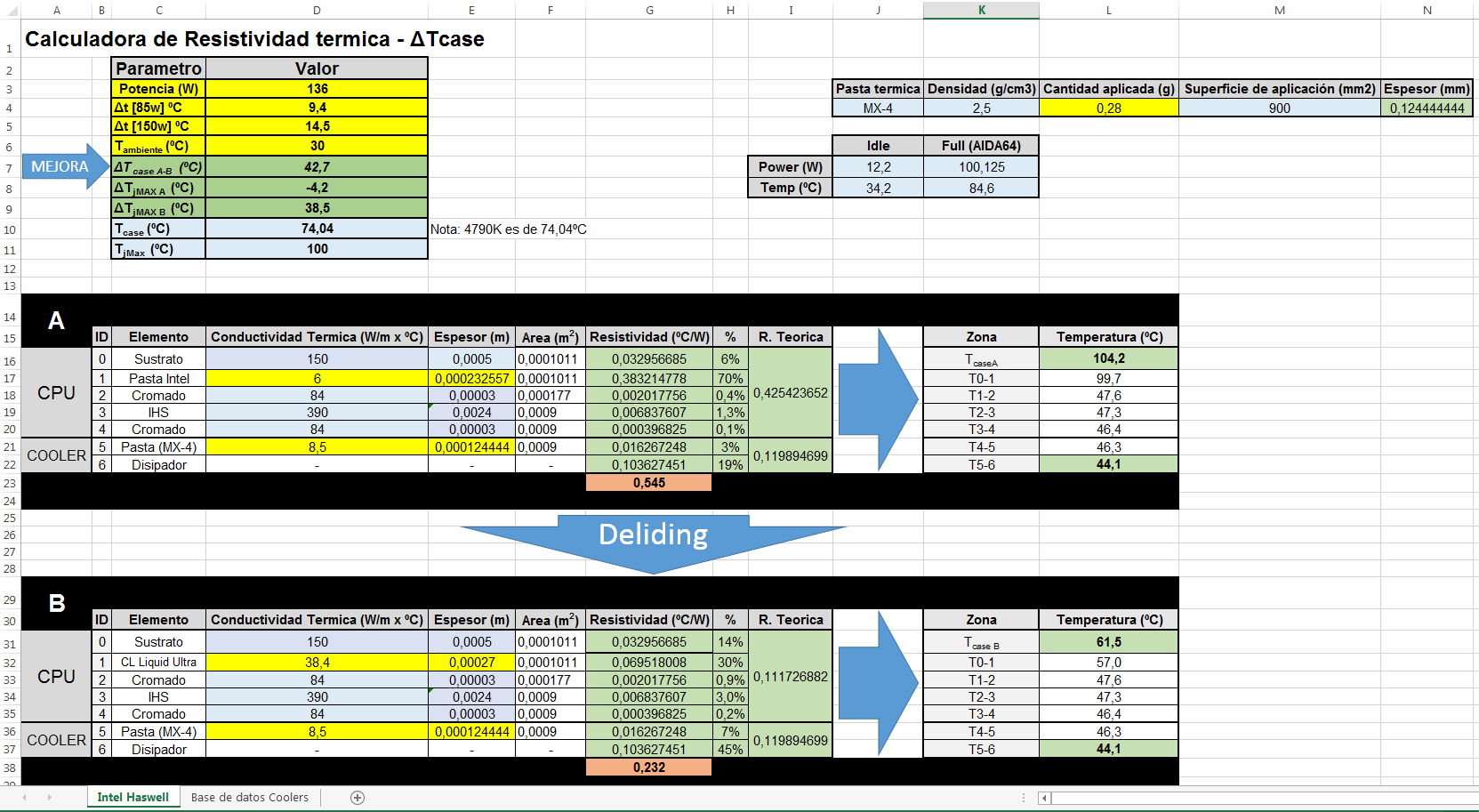
Intel XTU, Prime95 o AIDA 64 (Stress FPU) tenemos consumos entre los 80-120W por tanto menor temperatura:
Tcase= (Potencia x Resistividad) + T.ambiente
Prime 95 2.85-> Tcase= 122x0,545+30= 96,5ºC
AIDA64 Stress FPU -> Tcase= 100x0,545+30= 84,5ºC
Intel XTU-> Tcase= 80.9x0,545+31= 74,1ºCClaro… entonces ¿que software es mejor para testear?... depende del pico de vatios que disipe la CPU cuando le metes caña y de la temperatura ambiente de tu caja puesto que si juegas la tarjeta gráfica o las gráficas meterán la temperatura ambiente de tu caja mucho más alta que si testeas solo la CPU por separado (de ahí lo de "me aguanta horas el Prime95 pero me peta jugando al COD... el test no srive", error)... por tanto no hay un software mejor o peor... todos valen y ninguno garantiza nada... salvo pasar el LinX y meter una estufa en la habitación para que todo este sobre los 40º... así seguro que no petará ni fallará nunca.

@Rules:
Entonces, como de momento tengo el micro en garantia y no necesito mas potencia, lo he dejado a 1.16v con los 4 cores a 4.4GHz, esto me da una temperatura maxima REAL de 68º en estas epocas, con el prime se pone a 79º, pero no la tengo en cuenta ya que NO ES REAL, jugando y pegandole caña no me pasa de los 65 grados, asi que ya estoy mas que contento.
Yo pese a tener peores temperatura aplicando menos Vcore que tu todavía no he encontrado el momento… tengo la Liquid Ultra, el pegamento y las lijas para lapear tanto el IHS como la base del Noctua pero me ha sido imposible (igual que pasarme por aquí)... en teoría presento proyecto en septiembre pero no quiero más contratiempos y un día o dos los pierdo para hacer el apaño bien echo... eso sin contar que me podria quedara sin micro :wall: .
@Rules:
Mas adelante, cuando ya no tenga garantia (o necesite mas potencia,:troll: ) ya le quitare el IHS y entonces exprimire todo su potencial, por ahora, no me hace falta.
Si el micro no ha fallado ni te ha dado problemas no te los va a dar nunca… otra cosa es que pueda perder valor pero piensa que tienes micro para años y el potencial de destaparlo es brutal.
De echo cambiarte el disipador es tirar el dinero porque la mejora es mínima... por ejemplo he realizado una mega comparativa con esos 136W y apenas con un Coolermaster Nepton 280L que es el mejor kit de agua no bajo más que 6,8ºC (comparado con mi Noctua) y en principio destapandolo bajo seguro 15-20º mínimo pudiendo llegar a 30 o 50º… de echo la calculadora de Excel me da una ganancia de 42,7ºC si meto la Liquid Ultra :troll: pero no creo que gane tanto y seguramente será menos porque son cálculos teóricos y no puedo asegurar que mi disipador funciona igual que el de la review ni que la pasta térmica está perfectamente aplicada y tiene exactamente esa conductividad. :ffu:
Además estos disipadores con HeatPipes varían su conductividad y su eficiencia... por no hablar de que llegada cierta temperatura dejan de funcionar... por eso si metiera una liquida iría de cabeza a un bloque que me permita montarlo sin IHS... nada de kits chusqueros.
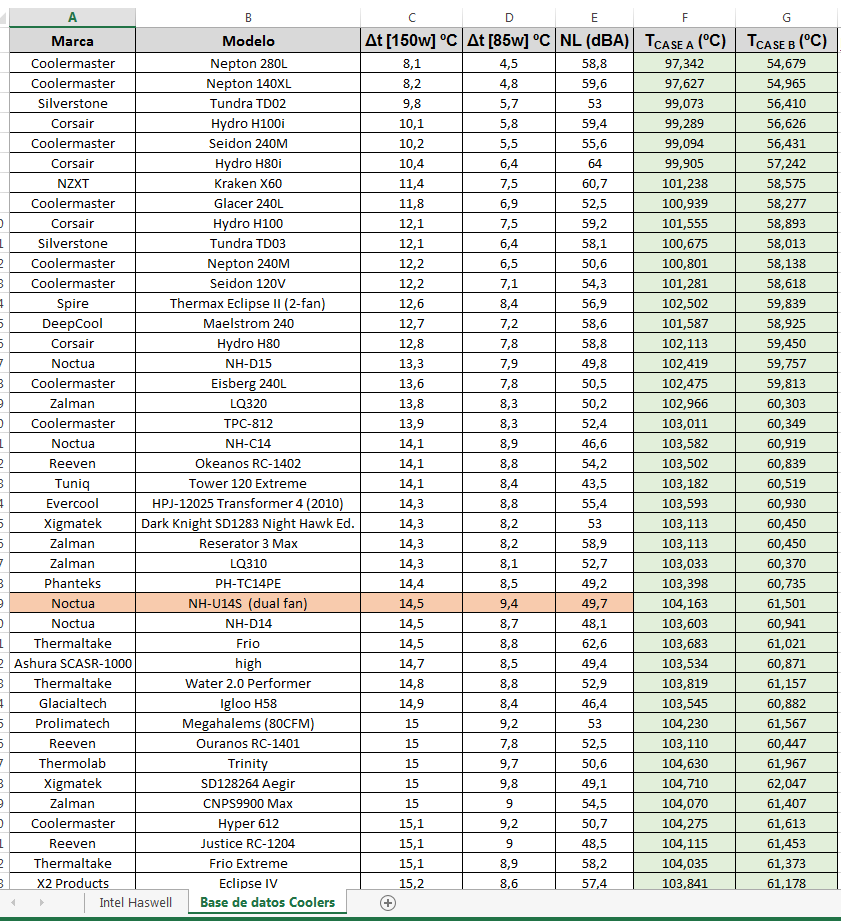
Mi consejo es que se lo hagas.
Por cierto, dejo por aquí la calculadora en Excel si alguien quiere trastear con ella o mejorarla:
CALCULADORA EXCEL DE TEMPERATURA PARA CPU
En cuanto lo destape pondré un post con la calcu para que lo fije algún admin ya que hasta que no tenga valores reales de mejora no crea que sea muy útil… de echo solo la recomiendo para calcular el Tcase, comparar con otros disipadores como mejoraría nuestro sistema de refrigeración o a que temperatura necesitamos tener la habitación para que el micro no se achichare con nuestro OC :facepalm:
Por cierto para calibrarlo para vuestra CPU:
1- Usar un test tipo Prime o AIDA64, obtener los vatios y temperatura medios durante el test (5min).
2- Usarlos como referencia para modificar el espesor de la pasta del IHS de vuestro micro hasta que la TcaseA sea igual a la temperatura media obtenida durante el test.Evidentemente hay que verificar la calibración con otros test que darán otros consumos y otras temperaturas para ver si está bien echa… entonces ya podéis usar la excel para ver vuestro margen de mejora al destaparlo o como se comportará ese micro con otros disipadores.
AMARILLO -> Datos de entrada (Se pueden modificar)
Azul claro-> Valores constantes modificables
VERDE-> ResultadosPor cierto, esto sirve entre otras cosas para luego al determinar la resistencia eléctrica del micro y con un determinado voltaje poder establecer los vatios que disipará… consecuentemente con esta excel puede obtenerse si nuestro sistema de refrigeración a una determinada temperatura ambiente aguantara y mantendrá el micro fresco por debajo del Tjmax.
-
[…]
As soon as I unwrap it I'll post a picture with the calculator so that an admin can fix it because until I have real improvement values I don't think it will be very useful… […]But you still haven't given it the hammer blow? :troll:
You're selling yourself very expensive, thief.;D -

Great contribution :sisi:
Intel i5 3570k / ASRock Z77 Extreme 4 / G.Skill F3-12800CL9D-8GBRL / Sapphire HD5850 / Samsung HD103UJ / TR TrueSpirit / NZXT Source 210 / OCZ ZS550W
Intel i5 4570 / ASRock H87 Pro 4 / 2x G.Skill F3-14900CL8-4GBXM / Samsung 850 EVO 250Gb + ST1000DM003 + ST2000DM003 + HGST HDS723020BLA642 + Maxtor 6V250F0 / CM Seidon 240M / Zalman MS800 / CM MWE 550
AMD Ryzen 7 1800X / B350 / 2x8GB Samsung DDR4-2400 CL17 / NVIDIA GTX 1070 8GB / SSD 120GB + ST4000DM004 + ST6000DM003 / EVGA Supernova 650 G2 -
Incredible post!! I hadn't read it until today!!! Great contribution

MAIN: Ryzen7 3800X + RTX2070Super + Asus x470 StrixF + KFA2 HOF 16GB DDR4 4000 + NVMe Samsung 970 EvoPlus 500GB + Samsung 850Pro 512GB + Samsung 860QVO 2TB + Asus Xonar STX + Phanteks Enthoo Pro M Se + Seasonic Focus+ 650W
LAPTOP: Asus Strix G531GT Intel i5 9300H + GTX1650 4GB + 16GB DDR4 2666 (8x2) + NVMe 256GB + 1TB HDD
-
@Rules:
Incredible thread!! I hadn't read it until today!!! Great contribution
You also haven't seen the improvement after you uncorked and polished it :troll:
-
Wow what a surprise to come back to the forum,... how much has this changed!
I'll just drop a couple of nude pics... I'll put the rest up tomorrow


And I have an H80i ready to be built

MAIN: Ryzen7 3800X + RTX2070Super + Asus x470 StrixF + KFA2 HOF 16GB DDR4 4000 + NVMe Samsung 970 EvoPlus 500GB + Samsung 850Pro 512GB + Samsung 860QVO 2TB + Asus Xonar STX + Phanteks Enthoo Pro M Se + Seasonic Focus+ 650W
LAPTOP: Asus Strix G531GT Intel i5 9300H + GTX1650 4GB + 16GB DDR4 2666 (8x2) + NVMe 256GB + 1TB HDD
-
@Rules @ESPINETENBOLAS
MAIN: Ryzen7 3800X + RTX2070Super + Asus x470 StrixF + KFA2 HOF 16GB DDR4 4000 + NVMe Samsung 970 EvoPlus 500GB + Samsung 850Pro 512GB + Samsung 860QVO 2TB + Asus Xonar STX + Phanteks Enthoo Pro M Se + Seasonic Focus+ 650W
LAPTOP: Asus Strix G531GT Intel i5 9300H + GTX1650 4GB + 16GB DDR4 2666 (8x2) + NVMe 256GB + 1TB HDD
-
@Rules said in High temperatures on i7 4790K:
Wow what a surprise to come back to the forum,... how has this changed!
I'm just going to post a couple of nude pics... I'll put everything up tomorrow
[IMG]http://i66.tinypic.com/2co4due.jpg[/IMG]
[IMG]http://i63.tinypic.com/2s7jedy.jpg[/IMG]
And I have an H80i ready to mount
Wow, that's really brutal...


-
@Rules said in High temperatures on i7 4790K:
Wow, what a surprise to come back to the forum,... how has this changed!
I'm just going to post a couple of nude images... I'll put everything up for you tomorrow
And I have an H80i ready to mount
I hope the surprise was a positive one.
By the way, as I've said in other threads and will continue to say in the future, I encourage you to upload images to the server instead of using external services. You can upload them by clicking the icon
 and you can also upload them by simply dragging the image.
Toda la actualidad en la portada de Hardlimit
Mis cacharros -
Damn man, I'm drunk but I was hoping to send a private message and I can't figure it out so I'm going to invade the thread, you can stone me later.
cobito, before I could put a url in the signature so that the photo of the team in my signature would show up, now I can't. Any ideas why?
How much has it dropped with the crazy delid? (The question is relevant, eggspero that the stoning comes with affection)
-
@Obione said in High temperatures in i7 4790K:
Damn man, I'm drunk but I was hoping to send a private message and I can't figure it out so I'm going to invade the thread, you can stone me later.
cobito before I could put a url in the signature so that the photo of the team in my signature would be visible, now I can't ¿Any ideas why?
Private messages are currently turned off. They will be turned on in the future.
That kind of inquiries can be made in the VIP forum without any problems. In fact there is a thread for doubts/complaints/suggestions there. In any other case, you can contact me by email at the address in the thread to recover the password.
By the way, the other day the Telegram client on the PC crashed so for a while now I only read the messages from there every so often.
I'll investigate the URL thing and let you know.
Toda la actualidad en la portada de Hardlimit
Mis cacharros -
I am finishing up the tests and will make a new thread with all the results, OC temperatures and a comparison of an RL H80i vs Noctua NHu12 (You will be surprised...)
MAIN: Ryzen7 3800X + RTX2070Super + Asus x470 StrixF + KFA2 HOF 16GB DDR4 4000 + NVMe Samsung 970 EvoPlus 500GB + Samsung 850Pro 512GB + Samsung 860QVO 2TB + Asus Xonar STX + Phanteks Enthoo Pro M Se + Seasonic Focus+ 650W
LAPTOP: Asus Strix G531GT Intel i5 9300H + GTX1650 4GB + 16GB DDR4 2666 (8x2) + NVMe 256GB + 1TB HDD







![http://i66.tinypic.com/2co4due.jpg[/IMG]](http://i66.tinypic.com/2co4due.jpg%5B/IMG%5D)
![http://i63.tinypic.com/2s7jedy.jpg[/IMG]](http://i63.tinypic.com/2s7jedy.jpg%5B/IMG%5D)

Hello! It looks like you're interested in this conversation, but you don't have an account yet.
Getting fed up of having to scroll through the same posts each visit? When you register for an account, you'll always come back to exactly where you were before, and choose to be notified of new replies (either via email, or push notification). You'll also be able to save bookmarks and upvote posts to show your appreciation to other community members.
With your input, this post could be even better 💗
Registrarse Conectarse