Crossfire problem with R9 290x (Solved)
-
-
-
When I first had problems setting up CrossfireX it was because the latest drivers AMD had available did not support this configuration, I don't know why. I solved it by trying previous drivers one after another until I found the version that kept CrossfireX activated and at the same time solved the problem of image scaling via HDMI (the first moves of this type that AMD suffered at that time).
I'm not saying it's the solution outright, but for the sake of trying…

Best regards!
>> i7-2600K Sandy Bridge @4.4GHz || Noctua NH-D14 || ASRock Z77 Extreme4 || 4x8Gb G.Skill Ripjaws X DDR3 1600MHz || XFX RX 5700 XT 8Gb || SSD Samsung 850 PRO 256Gb & 850 EVO 500Gb || WD Caviar Green 1Tb || Barracuda 1Tb || Corsair TX650 V2 || M-Audio Fast Track Pro || KRK RP8 RoKit G3 || BenQ GW2750 27"
>> Athlon 64 X2 5600+ Brisbane @2.9GHz || Gigabyte GA-M61PME-S2 || 2x2Gb DDR2 Kingston 800MHz || Sapphire Radeon HD 5850 Xtreme 1Gb || Maxtor 320Gb SATA2 || OCZ ModXStream 500W Modular || TEAC PowerMax 120/2 || Acer X243w 24"
>> Intel Core2Duo E6600 Conroe @2.4GHz || Asus P5N32-SLI SE DELUXE || 2x1Gb DDR2 Kingston 800MHz || Asus nVidia GeForce 9800GT 1Gb GDDR3 || Seagate Barracuda IDE 80Gb 7200RPM || Linkworld LPK12-35 450W -
Do you know that those bugs each have a TDP of 275W (2x275w=550W) and that all the heat they generate stays in the case if it is not well ventilated, right?
I say this because first make sure that your PSU really has enough power to handle so much juice since the CPU also eats its share.
The second thing is that when playing or running a demanding test, the temperatures in the case skyrocket with these monsters and can affect other components... especially if we have them overclocked on CPU or RAM and these have not been verified under these working conditions.
Also, the graphics cards themselves suffer from these temperatures in their own flesh, so even if they are stock, the VRM stage or the GPU itself can reach dangerous temperatures that activate the speed reduction systems... it is enough that one reduces the speed for Crossfire to go to hell and you even have less performance than with a single GPU... not to mention stuttering and sudden jumps in FPS.
I don't know, comment your complete configuration and I'll tell you how to test several things to see if it's a hardware problem since it's not the same AMD that Intel and also the TDP of the micro counts... besides if you have an insufficient PSU the equipment will blow up so comment the brand and model of it.
-
I don't think it's a temperature issue, right now I have the computer without covers.
My configuration is as follows:
Motherboard - MSI Z87 G45 Gamming
Processor - Intel i7 4770K 3900Mhz
M Ram - Crucial Vengeance 32 DDr3 1600
Graphics - ASUS R9 290X OC
ASUS R9 290X
Power supply - Corsair RM1000
Operating system - Windows 10 -
When I had my first problems setting up CrossfireX it was because the latest drivers that AMD had available did not support said configuration, I don't know why. I solved it by trying previous drivers one after another until I found the version that kept CrossfireX activated and at the same time solved the problem of image scaling via HDMI (first moves of this type that AMD suffered at that time).
I'm not saying it's the solution outright, but for trying…
Best regards!
I've tried using the drivers that came with the graphics card CD and it's even worse, so I guess the problem comes from there, the problem is that I can't find previous drivers, do you know of any website?
a couple more questions
Can I put some Windows 7 drivers on it?
Do I have to do the whole process of removing the second graphics card, cleaning the drivers, installing the new ones and putting the second graphics card every time I change drivers?
Thanks in advance and excuse my ignorance xD
-
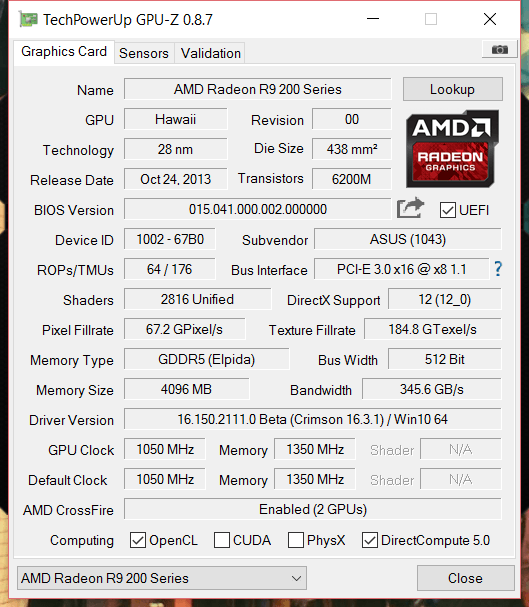
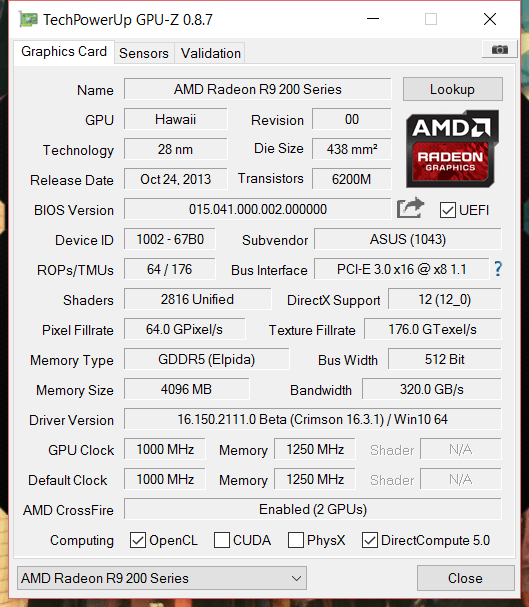
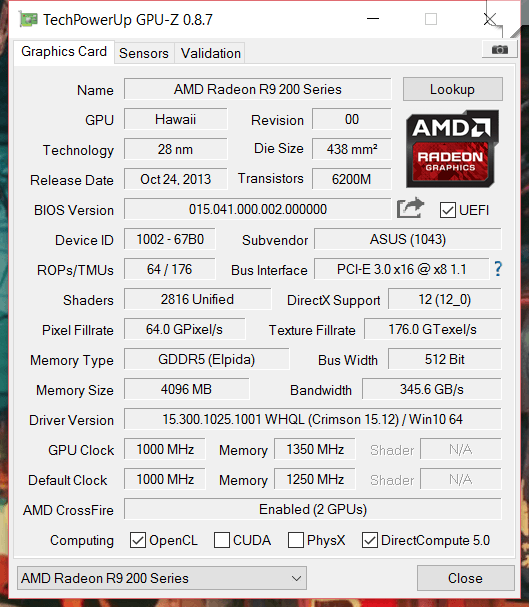
From the screenshot of GPU-Z we can see that you are using beta drivers, and also Win10, so if I were in your shoes I would try a test with a Win7 to test that there are no hardware problems, using drivers that are more than proven.
Regards!
Intel i5 3570k / ASRock Z77 Extreme 4 / G.Skill F3-12800CL9D-8GBRL / Sapphire HD5850 / Samsung HD103UJ / TR TrueSpirit / NZXT Source 210 / OCZ ZS550W
Intel i5 4570 / ASRock H87 Pro 4 / 2x G.Skill F3-14900CL8-4GBXM / Samsung 850 EVO 250Gb + ST1000DM003 + ST2000DM003 + HGST HDS723020BLA642 + Maxtor 6V250F0 / CM Seidon 240M / Zalman MS800 / CM MWE 550
AMD Ryzen 7 1800X / B350 / 2x8GB Samsung DDR4-2400 CL17 / NVIDIA GTX 1070 8GB / SSD 120GB + ST4000DM004 + ST6000DM003 / EVGA Supernova 650 G2 -
Yes, at first I had made a mistake and was using those drivers, but I changed it, and although it was better, the image still freezes
-
Ok, so then try with FurMark
Do the temperature monitoring with HWiNFO (Sensor Only ;D)
That is, install both programs... run them and click on StressTest in Furmark
You should look at the temperature of the cards and if the failure is reproduced or if strange things appear like a drop in FPS or artifacts
3DMark is quite demanding in some tests but since it runs in full screen you won't be able to see if at the moment of the failure you have something anomalous or how the cards are working... that's why it's better to use a stresstest.
You can also use OCCT which uses DirectX and will also stress the CPU but I honestly don't know if it works for MultiGPU... in any case try it in PowerSupply mode to generate maximum stress.
-
I tested the Furmark and had it running for a while without any problems, until I wanted to take a screenshot and it stopped working, it was running at just over 40,000 frames and a temperature of 91 degrees and it was working fine
-
The truth is that it scared me a little to see that it was going up to 91 degrees
How long does it take for the Frumark to do the testing? Mine stopped and it had already been going for a while ¿does it stop by itself or do I have to stop it?
-
It's not a test... it's a stress test and therefore when the GPU or VRM stage temperature no longer rises after 5 minutes from that moment I would say it's enough to minimally ensure that everything is fine... in your case something is wrong if the test fails or exits... the thing is :|.You should do the test with the case closed and everything in normal use conditions... doing it with the case open is wrong unless you remove the side of the case to play... so you are having a cooling problem since a well-ventilated case has better temperatures than a case with the side open.
With HWinfo you can record consumptions, voltages, speeds and other parameters of your equipment... although then those data generate a .CSV file that is a bit difficult to handle because you have to export it to Excel and then plot the results. (it's a bit PRO
 )
)In any case HWinfo if the equipment does not crash leaves the maximum and minimum recorded... although that does not serve to know if there is thermal throttling (speed reduction due to excess temperature) unless we are constantly looking at the program... which with programs like 3DMark is impossible because they work in full screen.
The only dangerous parameter is that the VRM stage exceeds 124ºC... if it exceeds it the power supply system will start to malfunction and the card could be damaged... it is unlikely that this will happen unless you have the card tricked with a modified bios for extreme OC but it is a parameter to take into account since if the temperature hovers around 100ºC the voltage conversion performance is reduced, consumption is triggered and the card can do strange things like FPS drops due to the aforementioned thermal throttling.
If you want to upload captures quickly use THIS FREE HOSTING
For example:

Although it should have shown the consumptions and more parameters of the card but well it's an example to show you how to upload the info.
NOTE: Remove from HWiNFO those secondary parameters that you do not want to monitor (right-click on the parameter -> HIDE)
-
There is no way… the program is working fine, but as soon as I try to take a screenshot either through the program or through Windows, the program crashes.
What I have noticed is that when it reaches 94 degrees, it soon drops to 88, goes back up to 94 and then back down to 88, and so on, at regular intervals.
Another thing I have noticed is that the temperature of one graphics card is stable at 40 degrees and the other one is the one that goes up to 94. Is this normal?
Yesterday I tried all the drivers for Windows 10 and Windows 7 and nothing... it always does the same thing.
I have no idea what else it could be. -
Such a difference in temperature between the graphics is not normal, so check the arrangement of the graphics, and if the "hot one" is on top of the other (a photo would help us know how you have it), it is likely that you are blowing hot air on it to "cool" it down and that is why it is not working correctly.
Regards!
Intel i5 3570k / ASRock Z77 Extreme 4 / G.Skill F3-12800CL9D-8GBRL / Sapphire HD5850 / Samsung HD103UJ / TR TrueSpirit / NZXT Source 210 / OCZ ZS550W
Intel i5 4570 / ASRock H87 Pro 4 / 2x G.Skill F3-14900CL8-4GBXM / Samsung 850 EVO 250Gb + ST1000DM003 + ST2000DM003 + HGST HDS723020BLA642 + Maxtor 6V250F0 / CM Seidon 240M / Zalman MS800 / CM MWE 550
AMD Ryzen 7 1800X / B350 / 2x8GB Samsung DDR4-2400 CL17 / NVIDIA GTX 1070 8GB / SSD 120GB + ST4000DM004 + ST6000DM003 / EVGA Supernova 650 G2 -

-
it is not very noticeable, considering that my fingers fit, I would say that there is between 1.5 cm and 1.7 cm between the two graficas.La, the one that gets the hottest is the one on top -
Well, without a screenshot of Furmark or HWinfo we can't really help you… what I can tell you is that the one at 40ºC isn't working... we would be out of doubts if you could take a screenshot.
By the way, the one above heats up because it's the primary or master and the one that's working.
In any case, try with OCCT to see if it sounds the whistle because that way I can't diagnose anything.
I think a screen shot would be useful if the screenshot issue gives you so many problems… try to take it before it crashes :troll:... in fact, take three: one before the test (everything at rest), one running the test and another just at the moment it crashes. You can even record a video, upload it to Youtube and post it in the forum... it will be by options

It's important as I say to have HWinfo open at all times otherwise we can't know what the hell is going on, or how the hardware is working, the heat dissipated... etc.
Another thing you should try is to test the cards separately... without Crossfire, one at a time with Furmark to see if one crashes or if both do something weird or if the problem is reproduced.
I recommend the application Display Driver Uninstaller to remove and clean all graphics drivers completely and without residues and put the latest version of drivers.
Of course update DirectX… for Furmark it doesn't matter because it's OpenCL but you never know where it might be causing problems.
By the way... have you done all this?
[YOUTUBE-HD]GBHi5JPXfJM[/YOUTUBE-HD]
-
Hello, I've tried it several times, but it just crashes when I want to take a photo or video, right at the exact moment I press the button…
Today I will try again to see if I have any luck.I tried again the graphics separately and they work perfectly.
The video tutorial you uploaded is the one I watched to know how to do crossfire, the only difference is that after deleting the drivers with programs and features I run the Display Driver Unistaller, with the computer in fault-tolerant mode.
Yesterday I reinstalled the latest drivers and let me play a little bit of The Division, but after a while it crashed.Could it not be a problem of conflict with something else? The RAM for example. I ask without having any idea, it's desperation hahaha
-
I finally managed to stop it from crashing when taking screenshots, I can't believe it . This is the computer's values at rest This is a screenshot of Furmark halfway through the stress test This is a screenshot of Furmark at the end of the stress test And this is a screenshot of Furmark at the end of the stress test
-
Well the second non-functional GPU … is enabled for Crossfire but it doesn't work... try to enable crossfire for furmark: How to Enable SLI and CrossFire Support for OpenGL Applications Let's see if the whistle sounds.


Hello! It looks like you're interested in this conversation, but you don't have an account yet.
Getting fed up of having to scroll through the same posts each visit? When you register for an account, you'll always come back to exactly where you were before, and choose to be notified of new replies (either via email, or push notification). You'll also be able to save bookmarks and upvote posts to show your appreciation to other community members.
With your input, this post could be even better 💗
Registrarse Conectarse