Solution to Windows 7 update problems
-
Perfect; I have a couple of PCs that I haven't updated in a while because of the absurd amount of time it takes just to search for updates. I even thought it was a strategy by MS to push people to use Windows 10.
Toda la actualidad en la portada de Hardlimit
Mis cacharros -
This thread would have saved me a headache a couple of weeks ago. :ugly:
In addition to Yorus's contribution, I would like to mention that W7 has what is called a "convenience roll-up package", which contains all the updates that have been released since SP1 in 2011.
It only works with Internet Explorer 6 or higher. -
At my job, among other things, we refurbish equipment from large companies that we then sell, so for almost a year, between one and the other, we must have installed thousands of devices, although the ones that are the same are cloned. The time we could have saved.
-
Well folks, we're back at it again.
I think it was in July the last time it was updated, and now in September it has become a zombie again.
It seems that the cause of the problem is that the agent updater installs through WU, so we already have a stupid loop that will prevent us from making updates through Windows Update in a normal way.But this time I was quick and found the solution in just two days. :ugly:
- Manual way:
We open IExplore (Win+R iexplore) and open the link of the Microsoft Update Catalog. The search in this case is for Windows 7 + Windows update.
The packages (of 32 or 64 bits, as appropriate) to search for are (I downloaded a lot, and these were the ones that turned out to be useful):
KB3161102
KB3172605
KB3177467
KB3177723
KB3179573
KB3181988
KB3182203
KB3184143From there, maybe before, I wasn't too methodical, I managed to get Windows Update to work by downloading the rest of the updates in the usual way.
- Easy way:
I found out later :wall::wall::wall:, that with this application it seems that you just have to select if you have a 32 or 64 bit system, and it downloads the relevant updates. I haven't tried it, but there you go.
-
Thanks for the information, at this point Windows 7 will really be loaded... or not. For the moment I haven't had these problems again, but I also haven't updated any this week.
-
Well, today I had another fight with the issue at work. A computer that I reinstalled in July is giving me a hard time. At night it tries to install updates and in the morning when you start the PC it starts reversing changes and gets stuck. Then you hit Windows Update to see what updates it's trying to install and it gets stuck on "checking for updates", despite having already installed KB3102810.
I tried the software that Espinete mentioned but after a while it seemed like it wasn't doing anything (first I downloaded the catalog and then I hit the updater).
Now I'm trying with the manual option you put of the catalog and the KBs you mentioned to see... -
They must have put interns on the W7 Update, because a couple of months ago, they tried to install a driver for the integrated micro, and after three attempts seeing that it gave an installation error, I checked the version, and it was not compatible with my processor :facepalm:So I had to end up hiding it so that it would stop downloading and trying to install it. Take WHQL driver ¬¬
Intel i5 3570k / ASRock Z77 Extreme 4 / G.Skill F3-12800CL9D-8GBRL / Sapphire HD5850 / Samsung HD103UJ / TR TrueSpirit / NZXT Source 210 / OCZ ZS550W
Intel i5 4570 / ASRock H87 Pro 4 / 2x G.Skill F3-14900CL8-4GBXM / Samsung 850 EVO 250Gb + ST1000DM003 + ST2000DM003 + HGST HDS723020BLA642 + Maxtor 6V250F0 / CM Seidon 240M / Zalman MS800 / CM MWE 550
AMD Ryzen 7 1800X / B350 / 2x8GB Samsung DDR4-2400 CL17 / NVIDIA GTX 1070 8GB / SSD 120GB + ST4000DM004 + ST6000DM003 / EVGA Supernova 650 G2 -
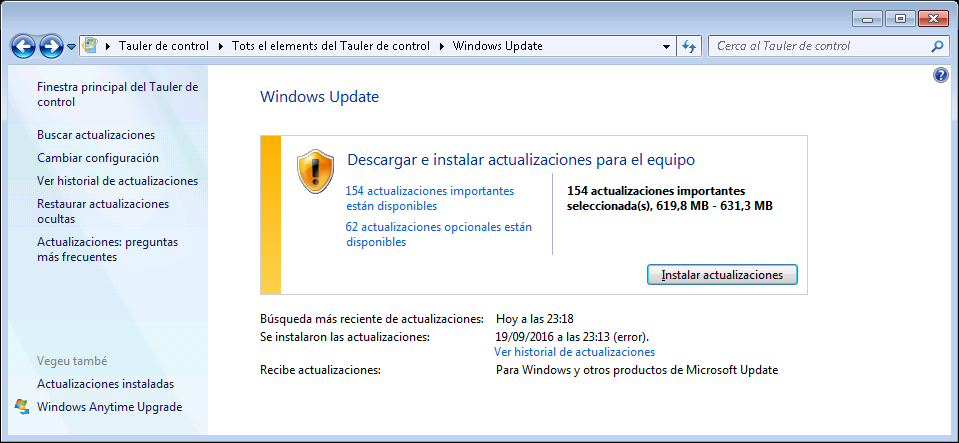
Well, it seems that the manual catalog option has worked. I will now try to install it to see what I find tomorrow...
Edit: 143 have been installed and 11 have given an error. Then I tried with those 11 and 6 have been installed, so there are 5 pending.
-
Well, here I leave you another page, this time with the precise packages to get things going when it gets stuck again.
Search for Windows Updates takes forever? - A possible solution

-
@whoololon I confirm that as of today, this solution works. I did a clean install on a Pentium E2000nosecuantos and the longest run showed the list in less than 5 minutes.
Toda la actualidad en la portada de Hardlimit
Mis cacharros -
@whoololon Perfect! That last link worked well for me this time. I thought that with KB3020369 and the April Rollup I would have enough but not so much... by adding KB3177467 and KB3172605 and restarting it found the remaining updates well.
-
since I didn't open a new thread, I revived it
on 03/05/2017 I bought a W7 ultimate sp1 everything has gone perfect until yesterday when I got the message that it's not original. I bought it as original and they sent me the download link, and it has been updating by itself without any problems.
any suggestions?
regards -
@clipper How much did it cost you?
-
does that matter? about 40 euros
-
Importantly, that is not a Microsoft price, so the chances of being given a corporate license are high, and in the end Microsoft ends up closing the tap.
-
Hello
I had the W7 pirate and it has nothing to do with this one, this one is authenticated on the network, no cracks and no hiding updates. That's why it bothers me that now it says it's pirated.
Any solution?
Regards -
From Microsoft's point of view, it is equally illegal, it is not a license intended for end users and they have caught him. Sometimes it can last for months, a year, many years... but it is a lottery.
Edit: I leave you this link on the subject
https://www.osi.es/es/actualidad/historias-reales/2017/05/31/compre-una-licencia-barata-de-windows-y-no-fue-buena-ideaIf you put "cheap windows licenses" in Google, you will find more information on the subject.
What you have done is better than putting in a crack, which is more dangerous, but equally illegal and, moreover, I regret to say that the license has cost you dearly for the prices that are being handled out there.
-
The issue is that I downloaded a pirated copy and it was advertised as original on the website, nowhere did it say it was pirated, it sold all versions as originals.
I mean, they sold it to me as dubbed, right?
Regards -
@clipper That thing about them having nothing to do with it, well, it depends, because it's true that those keys are not illegal, but not in the face of Microsoft.
In fact, you can find W10 Pro OEMs for quite less than €15, that's right, you know that any day they can check the list and you're out.
That even so it comes out cheaper than the €140 of a "legal" license?, that already depends on each one.If you were not aware of this and believed that what you were doing was allowed by Microsoft, unfortunately you have been deceived, both by the product and by the price.
Claim from the page where you bought it.
-
Thanks for the answers.
For once I want to go legal....
Send Có jo nes...
Regards






Hello! It looks like you're interested in this conversation, but you don't have an account yet.
Getting fed up of having to scroll through the same posts each visit? When you register for an account, you'll always come back to exactly where you were before, and choose to be notified of new replies (either via email, or push notification). You'll also be able to save bookmarks and upvote posts to show your appreciation to other community members.
With your input, this post could be even better 💗
Registrarse Conectarse