• Portada
    • Recientes
    • Usuarios
    • Registrarse
    • Conectarse

    My PC won't turn on because of the temperature

    Programado Fijo Cerrado Movido Procesadores, placas base y memorias
    pc ayudarefrigeracion
    47 Mensajes 9 Posters 5.8k Visitas 3 Watching
    Cargando más mensajes
    • Más antiguo a más nuevo
    • Más nuevo a más antiguo
    • Mayor número de Votos
    Responder
    • Responder como tema
    Accede para responder
    Este tema ha sido borrado. Solo los usuarios que tengan privilegios de administración de temas pueden verlo.
    • defaultuserD Desconectado
      defaultuser Veteranos HL @Clipper
      Última edición por

      @clipper said in My pc won't turn on because of the temperature:

      @defaultuser I don't think it's the GPU ventilation profile.

      Ha, I wasn't referring to that, the comment came because I think graphics cards are what die the most, and they suffer a lot.

      I would also point to the graphics card, but I'm not so sure about how it makes the micro go up that many degrees.

      so have you cleaned the disipa already? I'm going to palpas, I don't remember what these things were like anymore haha, I have no idea what things have been ruled out and/or have already been done.

      Ryzen 5 3600 - Tuf B550 pro - 2x 8g 3600c18 - Strix rtx 2060 - M2 1TB

      ClipperC 1 Respuesta Última respuesta Responder Citar 0
      • ClipperC Desconectado
        Clipper @defaultuser
        Última edición por

        @defaultuser sometimes people say that the pc turns off because of temperature...
        But temperature of what?
        CPU... GPU
        DDR voltages...
        When it is not explained well, we end up like this.
        Regards

        1 Respuesta Última respuesta Responder Citar 0
        • defaultuserD Desconectado
          defaultuser Veteranos HL @chixz
          Última edición por

          @chixz said in My pc won't turn on because of the temperature:

          @clipper turns on perfectly like this

          Ok, with just the micro and a ram module it turns on well, what temperatures? Normal, or just turns on and works?

          You will have to test the same but with the other module, and with the other slot you were using, it is logical.

          You will have to boot like this, and make sure first that it is perfect in everything.

          Also idem of the same but adding the M2 disk.

          Ryzen 5 3600 - Tuf B550 pro - 2x 8g 3600c18 - Strix rtx 2060 - M2 1TB

          1 Respuesta Última respuesta Responder Citar 0
          • defaultuserD Desconectado
            defaultuser Veteranos HL
            Última edición por

            Well, there's nothing else to say, as you can already play enough.
            I'll give news again when I'm desperate, it's not a problem.

            Ryzen 5 3600 - Tuf B550 pro - 2x 8g 3600c18 - Strix rtx 2060 - M2 1TB

            C 2 Respuestas Última respuesta Responder Citar 1
            • C Desconectado
              chixz @defaultuser
              Última edición por

              @defaultuser sorry guys, I sent to order a new heatsink for the pc and I forgot about the blog, but the problem persists and the pc turns off at 24º monitored from the bios, I will try every method they said so far, starting by formatting the bios

              1 Respuesta Última respuesta Responder Citar 0
              • C Desconectado
                chixz @defaultuser
                Última edición por

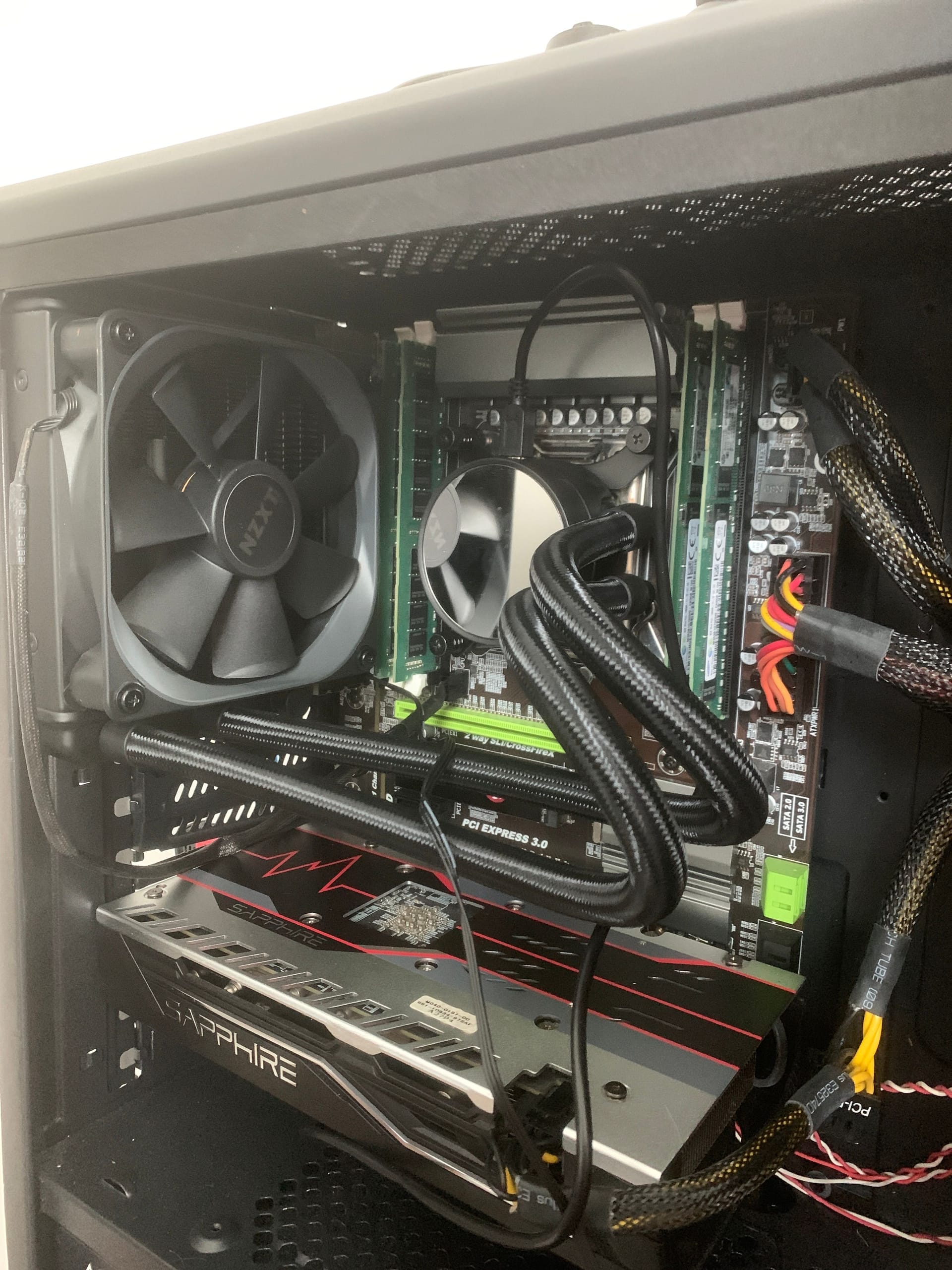
                @defaultuser image.jpg the new heatsink is this one

                C ClipperC 2 Respuestas Última respuesta Responder Citar 0
                • C Desconectado
                  chixz @chixz
                  Última edición por

                  Guys, I find it strange that when I turn it on and enter Windows at once, it doesn't turn off anymore

                  SylverS defaultuserD 2 Respuestas Última respuesta Responder Citar 0
                  • SylverS Desconectado
                    Sylver Veteranos HL @chixz
                    Última edición por

                    @chixz If you reset the BIOS, something was probably wrong with it and it's fixed now.

                    Saludos

                    >> i7-2600K Sandy Bridge @4.4GHz || Noctua NH-D14 || ASRock Z77 Extreme4 || 4x8Gb G.Skill Ripjaws X DDR3 1600MHz || XFX RX 5700 XT 8Gb || SSD Samsung 850 PRO 256Gb & 850 EVO 500Gb || WD Caviar Green 1Tb || Barracuda 1Tb || Corsair TX650 V2 || M-Audio Fast Track Pro || KRK RP8 RoKit G3 || BenQ GW2750 27"
                    >> Athlon 64 X2 5600+ Brisbane @2.9GHz || Gigabyte GA-M61PME-S2 || 2x2Gb DDR2 Kingston 800MHz || Sapphire Radeon HD 5850 Xtreme 1Gb || Maxtor 320Gb SATA2 || OCZ ModXStream 500W Modular || TEAC PowerMax 120/2 || Acer X243w 24"
                    >> Intel Core2Duo E6600 Conroe @2.4GHz || Asus P5N32-SLI SE DELUXE || 2x1Gb DDR2 Kingston 800MHz || Asus nVidia GeForce 9800GT 1Gb GDDR3 || Seagate Barracuda IDE 80Gb 7200RPM || Linkworld LPK12-35 450W

                    1 Respuesta Última respuesta Responder Citar 0
                    • defaultuserD Desconectado
                      defaultuser Veteranos HL @chixz
                      Última edición por

                      @chixz said in My pc won't turn on because of the temperature:

                      Guys, I think it's weird that when I turn it on and enter Windows at once, it doesn't turn off anymore

                      That after resetting the bios, right?

                      By the way, in all the photos you leave out the front of the tower, after they already asked you about the fans it has. Does it?

                      Ryzen 5 3600 - Tuf B550 pro - 2x 8g 3600c18 - Strix rtx 2060 - M2 1TB

                      1 Respuesta Última respuesta Responder Citar 0
                      • ClipperC Desconectado
                        Clipper @chixz
                        Última edición por

                        @chixz said in My pc won't turn on because of the temperature:

                        @defaultuser image.jpg the new radiator is that one

                        I highly doubt that 120 radiator will perform better than the one you had with air
                        Best regards

                        1 Respuesta Última respuesta Responder Citar 0
                        • FassouF Desconectado
                          Fassou MODERADOR
                          Última edición por

                          Out of curiosity. In the first photo with the air cooler.
                          Was the computer on?

                          450144a5-51dd-4751-88eb-c5a07e0b2fd7-imagen.png

                          Regards!

                          Intel i5 3570k / ASRock Z77 Extreme 4 / G.Skill F3-12800CL9D-8GBRL / Sapphire HD5850 / Samsung HD103UJ / TR TrueSpirit / NZXT Source 210 / OCZ ZS550W
                          Intel i5 4570 / ASRock H87 Pro 4 / 2x G.Skill F3-14900CL8-4GBXM / Samsung 850 EVO 250Gb + ST1000DM003 + ST2000DM003 + HGST HDS723020BLA642 + Maxtor 6V250F0 / CM Seidon 240M / Zalman MS800 / CM MWE 550
                          AMD Ryzen 7 1800X / B350 / 2x8GB Samsung DDR4-2400 CL17 / NVIDIA GTX 1070 8GB / SSD 120GB + ST4000DM004 + ST6000DM003 / EVGA Supernova 650 G2

                          hlbm signature

                          krampakK 1 Respuesta Última respuesta Responder Citar 2
                          • krampakK Desconectado
                            krampak Global Moderator @Fassou
                            Última edición por

                            @fassou visual effect or module badly pinned? ?

                            Mi Configuración
                            hlbm signature

                            C 1 Respuesta Última respuesta Responder Citar 2
                            • defaultuserD Desconectado
                              defaultuser Veteranos HL
                              Última edición por

                              It's not a visual effect, haha, I imagine the photo was taken between trying things out and it was just an oversight, otherwise I would have shouted at him for RAM.

                              @Clipper It's not going to improve with the AIO either, I think, but well, if he puts good ventilation in the tower, it's fine, and if he wants to go further, he puts another fan on the outside of the AIO, or even a 14 inch one with an adapter.

                              Better that he leaves everything as it is while he better understands his equipment, because the truth is we still don't know if it had a bad BIOS configuration, or the pipes of the cooler were stunned. Although at first it was the BIOS, we really don't know for sure.

                              Ryzen 5 3600 - Tuf B550 pro - 2x 8g 3600c18 - Strix rtx 2060 - M2 1TB

                              ClipperC 1 Respuesta Última respuesta Responder Citar 0
                              • ClipperC Desconectado
                                Clipper @defaultuser
                                Última edición por

                                @defaultuser @defaultuser man.
                                More facing the creator of the thread.
                                There are many performance comparisons between stock coolers, air coolers and liquid cooling.
                                And basically it comes down to this:
                                Stock cooler, for office work and little more that doesn't dissipate much.
                                So it's best to change it as soon as possible.
                                Air coolers have a wide variety to choose from and work well with zero maintenance ( well... Every six months at most you have to clean them if you don't have dust filters )
                                L.C can improve the cooling of an air cooler in some cases.
                                For example a triton 88 ( which is the one I had, with three fans ) to improve temperature I had to go to a minimum 240 mm radiator and with a 360 something is noticeable.
                                With a 120 it's the same or worse.
                                That's with stock L.C systems ( no maintenance )
                                If we start changing or adding fans, system: pull push things change.
                                And L.C wins
                                But by putting in bills.
                                Regards

                                C 1 Respuesta Última respuesta Responder Citar 1
                                • C Desconectado
                                  chixz @krampak
                                  Última edición por

                                  @krampak already took care of that in these days, if it was misplaced

                                  1 Respuesta Última respuesta Responder Citar 0
                                  • C Desconectado
                                    chixz @Clipper
                                    Última edición por

                                    @clipper I really did notice an improvement when I turned it on, from 42º degrees at rest it went down to 30º or even 27º, but you're giving me a reason so that beats my hunch

                                    _Neptunno__ ClipperC 2 Respuestas Última respuesta Responder Citar 0
                                    • _Neptunno__ Desconectado
                                      _Neptunno_ MODERADOR @chixz
                                      Última edición por

                                      @chixz said in My pc won't turn on because of the temperature:

                                      @clipper I really did notice an improvement when I turned it on, from 42º degrees at rest it went down to 30º or even 27º, but you're giving me a reason so that beats my hunch

                                      Depending on the temperature of the room, set it to around 22-25º, it's quite reasonable that you have those 27-30º when you turn on the computer because you won't have a lower temperature than the room temperature unless you use some kind of refrigeration like liquid nitrogen or something similar. 42º was excessive, even if it caught you in the middle of summer...you just don't have time to reach that temperature when you turn on the computer unless the sensor is malfunctioning or the heatsink is poorly placed.

                                      Regards.

                                      1 Respuesta Última respuesta Responder Citar 2
                                      • ClipperC Desconectado
                                        Clipper @chixz
                                        Última edición por

                                        @chixz
                                        I am old enough to have cut IDE cables so they would be narrower and improve, aesthetically and airflow.
                                        The basic rule for lowering the temperatures of a PC is to bring in more air than all the internal components (CPU and GPU heatsinks) move, and as much as possible, create a "chimney" effect. Some cases, like the Talius, are like this: three fans below, three above, and three front fans, with one rear fan. Only the top and rear fans blow air out, and the rear one is optional.
                                        This means that the bottom fans cool the GPU and the front fans cool the radiator you mount on top.
                                        The rear fan can blow out residual heat or help improve the flow of fresh air to the GPU radiator, which has to absorb the heat from the GPU.
                                        Regards

                                        defaultuserD 1 Respuesta Última respuesta Responder Citar 1
                                        • defaultuserD Desconectado
                                          defaultuser Veteranos HL @Clipper
                                          Última edición por

                                          @clipper Here we are, good explanation and brief.

                                          Going a step further with that topic, I currently have compartmentalized airflows.

                                          The CPU cooler is not swallowing the hot air from the graphics card, this air is conducted directly to the back without barely contaminating the motherboard (M2 ram and chipset, but very little). The top front fan creates an exclusive tunnel for the top, from the edge of the backplate of the vga upwards and up to the exit of the CPU cooler.

                                          The vga has separate intake and exhaust, it does not recirculate its hot flow, it feeds on fresh new air, the hot air that comes out of its cooler and its pcb comes out conducted directly towards the back of the case, and in addition the bottom front fan that feeds it with a flow independent of the top fan, produces a compartmentalized flow that allows to have very low temperatures without hardly using the noisy fans of the vga.

                                          Result; I can play at night in a very very discreet way and with very good temperatures, in all components.

                                          I admit that for now it is a cardboard prototype ? but it can perfectly be done with methacrylate or vinyl or another "more noble" material.

                                          Manufacturers tried to do something similar once, but they did not put much interest in it to be honest, the usual thing, they wanted to charge a fortune for a nonsense badly applied and they would be afraid of going too far off the track and losing money against the competition. ?

                                          Ryzen 5 3600 - Tuf B550 pro - 2x 8g 3600c18 - Strix rtx 2060 - M2 1TB

                                          ClipperC 1 Respuesta Última respuesta Responder Citar 0
                                          • ClipperC Desconectado
                                            Clipper @defaultuser
                                            Última edición por

                                            @defaultuser put a picture ?

                                            defaultuserD 2 Respuestas Última respuesta Responder Citar 0
                                            • 1
                                            • 2
                                            • 3
                                            • 2 / 3
                                            • First post
                                              Last post

                                            Foreros conectados [Conectados hoy]

                                            1 usuarios activos (1 miembros y 0 invitados).
                                            febesin, pAtO, HIAL-9000

                                            Estadísticas de Hardlimit

                                            Los hardlimitianos han creado un total de 543.5k posts en 62.9k hilos.
                                            Somos un total de 34.9k miembros registrados.
                                            roymendez ha sido nuestro último fichaje.
                                            El récord de usuarios en linea fue de 123 y se produjo el Thu Jan 15 2026.