Problem when changing DDR3 memory
-
Hello forum members!
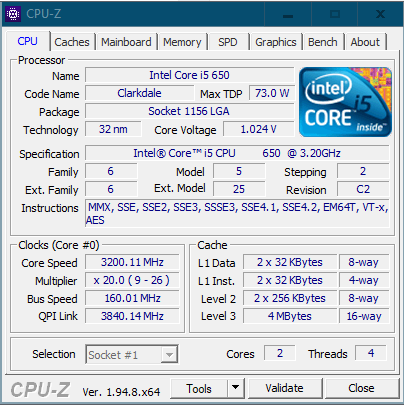
First of all, I'm delighted to post here again! I read you from a distance but, with my age, I had put the tinkering aside until yesterday when I had the brilliant idea to upgrade the RAM on my old PC, which was configured here in its day (let's go back to 2014-2015...) to leave it to the little one who is already starting to dabble in gaming.
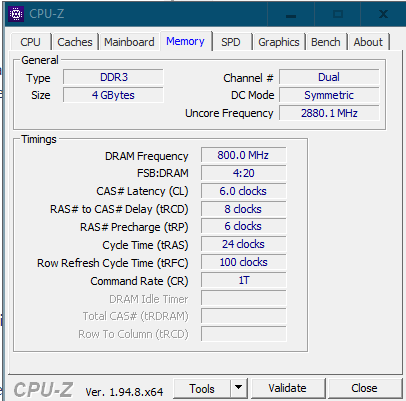
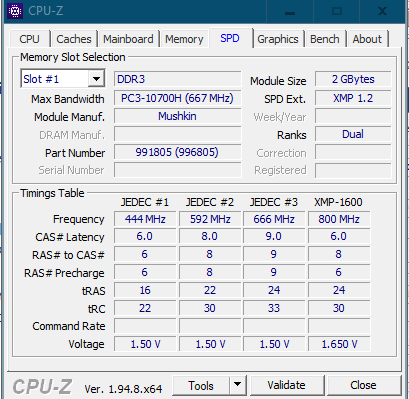
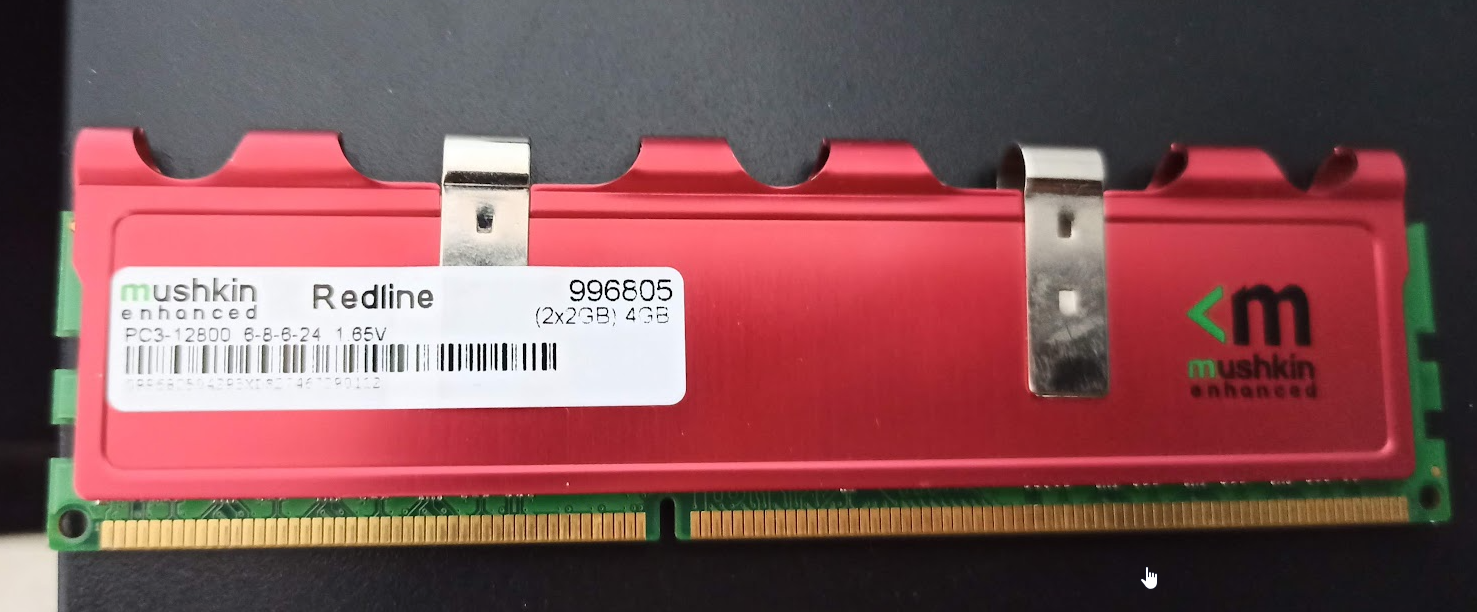
I decided to go from a 2x2GB Mushkin Redline DDR3 1600mhz PC12800
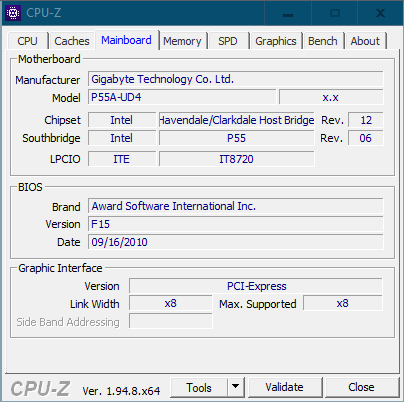
To a 2X4GB Kingston Fury Beast DDR3 1866mz PC12800Supposedly the motherboard, a Gigabyte P55A-UD4, supports memory per socket up to 16GB and at DDR3 speeds of 2200/1333/1066/800 mhz so I understand that 1866mhz would be supported.
The thing is that after putting the 2 memory banks and booting with a clear cmos, the PC boots fine, in the bios it detects the 8GB, but Windows doesn't boot.
And if I run memtest, it freezes always at 12-14% so something makes me suspect that the motherboard is not fully compatible with this type of memory.
The bios is updated to the latest version they released for this motherboard. And I've tried booting in Default Profile, Optimized profile, setting the speed manually to 1333mhz, 1600mz, 1866mhz, but nothing.
Best regards!!!
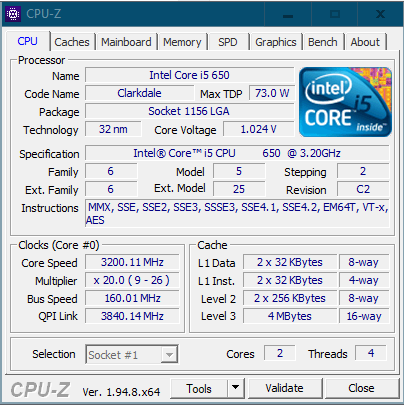
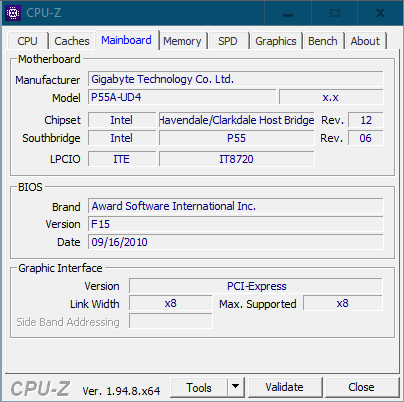
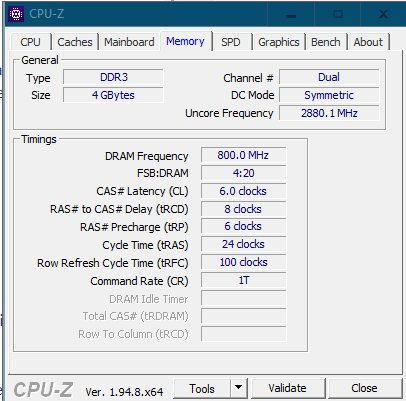
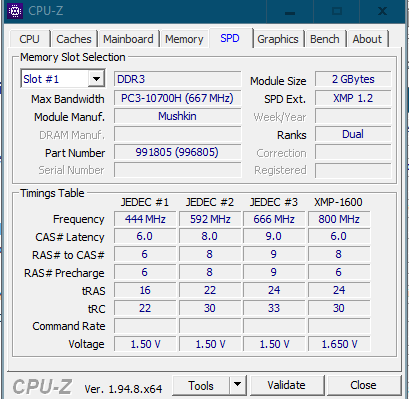
-
@ninchi_punkrock Hello buddy!
I can think of few solutions for your case, perhaps to rule out that it is not a damaged module you could try running memtest with 1 module only and then with the other, to see if it crashes with both. If so, it is almost certain that it is a compatibility problem.
This is the official list of verified memories for your board but it is already indicated that not all have been tested so it cannot be ruled out that they are compatible even if they are not on the list (the part number is needed): https://download.gigabyte.com/FileList/Memory/mb_memory_ga-p55a-ud4.pdf?v=4b707e8d531df1ea669bc14172f9ac77Another option is to try them in another computer, but I understand that you do not have one, right?
-
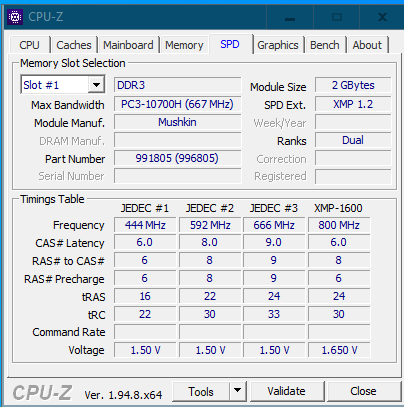
@ninchi_punkrock Try using an XMP profile and notice that for 800Mhz (1600) it puts 1.65v while the other SPD profiles put them at 1.5v
You have the specifications of that board here (Rev 1.0), and here for Rev 2.0.
You have to look at the Revision directly (it comes printed on the PCB)
Salu2!
Intel i5 3570k / ASRock Z77 Extreme 4 / G.Skill F3-12800CL9D-8GBRL / Sapphire HD5850 / Samsung HD103UJ / TR TrueSpirit / NZXT Source 210 / OCZ ZS550W
Intel i5 4570 / ASRock H87 Pro 4 / 2x G.Skill F3-14900CL8-4GBXM / Samsung 850 EVO 250Gb + ST1000DM003 + ST2000DM003 + HGST HDS723020BLA642 + Maxtor 6V250F0 / CM Seidon 240M / Zalman MS800 / CM MWE 550
AMD Ryzen 7 1800X / B350 / 2x8GB Samsung DDR4-2400 CL17 / NVIDIA GTX 1070 8GB / SSD 120GB + ST4000DM004 + ST6000DM003 / EVGA Supernova 650 G2 -
Thanks, guys!!
I ran memtest on each module separately and it froze the same way.
I enabled XMP profile to force them to go to 800x2 (1600mhz) with 1.65 voltage but no luck.In my case the motherboard is rev 2.0 with the BIOS updated to the latest, but it seems that there is something that is getting away, and I think this memory is not fully compatible.
I have proceeded to return them and I am thinking of getting these ones that at first glance seem more equivalent in specifications than the mushkin (although given the situation, who knows):
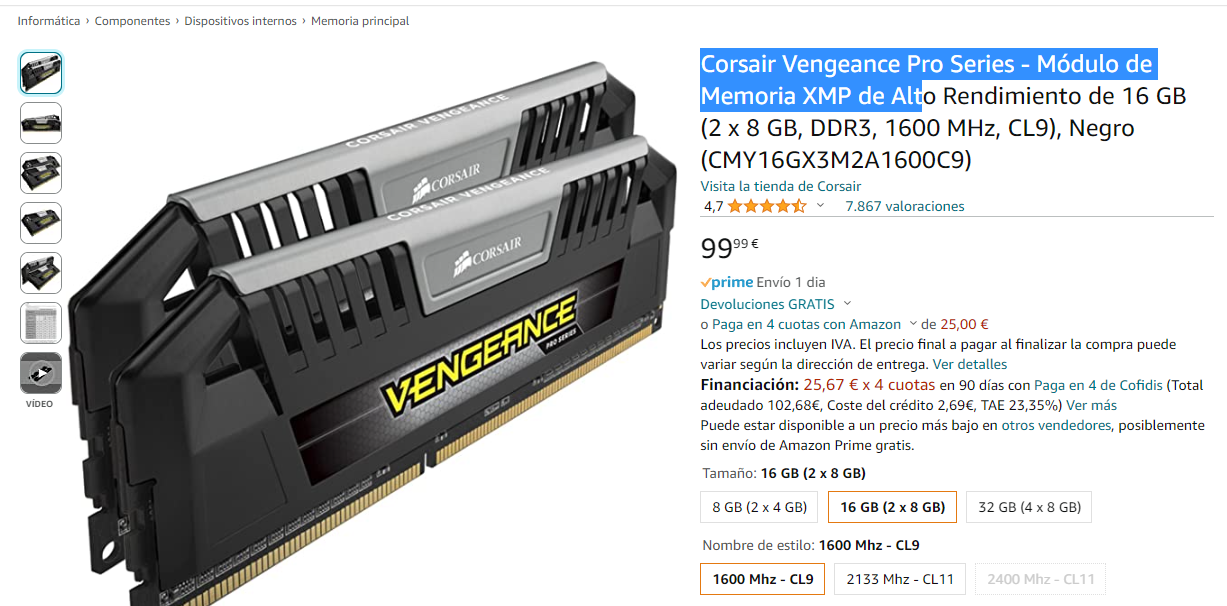
How do you see them?
Best regards!
-
@ninchi_punkrock With a Corsair or Kingston (okay, I saw later that you're having problems with a Kingston
 ) it's very difficult for you to have problems.
But for the 37€ that come out and seeing that you are interested in that store, take a look at these
Salu2!
Intel i5 3570k / ASRock Z77 Extreme 4 / G.Skill F3-12800CL9D-8GBRL / Sapphire HD5850 / Samsung HD103UJ / TR TrueSpirit / NZXT Source 210 / OCZ ZS550W
Intel i5 4570 / ASRock H87 Pro 4 / 2x G.Skill F3-14900CL8-4GBXM / Samsung 850 EVO 250Gb + ST1000DM003 + ST2000DM003 + HGST HDS723020BLA642 + Maxtor 6V250F0 / CM Seidon 240M / Zalman MS800 / CM MWE 550
AMD Ryzen 7 1800X / B350 / 2x8GB Samsung DDR4-2400 CL17 / NVIDIA GTX 1070 8GB / SSD 120GB + ST4000DM004 + ST6000DM003 / EVGA Supernova 650 G2 -
@Fassou
Those but at 1866 MHz I caught them.
But two blister (total 32gs)
They stayed at 1600 MHz because according to the "smart" ones from patriot they only work at 1866 MHz 32 gs if you buy their pack of four modules.
If you buy two of two they don't work.
So if you don't intend to expand in the future to 32 gs there is no problem.
Regards -
Thanks guys.
I'll take a look at those Patriots.
It's really about upgrading a bit since the team itself with the 4GB mushkin redline CL6 is scary for browsing and developing code, which is what I do (eclipse, netbeans, etc, etc)
But I want to leave it as a legacy to my little one (not so little anymore) and for running certain games, lightroom, steam, bluestacks, etc, it gets a bit stuck.
The store really doesn't matter to me. I chose that one for the "ease" of logistics for returning in case of problems.
I'll let you know how they went
-
Well, folks, bad news.
After testing the Patriot Viper 2x8GB I have to say that they haven't worked either, so I think the problem is with my motherboard, which is either very delicate or only works with certain models/chips (even though it's updated to the latest bios).
The battery of tests/configurations has been as follows, but with none of them have I managed to get past Memtest at 1%:
- Default Bios
- Bios with optimized values
- Placing them in slots 1 and 3
- Placing them in slots 0 and 2
- 1 module loose in slot 1
- 1 module loose in slot 3
- Increasing DRAM voltage to 1.65v
- Increasing QPI voltage to 1.1v
- With XMP Profile 1 Active Standard mode
- With XMP Profile 1 Active Turbo mode
- With XMP Profile 1 Active Extreme mode
- Forcing the multiplier to 133x10
- Timings 133x10 cas 10-10-10
- Timings 160x10 cas 10-10-10
- Timings 160x10 cas 12-12-12
I've started from the most basic changes to the most complex.
But there's no way.I've put the Mushkin Redline 2x2GB back in and they've swallowed every single one of the previous configurations without a problem.
I don't know what else to test, I'm running out of options. But I see too much coincidence that 2 brands I've tested (the Kingston Fury and the Viper) and other normal Kingston ones that I tested in their day, none of them work.
-
@ninchi_punkrock You may think it's not very practical, but... how about trying a 4x2Gb configuration? Either trying to get a Mushkin Redline kit 2x2Gb like yours from second hand (seeing the prices I think they are given away) or looking for a 4x2Gb kit from another brand. If they are native to 1600mhz they may work well right away.
Best regards!
>> i7-2600K Sandy Bridge @4.4GHz || Noctua NH-D14 || ASRock Z77 Extreme4 || 4x8Gb G.Skill Ripjaws X DDR3 1600MHz || XFX RX 5700 XT 8Gb || SSD Samsung 850 PRO 256Gb & 850 EVO 500Gb || WD Caviar Green 1Tb || Barracuda 1Tb || Corsair TX650 V2 || M-Audio Fast Track Pro || KRK RP8 RoKit G3 || BenQ GW2750 27"
>> Athlon 64 X2 5600+ Brisbane @2.9GHz || Gigabyte GA-M61PME-S2 || 2x2Gb DDR2 Kingston 800MHz || Sapphire Radeon HD 5850 Xtreme 1Gb || Maxtor 320Gb SATA2 || OCZ ModXStream 500W Modular || TEAC PowerMax 120/2 || Acer X243w 24"
>> Intel Core2Duo E6600 Conroe @2.4GHz || Asus P5N32-SLI SE DELUXE || 2x1Gb DDR2 Kingston 800MHz || Asus nVidia GeForce 9800GT 1Gb GDDR3 || Seagate Barracuda IDE 80Gb 7200RPM || Linkworld LPK12-35 450W -
It was already strange that the Kingston you had were failing, so the new ones are within the realm of possibility.@ninchi_punkrock With just one module of the new ones, does it work well?
Best regards!
Intel i5 3570k / ASRock Z77 Extreme 4 / G.Skill F3-12800CL9D-8GBRL / Sapphire HD5850 / Samsung HD103UJ / TR TrueSpirit / NZXT Source 210 / OCZ ZS550W
Intel i5 4570 / ASRock H87 Pro 4 / 2x G.Skill F3-14900CL8-4GBXM / Samsung 850 EVO 250Gb + ST1000DM003 + ST2000DM003 + HGST HDS723020BLA642 + Maxtor 6V250F0 / CM Seidon 240M / Zalman MS800 / CM MWE 550
AMD Ryzen 7 1800X / B350 / 2x8GB Samsung DDR4-2400 CL17 / NVIDIA GTX 1070 8GB / SSD 120GB + ST4000DM004 + ST6000DM003 / EVGA Supernova 650 G2 -
@sylver said in Problem when changing DDR3 memory:
@ninchi_punkrock You may think it's impractical, but... how about trying a 4x2Gb configuration? Either trying to get a Mushkin Redline 2x2Gb kit like yours from a second-hand (seeing the prices, they seem to be giving them away) or looking for a 4x2Gb kit from another brand. If they are native to 1600mhz, they might work fine right off the bat.
Best regards!
Well, it's not a bad idea at all. In fact, after your post, I saw on the second-hand market 3x2GB Mushkin Redline that are identical in specs and latencies to my Mushkin Redline, for 25€.
Of those 3 modules, I suppose I would only use two, since I already have 2 slots occupied for dual channel, and to fill the other two.
Would that be possible, or do they come made to have to put all 3?
@fassou said in Problem when changing DDR3 memory:
It was already strange that the Kingston you had were failing, so the new ones are within the realm of possibility.
@ninchi_punkrock Does it work well with just one module of the new ones?
Cheers!
I didn't have much hope either, but I had to try it.
With just one module of the new ones, tested in all 4 slots, it still didn't work. Neither with the Patriot nor the Kingston Fury.
I think that even with the updated BIOS, I just happened to get a somewhat "special" motherboard back in the day.
-
@ninchi_punkrock Man, I haven't expressly tried that 3x2Gb kit, but considering that you have 4 slots, it would be better to find another 2x2Gb kit like yours, I've seen several but I don't know if they differ in any specification with yours.
However, I think that only 2 modules from the 3-module kit should work without problems, mainly because of what you comment that they have exactly the same specifications as yours, but let's see if any fellow who has tried that technique can confirm it to us to be on the safe side.
Greetings!
>> i7-2600K Sandy Bridge @4.4GHz || Noctua NH-D14 || ASRock Z77 Extreme4 || 4x8Gb G.Skill Ripjaws X DDR3 1600MHz || XFX RX 5700 XT 8Gb || SSD Samsung 850 PRO 256Gb & 850 EVO 500Gb || WD Caviar Green 1Tb || Barracuda 1Tb || Corsair TX650 V2 || M-Audio Fast Track Pro || KRK RP8 RoKit G3 || BenQ GW2750 27"
>> Athlon 64 X2 5600+ Brisbane @2.9GHz || Gigabyte GA-M61PME-S2 || 2x2Gb DDR2 Kingston 800MHz || Sapphire Radeon HD 5850 Xtreme 1Gb || Maxtor 320Gb SATA2 || OCZ ModXStream 500W Modular || TEAC PowerMax 120/2 || Acer X243w 24"
>> Intel Core2Duo E6600 Conroe @2.4GHz || Asus P5N32-SLI SE DELUXE || 2x1Gb DDR2 Kingston 800MHz || Asus nVidia GeForce 9800GT 1Gb GDDR3 || Seagate Barracuda IDE 80Gb 7200RPM || Linkworld LPK12-35 450W -
@ninchi_punkrock
The Kingston listing:
https://www.kingston.com/es/memory/search/discontinuedmodel/59964/gigabyte-ga-p55a-ud4-motherboard
Which is not very extensive to be honest... -
@sylver said in Problem when changing DDR3 memory:
@ninchi_punkrock Man, I haven't specifically tested that 3x2Gb kit, but considering that you have 4 slots, it would be better to find another 2x2Gb kit like yours, I've seen several but I don't know if they differ in any specification from yours.
However, I think they should work without problems with only 2 modules from the 3-module kit, mainly because of what you say about having exactly the same specifications as yours, but let's see if any fellow user who has tried that technique can confirm it for us to be on the safe side.
Best regards!
This is mine specifically, a 2x2GB kit
And this is the one I've seen on the second-hand market, a 3x2GB kit
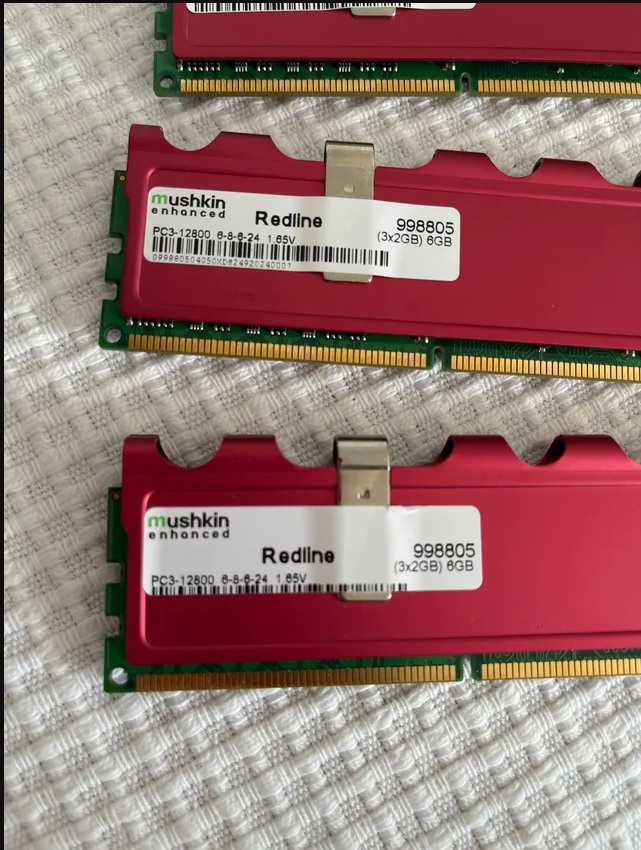
What makes me doubt is whether from that 3x2GB kit I can use only 2 modules while maintaining dual channel. Or do the kits come programmed in some way to work in dual channel only if you use the complete kit?
That would be the main question.
I've never been presented with this issue to be honest... But to try...
-
@ninchi_punkrock no idea about that brand.
Patriot does state on its official website that to install 4 RAM modules, you have to use their kit of 4 modules, otherwise you'll lose the MHz speed and it doesn't matter if they are identical.
They might work if you configure them manually, but they don't work with XCM.
In my case, they dropped from 1866 to 1600 MHz.
Check the website.
Regards.
P.d why don't you test if the BIOS recognizes the RAM to install the OS from scratch?
Regards 2 -
@clipper said in Problem when changing DDR3 memory:
@ninchi_punkrock I have no idea about that brand.
Patriot does say on its official website that to mount 4 RAM modules, it has to be its kit of 4 modules, otherwise it caps the speed in MHz and it doesn't matter if they are identical.
They might work if you configure them manually, but they don't work with XCM.
In my case, it capped them from 1866 to 1600 MHz.
Check the website.
Regards.
P.d why don't you try if the BIOS recognizes the RAM to install the OS from scratch?
Regards 2The thing is that the BIOS in all cases recognizes the RAM it puts in without problems. It boots, recognizes the capacity, recognizes the voltages it should apply, the latencies, the speed...
But when it comes to booting the operating system, it is unable to manage the RAM and gives blue screens.
And if you run memtest right after booting, it is unable to go beyond 5% and freezes. Which makes me think that no OS will work with those sticks in memtest.It seems like even though the BIOS initially recognizes the memory it puts in, it is then unable to work with it in any way.
-
>> i7-2600K Sandy Bridge @4.4GHz || Noctua NH-D14 || ASRock Z77 Extreme4 || 4x8Gb G.Skill Ripjaws X DDR3 1600MHz || XFX RX 5700 XT 8Gb || SSD Samsung 850 PRO 256Gb & 850 EVO 500Gb || WD Caviar Green 1Tb || Barracuda 1Tb || Corsair TX650 V2 || M-Audio Fast Track Pro || KRK RP8 RoKit G3 || BenQ GW2750 27"
>> Athlon 64 X2 5600+ Brisbane @2.9GHz || Gigabyte GA-M61PME-S2 || 2x2Gb DDR2 Kingston 800MHz || Sapphire Radeon HD 5850 Xtreme 1Gb || Maxtor 320Gb SATA2 || OCZ ModXStream 500W Modular || TEAC PowerMax 120/2 || Acer X243w 24"
>> Intel Core2Duo E6600 Conroe @2.4GHz || Asus P5N32-SLI SE DELUXE || 2x1Gb DDR2 Kingston 800MHz || Asus nVidia GeForce 9800GT 1Gb GDDR3 || Seagate Barracuda IDE 80Gb 7200RPM || Linkworld LPK12-35 450W -
@sylver said in Problem when changing DDR3 memory:
@ninchi_punkrock Yes, I understand what you mean.
Wouldn't this fix your problem?

Best regards!
Well, it's probably the best thing I can find on the second-hand market

I'll send him a message and see if I can get it up and running next week.
-
@ninchi_punkrock said in Problem when changing DDR3 memory:
@sylver said in Problem when changing DDR3 memory:
@ninchi_punkrock Yes, I understand what you mean.
Wouldn't this fix your problem?
Best regards!
Well, it's probably the most accurate thing I can find in the second-hand market
I'll send him a message and see if I can get it up and running next week.
Good luck...
Two weeks ago I bought some Hope brakes for the bike and the useless transport agency lost them...
They have to return to the seller so that he can send them again.
That's it...
Best regards -
@clipper Normally, shipments with wallapop do not give problems, they are certified by correos and with insurance, so they usually work like a clock.
That said, let's hope the seller protects the memories well, that is the most important thing.¡Saludos!




Hello! It looks like you're interested in this conversation, but you don't have an account yet.
Getting fed up of having to scroll through the same posts each visit? When you register for an account, you'll always come back to exactly where you were before, and choose to be notified of new replies (either via email, or push notification). You'll also be able to save bookmarks and upvote posts to show your appreciation to other community members.
With your input, this post could be even better 💗
Registrarse Conectarse