.htaccess file management
-
This thread is part of the guide to set up a server on Debian.
Remember that the content of Hardlimit is under Creative Commons license.
Procedure
As root:
a2enmod rewrite nano /etc/apache2/sites-available/000-default.confAdd within the corresponding VirtualHost section a Directory section:
<Directory "/var/www/html"> Require all granted Options Indexes FollowSymLinks MultiViews AllowOverride All </Directory>/etc/init.d/apache2 restartExplanation
The.htaccess file is a vital configuration file that applies to each subfolder of our server. In it we can do things like block certain pages, limit the linking of certain material (like images) and many more.
To enable it, the only thing we have to do is activate the rewrite module, so we write in the console as root:
a2enmod rewriteNow we must edit with Nano the 000-default.conf file as root:
nano /etc/apache2/sites-available/000-default.confThere we must create a Directory section within a VirtualHost section. This is done by copying the following text within a VirtualHost section:
<Directory "/var/www/html"> Require all granted Options Indexes FollowSymLinks MultiViews AllowOverride All </Directory>In the Directory field we must put the folder where we want.htaccess to work. If we want to enable.htaccess in some folders and disable it in others, we can use a scheme like the following:
<Directory "/var/www/html"> AllowOverride None </Directory> <Directory "/var/www/html/wordpress"> Require all granted Options Indexes FollowSymLinks MultiViews AllowOverride All </Directory>A functional configuration would look like this:
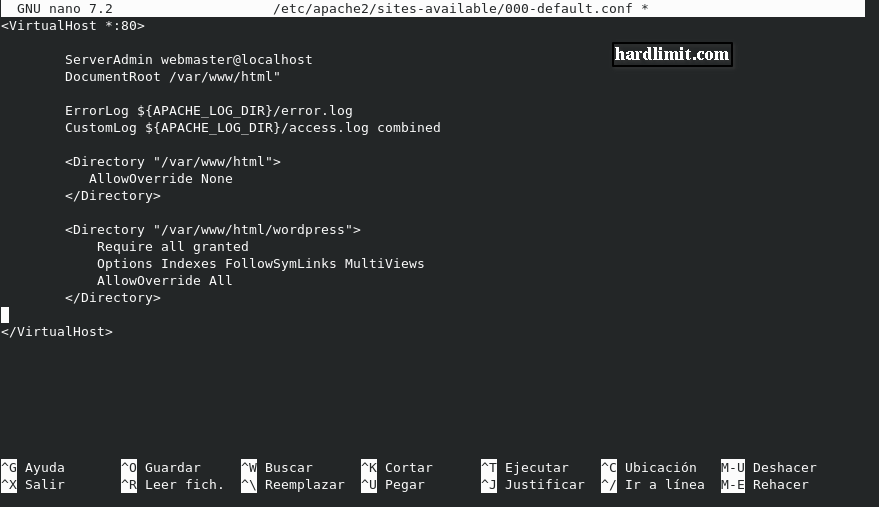
In this way,.htaccess will work in /var/www/html/wordpress but not in /var/www/html.
Each Directory section is independent and there can be as many as we need within a VirtualHost section.
Finally we restart the Apache server with:
/etc/init.d/apache2 restartToda la actualidad en la portada de Hardlimit
Mis cacharros -
 C cobito referenced this topic on
-
@cobito excelente explicación.
Un saludo
-
@sinchan2 many thanks for the explanation, it is greatly appreciated, recently I tried to edit it myself at [url edited by moderation] and I messed it up, I mean the website broke... because I wanted to make a 301.

Hello! It looks like you're interested in this conversation, but you don't have an account yet.
Getting fed up of having to scroll through the same posts each visit? When you register for an account, you'll always come back to exactly where you were before, and choose to be notified of new replies (either via email, or push notification). You'll also be able to save bookmarks and upvote posts to show your appreciation to other community members.
With your input, this post could be even better 💗
Registrarse Conectarse