monitor turns off when connected to cpu
-
the next problem is that the cpu turns on but when you connect the vga monitor cable to the cpu it goes into stand by power saving mode and doesn't show anything anymore the screen is black I cleaned the bios I cleaned the ram I disassembled and cleaned everything I checked the power supply everything and nothing the only thing is that the processor doesn't have thermal paste and had a pin that was slightly bent but I straightened it when I connect the monitor it immediately goes into power saving mode and turns black
what else can I try -
@nightcode1 for collecting... Beep? If the motherboard has a speaker. Does it have a dedicated graphics card or is it integrated? To try something that way, if it's integrated try a dedicated one, and if it's dedicated switch to another.
Regards
-
@Sylver said in monitor turns off when connecting to cpu:
@nightcode1 for going to collect... Does it beep? If the motherboard has a speaker. Does it have a dedicated graphics card or is it integrated? To try something that way, if it's integrated try a dedicated one, and if it's dedicated change it for another.
Regards
I'll tell you my dear.
it's a foxcom 671mx board
checking I manage to observe that it has a speaker cable connected to some pins that say CD inaux in. but it doesn't beep or anything in that slot
what I do see is that on the right inside of the board the speaker signal is printed but I don't see more pins where to place it. as for the graphics it only comes with the one that the cpu has by default where the vga cable goes normally I already tried with another monitor and it gives the same error.
I'm building a retro room, that's why I want to fix it it comes with 2 512mb memories
post datq: it doesn't have a dedicated graphics card
-
@nightcode1 in the few images I have found on the internet it seems that it does not have a built-in speaker on the board, but it must have some pins similar to these on one corner:
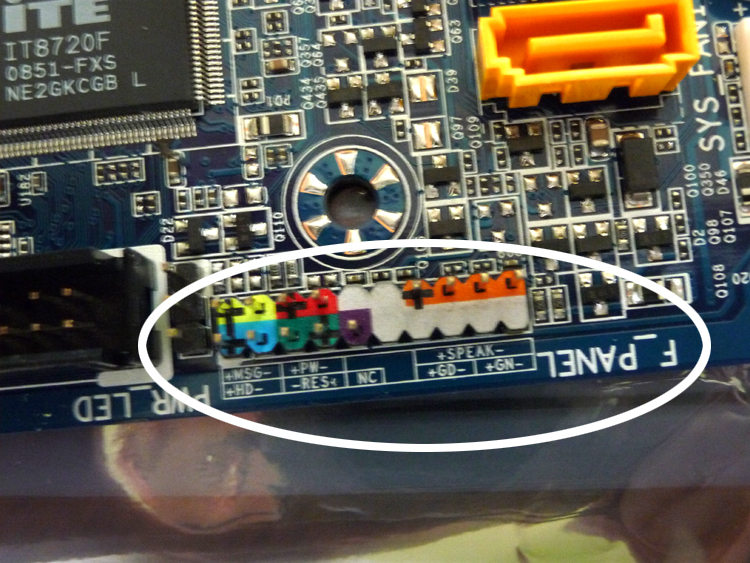
In the orange ones you can see the SPEAK inscription (from speaker, it usually comes in some similar form, or abbreviated SPK, etc.).
This is where the speaker is connected, it is always 4 pins. Next to it are all the POWER buttons, RESET, the LED indicators on the tower, etc.By connecting a speaker we can find out if it emits any initial beep and if it is a combination of them we can find out which specific section of the motherboard is failing, by referring to the beep code specific to that motherboard.
If it does not emit any beep, it could be a serious internal damage, such as a chipset or similar, which is why I mention the importance of being guided by this first check.
A shortcut can be to connect a dedicated graphics card directly to the PCI-express port and see if it gives an image, but if you don't have one handy I would start by checking the beeps, because if the problem is elsewhere, putting in the graphics card might not be of any use.
Regards
-
@Sylver said in monitor turns off when connecting to cpu:
@nightcode1 in the few images I've found on the internet it seems that it doesn't have an integrated speaker on the board, but it must have some pins similar to these in a corner:
In the orange ones you can see the legend SPEAK (from speaker, it usually comes in some similar form, or abbreviated SPK, etc).
That's where the speaker is connected, it's always 4 pins. Next to it are all the ones for the POWER buttons, RESET, the LED indicators on the tower, etc.By connecting a speaker we can find out if it emits any initial beep and if it's a combination of them we can find out which specific section of the motherboard is failing, referring to the beep code specific to that motherboard.
If it doesn't emit any beep, it could be a serious internal damage, like a chipset or similar, that's why I mention the importance of being guided by this first check.
A shortcut could be to connect a dedicated graphics card directly to the PCI-express port and see if it gives an image that way, but if you don't have one handy I would start by checking the beeps, because if the problem is something else, putting in the graphics card might not be of any use.
Regards
I understand I'll take another look at it after finishing dinner and check carefully if I can see where the speaker is, God willing and at least have that to make everything easier T. T
-
@Sylver said in monitor turns off when connecting to cpu:
@nightcode1 in the few images I have found on the internet it seems that it does not have a built-in speaker on the board, but it must have some pins similar to these in a corner:
In the orange ones you can see the legend SPEAK (of speaker, it usually comes in some similar form, or abbreviated SPK, etc).
That is where the speaker is connected, it is always 4 pins. Next to it are all the ones for the POWER, RESET buttons, the LED indicators in the tower, etc.By connecting a speaker we can know if it emits any initial beep and if it is a combination of them we can find out which specific section of the motherboard is failing, referring to the beep code proper of that motherboard.
If it does not emit any beep, it could be a serious internal damage, such as a chipset or similar, which is why I mention the importance of being guided by this first check.
A shortcut can be to connect a dedicated graphics card directly to the PCI-express port and see if it gives an image, but if you do not have any on hand I would start by checking the beeps, since if the problem is another, putting the graphics card might not be of any use.
Regards
I'll tell you after almost 3 long hours of trial and error I set out again to disassemble, everything until I reached the processor I verified that it was in perfect condition I assembled the heatsink and connected p4 and p20 (only power supply processor heatsink and cooler connected) power and nothing image or beep
2- I added the connection to the hard drive and still nothing
3- then I added 1 ram and nothing trying it in different slots then I tried the other and nothing either then both together and nothing either
4- I reset, bios by battery and nothing by jumper and nothing
5 - I tried with a new monitor out of the box and nothing
when, the, cpu is on I connect the mouse and the led of the mouse or the auxiliary ones light up something I noticed was that in one I connected the p20 but did not connect the p4 and touched power it turned on the power supply and heatsink without stopping at any moment I do not know if this will indicate something because I imagine that not being connected, the p4 should not have started to work the processor heatsink. I searched and searched for the speaker and nothing it does not have the cable and everything that says speaker but I could not find the connection point anywherein, this last image in, that, slot the speaker cable was connected but it does not emit any sound nothing
-
@nightcode1 vale, I just saw in the first photo you attached that it DOES have a built-in speaker on the board (in this case named BUZ, from buzzer).
If removing absolutely all components except processor and power supply does not emit any beep, it is possible that there is some internal damage on the board that is very difficult to identify, since we have no way to guide ourselves...
A swollen capacitor is also visible in the first photo. It may not be the cause of the problem, but if it has been like this for a long time, it is evident that it has not filtered the current at the point where it was planned to do so and it may have damaged the internal component it served.
With no response from the board, everything points to there being some internal damage.
What happened when you did not connect the P4 and tried to boot was that the board did not detect the power supply for the CPU and the reaction is usually that, the fan at maximum and does not turn on.
If by any chance the board's buzzer did not work (it is rare), you could try mounting a PCI-express graphics card directly and see if there was any luck, but everything points to the board being damaged internally as I mentioned to you.
Regards
-
@Sylver said in monitor turns off when connecting to cpu:
@nightcode1 okay, I just saw in the first photo you attached that it does have a speaker integrated into the board (in this case named BUZ, from buzzer).
If removing absolutely all components except processor and power supply doesn't emit any beep, it's possible that there is some internal damage to the board that is very difficult to identify, as we have no way to guide ourselves...You can also see a swollen capacitor in the first photo. It doesn't have to be the cause of the problem, but if it has been like this for a long time, it's evident that it hasn't filtered the current at the point where it was planned to do so and it may have damaged the internal component it served.
With no response from the board, everything points to there being some internal damage.
What happened when you didn't connect the P4 and tried to boot was that the board didn't detect the power supply for the CPU and the reaction is usually like that, fan at maximum and doesn't turn on.
If by any chance the board's buzzer didn't work (it's rare), you could try mounting a PCI-express graphics card directly and see if there was any luck, but everything points to the board being damaged internally as I told you.
Regards
hello friend, in effect I disconnected everything and only left the P4, P20 speaker connected and nothing that emits beeps, the power supply turns on but no beeps
 I don't have a tester so I'll have to send it for review to at least know what it has

Hello! It looks like you're interested in this conversation, but you don't have an account yet.
Getting fed up of having to scroll through the same posts each visit? When you register for an account, you'll always come back to exactly where you were before, and choose to be notified of new replies (either via email, or push notification). You'll also be able to save bookmarks and upvote posts to show your appreciation to other community members.
With your input, this post could be even better 💗
Registrarse Conectarse