Doubt about priorities in Linux
-
Hello.
I'm doing things with the Ryzen 9 9900X (12 cores with SMT disabled) and I want to prioritize processes. I've been reading about the concept of niceness in Linux which translated as friendliness, is quite intuitive (the more friendly the process, the more it lets others through and the more uncivil and rude, it sneaks in everything it can). It has a value of -20 (more priority) to 19 (less priority). I've used nice in the past and never had problems, but seeing the behavior I see now, I had to do some research. Although I can't find a solution to the issue.
On this machine, three types of processes run:
- ffpmeg which is configured to hog one thread of execution with a niceness of 19.
- whisper which is configured to consume 4 threads with a niceness of 0.
- python which is configured to consume all available threads with a niceness of 19.
These priority values are not random: ffmpeg runs very fast with this CPU, so I don't mind that it can consume very few resources. whisper is much more demanding and I want it to always consume everything that's available. And Python is very demanding, but I simply want it to consume what's left over from others, sharing what's left with ffmpeg.
This is a capture of top:
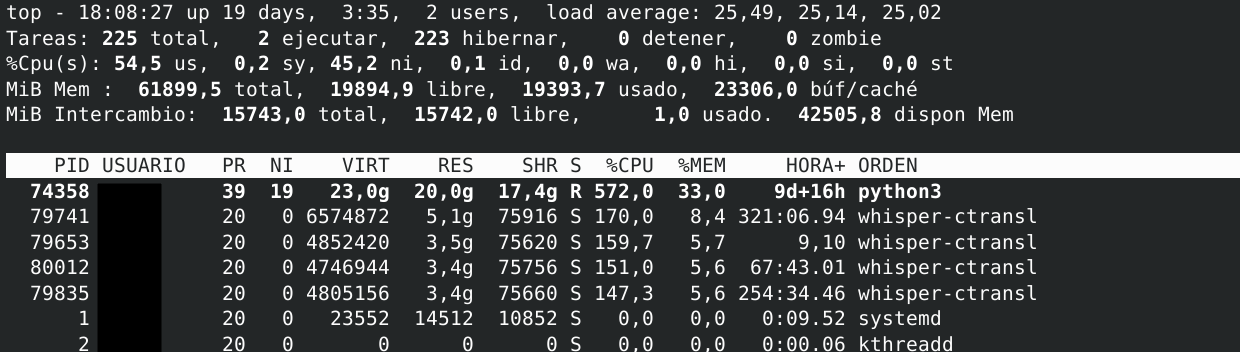
When there's also an ffmpeg process and the CPU is busy, it consumes very little CPU (less than 30%), which is what I want it to do. But as you can see in the image, python is consuming practically 6 cores while each whisper process doesn't reach 2. And the priorities, as can be seen, are correctly configured.
Why does this happen and how could I fix it?
Thanks.
Toda la actualidad en la portada de Hardlimit
Mis cacharros -
This is wrong on several levels. I'm seeing that when python is running, everything else is super slow and vice versa. For example, if there's an ffmpeg process consuming just one core, the speed of python (consuming 11 instead of 12 cores) drops dramatically. The same thing happens the other way around. \nI suspect there's a major bottleneck with memory and this is not exactly slow (6400MT/s 30-37-37-96 in dual channel). But the translation model is dedicated to crunching 20GB of RAM, so it's normal for the computer to slow down there.
\nWhat I'm going to do is make python pause automatically when it sees that there's an ffmpeg or whisper process running. I think this is the most efficient way to do everything and to get the most out of the CPU.
\nI'm going to forget about priorities since it seems that the issue is not there, although I'm curious about why it doesn't listen.
Toda la actualidad en la portada de Hardlimit
Mis cacharros -
@cobito I think it's super interesting but I don't know how to help you... But I do have a question, could the integrated RDNA2 graphics be used to encode in ffmpeg using VAAPI? I don't know if peertube allows it and I don't even know if it's more efficient than using the brute force of the CPU, because the integrated graphics are not very powerful and I have used it to encode OBS but, of course, not at too high a bitrate...
Nothing, I just wanted to raise that question but I don't think it's a good option...

-
@pos_yo I had thought about it for both ffmpeg and the AI. Although it's small, it might do something. But I'm 100% busy (let's see if I can publish version 4 of the test bench this weekend and move on to the next thing) so I haven't been able to test it.
One thing that does worry me a bit about using the GPU to encode video is that many years ago (I don't know if the issue has changed), the GPU accelerated but the image quality was substantially worse than doing it with the CPU.
Toda la actualidad en la portada de Hardlimit
Mis cacharros -
I've been measuring times to make an approximate calculation of yields. The mere fact that there is an ffmpeg process consuming a single thread makes pyhon go about 20-30 times slower (what would take 3 seconds, takes about a minute and a half). Here I see almost totally clear that it is a matter of memory bandwidth and possibly of CPU cache management because I believe (I'm not sure) that an ffmpeg thread would use a single memory channel so that python would have, at least, the other one available. So for the performance to fall in that way, I suppose that the cache should also be blamed.
The truth is that I have no idea, I have never put a machine to the limit in this way, but in the end the strategy of pausing Python when there are other things seems to be the most reasonable.
Toda la actualidad en la portada de Hardlimit
Mis cacharros -
 C cobito referenced this topic on
-
@cobito In theory, the x264 codec is better than AMD's h264 codec. At least, more efficient. The quality at the same bitrate is better (in theory) in x264 but I don't appreciate it and many people also say the same thing... It is also true that it has improved a lot... It is also true that the quicksync codec and intel's nvenc and nvidia's respectively are better than AMD's in terms of h264. In the AV1 codec there is not much difference but that is only in RDNA3 onwards.

Hello! It looks like you're interested in this conversation, but you don't have an account yet.
Getting fed up of having to scroll through the same posts each visit? When you register for an account, you'll always come back to exactly where you were before, and choose to be notified of new replies (either via email, or push notification). You'll also be able to save bookmarks and upvote posts to show your appreciation to other community members.
With your input, this post could be even better 💗
Registrarse Conectarse