Help with Q6600 + P35 DS3-R
-
This post is being processed/translated. The original version will be shown:
Buenas!
Bueno pues mi PC es el siguiente:
- Gigabyte P35-DS3R
- Intel Quad Q6600 + Asus Silent Square Pro
- 2x2GB GSkill DDR2 800Mhz
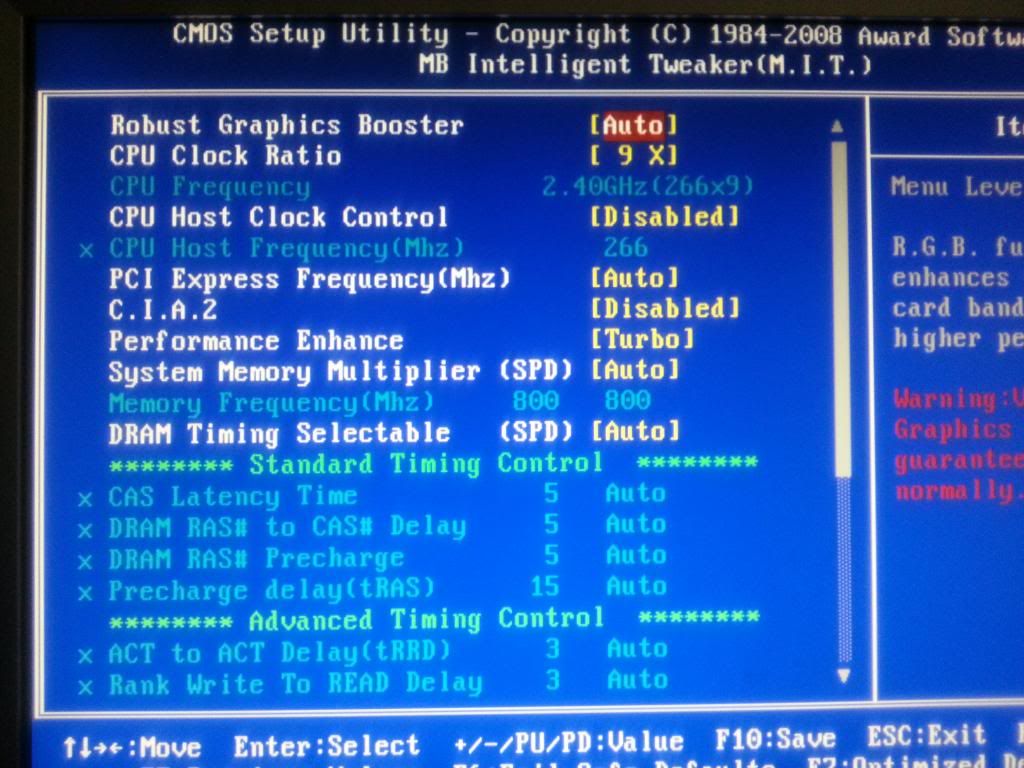
Como sabeis, el procesador viene por defecto a 2.40Ghz (266*9):

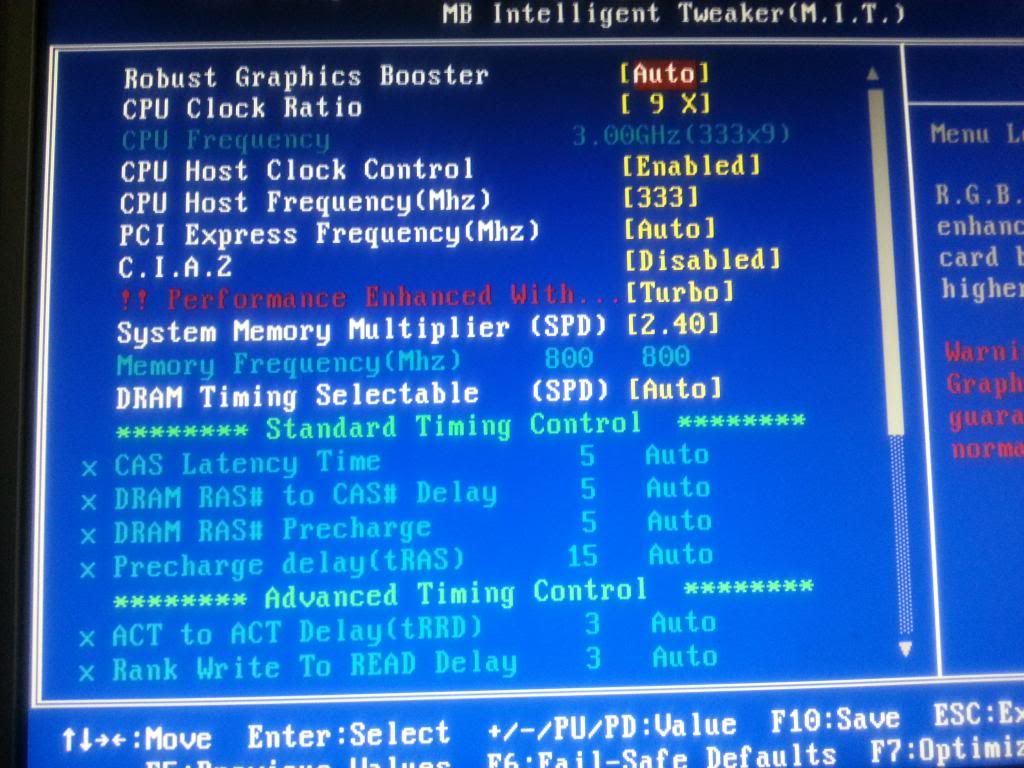
Solamente he conseguido hacer OC hasta este punto, únicamente subiendo de 266 a 333 y cambiando el System Memory Multiplier de Auto a 2.40, sin tocar voltajes:
Visto que las temperaturas que me dan varios programas son muy buenas, quería subir el procesador a 3.60Ghz pero nada, no lo consigo, o no arranca, o al rato de pasarle el prime95 se reinicia, etc.
Se que llega un punto en que tendré que tocar los voltajes pero es en lo que más me pierdo, agradecería algún alma caritativa que me contase que valores colocar para empezar a trastear (teniendo en cuenta la velocidad de 800mhx de la RAM, etc.)
Un saludo y muchas gracias!!!
-
This post is being processed/translated. The original version will be shown:
Descarga OCCT para ver temperaturas y voltaje o CPU-Z y CoreTemp si lo prefieres, en el primero verás el voltaje y en el segundo temps. Tras comprobar el voltaje efectivo que tienes de serie cámbialo en BIOS (CPU Voltaje Control) dándole +0.1 efectivo aproximadamente y prueba con FSB de 350 8h de Prime95. Yo que tú no pasaría de 1,4v de momento ni 65º.
Deja las memorias 1:1, cuando sepas hasta donde llega el micro ya te pondrás con ellas.
-
This post is being processed/translated. The original version will be shown:
Descarga OCCT para ver temperaturas y voltaje o CPU-Z y CoreTemp si lo prefieres, en el primero verás el voltaje y en el segundo temps. Tras comprobar el voltaje efectivo que tienes de serie cámbialo en BIOS (CPU Voltaje Control) dándole +0.1 efectivo aproximadamente y prueba con FSB de 350 8h de Prime95. Yo que tú no pasaría de 1,4v de momento ni 65º.
Deja las memorias 1:1, cuando sepas hasta donde llega el micro ya te pondrás con ellas.
Si ahora mismo lo tengo a 3.0GHz. y esto es lo que me marca Cpu-Z:
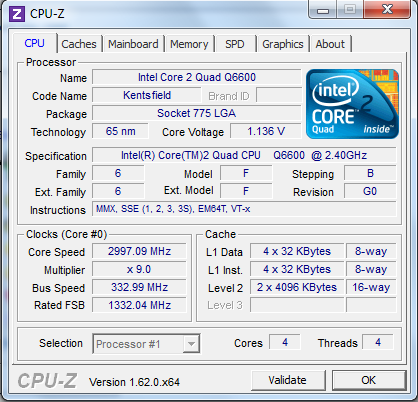
Lo que pasa que los valores me estan variando continuamente entre 1.200. 1.136, 1.152, 1.280, 1.168, …no para quieto. ¿Te refieres a coger uno de esos valores y sumarle +0.1?¿1.300?, ¿no es una burrada?
Normal CPU Vcore 1.32500 que sale debajo de CPU Voltage Control que no me deja cambiar, que es?
Gracias y perdona por lo negadillo que soy...
-
This post is being processed/translated. The original version will be shown:
Es el VID, un valor aproximado para el funcionamiento del micro pero vamos, se lo sacan un poco de la chistera y hay en micros que están con mucho más margen que otros. No le hagas caso a eso, según Intel el voltaje máximo es 1,5V pero si 1,4 ya me parecía un poco burrada, mejor olvidar esa especificación.
El VID puedes verlo entre 1,2 y 1,3 según micro, también depende de la revisión. La cuestión es que si tenías 3GHz con 1,2 y buenas temps, prueba con 350 1,25 si quieres, y si no aguanta le metes 1,3, no es una burrada mientras no pases de 65º. Si quieres ser cauteloso pues dale caña hasta 1,25v/60º (remember the summer), lo que llegue al tope primero. Sea como sea, para asegurarte un equipo estable necesitas pasar muchas horas de Prime95, por lo menos déjalo una noche previa comprobación de temp máxima (tras media horita de test no subirá mucho más).
Editing: He encontrado un hilo interesante de Tomshardware…
-
This post is being processed/translated. The original version will be shown:
Siempre que quieras tocar OC debes bloquear el pcie a 100,Dram tinming ponlo manual y la memoria al doble del FSB,eso de performance enhance yo lo dejaria en normal o auto,no en turbo.
-
Whenever you want to overclock, you should lock the pcie at 100, set the dram timing to manual and the memory to double the fsb. I would leave the performance enhance in normal or auto, not in turbo.
A question, why do we need to lock the pcie at 100 when overclocking?
I have it set to auto on two computers with oc and they seem stable.Regards.
-
So that it doesn't go up with the base clock, it's not a bad idea to be cautious, but with "modern" boards, it's usually set automatically.
-
So that it doesn't go up with the base clock, it's not superfluous to do it as a precaution but well, with the "modern" boards it's normal that they set it automatically.
That is, otherwise it would also raise the speed of the pcie bus and the graphics card would cause instabilities, in short, the PC probably wouldn't even start up.
-
One question, why do we have to block Pcie at 100 when overclocking?
I have it set to auto on two computers with OC and they are apparently stable.Regards.
I didn't see your question, normally when you increase FSB, Pcie increases and causes instability, then it will depend on the CPU architecture, if you do OC by multiplier then Pcie doesn't increase in frequency, if you do it by bus, either FSB or BCLK, you must block pcie at 100 so it doesn't cause instability.
Then it will depend on the OC you do, if you do little OC then maybe it will hold, if your CPU increases by multiplier then there's no need to block, but it's recommended to block it when you increase the bus, if a CPU has a bus of 266, if you increase it to 400 for example, then Pcie also increases and causes instability.
That's why blocking it at 100 avoids complications.
regards


