Urgent Help Asus ENGTX 295 (especially owners of one).
-
Hello, I'm writing because this graphics card has become a real headache for me over the past few months and I need help. If I'm not mistaken, the problem started to worsen after playing Assassin's Creed 3 and Far Cry 3. I finished both, but barely. Let me explain.
It's the classic black screen error. I'm playing and suddenly, the monitor goes black and the power light changes from fixed to flashing. Once this happens, I'm forced to do a hard shutdown. There are two games that I've noticed don't give me this error: Sleeping Dogs and Metro 2033. Currently, I have Hitman Absolution (crashes very quickly) and COD Black OPS II (also crashes after a couple of games played) installed. I've done all kinds of tests (and I mean all kinds), putting the graphics card in two other PCs and both give the error. I've put other graphics cards in my PC and it remains perfectly stable. I've tried countless old and not-so-old Nvidia drivers, cleaned every screw on the graphics card and changed the thermal paste, tried removing monitoring programs and even disabling the sound card from the BIOS for possible incompatibilities with Realtek (nothing). The same error always happens at different times, because sometimes it can crash at minute one or at half an hour. Temperatures have always been perfectly stable, both GPU and CPU (checked with Everest, MSI afterburner etc...), I've tried playing in Uni-GPU and many combinations of the Control Panel.
What's really strange about all this is that the graphics card never shows a red light on the back, it's always green as OK. When I run tests like FurMark, it never crashes even if I do the Burn-In Test, it reaches 70 and some degrees each GPU, nothing worrying for a burn-in test. It's never shown strange artifacts in the image like squares, stripes etc... It's the strangest error I've ever encountered. I start playing and BUM! Black screen, ruined game, forced PC restart and this has been going on for a few months now and I can't find a solution.At this point, where we know the problem is in the graphics/graphics software (I doubt it) 100% because it's not a motherboard, RAM, CPU etc.. according to the tests I've done, does anyone know how to explain this horrible error or give me a solution?
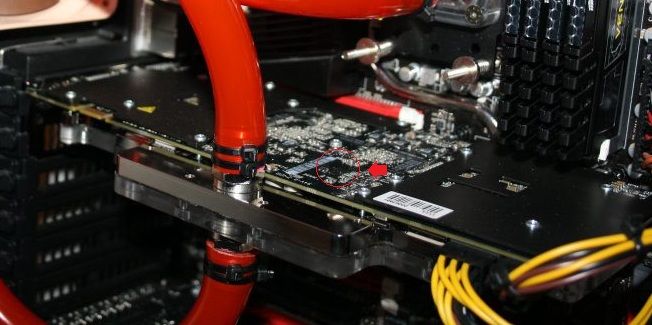
I've inspected the graphics card from PA to PA, and I've only seen one suspicious thing that is right on the exposed part of it (I'll show photos). There's a resistor or something like that covered in black. At first, I thought it might be some factory coating, but seeing that it doesn't have it anywhere else on the card and it's right on the exposed part, I'm starting to think it's something burned and it's the epicenter of my headache. I'd like someone to clarify this with a photo of the same area or something like that, and if it's definitely something burned, is it repairable?
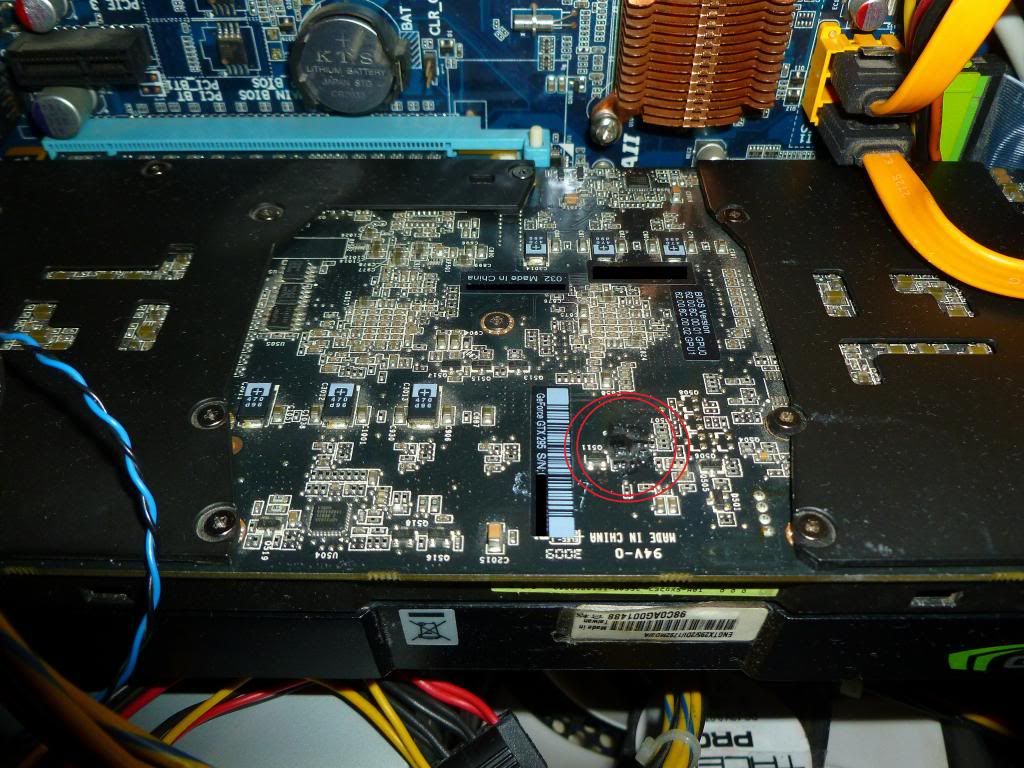
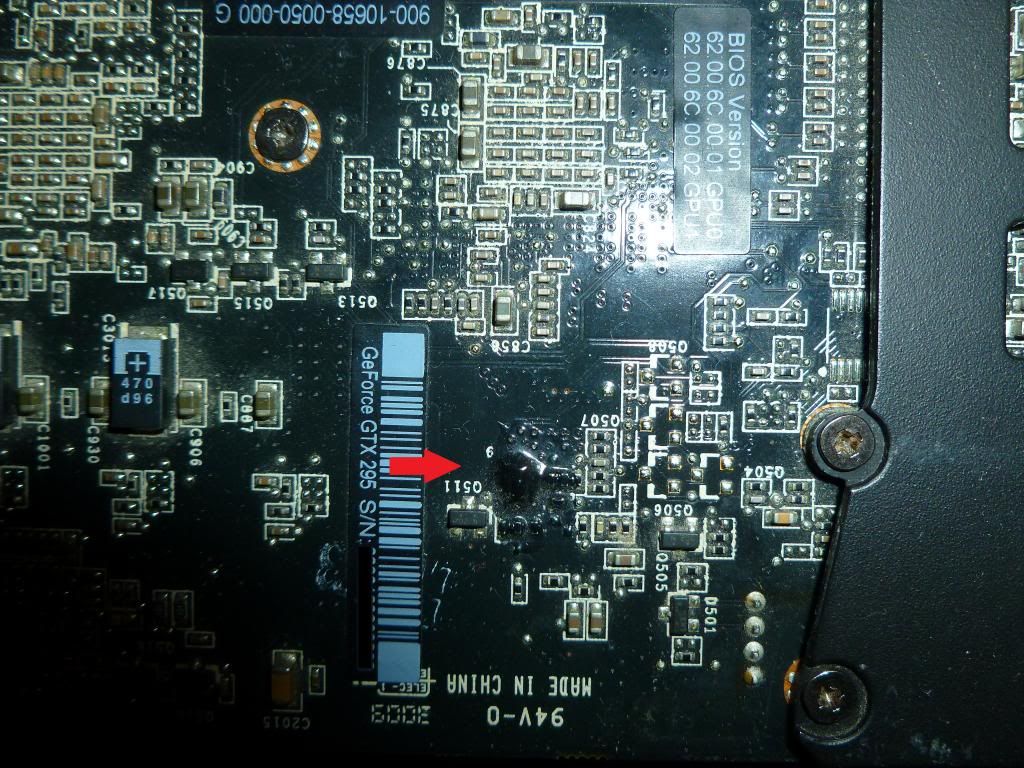
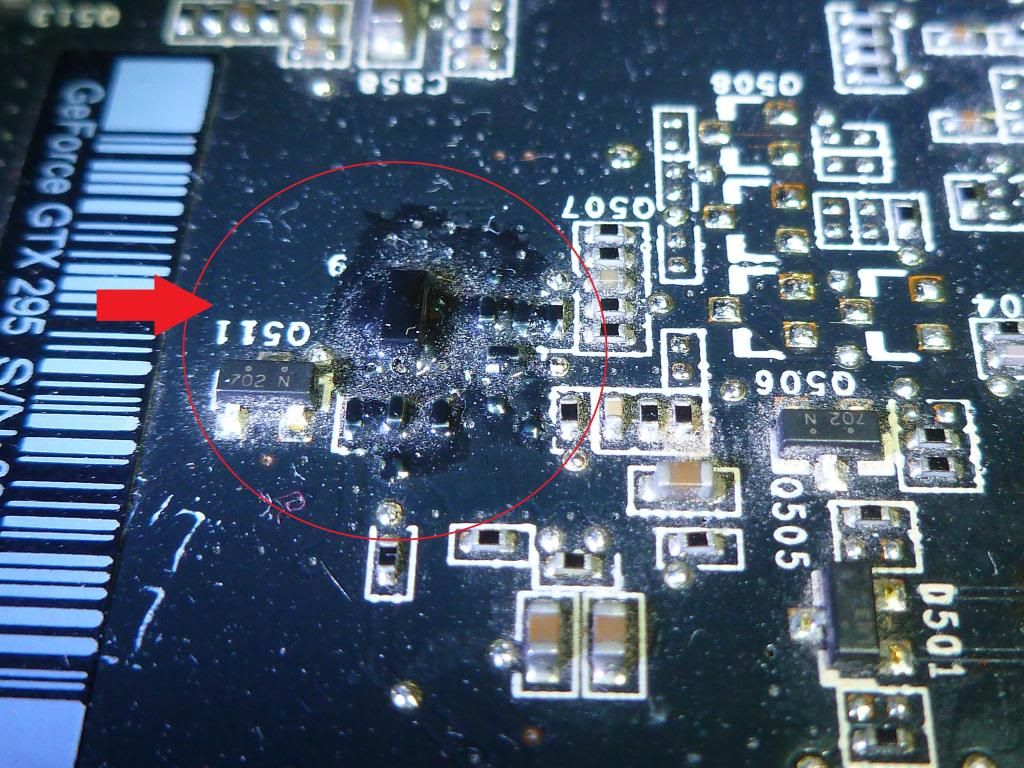
I've already started to think that it might be irreparable and I'm saving up to get a 'GTX 660 Ti' with maybe an eye on SLI in the future and a renewal of the rest of the PC. At this point, I'm considering putting it in the oven to try to resolder it if that's the problem, according to what people say out there, it works OK but the faults they fix are usually of another type like artifacts.
MY TEAM:
CPU: Intel E8400 Core 2 Duo 3,0Ghz
Placa: Gigabyte x38-DQ6
RAM: Kingston Hyperx 2x2GB 667Mhz
Fuente de Alimentación: Thermaltake LitePower 700W
Tarjeta Gráfica: Asus ENGTX295 (single, i.e. two GPUs in one board) -
Check the temperature to see if it cuts out when it reaches 100º. The 295 dual pcb is very hot and most failures come from the high temperature. I have one and I preferred to put a 470 that performs almost the same, it's monogpu, dx11 and it gets much less hot. At least mine maintains a very good temperature. It's very difficult to maintain temperatures with the 295 because even if you put the fan at full blast and even if you have a well-ventilated case, it doesn't do much.
I had it in a well-ventilated case where I eventually put two 480s and the 480s are much cooler and they are two cards with a reputation for being hot. What does surprise me is that it crashes in Hitman or black OPS 2 and doesn't do it in Sleeping dogs, which does heat up the cards.
Maybe it's a fault with the HDMI if you have it connected like that.
Also, if you have a C2D, that card is not advisable. I prefer to have a 260 over a 775. I mean, I have a 260 put in and the 295 in a drawer. It's preferable to put a monogpu like the 560ti, 470, they will perform better, they will be more stable and they will get much less hot and some can be found cheap if you look at second-hand.
Well, it seems that yours and mine are different. I have the one with two PCBs and yours is a single PCB. Mine doesn't have anything burned, it's too good for everything it gets hot, but if it were burned, it wouldn't work with any game.
regards
-
Check the temperature to see if it crashes when it reaches 100º. The 295 with dual PCBs are very hot and most failures come from high temperature. I have one and I prefer to put a 470 that performs almost the same, it's monogpu, dx11 and it gets much less hot. At least mine maintains a very good temperature. It's very difficult to maintain temperatures with the 295 because even if you put the fan at full blast and even if you have a well-ventilated case, it doesn't do much.
I had it in a well-ventilated case where I finally put two 480s and the 480s are much cooler and they are two cards with a reputation for being hot. What I find surprising is that it crashes in Hitman or Black Ops 2 and doesn't do it in Sleeping Dogs, which really does heat up the cards.
Maybe it's a fault with the HDMI if you have it connected like that.
Also, if you have a C2D, this card is not advisable. I prefer to have a 260 over a 775. In fact, I have a 260 put in and the 295 in a drawer. It's preferable to put a monogpu like the 560ti, 470, they will perform better, they will be more stable and they will get much less hot, and some can be found cheap if you look for second-hand.
regards
I agree with you about Sleeping Dogs, I put it at full blast and it didn't crash, apart from that I already said that the temperatures are totally ok, it's not the cable because it was already tested on two other PCs with another screen and everything, the ventilation is perfect, please just read carefully so as not to waste time, with phrases like install the latest drivers or things like that... Because they won't solve anything for me. And I already said that the card is from a single PCB with two GPUs, not two joined... Please read.
-
That thing doesn't look too good...
I had a GTX295 until two days ago. It was one of the dual PCB ones so I can't help you much.It's strange that it doesn't crash with certain games... And about putting it in the oven, I don't recommend it at all, because your problem isn't about intermittent soldering...
If you want something that performs similar to the 295, it's a 480.
Anyway, these GPUs aren't matched with the rest of the equipment and probably make a bottleneck for you. -
Well since almost no one has responded, I started looking for photos on google and I only found two in which that part is seen, in one quite clearly, and it does seem that the black is some kind of factory coating, because it is seen black in both photos, let's see if someone posts a photo of theirs or if I can get someone to tell me a solution to this problem.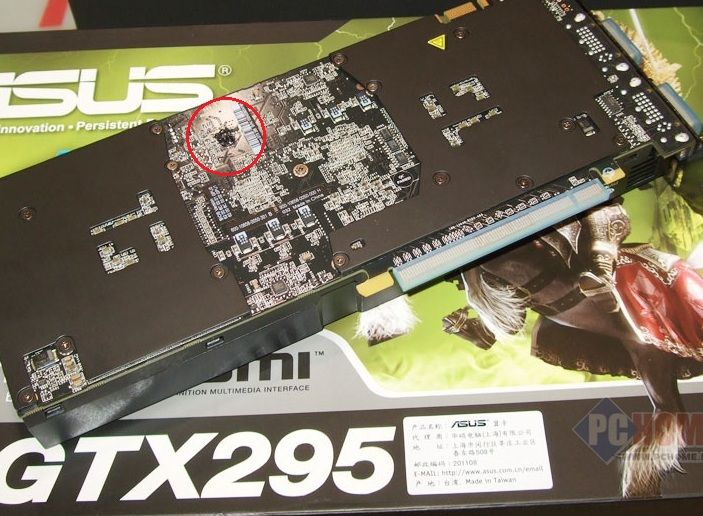
-
I haven't had a 295, but those images you put of yours, they don't look to me at all like a graphic card that came from the factory like that. It could be from use, and after many hours that part of the PCB "melts" along with the VRM that it has in that area. I explain the other photos in the same way.
Besides, it blows up with specific games, and, with intensive use, it doesn't give a good feeling….
But what I don't think is that it came like that from the factory, you would have noticed when you installed it, right??
Salu2...
-
I haven't had a 295, but those images you post of yours don't look to me like a graphic card that came from the factory like that. It could be from use, and after many hours that part of the PCB "melts" along with the VRM that's in that area. I explain the other photos the same way.
Besides, it blows up with specific games, and with intensive use, it doesn't hold up well...
But what I don't think is that it came like that from the factory, you would have noticed when you installed it, right?
Best regards...
They don't come that way from the factory but with use there are areas more prone to darkening, areas near the phases if they heat up, I still believe that if something was burned out it wouldn't work with Metro 2033 or Sleeping dogs because they are very demanding games, it should fail earlier, Black Ops 2 has glitches and Hitman although it's also quite demanding, it seems strange that it could blow and not do so with Metro or the other one, I would look for another option perhaps DirectX, maybe the memory can't handle it and that's why it freezes, even possibly a very high use of VRAM and that some memory module is damaged and that's why the failure occurs.
I would lower the memory frequency a bit, these latest games that AMD sponsors ask for a lot of VRAM, they make both the graphics memory and the system memory work a lot, that happened to me with an Asus 9800GTx, that in some game the screen goes black and you have to restart, the memory came a bit tight on frequencies, the graphics card is fine, but the memory can't handle the 2200mhz that comes standard in some game, although it started to happen over time, not from the beginning.
regards
-
Besides the fact that it crashes with specific games, and with intensive use, it doesn't perform well...
I already explained that it doesn't crash in Metro 2033 or Sleeping Dogs and I think they are quite intensive as you say, so from there I could derive a temperature problem but it's not the case at all.
They don't come that way from the factory but with use, there are areas more prone to darkening, areas close to the phases if they heat up, I still believe that if something were burned, it wouldn't work with Metro 2033 or Sleeping dogs because they are very demanding games, it should fail before, Black OPS 2 has flaws and Hitman although it's also quite demanding, it seems strange that it could crash and doesn't do it with Metro or the other, I would look for another option, maybe DirectX, maybe the memory can't handle it and that's why it freezes, even possibly a very high use of VRAM and that some memory module is damaged and that's why the failure occurs.
I would lower the memory frequency a bit, these latest games sponsored by AMD ask for a lot of VRAM, they make both the graphics memory and the system memory work a lot, that happened to me with an Asus 9800GTx, that in some game the screen goes black and you have to restart, the memory came a bit tight in frequencies, the graphics card is fine, but the memory can't handle the 2200mhz that comes standard in some game, although it started to happen over time, not from the beginning.
regards
I don't rule out that it's the graphics card memory, now that it's a problem with the PC RAM I doubt it because as I say I've already done more than enough tests to rule out any other part, it's a real mystery what the failure is, if I lower the working frequencies what a joke, I'm losing power, that didn't happen before, it shouldn't happen now, the thing is that if it's a bit more stable then I had already tried lowering the frequencies, in fact I set them all to half once and in the end it still crashes although it's much later and as for DirectX it could also be but there's no solution if it's some kind of incompatibility.
-
Well I've kept on trying things, I've manually deleted the directx files and reinstalled, I've lowered the graphics card frequencies again and it still crashes when entering the game, with Hitman Absolution and Battlefield 3 which are the two I'm using to check, in COD Black Ops II single player mode with everything maxed out it takes a while but it crashes too.
I've run the BurnInTest from FurMark again at MSAA8x 1680x1050 and with PostFX, I left it for 10 minutes and temperatures were normal and no crashes, I've run the Heaven Benchmark 4.0 several times and in several ways in Directx11 in Extreme and it never crashes.
This is a real headache, the screen goes black and the sound loops, there's no way, it seems like it's an instability error due to overclocking or something like that but it's impossible I don't have anything like that set up and the bios is more than checked…. please help...


Hello! It looks like you're interested in this conversation, but you don't have an account yet.
Getting fed up of having to scroll through the same posts each visit? When you register for an account, you'll always come back to exactly where you were before, and choose to be notified of new replies (either via email, or push notification). You'll also be able to save bookmarks and upvote posts to show your appreciation to other community members.
With your input, this post could be even better 💗
Registrarse Conectarse