• Portada
    • Recientes
    • Usuarios
    • Registrarse
    • Conectarse

    What do you think?

    Programado Fijo Cerrado Movido Tarjetas Gráficas
    32 Mensajes 8 Posters 4.1k Visitas 1 Watching
    Cargando más mensajes
    • Más antiguo a más nuevo
    • Más nuevo a más antiguo
    • Mayor número de Votos
    Responder
    • Responder como tema
    Accede para responder
    Este tema ha sido borrado. Solo los usuarios que tengan privilegios de administración de temas pueden verlo.
    • SylverS Desconectado
      Sylver Veteranos HL @booker
      Última edición por

      Good

      +1 to Amazon, good prices and good customer service.

      You can get the Gigabyte, better cooling always extends the life of the card, although the Sapphire is not far behind.

      Regarding the size, you should measure it yourself on the ground by hand, it's the best, but it should fit. If I put a special edition 5850 in a cheap gaming mid-tower...

      Regards

      >> i7-2600K Sandy Bridge @4.4GHz || Noctua NH-D14 || ASRock Z77 Extreme4 || 4x8Gb G.Skill Ripjaws X DDR3 1600MHz || XFX RX 5700 XT 8Gb || SSD Samsung 850 PRO 256Gb & 850 EVO 500Gb || WD Caviar Green 1Tb || Barracuda 1Tb || Corsair TX650 V2 || M-Audio Fast Track Pro || KRK RP8 RoKit G3 || BenQ GW2750 27"
      >> Athlon 64 X2 5600+ Brisbane @2.9GHz || Gigabyte GA-M61PME-S2 || 2x2Gb DDR2 Kingston 800MHz || Sapphire Radeon HD 5850 Xtreme 1Gb || Maxtor 320Gb SATA2 || OCZ ModXStream 500W Modular || TEAC PowerMax 120/2 || Acer X243w 24"
      >> Intel Core2Duo E6600 Conroe @2.4GHz || Asus P5N32-SLI SE DELUXE || 2x1Gb DDR2 Kingston 800MHz || Asus nVidia GeForce 9800GT 1Gb GDDR3 || Seagate Barracuda IDE 80Gb 7200RPM || Linkworld LPK12-35 450W

      B 1 Respuesta Última respuesta Responder Citar 0
      • B Desconectado
        booker @Sylver
        Última edición por

        Thanks for responding sylver.

        I've been looking at the case a bit and the hard drive is about 5 cm below the graphics card.

        I mean if you stand at the height where it will be placed it's 5 cm below so it would fit.

        The problem is that on one side the hard drive is fixed by a kind of red cover and it's 27 cm from the back of the tower. And the graphics card measures 28.5 cm. But I don't know if they measure what the graphics card's plate is or if they measure above the fans. Because the fans are oval-shaped so I think they would fit.

        But the doubt is if by removing the hard drive I could also remove the red cover.

        I know it's a bit confusing and they probably won't know what to answer me. But I'm sharing it in case someone could help me.

        Edit: According to this video at minute 4:00 approx the graphics card measures 27 cm. So maybe just barely but it fits.


        What do you think?
        Thanks anyway!!

        SylverS 1 Respuesta Última respuesta Responder Citar 0
        • SylverS Desconectado
          Sylver Veteranos HL @booker
          Última edición por

          I don't know what exactly the "red cover" is, if you put a picture you would surely illustrate it more easily, but anyway it could be an adapter to fit or some kind of casing, in any case you should be able to remove everything without problems.

          Even so, the important thing is the measurements, and if you think it fits, I don't think there will be any surprises.

          Greetings

          >> i7-2600K Sandy Bridge @4.4GHz || Noctua NH-D14 || ASRock Z77 Extreme4 || 4x8Gb G.Skill Ripjaws X DDR3 1600MHz || XFX RX 5700 XT 8Gb || SSD Samsung 850 PRO 256Gb & 850 EVO 500Gb || WD Caviar Green 1Tb || Barracuda 1Tb || Corsair TX650 V2 || M-Audio Fast Track Pro || KRK RP8 RoKit G3 || BenQ GW2750 27"
          >> Athlon 64 X2 5600+ Brisbane @2.9GHz || Gigabyte GA-M61PME-S2 || 2x2Gb DDR2 Kingston 800MHz || Sapphire Radeon HD 5850 Xtreme 1Gb || Maxtor 320Gb SATA2 || OCZ ModXStream 500W Modular || TEAC PowerMax 120/2 || Acer X243w 24"
          >> Intel Core2Duo E6600 Conroe @2.4GHz || Asus P5N32-SLI SE DELUXE || 2x1Gb DDR2 Kingston 800MHz || Asus nVidia GeForce 9800GT 1Gb GDDR3 || Seagate Barracuda IDE 80Gb 7200RPM || Linkworld LPK12-35 450W

          B 1 Respuesta Última respuesta Responder Citar 0
          • B Desconectado
            booker @Sylver
            Última edición por

            Well right now I can't take a picture of it but if I take it out tomorrow you would help me? And this way I can show you a little bit of the tower inside and you can comment.

            But anyway I will try to explain it as best as I can.

            The hard drive is not as wide as the tower (obviously) my tower inside is like this:

            MS-Tech CA-0280 PRO X Furios Longhorn 0 Watt /grijs

            in the link you can see the photos and there is a photo of the inside and if you look to the right you can see something red between the grilles.

            Well since the drive is not as wide there is a kind of red cover on one side where the hard drive is screwed in place and the hard drive is left between this cover and the tower's metal.

            I don't know if you understand me more or less but if not tomorrow I will take some photos and show you if it's not a bother.

            Thanks really

            SylverS 1 Respuesta Última respuesta Responder Citar 0
            • SylverS Desconectado
              Sylver Veteranos HL @booker
              Última edición por

              Alright, that's an adapter for the bay, so it can reach the sides and be secured, you can remove it without any problems, just like I thought.

              Best regards

              >> i7-2600K Sandy Bridge @4.4GHz || Noctua NH-D14 || ASRock Z77 Extreme4 || 4x8Gb G.Skill Ripjaws X DDR3 1600MHz || XFX RX 5700 XT 8Gb || SSD Samsung 850 PRO 256Gb & 850 EVO 500Gb || WD Caviar Green 1Tb || Barracuda 1Tb || Corsair TX650 V2 || M-Audio Fast Track Pro || KRK RP8 RoKit G3 || BenQ GW2750 27"
              >> Athlon 64 X2 5600+ Brisbane @2.9GHz || Gigabyte GA-M61PME-S2 || 2x2Gb DDR2 Kingston 800MHz || Sapphire Radeon HD 5850 Xtreme 1Gb || Maxtor 320Gb SATA2 || OCZ ModXStream 500W Modular || TEAC PowerMax 120/2 || Acer X243w 24"
              >> Intel Core2Duo E6600 Conroe @2.4GHz || Asus P5N32-SLI SE DELUXE || 2x1Gb DDR2 Kingston 800MHz || Asus nVidia GeForce 9800GT 1Gb GDDR3 || Seagate Barracuda IDE 80Gb 7200RPM || Linkworld LPK12-35 450W

              B 1 Respuesta Última respuesta Responder Citar 0
              • B Desconectado
                booker @Sylver
                Última edición por

                Bloody hell without a photo or anything!!

                Just out of curiosity, how did you figure it out? because I'm not even very clear with the explanations I've given. I only know that the hard drive is screwed to it on one side.

                So you're saying it can be removed without any problems in case it doesn't fit?

                Anyway, if I upload a photo tomorrow, would you mind?

                I'm not very sure if it can be removed. (it's also true that I've only looked at it briefly)

                edit: I'm still not very clear. Is the bay adapter all of that (I mean the red cover and the plate where the hard drive is screwed) or just the red cover?

                Thanks and regards

                SylverS 1 Respuesta Última respuesta Responder Citar 0
                • SylverS Desconectado
                  Sylver Veteranos HL @booker
                  Última edición por

                  As far as I know and judging by the images on the website, it is a bay adapter and if you say it has a cover, it will be a single piece, but normally the side pieces are independent of each other.

                  If you are not clear, post one or several photos and I will confirm it to you without any problems.

                  Regards

                  >> i7-2600K Sandy Bridge @4.4GHz || Noctua NH-D14 || ASRock Z77 Extreme4 || 4x8Gb G.Skill Ripjaws X DDR3 1600MHz || XFX RX 5700 XT 8Gb || SSD Samsung 850 PRO 256Gb & 850 EVO 500Gb || WD Caviar Green 1Tb || Barracuda 1Tb || Corsair TX650 V2 || M-Audio Fast Track Pro || KRK RP8 RoKit G3 || BenQ GW2750 27"
                  >> Athlon 64 X2 5600+ Brisbane @2.9GHz || Gigabyte GA-M61PME-S2 || 2x2Gb DDR2 Kingston 800MHz || Sapphire Radeon HD 5850 Xtreme 1Gb || Maxtor 320Gb SATA2 || OCZ ModXStream 500W Modular || TEAC PowerMax 120/2 || Acer X243w 24"
                  >> Intel Core2Duo E6600 Conroe @2.4GHz || Asus P5N32-SLI SE DELUXE || 2x1Gb DDR2 Kingston 800MHz || Asus nVidia GeForce 9800GT 1Gb GDDR3 || Seagate Barracuda IDE 80Gb 7200RPM || Linkworld LPK12-35 450W

                  B 1 Respuesta Última respuesta Responder Citar 0
                  • B Desconectado
                    booker @Sylver
                    Última edición por

                    Yes I think it should be possible to remove it but the bad thing is that I don't know how. Anyway tomorrow afternoon-evening I will upload some photos with that area in question so that you can see it and tell me how to proceed and with the rest of the team so that you can see how it is distributed and recommend me to put that graphic. Thank you again for your attention and tomorrow I will upload the photos and you can comment. Thanks again sylver!!
                    B 1 Respuesta Última respuesta Responder Citar 0
                    • S Desconectado
                      shimian
                      Última edición por

                      ¡Esta publicación está eliminada!
                      1 Respuesta Última respuesta Responder Citar 0
                      • B Desconectado
                        booker @booker
                        Última edición por

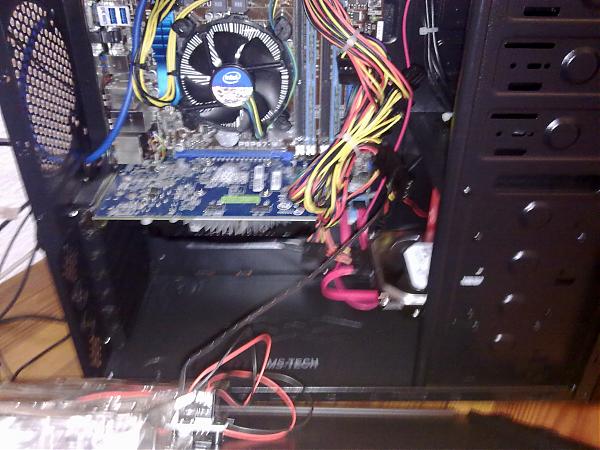
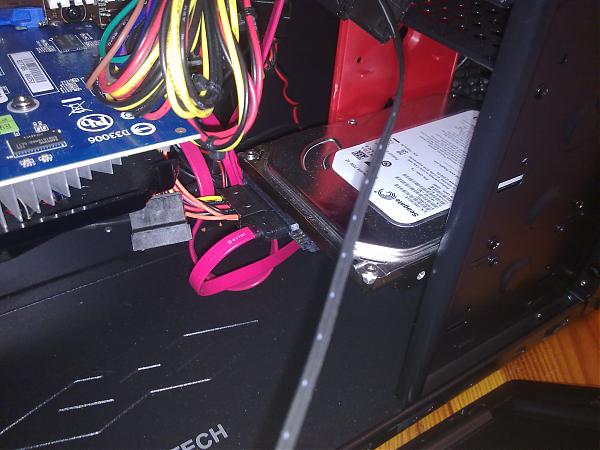
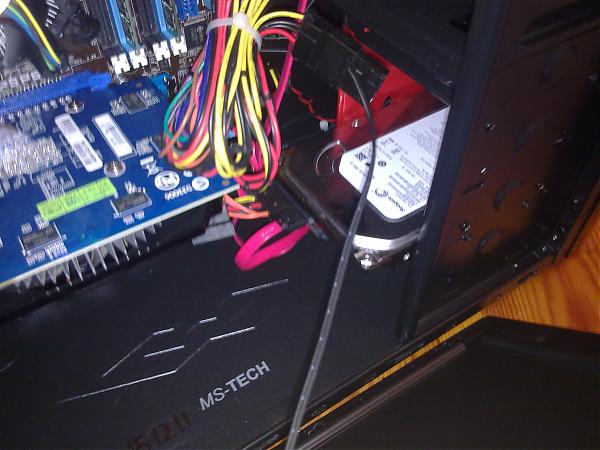
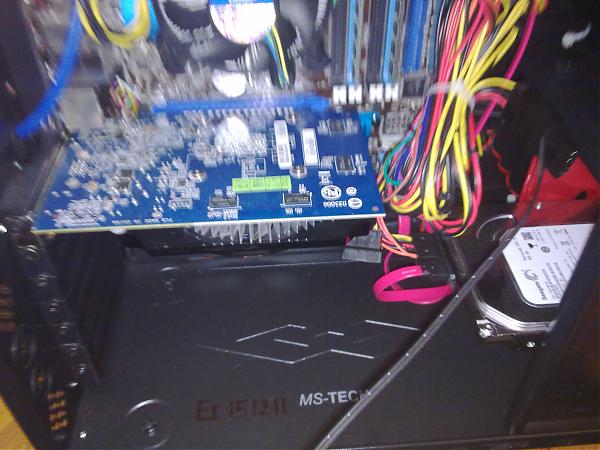
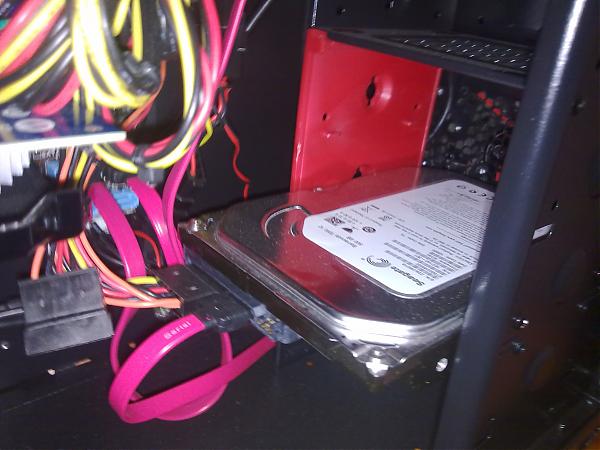
                        Well here I have the photos of the inside of my pc.

                        Right now I have it with a gt 440 and a generic power supply because my power supply is in my brother's pc and my original card broke. I hope you can see the red cover of the hard drive well.

                        By the way in the end I will go for the sapphire hd 7950 vapor-x.

                        I hope you give me your opinion that can help me. Thank you very much in advance.

                        attachment_p_540844_0_28032013274.jpg
                        attachment_p_540844_1_28032013275.jpg
                        attachment_p_540844_2_28032013276.jpg
                        attachment_p_540844_3_28032013278.jpg
                        attachment_p_540844_4_28032013279.jpg

                        FranziskanerF 1 Respuesta Última respuesta Responder Citar 0
                        • FranziskanerF Desconectado
                          Franziskaner @booker
                          Última edición por

                          it doesn't paint well or badly :troll: normally when a manufacturer makes you a piece in two colors it means that one can be disassembled ;D what I don't understand is why the one at the back is the removable :nono: anyway the most likely thing is that you measure with a tape measure the space available and if it doesn't fit ….. you use a drill and a saw (to remove the bottom bracket of the hard drives)
                          regards
                          B 1 Respuesta Última respuesta Responder Citar 0
                          • B Desconectado
                            booker @Franziskaner
                            Última edición por

                            Thanks for the reply Franziskaner.

                            I'm going to measure everything properly and see if it fits. If it doesn't fit by 1 cm or so, how could I remove that red cover to change the hard drive's location? I can't see any screws or anything :S

                            By the way, my brother always takes care of assembling the PC, but he's going to be traveling for a while, and I only have one question about assembling the graphics card and my power supply.

                            When changing the power supply again and connecting everything, in the first photo of the 2 below (there are 3 above and 2 below) that I posted, there's a black cable that goes to the case cover. There are 2 fans there and that cable is the one that powers them. Well, how can I remove that adapter that connects to the fans? I've tried pulling it out by the middle, but it's hard and I'm afraid to pull like an animal and mess it up.

                            Thanks and regards

                            FranziskanerF 1 Respuesta Última respuesta Responder Citar 0
                            • FranziskanerF Desconectado
                              Franziskaner @booker
                              Última edición por

                              @booker:

                              Thanks for the reply Franziskaner.

                              I'm going to measure everything well and see if it fits. If it doesn't fit by 1 cm or so how could I remove that red cover to change the hard drive location? I can't see any screws or anything :S

                              By the way the issue of assembling the PC is always handled by my brother but he's going to be traveling for a while and to assemble the graphics card and my power supply I only have one doubt.

                              When changing the power supply again and connecting everything, in the first photo of the 2 below (there are 3 above and 2 below) that I've posted there's a black cable that goes to the case cover. There are 2 fans there and that cable is the one that powers them. Well that adapter that connects to the fans how can I remove it? I've tried pulling it out by the middle but it's hard and I'm afraid to pull like an animal and mess it up.

                              Thanks and regards

                              I'm going to measure everything well and see if it fits. If it doesn't fit by 1 cm or so how could I remove that red cover to change the hard drive location? I can't see any screws or anything :S

                              as a rule they use rivets, you could use a drill to "eat" the head (they are usually aluminum)

                              When changing the power supply again and connecting everything, in the first photo of the 2 below (there are 3 above and 2 below) that I've posted there's a black cable that goes to the case cover. There are 2 fans there and that cable is the one that powers them. Well that adapter that connects to the fans how can I remove it? I've tried pulling it out by the middle but it's hard and I'm afraid to pull like an animal and mess it up.

                              that's a four pin molex, they tend to be a bit hard, don't pull on the cables ;D do the "señorita", reverse and it will come out for sure.
                              regards
                              P.D ask anything

                              B S 2 Respuestas Última respuesta Responder Citar 0
                              • B Desconectado
                                booker @Franziskaner
                                Última edición por

                                @Franziskaner:

                                I'm going to measure everything properly and see if it fits. If it doesn't fit by 1 cm or so, how could I remove that red cover to change the hard drive's location? I can't see any screws or anything :S

                                As a rule, they use rivets. You can use a drill to "eat" the head (they are usually aluminum)

                                When it comes to changing the power supply again and connecting everything, in the first photo of the 2 below (there are 3 above and 2 below) that I posted, there is a black cable that goes to the case cover. There are 2 fans there and that cable is the one that powers them. So, how can I remove that adapter that connects to the fans? I've tried pulling it out by the middle but it's hard and I'm afraid to pull like an animal and mess it up.

                                That's a four-pin molex, they usually come out a bit hard, don't pull on the cables ;D do the "Miss" trick, reverse it and it will come out safely.
                                Regards
                                P.D. Ask anything

                                First of all, thank you for replying.

                                Yes, I realized that they do come with rivets (at least the outside part, I couldn't reach the red cover part) Let's see if I remove the graphics card I have now and measure everything properly and comment.

                                Regarding the molex. The truth is that it is indeed hard but I don't know what you mean by "Miss". I thought that maybe you had to press some kind of trigger or something for it to come out. If you could explain the process better, I would appreciate it.

                                And another thing about the graphics card, what's your opinion? Since you're helping me, I'd like to know your opinion.

                                Thank you very much for everything, really, forgive my novice doubts ?

                                C 1 Respuesta Última respuesta Responder Citar 0
                                • C Desconectado
                                  chispis @booker
                                  Última edición por

                                  I think if you remove the other cover of the tower, you will see the screws
                                  http://www.hartware.de/review_1451_4.html

                                  FranziskanerF 1 Respuesta Última respuesta Responder Citar 0
                                  • FranziskanerF Desconectado
                                    Franziskaner @chispis
                                    Última edición por

                                    @chispis:

                                    I think if you remove the other cover of the tower, you will see the screws
                                    http://www.hartware.de/review_1451_4.html

                                    +1
                                    greetings

                                    B 1 Respuesta Última respuesta Responder Citar 0
                                    • B Desconectado
                                      booker @Franziskaner
                                      Última edición por

                                      Well in the end you were right.

                                      On the red cover when I opened it on the other side it said "remove for a long card" so it was already prepared for it I removed it and ready any graphics card fits now.

                                      And I also managed to remove the fan, it was a bit tight but it came out well. Thanks for helping me too

                                      By the way which graphics card do you recommend? the sapphire hd 7950 vapor-x or the gigabyte hd 7950?

                                      Thanks for responding, regards!!

                                      SylverS 1 Respuesta Última respuesta Responder Citar 0
                                      • SylverS Desconectado
                                        Sylver Veteranos HL @booker
                                        Última edición por

                                        This post is being processed/translated. The original version will be shown:

                                        Son casi iguales, rendimiento calcado, así que ve a por la que más te guste, la gigabyte está muy bien refrigerada y la vapor-x es algo mas barata.

                                        Saludos

                                        >> i7-2600K Sandy Bridge @4.4GHz || Noctua NH-D14 || ASRock Z77 Extreme4 || 4x8Gb G.Skill Ripjaws X DDR3 1600MHz || XFX RX 5700 XT 8Gb || SSD Samsung 850 PRO 256Gb & 850 EVO 500Gb || WD Caviar Green 1Tb || Barracuda 1Tb || Corsair TX650 V2 || M-Audio Fast Track Pro || KRK RP8 RoKit G3 || BenQ GW2750 27"
                                        >> Athlon 64 X2 5600+ Brisbane @2.9GHz || Gigabyte GA-M61PME-S2 || 2x2Gb DDR2 Kingston 800MHz || Sapphire Radeon HD 5850 Xtreme 1Gb || Maxtor 320Gb SATA2 || OCZ ModXStream 500W Modular || TEAC PowerMax 120/2 || Acer X243w 24"
                                        >> Intel Core2Duo E6600 Conroe @2.4GHz || Asus P5N32-SLI SE DELUXE || 2x1Gb DDR2 Kingston 800MHz || Asus nVidia GeForce 9800GT 1Gb GDDR3 || Seagate Barracuda IDE 80Gb 7200RPM || Linkworld LPK12-35 450W

                                        B 1 Respuesta Última respuesta Responder Citar 0
                                        • B Desconectado
                                          booker @Sylver
                                          Última edición por

                                          This post is being processed/translated. The original version will be shown:

                                          Muchas gracias por responder.

                                          Al final me he decidido por la sapphire hd 7950 vapor-x.La encargé ayer por la tarde y espero que para mañana o pasado me venga como muy tarde.

                                          Sólo tengo una última duda, y es con el proceso de instalación. ¿Qué tengo que hacer?

                                          Tengo que quitar los drivers de mi antigua nvidia no? ¿Que programa uso para ello?

                                          Luego sería quitar la gráfica que tengo e instalar la nueva. Y una vez que la instale, que tengo que hacer? entro en la página de amd y me descargo los últimos drivers? o puedo ir descargando los drivers ya para cuando la tenga?

                                          Gracias por contestar y saludos!!

                                          FranziskanerF 1 Respuesta Última respuesta Responder Citar 0
                                          • FranziskanerF Desconectado
                                            Franziskaner @booker
                                            Última edición por

                                            This post is being processed/translated. The original version will be shown:

                                            hola como es diferente marca no creo que tengas ningún problema, pero bueno , sino puedes ir a panel de control/desistalar un programa y eliminas todo lo de Nvidia . sino puedes provar algo asi :
                                            Solve Driver Problems, Fix Crashes - Driver Cleaner
                                            saludos

                                            B 1 Respuesta Última respuesta Responder Citar 0
                                            • 1
                                            • 2
                                            • 1 / 2
                                            • First post
                                              Last post

                                            Foreros conectados [Conectados hoy]

                                            0 usuarios activos (0 miembros y 0 invitados).
                                            febesin, pAtO,

                                            Estadísticas de Hardlimit

                                            Los hardlimitianos han creado un total de 543.5k posts en 62.9k hilos.
                                            Somos un total de 34.9k miembros registrados.
                                            roymendez ha sido nuestro último fichaje.
                                            El récord de usuarios en linea fue de 123 y se produjo el Thu Jan 15 2026.