Hardlimit test bank
-
Many thanks for the contribution, for me who has just returned after so much time and have no idea about the BenchMark that are available, they come in very handy

-
@Hin It's only been a few days since it was published. I hope it serves you well. And your contributions with validations will serve others.
Over time, new features, statistics, and more will be included. It's just a matter of collecting enough results.
Toda la actualidad en la portada de Hardlimit
Mis cacharros -
Yes, I already took a look and added results to the table, although the configuration of this Asus work laptop is not very advanced, it is serving me well for the bench to get it ready by seeing the variation of results when doing a "clean up"
When I advance with the gaming project I have on hand, I will be doing tests with it to compare it with other benches when I catch up with the ones that are available, I am very new to this haha
I will be attentive to the news, Thanks @cobito
Regards,
-
From now on, Hardlimit signatures are available. By accessing the details of your result, you have two styles to choose from, along with a link to the image and the code to use as a signature:
Dark style:
You can see the light style in my signature.
Unfortunately, the signature system does not allow for many possibilities, so you will have to choose between leaving a text (or whatever you have now) or this signature.
Toda la actualidad en la portada de Hardlimit
Mis cacharros -
I have already been able to do my first tests with the Xeon and the current version of the test. Although it is not the computer that I will use regularly, it is the one that I put in my signature.
-
I have made a couple of changes:
· I have limited the top100 to top50. It will be increased as there are more submissions.
· A search function has been introduced: you can search for users, processor models or any information that identifies a result. Unlike the tops (where only the best result of a CPU model sent by a user appears), in the search results all the results sent appear.Toda la actualidad en la portada de Hardlimit
Mis cacharros -
@cobito said in Hardlimit test bank:
I've made a couple of changes:
· I've limited the top100 to top50. It will increase as there are more submissions.
· A search function for results has been introduced: you can search for users, processor models or any information that identifies a result. Unlike the tops (where only the best result of a CPU model sent by a user appears), in the search results all the results sent appear.If you search for 2 digits or less it returns a completely blank page. For example "i3".
Edit: Could you make the searches sorted by score? So if you search for the same model or a range, you see the fastest ones at the top. And while we're at it... would it be too much to ask for the 2 scores (single and multithread) to appear in 2 columns in the search?
PD: Between tonight and tomorrow I might be able to give it a go with a good Xeon xD
-
@krampak Your wishes have come true.
Searches are limited to 3 characters to prevent overly generic searches that could overload the server (in the future). What you see when searching for "i3" is an error page that I still have to define. To find all i3s you can try searching for intel i3 or core i3.
The results now also show both single and multi-core scores sorted from highest to lowest multi-core score. In the future I may add little arrows to sort the results in the order and column you want.
Toda la actualidad en la portada de Hardlimit
Mis cacharros -
Apart from the aesthetic changes and the possibility to sort search results based on both single and multi-threaded results that were introduced yesterday, today it is already possible to consult information about individual processor models. To do this, you just have to enter the link of the model that will appear in the tops and in the search results.
The link will only be available when there is additional information about the model. On the page of each model, in addition to the additional information, all the results sent for that model are shown.
As more results arrive, in the future on the pages of each model, performance statistics, graphs of distribution of results, etc., will appear.
By the way, submissions for different modes are also welcome. If your micro can SSE3, having results of all lower modes (FPU, MMX, etc., but especially of Mode 0 [FPU]) is also useful. Not everything in life is AVX2 and in order to be able to make comparisons with real-world results, it is good to have this type of information.
Toda la actualidad en la portada de Hardlimit
Mis cacharros -
@cobito Check out the latest result I uploaded, you can cheat on the bench.
-
@kynes Apart from posting 32 threads, have you done anything else?
Toda la actualidad en la portada de Hardlimit
Mis cacharros -
@cobito No, únicamente eso.
-
@kynes Well that was expected. I will investigate it.
By the way, I will end up deleting that result.
Toda la actualidad en la portada de Hardlimit
Mis cacharros -
@cobito Damn, I can't use it as a signature anymore

-
The problem seems to be due to a failure in the synchronization of the execution of the processes. It appears mainly on slower PCs. For the moment I have patched the issue by limiting the maximum number of threads to at most twice the detected threads. In order to continue sharing results, you need to download the new version.
Toda la actualidad en la portada de Hardlimit
Mis cacharros -
My best friends are inside the Hwbot Staff, I can pass them the application so they can take a look

-
@Xevipiu That would be great. The more of us that participate, the more useful it will be for everyone when it comes to making comparisons.
Toda la actualidad en la portada de Hardlimit
Mis cacharros -
What I miss is a process LOG interface, so the wait wouldn't be so boring

Intel 8088 7.15Mhz, 512Kb RAM, CGA 4coleretes, HD 10Mb
-
@Xevipiu Tomo nota.
I have rewritten the frequency meter from scratch. If someone with OC would be so kind as to test it, I would appreciate it.
Toda la actualidad en la portada de Hardlimit
Mis cacharros -
@cobito Better, but it shows the serial clock, rather than the active

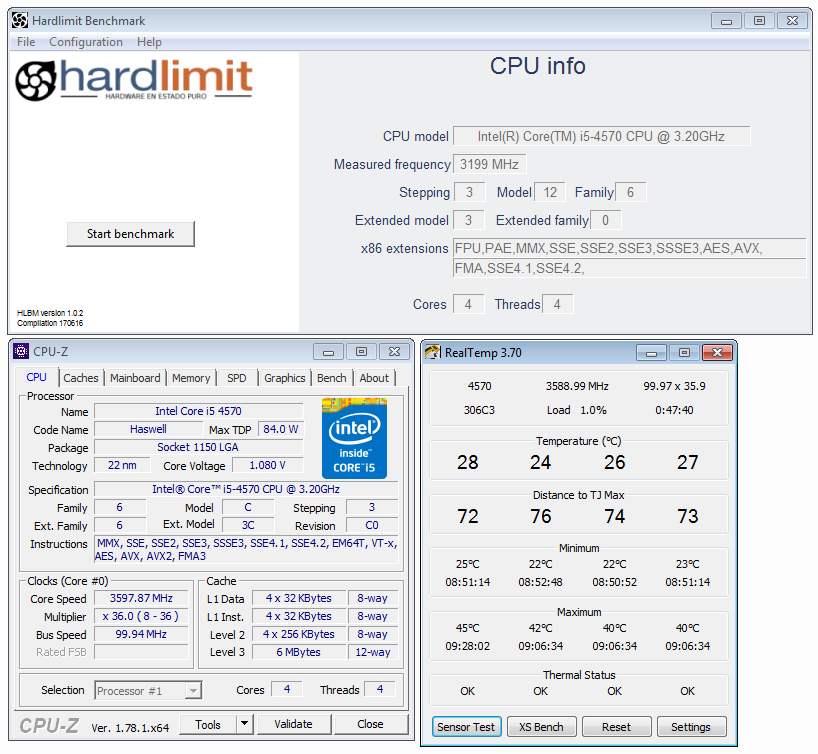
Intel i5 3570k / ASRock Z77 Extreme 4 / G.Skill F3-12800CL9D-8GBRL / Sapphire HD5850 / Samsung HD103UJ / TR TrueSpirit / NZXT Source 210 / OCZ ZS550W
Intel i5 4570 / ASRock H87 Pro 4 / 2x G.Skill F3-14900CL8-4GBXM / Samsung 850 EVO 250Gb + ST1000DM003 + ST2000DM003 + HGST HDS723020BLA642 + Maxtor 6V250F0 / CM Seidon 240M / Zalman MS800 / CM MWE 550
AMD Ryzen 7 1800X / B350 / 2x8GB Samsung DDR4-2400 CL17 / NVIDIA GTX 1070 8GB / SSD 120GB + ST4000DM004 + ST6000DM003 / EVGA Supernova 650 G2