Hardlimit test bank
-
@cobito It's clear that my processor is a rebel

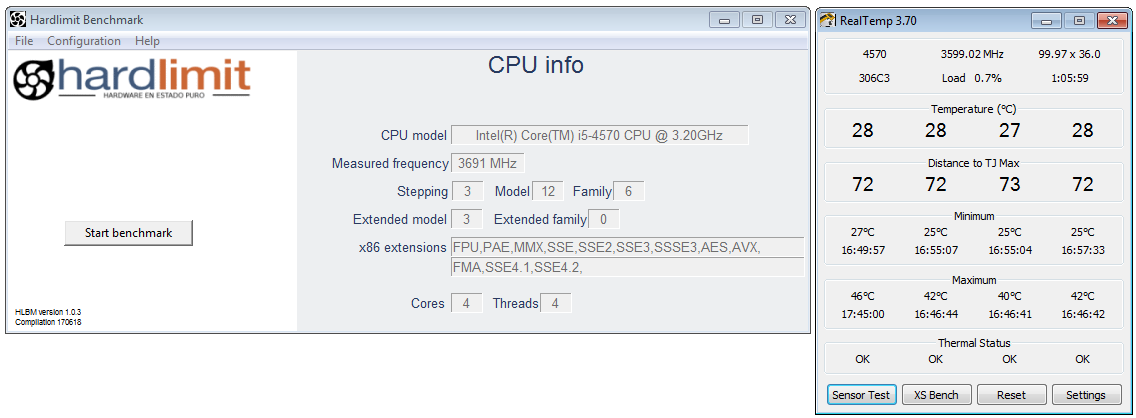
That said, it takes about ten seconds to close the program, thinking :thinking:
Intel i5 3570k / ASRock Z77 Extreme 4 / G.Skill F3-12800CL9D-8GBRL / Sapphire HD5850 / Samsung HD103UJ / TR TrueSpirit / NZXT Source 210 / OCZ ZS550W
Intel i5 4570 / ASRock H87 Pro 4 / 2x G.Skill F3-14900CL8-4GBXM / Samsung 850 EVO 250Gb + ST1000DM003 + ST2000DM003 + HGST HDS723020BLA642 + Maxtor 6V250F0 / CM Seidon 240M / Zalman MS800 / CM MWE 550
AMD Ryzen 7 1800X / B350 / 2x8GB Samsung DDR4-2400 CL17 / NVIDIA GTX 1070 8GB / SSD 120GB + ST4000DM004 + ST6000DM003 / EVGA Supernova 650 G2 -
@Fassou Well blessed are you. It took me about a minute or more
-
The frequency meter has a small error that will be corrected. Regarding the boot time, yes, it needs to be improved. For now, it should take around 10 seconds.
Toda la actualidad en la portada de Hardlimit
Mis cacharros -
In processors that are not 100% natics to AVX2, their execution would have to be capped, since it sounds like a hedge the score
-
@Xevipiu What do you mean by processors that are not 100% native to AVX2?
Toda la actualidad en la portada de Hardlimit
Mis cacharros -
@cobito said in Hardlimit test bench:
@Xevipiu What do you mean by processors that are not 100% native to AVX2?
There are processors that do not use the instructions 100%, but when they do, they give result inaccuracies.
But leaving this aside, using AVX vs AVX2, the results are abysmal.You would have to cap them according to the instructions of each processor to go well, don't you think?
-
@Xevipiu I still don't understand. What do you mean by there are processors that don't use instructions at 100%? The benchmark is designed to do 4 tests: two of the SIMD type (where having AVX for example will improve the results), one of memory (where more cache and/or faster memory will give you better results) and a generic test whose result has little dependence on the instruction set.
If you want to compare two processors under equal conditions, you just have to pass the benchmark in the same mode for both. If you don't have a result in the same mode, you can look at test#4 to get an idea.
The operations that are executed in all modes are exactly the same. If in a processor in FPU mode it gives you 1000 points in test#1 and changing to AVX2 mode it gives you 15000 points it simply means that for the vector calculation of integers, AVX2 multiplies by 15 in performance. That is the reality. Another matter is that then you are not going to run multimedia software or games and you don't care about vector instructions. In that case, once again, you either have test#4 or the complete benchmark in a lower mode.
One of the objectives of HLBM is precisely to evaluate how much the recent sets improve performance and also how optimized the older sets are in current CPUs.
As I understand it, what you are asking is that I weigh the results of higher modes so that the final result is similar to the execution in a lower mode? In that case it wouldn't make sense to have the possibility of evaluating the performance of recent sets.
Toda la actualidad en la portada de Hardlimit
Mis cacharros -
For whom I go, if it is in the sense of evaluating the differences between instructions, what was said makes sense
-
@Xevipiu Let's see, the benchmark is very versatile and serves for many things. Among other things, it serves to evaluate:
· Instruction sets (with different modes)
· Implementations of Hyperthreading and SMT: in the results you can see the score per execution thread in the multithread test. If the micro has HT or SMT, the closer this result is to the monothread result, the better HT or SMT the micro has. If that result is closer to 50% of the monothread result, the worse HT/SMT it has.
· Amount and speed of cache memory (test#3).
· Comparison of processors to do a specific task: using the same mode on both micros or comparing test#4.
· Comparison of processors in general: using the highest possible mode.That is to say, it is not a benchmark only to evaluate a micro with a generic and bland bench. You have much more information and with it you can know how well or badly a model goes for a multitude of tasks.
Now, it is true that in the ranking there are results that are disproportionate with respect to micros that are not so much slower, just because some support AVX2 and others do not. And in the real world, the difference between both models is not so abysmal. That is why it is also good that tests are passed in lower modes (even if the result is not for the top) because it is the best way to make more reliable comparisons.
When there are more results, a new top will appear only for mode 0. There the sieve will take out a few that are now in the first positions. But in order to be able to get that kind of statistics (and others) it is still necessary that more results are sent.
Toda la actualidad en la portada de Hardlimit
Mis cacharros -
I left you the result of a crappy MAD, the truth is that it disappoints me for what they are, I hope that the next generation will measure up

-
@Xevipiu The first Ryzen! Well, in multi-threading it seems to have eaten krampak's xeon. Although compared to the 7700K in single-threading, it pulls 10% less performance per MHz. There it really has stuck.
Toda la actualidad en la portada de Hardlimit
Mis cacharros -
The monore test of the 7700k, was only at 5.11Ghz with the previous version
-
News
There is a new version of the program that speeds up the start time. In return, the initial screen only shows the stock frequency. To see the real frequency, you have to validate the result. We have managed to get the real frequency to have an error <3%. It is recommended that there are no other programs running during the test (not even CPUZ or similar).
The central has also received changes. To know them, you can see the first post of this thread.
In addition, a top10 has been added for mode 0. This top is only for the brave who want to compare their micro one-on-one without fancy sets that inflate scores excessively. I invite you to pass the bench in mode 0 unless you are a chicken


For now there are only 6 results in the ranking of mode 0 with pretty old micros, so you have it easy to appear.
Toda la actualidad en la portada de Hardlimit
Mis cacharros -
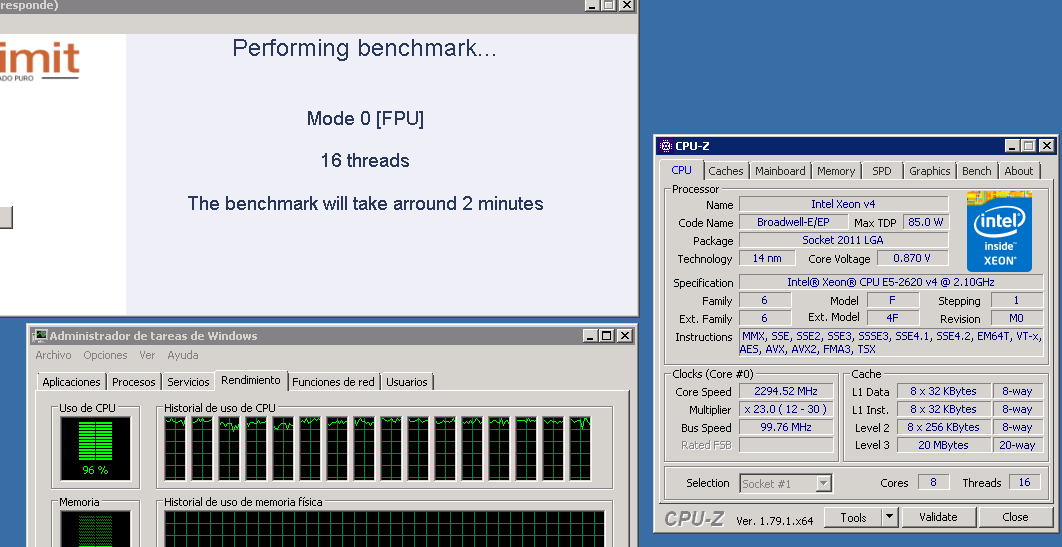
I have tested Mode0 with the E5-2620V4 but the calculated speed is 1.78Ghz, I am not sure if the CPU does not really go up to the theoretical 2.1Ghz or if it is an error in the benchmark meter.
Edit: It seems to be a problem with the test, as it does not capture the maximum frequency that the CPU reaches (although it also does not show the one it has at rest, rather an average):
-
@krampak The performance graphs of that result have some brutal ups and downs. Something is happening on that PC that is interfering with the program. If during the frequency measurement it has caught one of those downs, it will not show the real one.
In fact, the mmt ratio indicates that there is something running in the background that is consuming quite a few processor cycles.
Toda la actualidad en la portada de Hardlimit
Mis cacharros -
@cobito said in Hardlimit test bench:
@krampak The performance graphs of that result have some brutal ups and downs. Something is going on in that PC that is interfering with the program. If during the frequency measurement it caught one of those downs, it won't show the real one.
In fact, the mmt ratio indicates that there is something running in the background that is consuming quite a few processor cycles.
There is a resident antivirus that I can't deactivate. I guess it must be that.
PD: What a lunch the Ryzen has had in mode0...
-
@cobito On an i5 6500 it just gave me 6Ghz of calculated frequency... and curiously (I don't know if it's a thing of the new version) it has surpassed the old result of the i5 7500.
https://bm.hardlimit.com/result.php?bm=9796222558dc06a8a250c56af2a06753144
-
@krampak What is the real frequency? This weekend I will make the last change of the season, to see if I can close the topic of the frequency once and for all.
The code of the test bench has not changed (nor will it change in the future without a very good reason), so if it has given more it is because it has performed better.
Toda la actualidad en la portada de Hardlimit
Mis cacharros -
@cobito said in Hardlimit test bank:
@krampak What is the real frequency? This weekend I will make the last change of the season, to see if I can close the topic of the frequency once and for all.
The code of the test bank has not changed (nor will it change in the future without a very good reason), so if it has given more it is because it has performed better.
Well the real one would be 3.6Ghz at most (turbo), it is an i5 6500 (without K). When I finish the d*** Windows 10 update I will test it on another i5 7500. I also have a laptop with an i7 6560U that I will test in the afternoon.
-
The day before yesterday, at 4.25Ghz, the MAD gave me 4.5Ghz