Asus X551CA..boot error
-
Hello friends... I have this model and I'm having the following problem... I've put a new hard drive in it and I've also installed Windows 7 from scratch (it came from the factory with eight)
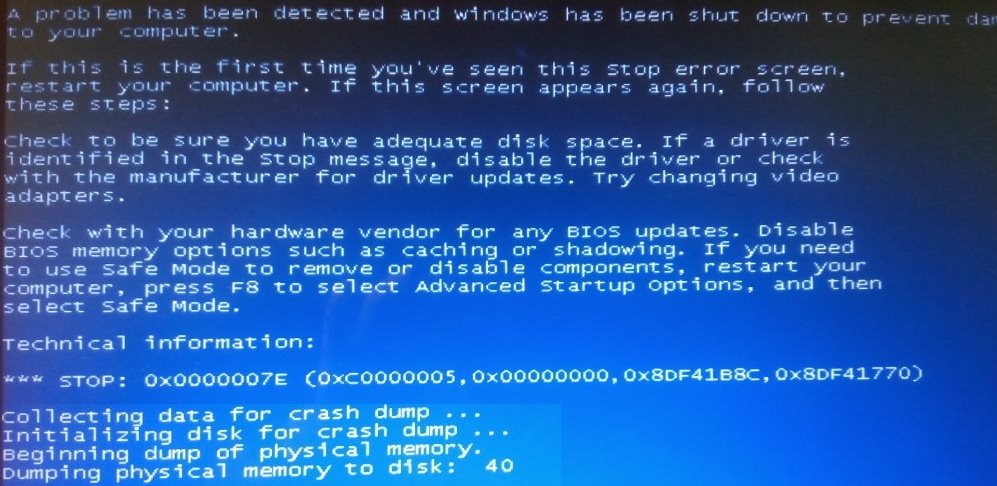
The error it gives... is that when I try to start the system, the blue screen of the attached image appears... and this has become a loop, and from there it doesn't go...
I've looked in the BIOS to see if I could find the option to disable memory or something like that and there's nothing. I see that it's a very simple and limited BIOS. So I don't know where the problem might be.
About the RAM, I've diagnosed it with Hiren's Boot, and it didn't detect anything strange, the diagnosis came out correct.
I've also tried booting with F8 (failsafe mode) and nothing, it doesn't start either.
If anyone has any suggestions or ideas to tackle the problem...
-
If you still have the old disk with the old installation, try putting it in and booting up in case it's a problem with the disk itself.
If it still doesn't work with error checking, we can rule out drivers; try using a LiveCD of any Linux distro to see if you can access the new disk from there.
Since it's the only hardware component that has changed, I think that's where the problem lies; maybe another colleague will enlighten you more and better.

-
Looking at the Asus website, I see drivers for W7 x64 so it seems that it does support that OS.
You do not indicate the size of the old disk or the new one, nor the time when the blue screens started.
Did you complete the installation? Were you able to use W7 for some time before it failed?...
If the answers are yes, I would start by looking into how to disable the Asus HDD Protection in BIOS, or from a safe mode boot.
Salu2!
Intel i5 3570k / ASRock Z77 Extreme 4 / G.Skill F3-12800CL9D-8GBRL / Sapphire HD5850 / Samsung HD103UJ / TR TrueSpirit / NZXT Source 210 / OCZ ZS550W
Intel i5 4570 / ASRock H87 Pro 4 / 2x G.Skill F3-14900CL8-4GBXM / Samsung 850 EVO 250Gb + ST1000DM003 + ST2000DM003 + HGST HDS723020BLA642 + Maxtor 6V250F0 / CM Seidon 240M / Zalman MS800 / CM MWE 550
AMD Ryzen 7 1800X / B350 / 2x8GB Samsung DDR4-2400 CL17 / NVIDIA GTX 1070 8GB / SSD 120GB + ST4000DM004 + ST6000DM003 / EVGA Supernova 650 G2



Hello! It looks like you're interested in this conversation, but you don't have an account yet.
Getting fed up of having to scroll through the same posts each visit? When you register for an account, you'll always come back to exactly where you were before, and choose to be notified of new replies (either via email, or push notification). You'll also be able to save bookmarks and upvote posts to show your appreciation to other community members.
With your input, this post could be even better 💗
Registrarse Conectarse