Install 2nd 2.5 SATA + M.2 2280 SATA Drive
-
Hello community, I have a Toshiba M.2 2280 SATA hard drive as my main drive (Win10) and I want to install a second drive for storage SATA 2'5 ST98823AS.
The thing is that when I put the drive, it doesn't recognize it, I have always believed that in the installation process, both in the system and in the BIOS, they recognized it automatically, without doing anything.
Is there any solution to this, I am going through a hard time.
Equipment:
DELL Vostro 15-55681st- Toshiba M.2 SATA SSD 2280 - 256GB
2nd- Seagate ST98823AS HDD - 80GB
OS Windows 10 Pro 64 -
Hello,
Does it appear in the disk manager? And in the BIOS?
Best regards
-
Hello Sylver, I now realize that if both appear in Admin.Devices.
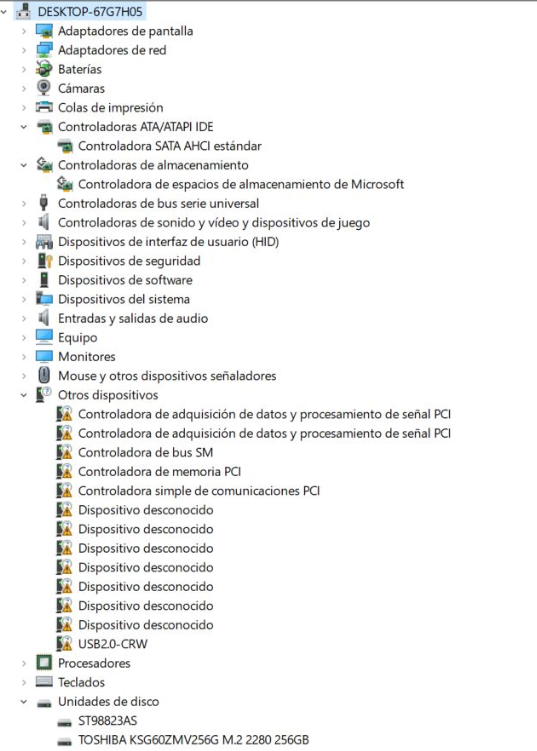
And in the BIOS...the following appears.
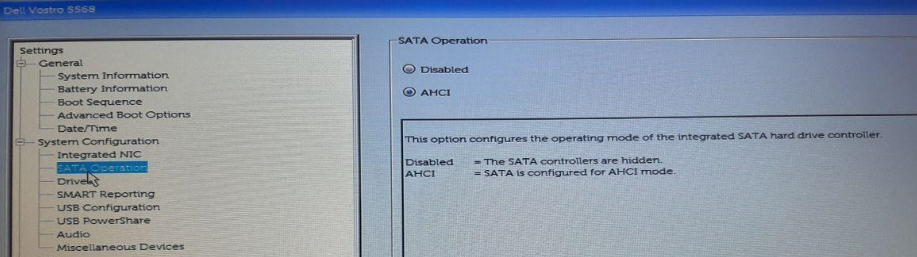
-
It looks like you are missing the motherboard (chipset) drivers, try installing them first (you can find them on the manufacturer's website). Anyway, I see that the disk appears to you, so probably what is missing is to initialize it in the Windows disk manager. -
As @krampak rightly points out, you can initialize it from the Windows disk manager and start using it normally. That's why I mentioned it to you.
Best regards
-
Well, I'm happy to say that I've finally managed to do it... I've accessed the disk admi and assigned a drive letter to the 2nd disk.
Thanks to everyone and bye for now.



Hello! It looks like you're interested in this conversation, but you don't have an account yet.
Getting fed up of having to scroll through the same posts each visit? When you register for an account, you'll always come back to exactly where you were before, and choose to be notified of new replies (either via email, or push notification). You'll also be able to save bookmarks and upvote posts to show your appreciation to other community members.
With your input, this post could be even better 💗
Registrarse Conectarse