• Portada
    • Recientes
    • Usuarios
    • Registrarse
    • Conectarse

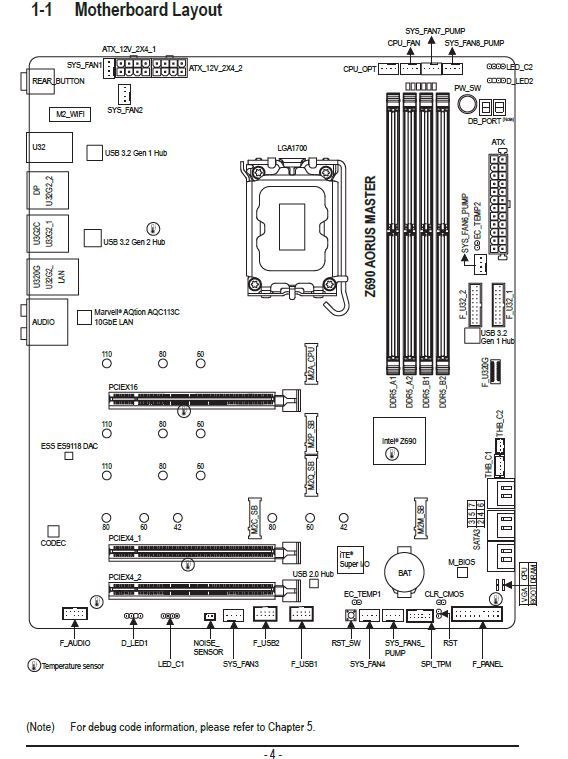
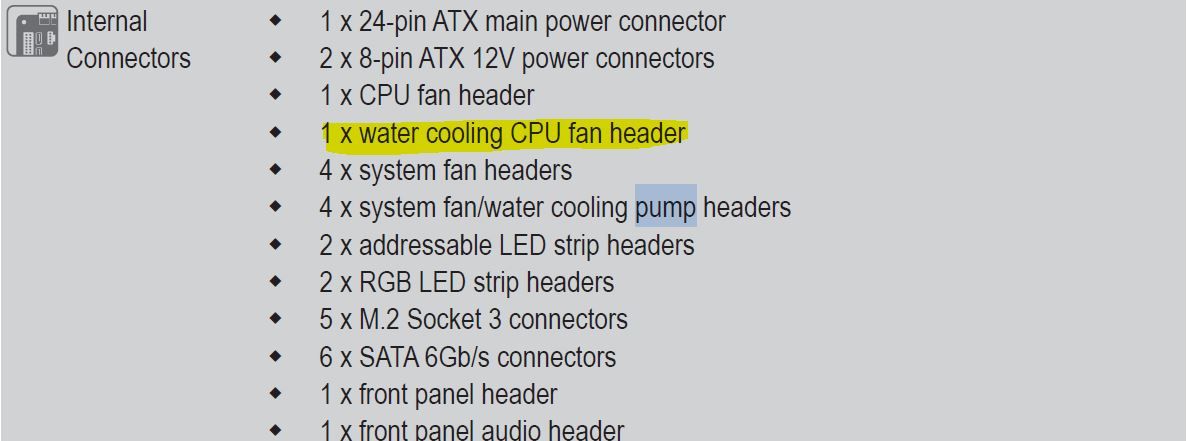
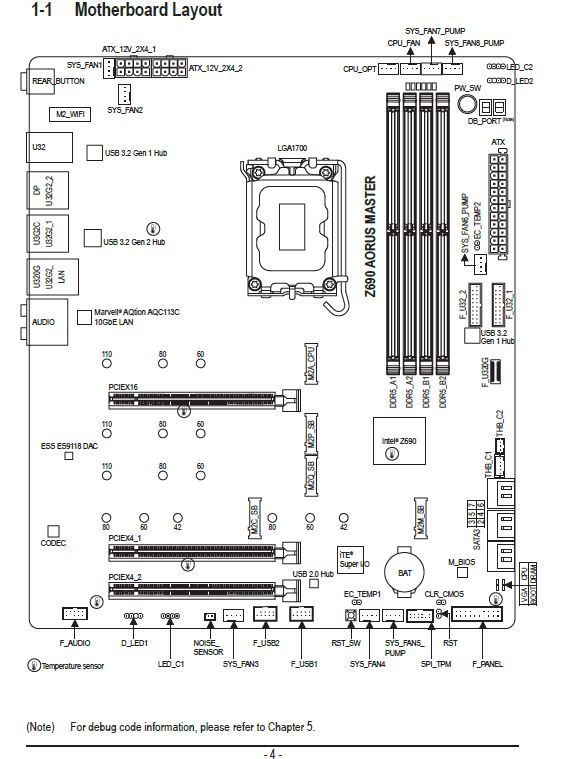
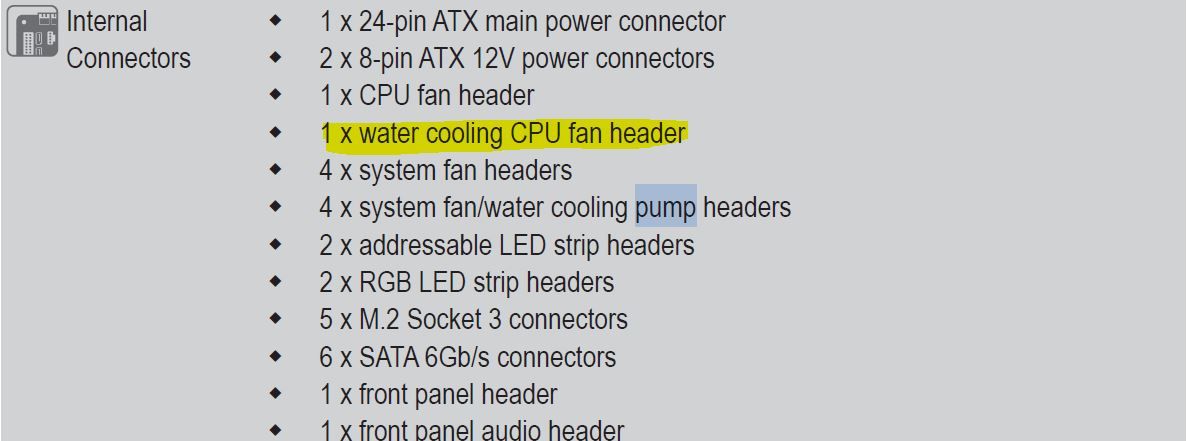
    Aorus Master Z690 connections
    Programado Fijo Cerrado Movido Procesadores, placas base y memorias
    33 Mensajes 5 Posters 2.8k Visitas 3 Watching
    Cargando más mensajes
    • Más antiguo a más nuevo
    • Más nuevo a más antiguo
    • Mayor número de Votos
    Responder
    • Responder como tema
    Accede para responder
    Este tema ha sido borrado. Solo los usuarios que tengan privilegios de administración de temas pueden verlo.
    • QVENGADORQ Desconectado
      QVENGADOR
      Última edición por

      Good evening:

      I am asking a new question because I do not want to open another thread. I am installing the motherboard drivers but I am missing the following ones that, even though I have put all the drivers from the page, resist me.
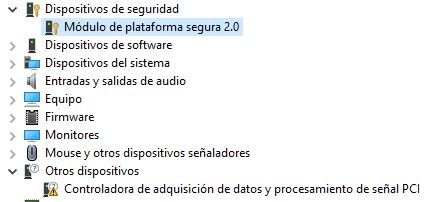
      elementosdelpc.JPG
      If you can guide me, I would appreciate it. Regards.

      hlbm signature

      defaultuserD 1 Respuesta Última respuesta Responder Citar 0
      • defaultuserD Desconectado
        defaultuser Veteranos HL @QVENGADOR
        Última edición por defaultuser

        @qvengador First things first, the TPM, because from the image it doesn't seem to be a problem. If you double-click it, you'll see in its properties if it presents any problems and what driver it has installed.

        For me, that module comes up with a Microsoft driver, and another one with an AMD driver. I don't know how it will be for you, but check the properties because in theory it should be correct.

        In "other devices", does it only show that one?

        Ryzen 5 3600 - Tuf B550 pro - 2x 8g 3600c18 - Strix rtx 2060 - M2 1TB

        defaultuserD QVENGADORQ 2 Respuestas Última respuesta Responder Citar 1
        • defaultuserD Desconectado
          defaultuser Veteranos HL @defaultuser
          Última edición por defaultuser

          The second one seems to be a chipset issue, check out this, it will make it easier for you.

          Ryzen 5 3600 - Tuf B550 pro - 2x 8g 3600c18 - Strix rtx 2060 - M2 1TB

          QVENGADORQ 1 Respuesta Última respuesta Responder Citar 1
          • QVENGADORQ Desconectado
            QVENGADOR @defaultuser
            Última edición por

            @defaultuser Indeed it only shows me. I haven't put the whole image to focus on that.
            thanks.

            hlbm signature

            ClipperC 1 Respuesta Última respuesta Responder Citar 0
            • QVENGADORQ Desconectado
              QVENGADOR @defaultuser
              Última edición por

              @defaultuser ok voy a ello.
              Gigabyte tiene una aplicacion para instalar los drivers. La instale y me ha liado una muy gorda.
              He tenido que desinstalar todo los drivers que me puso y la aplicacion. Porque me daba pantallazos azules. Y hacia años que no veia eso.

              hlbm signature

              defaultuserD 2 Respuestas Última respuesta Responder Citar 0
              • ClipperC Desconectado
                Clipper @QVENGADOR
                Última edición por

                @qvengador by default on new boards you have a pen drive with all the drivers and applications, although in my case MSI puts it compressed.
                The fastest way is to go to the Asus website and download all the drivers for your board on a pen and from there you load them.
                Regards

                QVENGADORQ 1 Respuesta Última respuesta Responder Citar 0
                • defaultuserD Desconectado
                  defaultuser Veteranos HL @QVENGADOR
                  Última edición por

                  @qvengador After the complications with the drivers, it usually becomes a big mess, so make sure to uninstall them thoroughly, or use a restore point.

                  Ryzen 5 3600 - Tuf B550 pro - 2x 8g 3600c18 - Strix rtx 2060 - M2 1TB

                  1 Respuesta Última respuesta Responder Citar 1
                  • defaultuserD Desconectado
                    defaultuser Veteranos HL @QVENGADOR
                    Última edición por defaultuser

                    @qvengador said in Aorus Master Z690 Connections:

                    @defaultuser ok I'll do it.
                    Gigabyte has an application to install the drivers. I installed it and it messed things up big time.
                    I had to uninstall all the drivers it installed and the application. Because it was giving me blue screens. And I hadn't seen that in years.

                    When I get a new computer, I prefer to exhaust the Windows updates that already include generic drivers for everything, and then I install the specific ones that are needed. Windows usually manages the change without problems and the system starts with a minimum of functionality that avoids strange glitches from not installing things in order and so on.

                    What clipper says is the easiest thing, but if it's already been messed up or you clean it, or go back, or do it manually but in the correct order (board/chipset first)

                    do one more thing, and a very important one, before all that, make sure you have the latest bios.

                    Regards.

                    Ryzen 5 3600 - Tuf B550 pro - 2x 8g 3600c18 - Strix rtx 2060 - M2 1TB

                    QVENGADORQ 1 Respuesta Última respuesta Responder Citar 1
                    • QVENGADORQ Desconectado
                      QVENGADOR @Clipper
                      Última edición por

                      @clipper Well that's what I had to do after messing up with the Gigabyte application that really messed me up.
                      But I still need to do the image thing.

                      hlbm signature

                      defaultuserD ClipperC 2 Respuestas Última respuesta Responder Citar 0
                      • QVENGADORQ Desconectado
                        QVENGADOR @defaultuser
                        Última edición por

                        @defaultuser That's what I'm going to do, but tomorrow. I'll get up, have some tea, and pray that I don't mess up the bios update.

                        hlbm signature

                        defaultuserD 1 Respuesta Última respuesta Responder Citar 0
                        • defaultuserD Desconectado
                          defaultuser Veteranos HL @QVENGADOR
                          Última edición por

                          @qvengador the image thing first tpm is almost certainly correct, you can confirm it by opening its properties.
                          And the controller on other devices is a matter of the chipset, unless it is something more connected to the board, wifi or another peripheral.

                          Ryzen 5 3600 - Tuf B550 pro - 2x 8g 3600c18 - Strix rtx 2060 - M2 1TB

                          1 Respuesta Última respuesta Responder Citar 1
                          • defaultuserD Desconectado
                            defaultuser Veteranos HL @QVENGADOR
                            Última edición por

                            @qvengador said in Aorus Master Z690 Connections:

                            @defaultuser Well that's what I'm going to do, but tomorrow. I'll get up, have some chamomile tea, and pray not to mess up the bios update.

                            Remember to set it to default before flashing (there's an option for that), do it from the bios with a USB drive, read the instructions while having that chamomile tea you mentioned, and if the light doesn't fail everything should go well.
                            Now they are more complex than the pure old bios, just follow the instructions and update everything it tells you.

                            Ryzen 5 3600 - Tuf B550 pro - 2x 8g 3600c18 - Strix rtx 2060 - M2 1TB

                            1 Respuesta Última respuesta Responder Citar 1
                            • ClipperC Desconectado
                              Clipper @QVENGADOR
                              Última edición por

                              @qvengador
                              By parts....
                              Make sure you are downloading the drivers for your M.B. Watch out for the rev
                              Like: Rev 1.5
                              1.7
                              By default, since your board is new, you will have dual BIOS.
                              And a BIOS reset button on the back.
                              What I usually do.
                              Clean installation of the OS
                              Pen with the M.B drivers

                              You install the OS
                              And you put the basic drivers, network and little more.
                              When the OS works with network.
                              You put the graphics drivers.
                              And what it asks you, already pulling from the web of your board.
                              The thing about the BIOS... I don't think it's necessary to update, since it's "new" and you use compatible components.
                              Another thing would be that the M.B asks you to update BIOS for another "not compatible" processor without updating the BIOS.
                              Regards

                              defaultuserD 1 Respuesta Última respuesta Responder Citar 1
                              • defaultuserD Desconectado
                                defaultuser Veteranos HL @Clipper
                                Última edición por

                                @clipper said in Aorus Master Z690 Connections:

                                The BIOS thing... I don't think it's necessary to update, since it's "new" and you use compatible components

                                And the bug fixes and/or improvements? You'll have to look at it at least, I say

                                Ryzen 5 3600 - Tuf B550 pro - 2x 8g 3600c18 - Strix rtx 2060 - M2 1TB

                                ClipperC 1 Respuesta Última respuesta Responder Citar 1
                                • ClipperC Desconectado
                                  Clipper @defaultuser
                                  Última edición por

                                  @defaultuser some new BIOS are for optimizing new processor.
                                  Others for RAM
                                  And others Bugs.
                                  Updating to tun tun can be worse.
                                  Regards

                                  defaultuserD 1 Respuesta Última respuesta Responder Citar 1
                                  • defaultuserD Desconectado
                                    defaultuser Veteranos HL
                                    Última edición por

                                    Look where you have it, it has a bios from this month, last month it released two.... and the first one is from a year ago.
                                    By the way, no matter how new the board is, it came out of the factory on a date with a certain bios. And the updates are not just for compatibility with new hardware, there is much more to it, modern bioses are linked with all sorts of things.
                                    @clipper said in Aorus Master Z690 Connections:

                                    since it's "new"


                                    Better put it to me, I don't think it will come with one of the two bios from November, not even with the one from December, and with the next one closer that is six months old, I give it a 50% chance that it will bring it.
                                    gigabyte.com/es/Motherboard/Z690-AORUS-MASTER-rev-1x/support#support-dl-bios

                                    Ryzen 5 3600 - Tuf B550 pro - 2x 8g 3600c18 - Strix rtx 2060 - M2 1TB

                                    1 Respuesta Última respuesta Responder Citar 1
                                    • defaultuserD Desconectado
                                      defaultuser Veteranos HL @Clipper
                                      Última edición por defaultuser

                                      @clipper said in Aorus Master Z690 Connections:

                                      @defaultuser some new BIOSes are for optimizing new processors.
                                      Others for RAM
                                      And others Bugs.
                                      Updating to the tun tun can be worse.
                                      Regards

                                      @clipper said in Aorus Master Z690 Connections:

                                      Updating to the tun tun can be worse.

                                      The latest already includes all that, and there is no tun tun tun in the matter, they are incremental.

                                      Manufacturers and others say that if you are doing well you don't need anything. If you look at it well it is something a bit delicate, not because it is difficult at all, but because a power outage or an anxious user can render the bios and the entire board useless, and advocate for the saying "what works should not be touched".

                                      @clipper said in Aorus Master Z690 Connections:

                                      some new BIOSes are for optimizing new processors.
                                      Others for RAM
                                      And others Bugs.

                                      And so what?, and security and stability and improvements in the management of old and new CPUs and performance improvements in a thousand other places and design corrections.... current uEFIs are so much more complex now that I don't even know the list, but if you look at it a bit there is a lot of material.

                                      Late updates are for some new micro, some improvement and things like that. but precisely when the board is relatively new there are easily updates that complete the work on early versions, and bring things that normally imply several improvements.
                                      That is something to look into.
                                      It wouldn't be the first one to realize after 15 days already with Windows upside down.

                                      Ryzen 5 3600 - Tuf B550 pro - 2x 8g 3600c18 - Strix rtx 2060 - M2 1TB

                                      1 Respuesta Última respuesta Responder Citar 1
                                      • QVENGADORQ Desconectado
                                        QVENGADOR
                                        Última edición por

                                        In the end I have updated and for now everything is fine.
                                        My old pc has an i7-4820k and with normal activity it has a temperature of 23 or so
                                        The thing is that the one I have now with i9-13900k with normal activity has a temperature of 37 or so.
                                        Both have liquid cooling. But with a difference of 10 degrees. Isn't that too high?

                                        hlbm signature

                                        defaultuserD 1 Respuesta Última respuesta Responder Citar 0
                                        • defaultuserD Desconectado
                                          defaultuser Veteranos HL @QVENGADOR
                                          Última edición por defaultuser

                                          @qvengador said in Aorus Master Z690 Connections:

                                          In the end I've updated and everything is fine for now.
                                          My old pc has an i7-4820k and with normal activity it has a temperature of 23 or so
                                          The thing is that the one I have now with i9-13900k with normal activity has a temperature of 37 or so.
                                          Both have liquid cooling. But with a difference of 10 degrees. Isn't that too high?

                                          Don't believe it.
                                          get used to the idea that it's not like before that with good liquid cooling the micro never saw 50ºC in its life, now it's the other way around, at the slightest that you use half a micro you'll have those degrees at minimum despite putting in good cooling.
                                          It seems that now to get what the micros give us they have used an internal material that blocks a lot of heat, besides they have the same watts and even more than before, but in less space each time.
                                          In theory the micro will lower you at rest (5%) at most to 30º or so, and at the slightest that the micro does something (10-15%) it approaches 40.

                                          In my case with a zen 2 the whole micro is perfect except for the cores that always scale temperature as if they were separate. while the L3 cache that is on the same chiplet is at normal temperatures for the cooling employed.

                                          PD:
                                          Apart from that you would have to see if the tower is ventilated, the rpm of the pump, the temp of the water etc, but we're not going to cool like the ones of before, get used to the idea.
                                          oh and another thing, the corsair software may not offer you the control options that you would like, I haven't tried it but @Clipper can tell you.

                                          Ryzen 5 3600 - Tuf B550 pro - 2x 8g 3600c18 - Strix rtx 2060 - M2 1TB

                                          ClipperC 1 Respuesta Última respuesta Responder Citar 1
                                          • ClipperC Desconectado
                                            Clipper @defaultuser
                                            Última edición por

                                            In Intel the anchoring system is by screws and in AMD by two staples with tension screws.
                                            In theory and in practice the CPU heatsink contact is better than in AMD.
                                            The icue only has three speed parameters:
                                            Low
                                            Extreme medium
                                            Both for the pump and for the fans.
                                            It does not allow you to make "curves"
                                            In the BIOS if I can (in my case MSI)
                                            With icue I have not managed to put the fans at full speed, corsair ML 120.
                                            Neither with the serial controller nor with a consair comander.
                                            About the corsair aio the only "but" I see is that it always marks the same water temperature in icue (doing a short stress test, which puts the CPU, around 100 degrees)
                                            I have the icue totally updated in version and so on.
                                            As I have been busy with raid 0 and setting up W11 I have not had time (which I have little) to run CPU Z to stress the CPU for longer and see if the water temperature changes.
                                            But according to comments from party colleagues it is something normal.
                                            Regards

                                            1 Respuesta Última respuesta Responder Citar 2
                                            • 1
                                            • 2
                                            • 1 / 2
                                            • First post
                                              Last post

                                            Foreros conectados [Conectados hoy]

                                            0 usuarios activos (0 miembros y 0 invitados).
                                            febesin, pAtO,

                                            Estadísticas de Hardlimit

                                            Los hardlimitianos han creado un total de 543.5k posts en 62.9k hilos.
                                            Somos un total de 34.9k miembros registrados.
                                            roymendez ha sido nuestro último fichaje.
                                            El récord de usuarios en linea fue de 123 y se produjo el Thu Jan 15 2026.